
Compliance software that puts every deadline in one calendar, with a name on it.
Compliance rarely fails at the big things. It fails at the fire-door inspection that was due in March, the certification that expired while its owner was on parental leave, the contract that rolled over because nobody read the notice period. ExpiryEdge holds licences, certifications, inspections, insurance, contracts and filings in one calendar - each with an owner, a reminder cadence and the document attached.
People forget. Systems do not.
One calendar across licences, certifications, inspections, insurance and contracts
Reminders at 90 / 60 / 30 / 7 days to the person accountable
Documents on every record, exportable as an audit pack
Department, site and entity views that roll up to one number
Quick answer
Compliance software for deadlines (often called compliance tracking or compliance management software) keeps every dated obligation an organisation carries in one place - licence renewals, staff certifications, equipment inspections, insurance renewals, contract notice periods, regulatory filings and policy review dates - with an accountable owner and an automated reminder schedule on each. ExpiryEdge is the umbrella layer. Each category below also has its own dedicated setup, and this page routes you to the right one.
What tracking deadlines by hand costs before anything is missed
62%
of compliance professionals spend between one and seven hours in an average week tracking and analysing regulatory developments
Source: Thomson Reuters, Cost of Compliance (2023)45%
said they do not monitor the cost of compliance across their organisation - so the price of a missed deadline never lands anywhere
Source: Thomson Reuters, Cost of Compliance (2023)94%
of spreadsheets in 85 intensive audits contained errors.
Source: Panko, University of Hawaii (spreadsheet-error research review)What ends up in the compliance calendar
Business licences and operating permits
Staff certifications and professional qualifications
Equipment inspections and servicing schedules
Fire, gas, electrical and Legionella certificates
Commercial insurance renewals
Vendor and subcontractor certificates of insurance
Contract notice periods and auto-renewal dates
Regulatory filings, returns and registrations
Health and safety training records
Right-to-work and visa documents
Policy and procedure review dates
Internal and external audit dates
Nine things that expire, and where each one is handled
This page is the umbrella. Every category below has its own setup, its own reminder cadence and its own evidence trail - start where the pain is.
Four things every category has in common
Different obligations, same mechanics underneath.
One status, one place
Current, expiring within 90 days, or lapsed. The dashboard changes the moment a renewal is logged - there is no file waiting for someone to refresh it before a board meeting.
An owner with a name
Every record goes to a person, a team or a department, and shows as Not started, In progress, Completed or Overdue. "I thought you had it" stops being an available answer.
One cadence, five channels
Default 90 / 60 / 30 / 7 days, configurable per record, delivered on email, SMS, WhatsApp, Slack and Microsoft Teams, with escalation when nothing happens.
Evidence that attaches itself
Certificates, reports, signed checklists and e-signed acknowledgements sit on their record, with a timestamped log of who did what. The audit pack becomes a download rather than a project.
From scattered obligations to one number leadership can read
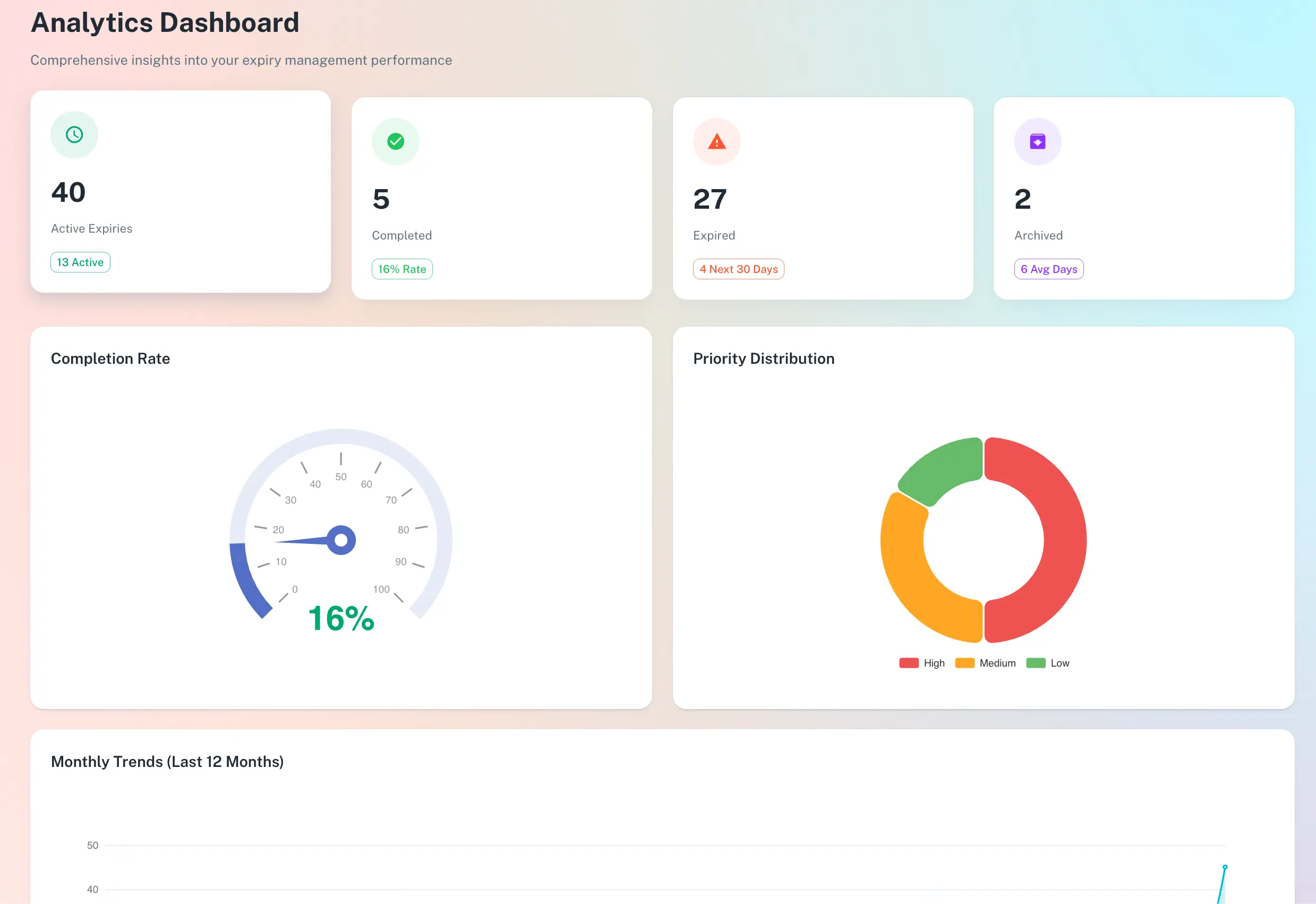
A live read on how much of the estate is actually current
Ask most teams what share of their compliance estate is in date and you get a pause, then a guess. ExpiryEdge gives a figure that moves as renewals are logged, and the items dragging it down are one click underneath it.
A live figure, not a quarterly snapshot
Overdue and near-expiry items listed beneath the number
Roll up by team, department, site or legal entity
Each obligation routed to whoever can actually close it
HR owns certifications. Facilities owns inspections. Finance owns contracts and insurance. Each team works its own list, a compliance lead sees everything, and when someone leaves you reassign their records in one click instead of discovering the gap a year later.
Person, team or department per record
Role-based views and notifications
Reassign in one click - the reminder schedule continues
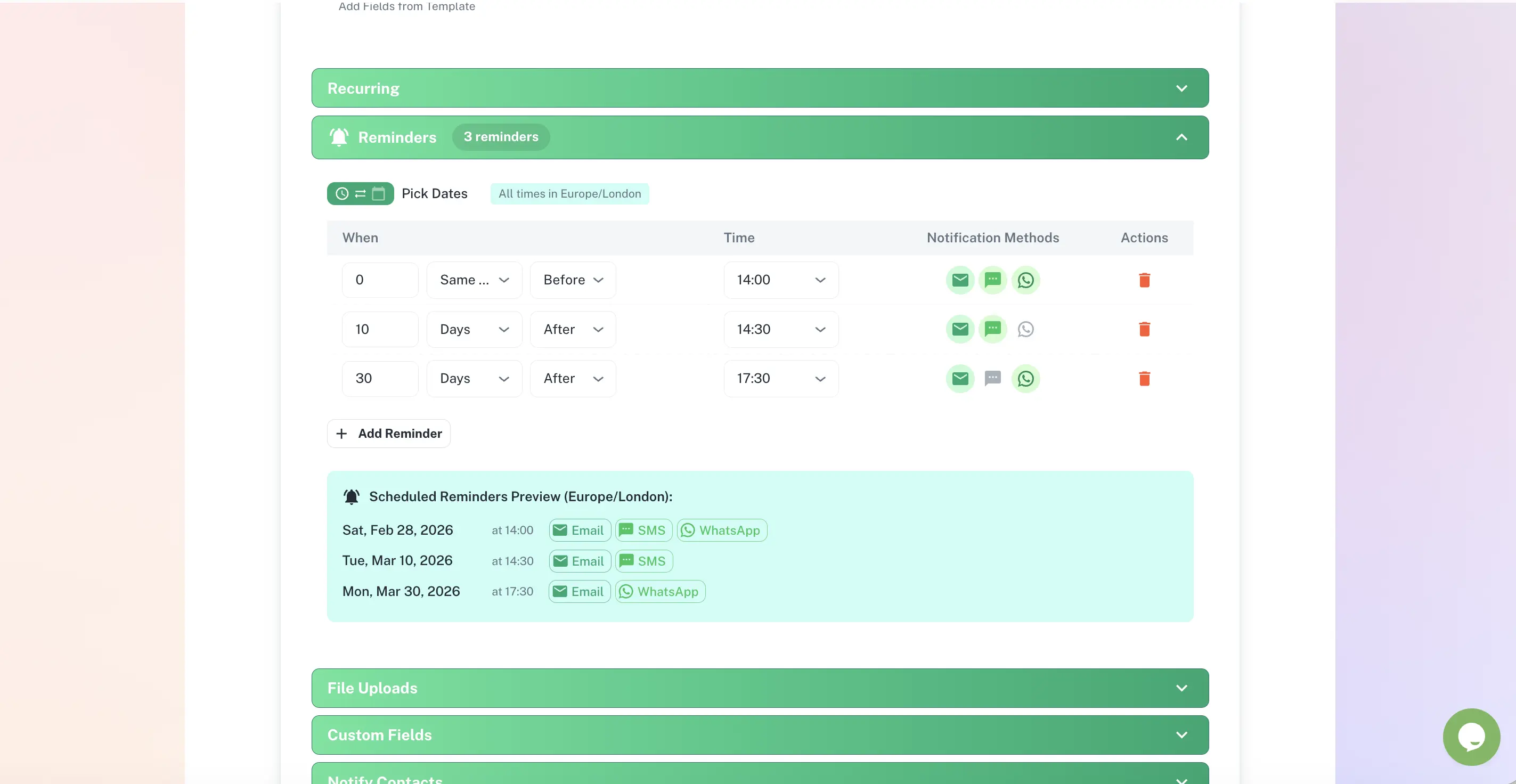
Five channels, staged lead times, escalation at the end
A 90-day email to the owner. A 30-day nudge in Slack. A 7-day SMS. Silence after that escalates to their manager. Set the pattern once per record type and it runs on every future cycle without anyone rebuilding it.
Email, SMS, WhatsApp, Slack, Microsoft Teams
Different recipients at different stages
Escalation when a deadline passes unactioned
A per-site view for managers, a group view for the board
Six care homes, four depots or eleven branches each carry their own inspection and certificate schedule. The site manager sees their own tile and nothing else. Head office sees which tile has gone amber, in the week it happens rather than at the next inspection.
Records grouped by site, department or legal entity
Per-site drill-down and group-wide roll-up
Filter by category, owner or due date
A timestamped trail nobody had to write up afterwards
Every reminder sent, document uploaded, checklist step completed and status change is logged with a name and a time. When an inspector, insurer or client asks how you manage this, the answer is an export rather than a fortnight of retrospective paperwork.
Who did what, when - captured as it happens
Documents retained for the lifetime of the account
Export the full pack to CSV, PDF or XLSX
What compliance software does that a spreadsheet cannot
| ExpiryEdge | Spreadsheet | Shared calendar | Email reminders | |
|---|---|---|---|---|
| Status changes without anyone editing it | ||||
| A different owner per obligation | Manual | One calendar | Partial | |
| Staged reminders with escalation | ||||
| Documents stored on the record | In the thread | |||
| Timestamped audit trail | ||||
| Survives the owner leaving | Partial | |||
| Site, department and entity roll-up | Manual | |||
| One-click evidence export | Manual |
Compliance software helps an organisation meet its legal, regulatory and contractual obligations on time. Most compliance software falls into two groups. GRC platforms map controls and evidence to a framework such as ISO 27001 or SOC 2. Compliance tracking software, like ExpiryEdge, tracks dated obligations: licences, certifications, inspections, insurance, contracts and filings, each with an owner and automatic reminders.
Good compliance tracking software does five things: holds every obligation and its due date in one register, gives each one a named owner, sends staged reminders before the deadline, stores the certificate or report on the record, and keeps an audit trail you can export. If a tool cannot show you today which items are overdue and who owns them, it is a list, not compliance software.
Yes. Small businesses rarely need a full GRC suite. They need a compliance tracker that reminds the right person before a licence, insurance policy, inspection or certification lapses. ExpiryEdge is built for that: set-up takes a day, a CSV import moves your spreadsheet across, and the 14-day trial needs no card.
Anything with a date attached that carries a consequence if it passes. Licence and permit renewals, staff certifications, equipment inspections and servicing, fire, gas, electrical and Legionella certificates, insurance renewals, contract notice periods, regulatory filings, training refreshers, right-to-work document expiry, and the review dates on your own policies and procedures. If missing the date costs money, stops work or has to be explained to somebody, it belongs in the calendar.
No, and it is worth being straight about that. ExpiryEdge tracks the obligations you have already identified - your records, your dates, your owners. It does not read regulatory feeds or tell you a rule has changed. What it does handle is the review cycle: put a review date on the policy or register that would need updating, assign it to whoever tracks the rules, and the reminder arrives on schedule. The judgement stays with your people; the calendar stops depending on them remembering.
Every record carries its current document, its renewal history and a log of every reminder sent, every status change and every checklist step completed, each with a name and a timestamp. Export the set - filtered to a site, a department, a category or a date range - as CSV, PDF or XLSX. Auditors generally want two things: that the item was in date, and that there was a system rather than a scramble. The export answers both without anyone reconstructing a paper trail the night before.
Yes. Access and notifications are set per role. HR works certifications and training, facilities works inspections and building certificates, finance works contracts and insurance, and each sees only their own list. A compliance lead or director gets the view across all of it. Nobody has to filter a shared spreadsheet down to the rows that concern them.
Records are grouped by site, department and legal entity, and those groupings stack. A regional manager filters to their four sites. A site manager sees one. A group compliance lead sees every entity in one roll-up with a status figure per site, so an amber tile gets a phone call the same week rather than a finding at the next inspection.
This is where calendar reminders fail, because they belong to an individual and leave with them. In ExpiryEdge the obligation belongs to the organisation. Reassign a departing person’s records to a new owner in one action and the reminder schedule, the documents and the history carry on untouched. Nothing goes quiet because an account was deactivated.
A GRC platform is organised around a framework - controls, policies, evidence mapped to a standard you are certifying against. ExpiryEdge is organised around dates and owners: what expires, when, and who has to act. They solve different problems and a lot of organisations run both. If your failure mode is "we could not evidence control 6.2", that is GRC. If it is "the fire alarm service certificate expired in March and nobody noticed until July", that is this.
Yes, and most teams do. Load the category that is causing the pain, get the reminders running, then add the next one when the first is boring. The category pages linked above go into far more detail on the specifics - the eight-field permit record, claims-made insurance gaps, certification matrices by shift - and every category ends up in the same calendar whichever door you come in through.
Most teams are tracking within a day. Add the items, upload the current documents, set owners and reminder cadences, and the schedule takes over. For a few hundred records a bulk CSV import does the heavy lifting: export what is in your existing spreadsheet, map the columns, import. The 14-day trial is full-access with no card required.
One calendar. Every obligation. A name against each one.
Free 14-day trial. Bulk CSV import. No credit card.