
Your Processes Live In Someone's Head. Until They Leave.
Standard operating procedures only work when people follow them - consistently, in the right order, every time. Most businesses write their SOPs in a document nobody opens. ExpiryEdge turns any process into a structured checklist: sections broken into steps, each step assigned to the right person, every completion timestamped and logged. Nothing is skipped. Nothing relies on memory.
Any repeatable process, run as a tracked checklist
Onboarding, inspections, month-end, audits - all structured
Steps assigned to named people with deadlines
Real-time progress - no chasing, no status meetings
A timestamped completion record for every run
Quick answer
ExpiryEdge SOP software turns any repeatable business process into a structured, assignable checklist. You build sections and steps once, assign each step to the right person, and run the template as many times as you need. Every run tracks live progress and logs each completion with who did it and when - so processes survive staff turnover and you can prove they were followed.
A document is not a process
Written SOPs go unread, steps get skipped, and the only record is what someone remembers.
The knowledge walks out the door
Experienced staff train new people verbally. When they leave, quality drops because the process never lived anywhere but in their head.
Steps get skipped silently
A spreadsheet checklist has no assignment and no notification. If someone misses a step, nobody knows until something goes wrong.
No proof it was done right
When an auditor or client asks whether a process was completed correctly, "we always do it" is not evidence - you need names, dates and order.
From a written SOP to a running, tracked process
Structured sections and steps, each with an owner
Build your SOP as a hierarchy - sections group related steps, and each step has an assignee, a deadline and a completion checkbox. Complex processes with 50+ steps stay organised and navigable instead of becoming a wall of bullet points.
Sections and steps in a clear hierarchy
Step-level assignment to the right person
Deadlines on each step
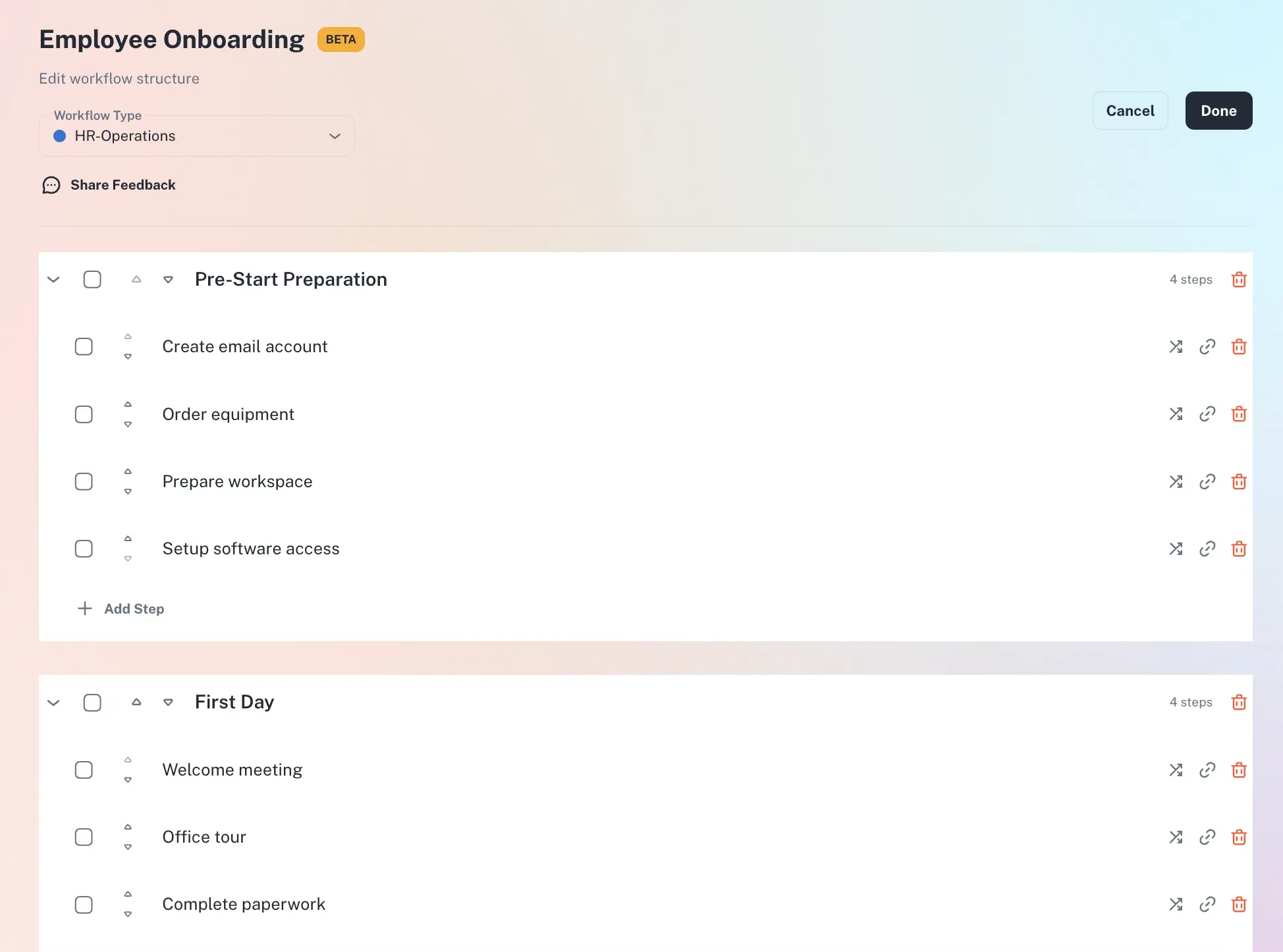
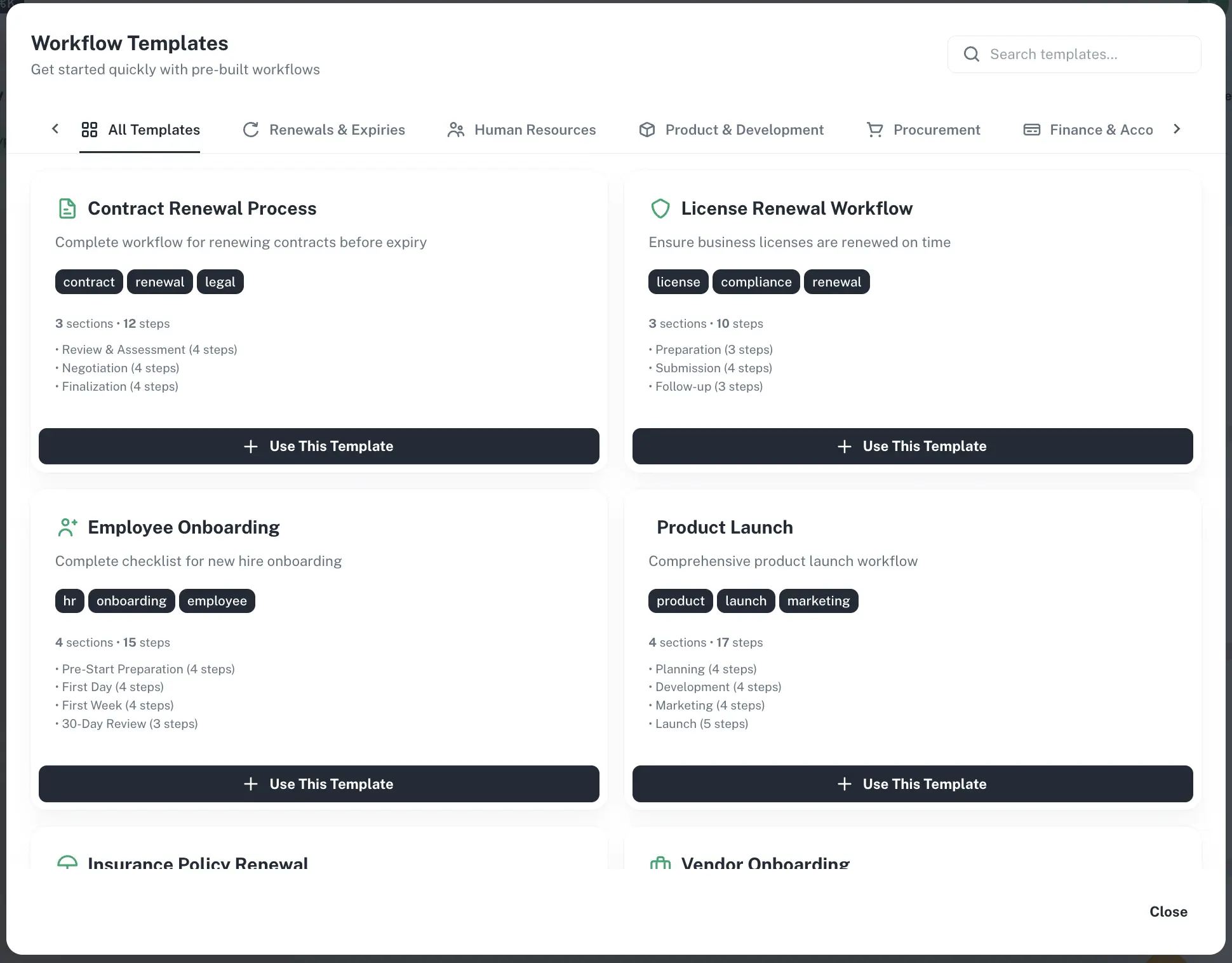
Reusable templates, one independent run at a time
Save a checklist as a template and launch a run whenever the process needs to happen. Each run is independent with its own completion record - onboarding, monthly close, safety inspections, client handovers all from one template, infinite repeatable runs.
One template, unlimited runs
Each run has its own audit trail
Trigger manually or when a deadline fires
Real-time progress across every active run
See exactly how far through any checklist run your team is - which steps are complete, in progress, or overdue, and who owns each. No status meeting required, and overdue steps escalate to a manager automatically.
Live progress per run and per owner
Overdue steps flagged and escalated
Close the run and store the record
From document to completion record
Build your SOP as a checklist
Create sections for each phase - pre-work, execution, sign-off. Add steps, assign each to the right role, set time constraints, and save as a reusable template.
Launch a run when needed
Trigger a run manually or automatically when a deadline fires. Assignees are notified on their channel and see only their steps to tick off.
Monitor progress and close
Managers watch real-time progress across active runs. When every step is complete the run closes and the audit trail is stored, ready for the next run.
Built for the people who own consistency
Operations Manager
Needs every repeatable process to run consistently whether they are in the office or not. Wants documented, trackable, repeatable processes instead of verbal training that fades.
Compliance or Quality Manager
Needs to demonstrate to auditors that processes are followed completely every time - with a completion record of names, dates and timestamps.
Franchise or Multi-Location Owner
Needs every location to follow the same opening, closing and inspection process - and visibility that it was actually completed at each site, not just claimed.
Any process your team repeats on a schedule or trigger. Common examples include: employee onboarding and offboarding, monthly health and safety inspection, quarterly supplier review, annual ISO or regulatory audit preparation, client onboarding sequence, equipment maintenance sign-off, shift handover procedure, food safety opening and closing checks, financial month-end close, and new branch or franchise opening. If you do it more than once and it matters that it is done correctly, it belongs in an SOP checklist.
A spreadsheet checklist has no assignment, no notification, no escalation, and no audit trail. If someone skips a step, nobody knows until something goes wrong. ExpiryEdge assigns each step to a named person, notifies them when their step is due, escalates to a manager if it is overdue, and creates a timestamped record of every completion. It is the difference between a list and a managed process.
Yes. Each step is assigned independently. Step 1 might go to HR, step 2 to IT, step 3 to the line manager. They each see their own steps and complete them independently. No step requires someone to manually forward a task to the next person.
Every time a step is marked complete, ExpiryEdge records who completed it, when, and on which device. Every checklist run has a full completion history from start to finish. If a regulator asks whether your food safety opening checks were completed on a specific date, or whether an equipment inspection was signed off by the right person, you can show the record immediately.
Yes. You can link a checklist template to a tracked deadline. When an expiry reminder fires - for example, a safety certificate approaching its renewal date - ExpiryEdge automatically starts the renewal SOP checklist, assigns the steps, and begins tracking progress. The reminder and the process are managed together without manual intervention.
You can build your first checklist in minutes - create the sections and steps, assign owners, and save it as a template. From there, launching a run is a single action. Most teams have their first SOP live the same day. ExpiryEdge offers a 14-day free trial with full access - no credit card required.
Turn every process into a checklist. Turn every checklist into a completion record.
Free to try. No credit card required.