
Centralized Dashboard
Every licence, certificate, contract date and open task sits on one screen, sorted by what runs out first.
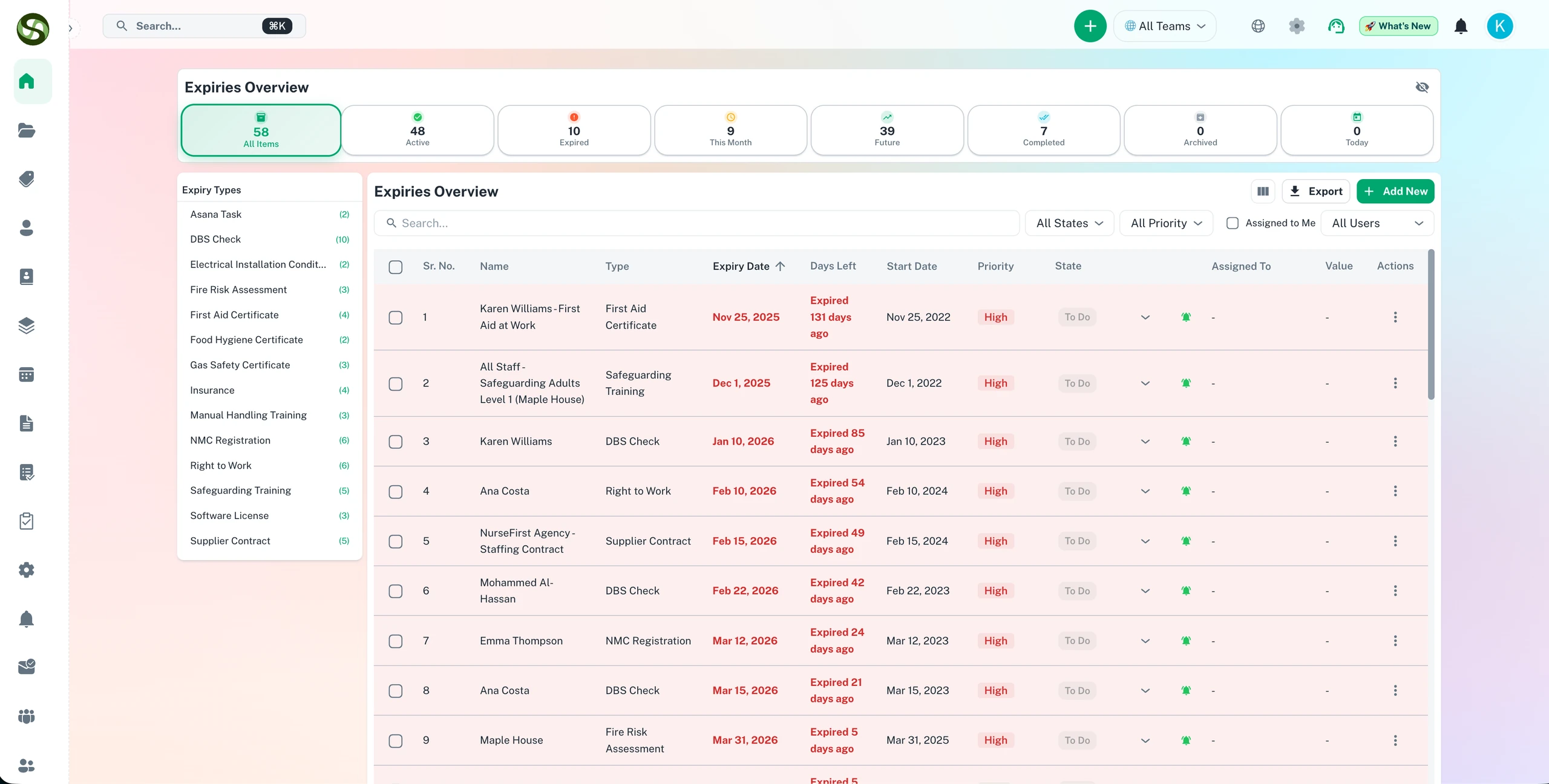
One compliance dashboard to track every deadline, task, and renewal in real time
Unified deadline overview
Real-time task updates
Customisable widgets
Team activity feed
Centralized Dashboard Features
Everything you need to streamline your workflow and boost productivity
Unified Deadline View
Your fleet's MOT dates sit next to staff DBS checks and the office lease. Filter by team, priority, date range or category.
Real-Time Updates
When someone uploads a renewed certificate or ticks off a task, the dashboard changes straight away. Nobody works from last week's spreadsheet export.
Visual Analytics
Charts show who carries the most open items, how often work finishes on time, and which months pile up with renewals.
Customizable Widgets
Drag widgets into a layout that suits your job. A site manager might keep only overdue items for one building.
Team Activity Feed
See who renewed the gas safety certificate, who reassigned a task and which reminder went unanswered today.
Smart Priority Indicators
Red means overdue, amber means close, and the list sorts itself so you can tell at a glance which item to deal with before lunch.
Why Use Centralized Dashboard?
Real benefits that drive measurable results for your business
One screen instead of five
Stop opening the HR system, a shared drive and three spreadsheets to answer one question. It is all on one page.
Faster Decision Making
When an insurer asks whether every driver's licence check is current, you can answer on the call instead of promising a report.
Shorter status meetings
When everyone can check progress themselves, the weekly update shrinks to the few items that need a discussion.
Improve Resource Allocation
Spot the person with forty open items and the colleague with four. Move some work across before anything slips past its date.
Who Uses Centralized Dashboard?
Designed for teams and businesses across industries
Executive Overview
Directors get a quick read on what is overdue across the business without asking each department head for an update.
Team Leaders
Project leads see who is overloaded and which tasks are stuck, then hand work to someone with room before a date passes.
Compliance Officers
Keep regulatory deadlines, certifications and audit items in a dedicated compliance view, apart from everyday operational tasks.
Operations Managers
Follow daily checks, recurring jobs and SOP steps across several sites or departments from the same page you use for renewals.
Individual Contributors
Staff see their own tasks and upcoming deadlines first, plus enough of the team's activity to know what is happening around them.
Business Analysts
Pull trend data on completion rates and on-time renewals, then turn it into reports on how each team handles its deadlines.
Frequently Asked Questions
Everything you need to know. Can't find the answer? Reach out to our support team.
It lists every compliance item you track, grouped as current, expiring soon or overdue. Each row shows the deadline, the owner and the item type, with completion rates at the top. Filter by team, department, location or category to focus on one area.
Yes. Items from every department, team and location land on the same screen, so a compliance officer sees the whole picture without emailing each team. A department manager can get a filtered view of just their own area.
Colour coding does most of the work. Something expiring within 7 days looks different from something due in 30 or 90 days. The default sort puts the most urgent items at the top, so you start with whatever is closest to lapsing.
Yes. Export the status view as a PDF or CSV for a board pack, an internal audit or a regulator who wants evidence. Each line includes status, owner, expiry date and the last action taken.
Yes. ExpiryEdge runs in the browser, so it works on a laptop, tablet or phone. A manager can check urgent items from a site visit or the train without installing anything.
Ready to Get Started?
Join thousands of teams already using ExpiryEdge to streamline their workflows