
Team Collaboration Features
Collaborate seamlessly with shared deadlines, team comments, file sharing, and real-time updates. Keep everyone on the same page.
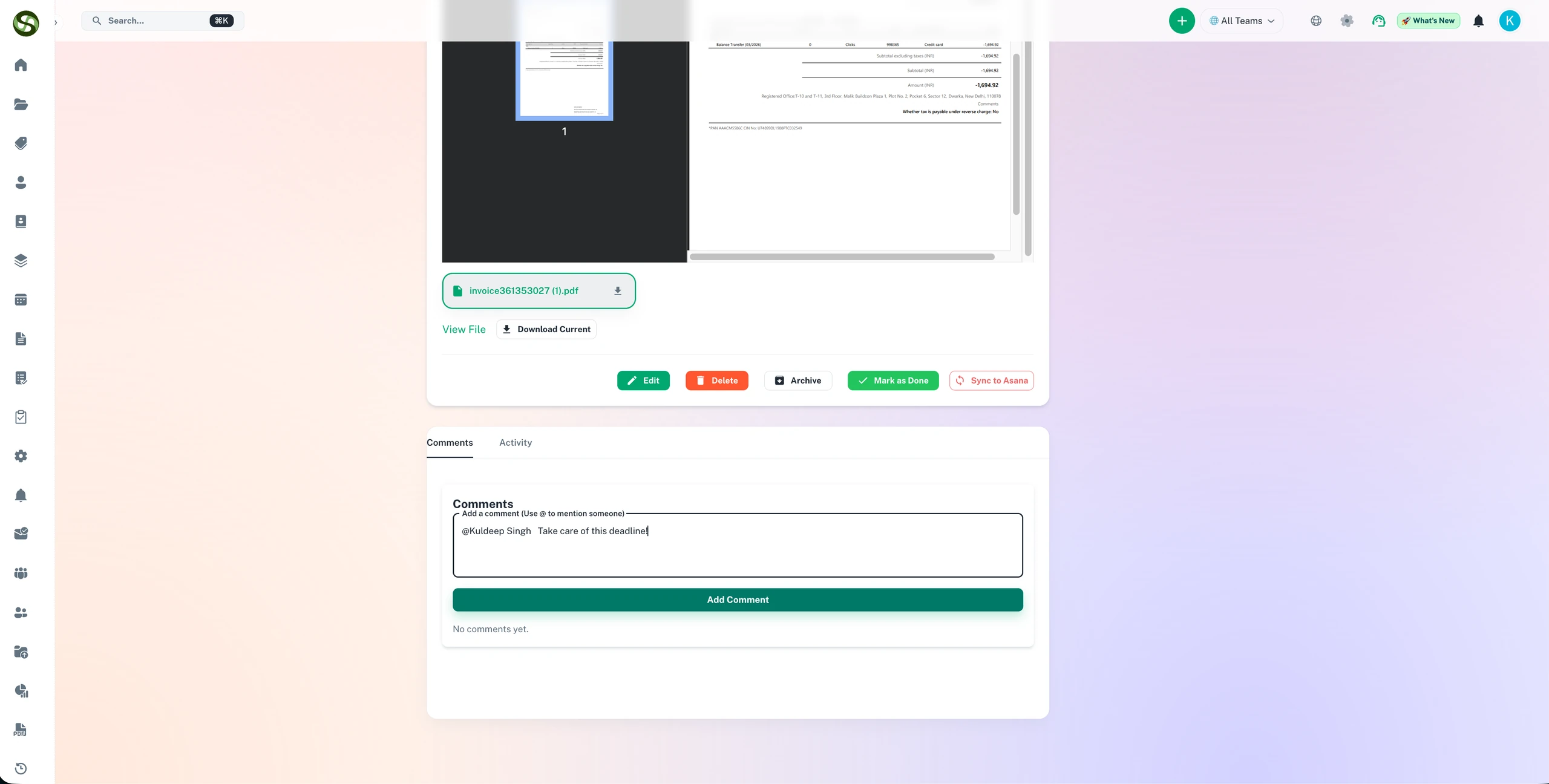
Collaborate on compliance tasks with shared deadlines, comments, and team ownership
Shared task ownership
Inline comments & notes
Team deadline visibility
Collaborative workflows
Team Collaboration Features Features
Everything you need to streamline your workflow and boost productivity
Shared Team Workspaces
Create dedicated workspaces for each team, department, or project. Everyone sees the same deadlines, updates in real-time, and stays aligned without constant meetings or email chains.
Contextual Comments & Discussions
Comment directly on deadlines and tasks. Ask questions, provide updates, and discuss issues without leaving the platform. All conversation history is preserved with the deadline.
Centralized File Sharing
Attach contracts, licenses, certificates, and documents directly to deadlines. Team members access the latest versions instantly-no more digging through email or shared drives.
Granular Permission Control
Assign roles like Admin, Manager, or Viewer with specific permissions. Control who can create, edit, delete, or view deadlines. Maintain security while enabling collaboration.
Team Activity Feed
See what your team is working on with a live activity feed. Track who created deadlines, completed tasks, added comments, or uploaded files. Complete visibility without micromanaging.
Task Assignment & Ownership
Assign deadlines to specific team members with clear ownership. Everyone knows who is responsible for what, eliminating confusion and improving accountability.
Why Use Team Collaboration Features?
Real benefits that drive measurable results for your business
Reduce Email Overload by 60%
Stop sending "What is the status?" emails. Team members see updates in real-time, reducing inbox clutter and improving response times from hours to minutes.
Eliminate Information Silos
Break down departmental barriers. Legal, HR, IT, and Compliance teams all work from the same source of truth, reducing duplicated effort and miscommunication.
Onboard New Team Members 3x Faster
New hires see complete context: deadlines, files, comments, and history in one place. No more asking "Where do I find...?" questions repeatedly.
Improve Team Productivity by 40%
Spend less time searching for information and more time on actual work. Teams report 40% productivity gains when all deadline information is centralized and accessible.
Who Uses Team Collaboration Features?
Designed for teams and businesses across industries
Cross-Functional Compliance
Legal, Finance, and Operations teams collaborate on regulatory deadlines. Lawyers attach compliance documents, accountants confirm budget, operations update completion status-all in one place.
Multi-Department License Renewals
IT tracks software licenses, Procurement handles contracts, Finance approves payments. Everyone comments on the same deadline, eliminating handoff confusion.
Client Deliverable Tracking
Account managers, project managers, and delivery teams coordinate client deadlines. Internal discussions stay private while client-facing updates remain professional.
Security Certification Management
Security, compliance, and IT teams manage ISO, SOC2, and HIPAA certifications together. Track audit requirements, evidence collection, and renewal deadlines collaboratively.
Facility Management Coordination
Facilities, safety, and compliance teams track building permits, inspections, and maintenance certifications. Field technicians upload inspection reports directly to deadlines.
Training & Certification Programs
HR and department managers track employee certifications, mandatory training, and professional development deadlines across the organization.
Frequently Asked Questions
Everything you need to know. Can't find the answer? Reach out to our support team.
ExpiryEdge enables teams to work on compliance together without relying on email threads or shared spreadsheets. Compliance items are assigned to specific owners, but any team member with the right permissions can view, add notes, upload documents, or update the status. The activity log on each item shows a complete history of who did what and when.
Yes. Reminders for any compliance item can be sent to multiple recipients. You might notify the item owner for day-to-day management, their manager for oversight, and the compliance team for monitoring. Each person receives alerts via their preferred channel on the schedule configured for their notification tier.
Role-based permissions control exactly what each team member can see. Sensitive compliance records can be restricted to specific roles while general compliance status is visible to broader teams. Document access can be controlled independently from record visibility, allowing teams to share status without exposing confidential documents.
Yes. Each compliance item has a notes and comments section where team members can add context, flag issues, record conversations with external providers, or note reasons for delays. These comments are part of the audit trail, creating a complete record of all discussions and decisions related to each compliance obligation.
Remote and hybrid teams benefit most from ExpiryEdge because it eliminates the need for in-person coordination. Every team member receives their own reminders via their preferred channel. Managers see live compliance status without needing to check in with individuals. Documents and records are centrally accessible from any location. Compliance does not depend on physical proximity.
Ready to Get Started?
Join thousands of teams already using ExpiryEdge to streamline their workflows