
Set it once. Every deadline tracks itself.
Your business runs on licences, contracts, certifications and insurance policies - every one carrying an expiry date you are expected to stay on top of. ExpiryEdge records each item, fires a reminder cadence you choose, and escalates if nothing is actioned. After setup, the system runs it.
Tracking that runs whether anyone remembers to check or not
Multi-step reminder sequences per item type
Live compliance dashboard across every team
Unlimited tracking categories
Risk flagging and automatic escalation
Quick answer
Expiry tracking software records any document or deadline that has an expiry date - licences, contracts, certifications, insurance, permits, equipment inspections - and sends scheduled reminders before each one lapses. ExpiryEdge adds named ownership, multi-channel alerts, automatic escalation when deadlines pass, and a live dashboard showing exactly what is expired, expiring soon, or healthy across every team.
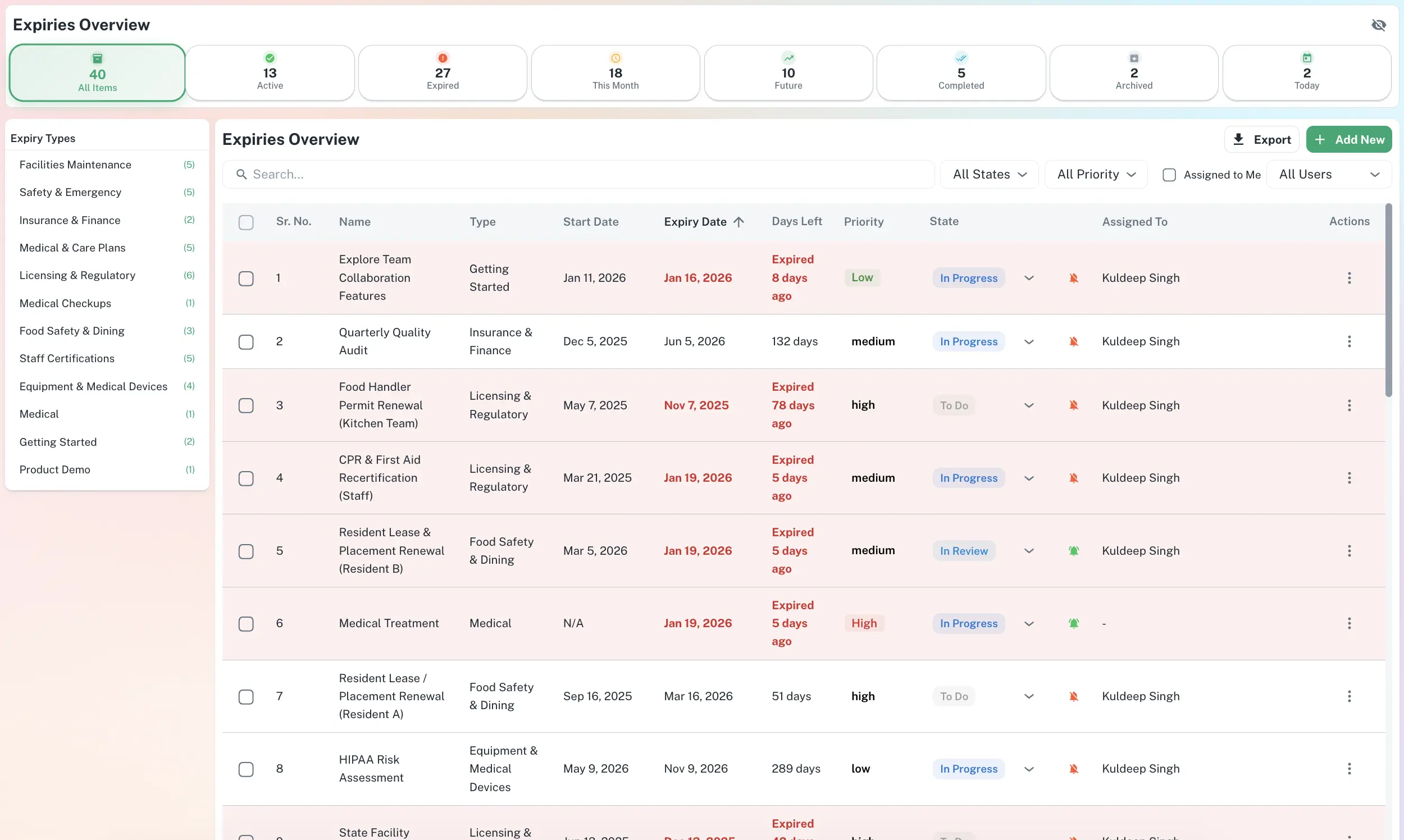
Every deadline on one screen
The Expiries Dashboard is your single source of truth - type, deadline, priority and owner in one searchable list. Switch to the calendar to see what is coming, or filter by status to focus on what needs action today.
Filter by type, status and assignee - the whole portfolio on one screen.
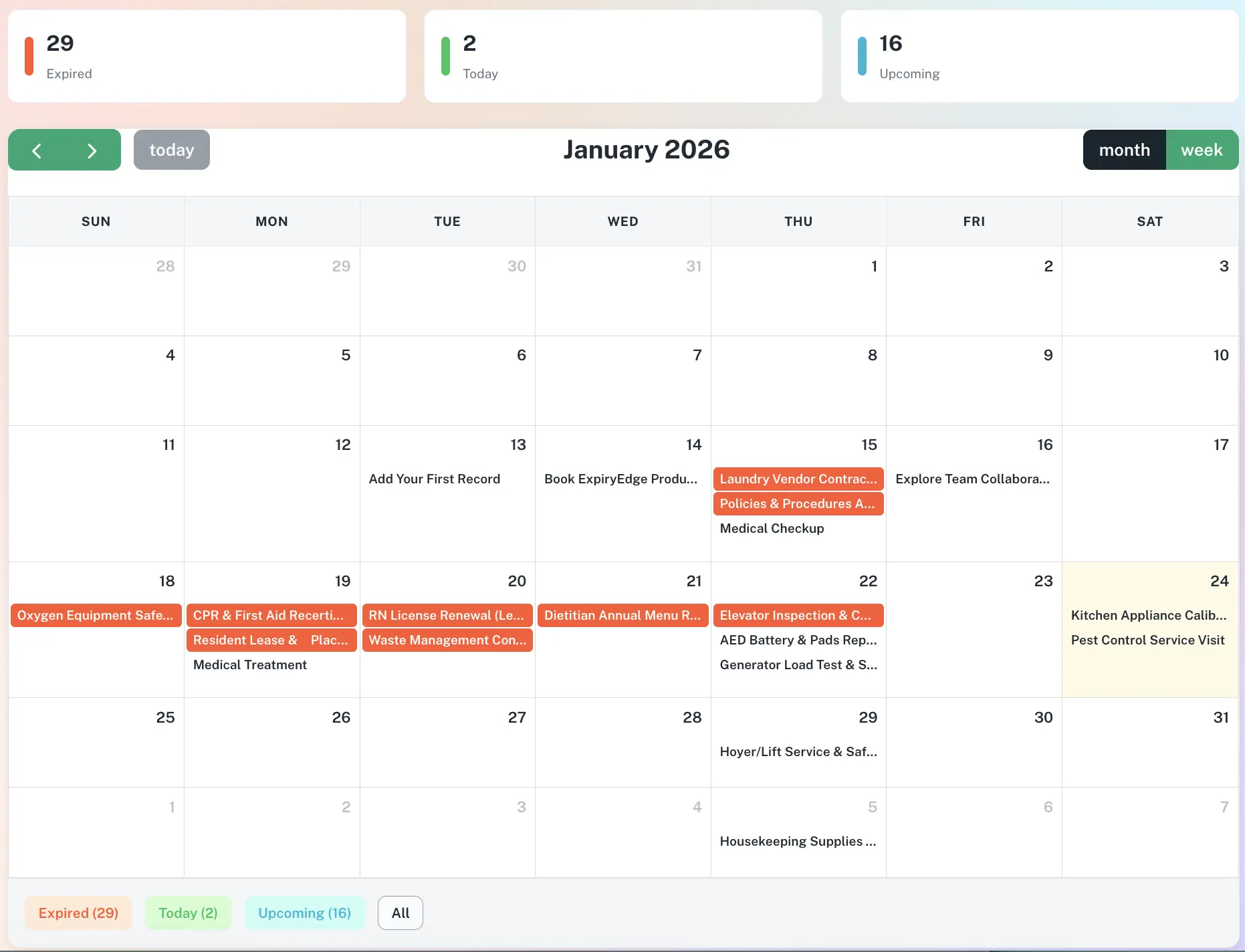
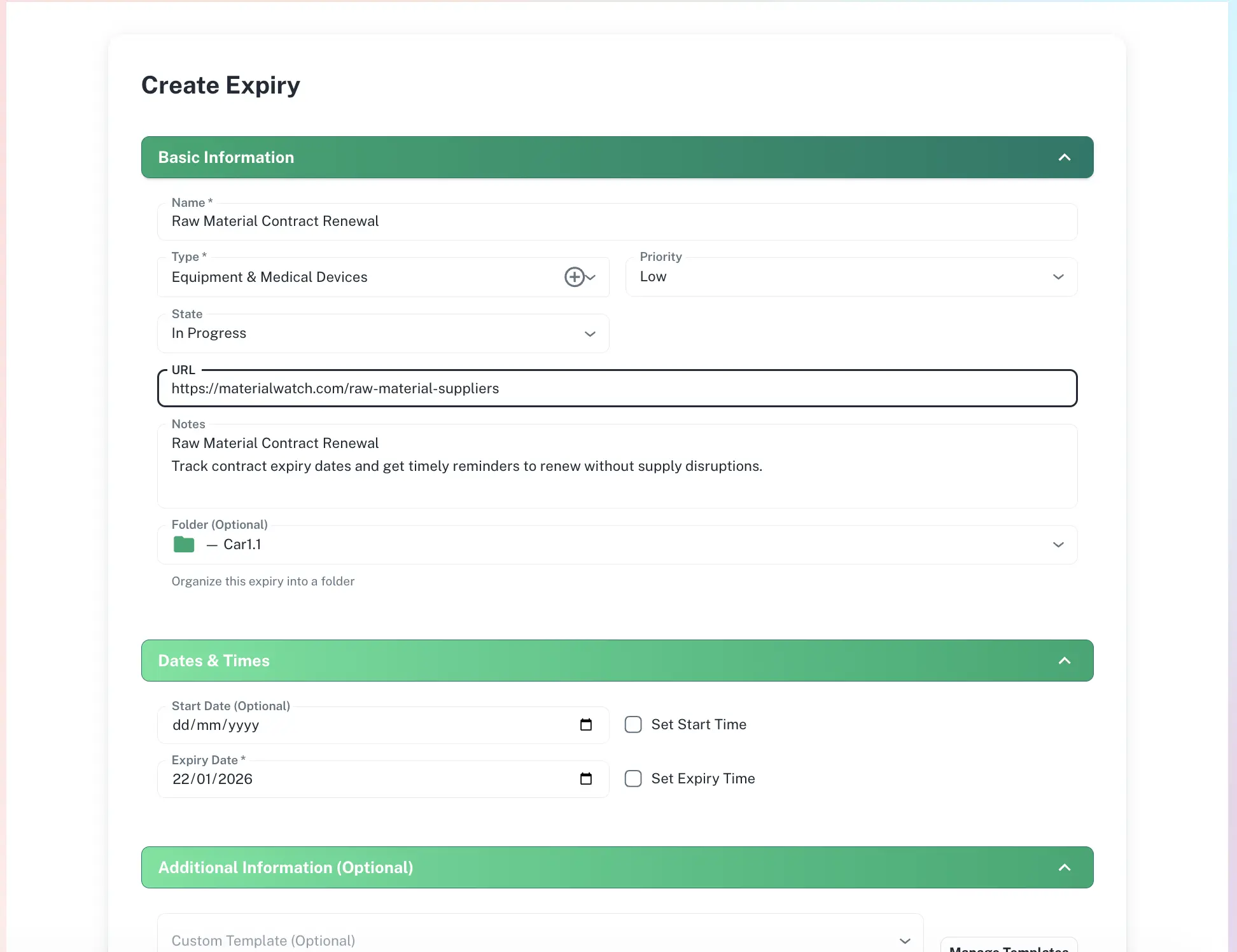
From a date in your head to a control that runs itself
Add the item
Record the licence, contract or certificate with its expiry date - or bulk import your backlog from a spreadsheet.
Set the cadence
Choose a reminder sequence per item type - for example 90, 30, 7 and 1 day before expiry.
Assign an owner
Name the person responsible and the manager who gets the escalation if nothing happens.
Let it run
ExpiryEdge fires every reminder on schedule and flags risk on the dashboard - automatically.
Tracking that works in the background
Multi-step sequences per item type
A contract needs alerts at 90, 30, 14 and 7 days. Equipment maintenance at 30 and 7 only. You define every rule once, and ExpiryEdge fires each reminder on schedule - escalating up the chain if a deadline passes without action.
Custom cadence per category
Email, SMS, WhatsApp, Slack, Teams
Automatic escalation on overdue items
One record type for every obligation
Track licences, contracts, insurance, staff certifications, equipment dates, vendor agreements, permits and software renewals - or create unlimited custom categories. Each record carries its documents, owner and reminder rules in one place.
Unlimited custom categories
Documents attached to each record
Recurring renewals supported
A live dashboard that never goes stale
Add a record, set its cadence, and it appears on the dashboard immediately - colour-coded by risk status. Filter by category, team or location to prioritise what matters today, and pull an audit pack the moment an inspector asks.
Risk status: expired / expiring / healthy
Filter by team, location or category
Spreadsheet import for your existing backlog
Who relies on automated expiry tracking
Operations Managers
The spreadsheet goes stale and the first sign something lapsed is the wrong kind of call. ExpiryEdge tracks every licence, contract and certification across every team - and sends the reminders whether anyone checks it or not.
HR Managers
Track staff certification expiry automatically. Remind employees and line managers before any training, food safety or professional licence lapses.
Franchise & Multi-Site Operators
Manage licence and permit expiry across every location in one dashboard, with instant escalation when any site falls out of compliance.
Legal & Contract Managers
Track every vendor agreement with multi-step reminders and the signed document attached - so you are always negotiating with time on your side.
Health & Safety Officers
Track equipment inspection dates, safety certifications and permit renewals with reminders that escalate to management when action is overdue.
Compliance Officers
Maintain a live, audit-ready record of every tracked item and prove your posture at any moment with one-click exports.
Why a spreadsheet is not enough
| ExpiryEdge | Spreadsheet | Calendar | |
|---|---|---|---|
| Automatic multi-step reminders | |||
| Multi-channel alerts (SMS, WhatsApp, Slack, Teams) | |||
| Escalation when deadlines pass | |||
| Named ownership per item | Manual | ||
| Documents stored with the record | |||
| Live risk dashboard | Manual | ||
| One-click audit export | Manual |
ExpiryEdge can track any document or deadline with an expiry date: business licences, professional certifications and certificate tracking, insurance policy renewals, contracts and vendor agreements, equipment maintenance schedules, staff ID and work visa expiry, health and safety inspection dates, software license tracking and software license renewal dates, lease agreements, and any custom category you define.
When you add an item to ExpiryEdge, you assign a reminder sequence - for example, alerts at 90 days, 30 days, 7 days and 1 day before expiry. ExpiryEdge sends those reminders automatically on schedule, to whoever you assign, via whatever channel they prefer (email, SMS, WhatsApp, Slack, Teams). Once configured, the system runs without any manual input.
ExpiryEdge automatically escalates overdue items. If a deadline passes without action, the system sends escalation alerts to the designated manager or executive. You configure multi-tier escalation - first to the item owner, then to their manager, then to leadership - so nothing is ever silently missed.
Yes. ExpiryEdge supports bulk import from CSV and Excel. Map your existing columns to the required fields, review the import, and your entire backlog of expiry records is immediately tracked with automated reminders.
Spreadsheets require someone to manually check for upcoming dates and send reminders. ExpiryEdge automates every step: multi-step reminder sequences, multi-channel delivery, escalation when deadlines pass, named accountability per item, document storage alongside each record, and audit-ready reporting. A spreadsheet tracks dates. ExpiryEdge ensures the work actually gets done.
Stop tracking expiry dates manually
Track every licence, contract, certificate and permit across every team - and let the reminders run themselves.