
How ExpiryEdge Works
Put every renewal date in one place, and turn the jobs you repeat every month into SOP checklists. You can be up and running this afternoon without calling IT.
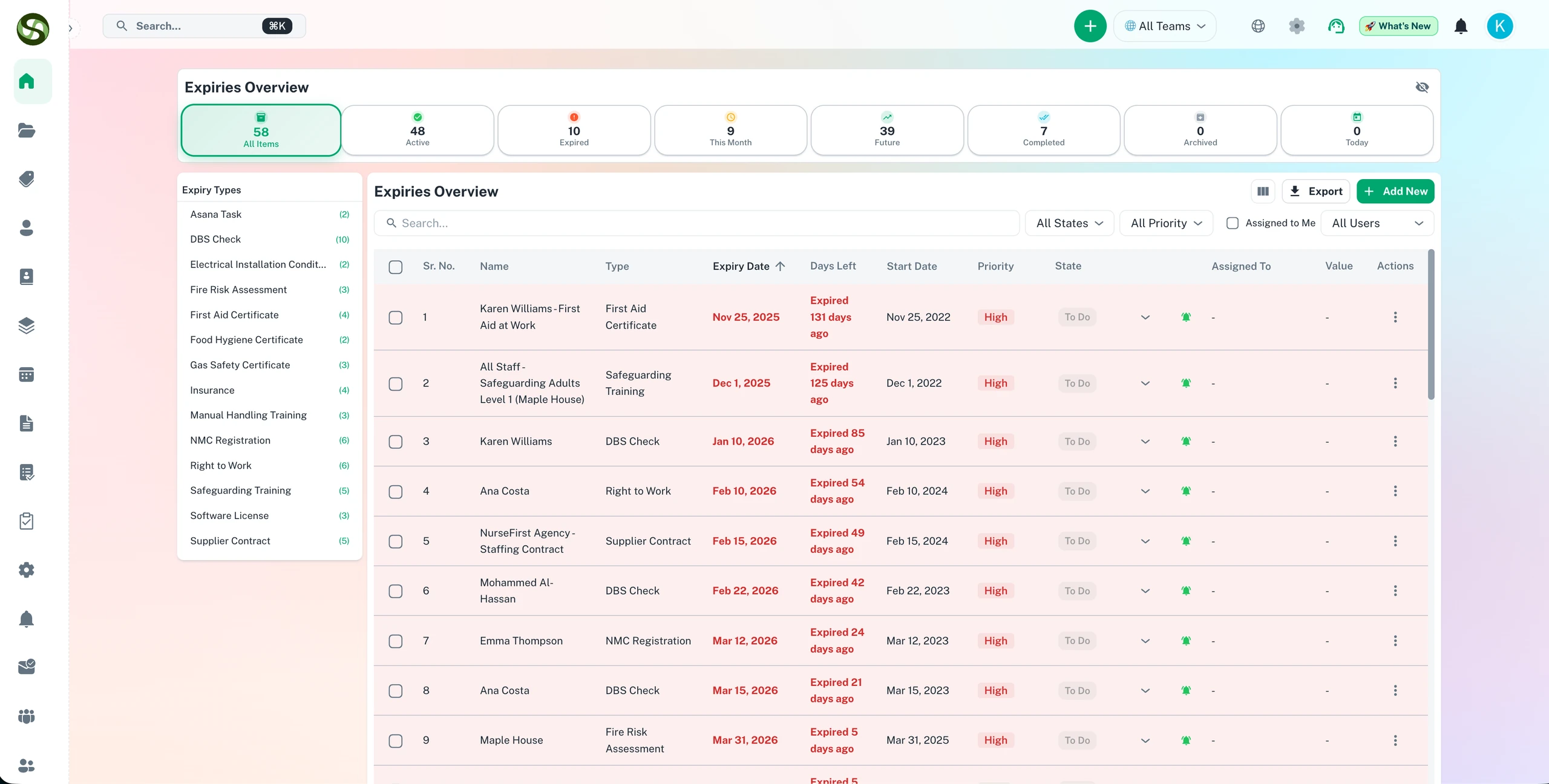
How ExpiryEdge tracks expiry dates, chases the right person and keeps you compliant
Onboarding in an afternoon
Add records in minutes
Reminders go out on their own
A live view of what is due
How ExpiryEdge Works Features
Everything you need to streamline your workflow and boost productivity
Add Your Deadlines
Type in a licence, contract, insurance policy or anything else with a date on it. Pick who owns it and which category it sits in. That's the whole form.
Choose When to Be Reminded
Decide how far ahead you want warning: 90 days for a lease, a week for a fire extinguisher check. Reminders go out by email, SMS, Slack or WhatsApp.
Track & Manage
Your dashboard lists every expiry you track. Sort it by date, category or priority, mark things renewed, and look back at the renewal history when someone asks.
Collaborate with Teams
Give each deadline an owner. Your site manager sees the gas safety certificate, your HR lead sees the DBS checks, and nobody has to forward emails around.
Get Notified
Alerts reach people where they actually read messages. If the email gets buried, the text or the Slack ping usually doesn't.
Renew & Repeat
One click marks an item renewed. For things that come round every year, quarter or month, set them to recur and the next date appears by itself.
Why Use How ExpiryEdge Works?
Real benefits that drive measurable results for your business
Setup in Minutes
There's nothing to configure before you start and no training course. Your first expiry takes under a minute to add.
Works Everywhere
Use it on a laptop at the office or on your phone in the car park. The same list shows up on every device.
Integrates Seamlessly
Reminders can land in Slack or Microsoft Teams, so your team sees them in the channels they already have open.
Scales With You
Ten items or 10,000+: the same dashboard, the same reminders, and nothing to rebuild as you grow.
How ExpiryEdge Works in Action
Visual walkthrough of the platform in action
Step 1: Import Your Records
Upload the spreadsheet you already keep and map the columns. Or add records one at a time with a short form.
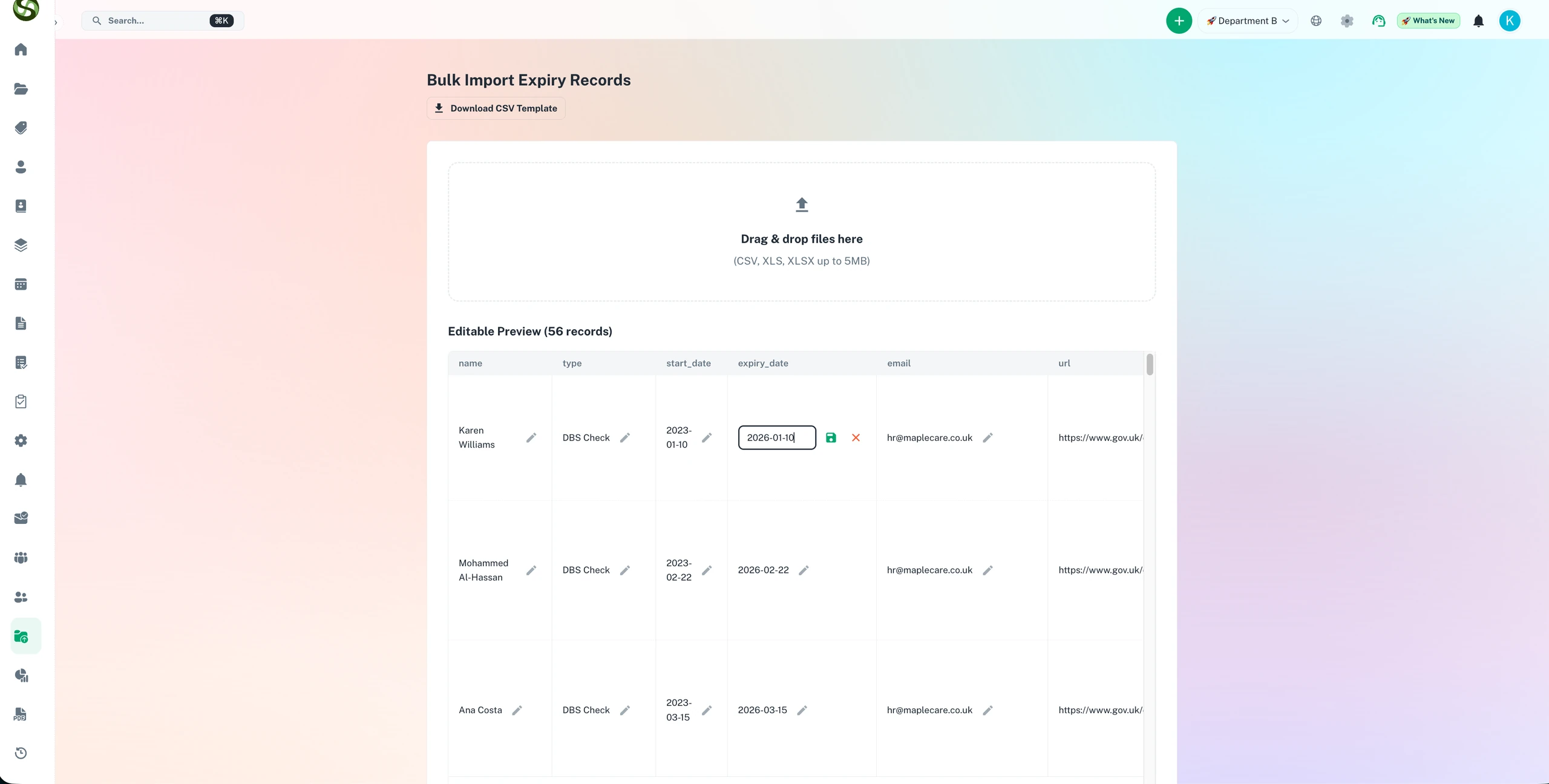
Step 2: Track Everything in One Dashboard
One screen shows every record you track, with its status, priority, owner and due date, across all your sites and teams.
Who Uses How ExpiryEdge Works?
Designed for teams and businesses across industries
License Renewals
Professional licences, trading permits and the software subscriptions that renew on a card nobody checks.
Contract Management
Hear about a supplier contract's notice window before it auto-renews for another year.
Compliance Tracking
Keep certificates current so an inspector or auditor finds nothing out of date.
Employee Certifications
First aid, forklift tickets, CPD hours: see whose training expires next month.
Vehicle & Equipment
MOT dates, insurance, registrations and service intervals for every van in the fleet.
Healthcare Credentials
Medical licences, board certifications and the continuing education hours that keep them valid.
Frequently Asked Questions
Everything you need to know. Can't find the answer? Reach out to our support team.
Most teams are live within a working day. Sign up, bring in your records by CSV or by hand, pick reminder schedules and channels, and assign owners. You don't install anything, there's no implementation project, and nobody has to sit through training.
No. The people who set it up are usually compliance managers, office managers, HR staff and owners, not developers. Item types, reminder schedules and teams are all set from ordinary menus. If you can keep a spreadsheet tidy, you can set this up.
It runs on its own. Nobody needs to log in for reminders to go out. ExpiryEdge keeps checking due dates and messages the right people on the schedule you chose, by email, SMS, WhatsApp, Slack, Teams or a mix of them.
They get the item name, the expiry date, who owns it and a link to the record. From there they can open it, upload the renewed document and mark it done. Each of those steps is written to the audit log, so you can show an auditor who did what and when.
Yes. Export your sheet as CSV, match its columns to ExpiryEdge fields, and import everything in one go. Most organisations move their existing records across in under an hour.
Ready to Get Started?
Join thousands of teams already using ExpiryEdge to streamline their workflows