
Professional license renewal tracking software for every state you are licensed in.
State boards do not chase you. Some send one notice, many send none, and a license stops being valid on its expiration date whether or not the CE credits were logged. ExpiryEdge holds every license the business and its licensed staff depend on - the issuing board, the license number, the renewal window, the CE requirement, the fee and a named owner - and starts reminding 120 days out, while there is still time to finish the coursework and file. A license authorises an entity or a licensed professional to operate. The tickets an individual worker holds - first aid, forklift, trade cards - are certifications, and they are tracked separately.
Last updated · ExpiryEdge editorial team
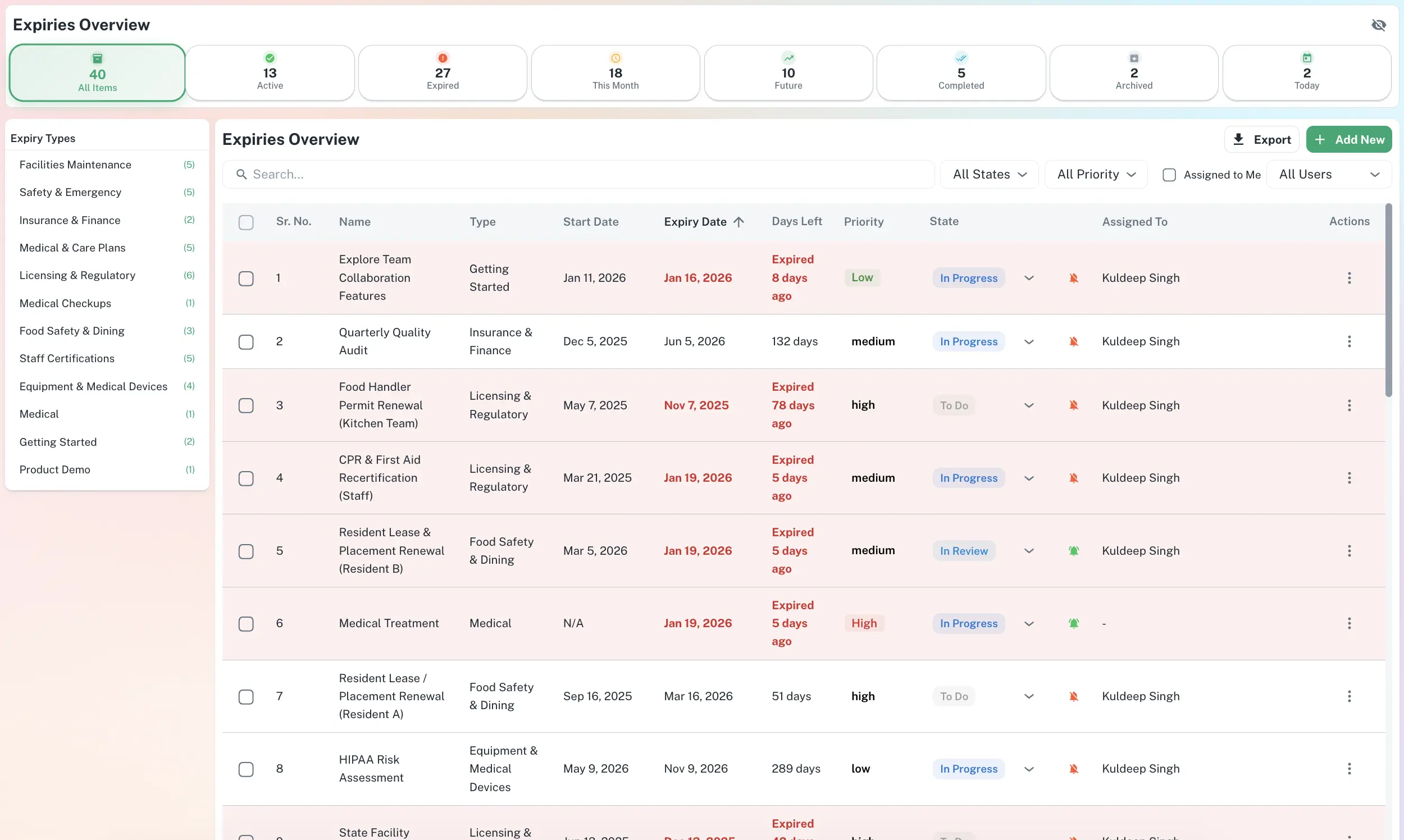
Board, license number, renewal window, CE requirement, fee, owner - one record
Reminder cadence per license type - 120 days where CE is required
CE credits and prerequisites tracked as a checklist
Every state cycle in one register, sorted by what is next
Certificate, license number and issuing board on the record
Quick answer
Professional license renewal tracking software keeps one register of every license and registration an organisation and its licensed people must hold - state professional licenses, contractor and trade licenses, business licenses and city registrations, annual reports and franchise tax filings, facility and controlled-substance registrations, and the vendor subscriptions finance treats the same way. Each record carries the issuing board, the license number, the expiration date, the renewal window, any continuing-education prerequisite, the fee and a named owner. ExpiryEdge counts back from each expiration date, reminds the owner early enough to finish the prerequisites, escalates if the date approaches untouched, and keeps the certificate on the record. Note the boundary: a license authorises the business or the licensed professional to operate, while the qualifications an individual worker holds are certifications and belong in employee certification tracking.
What a lapse costs once a board stops waiting
Same day
most licensing authorities can revoke a license the day it expires - there is no grace period
Source: Wolters Kluwer (2024)591
contractor licenses revoked by California's state board in FY2024-25, alongside 455 suspensions and 916 citations
Source: CSLB FY2024-25 Enforcement Report$2.31M
in cost recovery ordered against licensees by that same board in that same year
Source: CSLB FY2024-25 Enforcement Report62%
of compliance professionals spend between 1 and 7 hours of an average week tracking and analysing regulatory developments
Source: Thomson Reuters, Cost of Compliance (2023)Licenses and registrations the organisation itself has to hold
State professional licenses - CPA, PE, RN, LCSW
Contractor and trade licenses, per state
Business licenses and city registrations
Annual reports and franchise tax filings
Foreign qualification and good-standing renewals
Sales tax and reseller registrations
DEA and state controlled-substance registrations
Facility, clinic and pharmacy licenses
Insurance producer and broker licenses
Real estate broker and salesperson licenses
Registered agent and entity filings
Software licenses, seats and vendor agreements
Who manages licenses on ExpiryEdge
Operations & Compliance
Owns the operating licenses and regulatory registrations that decide whether the business can trade this week, and needs none of them to lapse quietly.
HR & People teams
Tracks the professional licenses employees must hold to do their jobs - CPA, PE, clinical and trade licenses - and the CE credits attached to each renewal.
Practice & clinic managers
Keeps facility licenses, DEA registrations and each clinician's state licensure current, so billing and payer credentialing are never held up by an expired record.
Multi-state service businesses
Runs the same license in eight states on eight different cycles, and needs one view of which board is due next rather than eight portal logins.
Finance & Procurement
Plans renewal fees and committed software spend by quarter, with advance notice before anything auto-renews or lapses.
IT & vendor management
Manages software licenses, seat counts and vendor agreements, and needs the renewal date surfaced before access disappears mid-project.
From eight board portals to one expiration register
Every license, with its board, number and certificate attached
Operating licenses, professional credentials, regulatory registrations and vendor subscriptions live in one stack. Each record carries the issuing board, the license number, the expiration date, the fee, the named owner and the certificate itself - so renewing does not start with a search for last year's paperwork.
Issuing board or vendor logged on every record
Certificate, license number or seat record stored in place
Current, expiring and lapsed visible at a glance
Multi-state licensure without eight portal logins
The same professional license renews in March in one state, on a birth-month cycle in another, and biennially in a third. ExpiryEdge holds one record per license per state, each with its own board, fee and CE rule, and the dashboard sorts them by what is due next. A firm licensed in twelve states stops rebuilding that picture by hand every quarter.
One record per license, per state, per licensed person
State-specific renewal window, fee and CE rule on each
Filter by state, board, license type, owner or due date
CE credits and prerequisites tracked as steps, not as a memory
Filing a professional renewal is the last ten minutes of the job. The months before it are continuing education, an ethics course, a bond or insurance certificate, a fingerprint check. Attach those as a checklist to the license record and each one gets its own due date and evidence upload, so the renewal window opens on a file that is already complete.
CE hours logged against the license they satisfy
Bonds, insurance certificates and background checks as prerequisite steps
Evidence uploaded at each step with a timestamp
Track, alert, renew, verify - then re-arm on the new date
Every license runs the same cycle. ExpiryEdge tracks the expiration, alerts the owner far enough ahead to act, captures the renewal, checks that the new certificate is actually on file, then sets the next cycle from the new date. A renewal that was filed but never verified stays open rather than disappearing from the list.
Owner alerted on their own channel, with escalation if ignored
Renewed certificate verified on the record before the cycle closes
Next cycle armed automatically from the new expiration date
Vendor subscriptions and seat counts on the same register
Software renewals slip the same way board renewals do, and an expired seat blocks a team mid-task. Log each subscription's renewal date, seat count, vendor and owner so finance can see committed spend by quarter and nobody loses access by surprise.
Renewal date and seat count per subscription
Owner alerted before auto-renewal or lapse
Committed software spend grouped by renewal window
One register for every license and registration an organisation and its licensed people must hold, with the issuing board, license number, expiration date, renewal window, fee, prerequisites and a named owner on each record. ExpiryEdge counts back from each expiration date and reminds the owner early enough to complete whatever the board requires first - continuing education, a bond, an insurance certificate - then stores the renewed certificate against the same record.
A license authorises an entity or a licensed professional to operate: a state CPA license, a contractor license, a city business license, a DEA registration. It is issued by a board or an authority, it renews on that authority's cycle, and losing it stops the work. A certification is a qualification an individual earned - first aid, forklift, OSHA 10, a trade card - which follows the person between employers. ExpiryEdge keeps them in separate registers because they fail differently and different people own them, but both run on the same reminder engine and appear on the same dashboard.
Each state is its own record. A nurse licensed in three states has three records, three boards, three renewal windows and potentially three different CE rules - because a board in one state will not accept the credits another accepted. The dashboard rolls all of them up and sorts by what is due next, with filters by state, board, license type, owner and due date. That is the view multi-state firms currently rebuild by hand every quarter.
Work back from the prerequisite, not the expiration date. A professional license with 40 hours of continuing education attached needs its first reminder around 120 days out. A business license with nothing but a fee to pay is fine at 60. Anything that needs a background check, a bond, a surety or a public notice period should start earlier still. Reminder cadence is set per license type in ExpiryEdge, so the software renewal that only needs 30 days does not drag every board renewal onto the same schedule.
The record stays with the business and the ownership moves. If the person held the license themselves, the record is archived with its full history, which matters when a board or a client later audits the period they worked. If they were the named owner of other licenses, those reassign to a new owner in one click and the reminders continue. A license whose only reminder lived in a departed employee's calendar is the most common way a renewal is missed.
Every record keeps the certificate, the license number, the renewal history and a timestamped log of every reminder sent and every step completed. Export by entity, state, license type or owner in CSV, PDF or XLSX. When a client, insurer or prime contractor asks for evidence that your licenses are current, you send a current report rather than a folder of scans of varying age.
Yes, as prerequisite steps on the license they satisfy. Log the hours as they are completed, upload the course certificate against the step, and the license record shows what is still outstanding before the renewal can be filed. If the credits are not complete as the window approaches, the reminder escalates rather than repeating.
On the license record, encrypted, with permission-based access. When the renewed certificate arrives you replace the current version on the same record, and the previous one stays in the history - so you can show what was valid on any given date, not only what is valid today.
Yes. Log each subscription's renewal date, seat count, vendor and owner alongside the regulatory licenses. ExpiryEdge alerts before an auto-renewal commits or a seat lapses, which gives finance a window to renegotiate and stops a team losing access mid-project.
The reminder escalates to a manager or compliance lead rather than repeating to the same inbox, and the record moves into a lapsed state that stays visible on the dashboard until it is resolved. Most licensing authorities can revoke a license the day it expires, with no grace period, so the escalation is deliberately noisy.
Stop any activity the licence covers until you know where you stand, then contact the issuing authority the same day to ask how to renew or reinstate and whether a late fee or re-application applies. Rules and grace periods differ by city, state and country, so get the answer in writing. Then check every other licence and permit you hold - one miss usually means the tracking method has failed, not just one date. In ExpiryEdge each licence gets an owner, reminders from 90 days out and escalation if nobody renews it.
Hold each licence as its own record against the location and jurisdiction that issued it, so two stores with the same licence type have two records and two expiry dates. Give each store manager a view of their own site and head office a roll-up filtered by what expires in the next 30, 60 or 90 days. ExpiryEdge groups records by location with role-based access and sends reminders to the local owner, with escalation to a regional lead when a date passes.
One register for every license, every board, every state
Import the register, set a cadence per license type, assign an owner. Free 14-day trial, no credit card.