
Centralized Document Management
Store, organize, and access all deadline-related documents in one place. Attach files to expiries with version control and secure sharing.
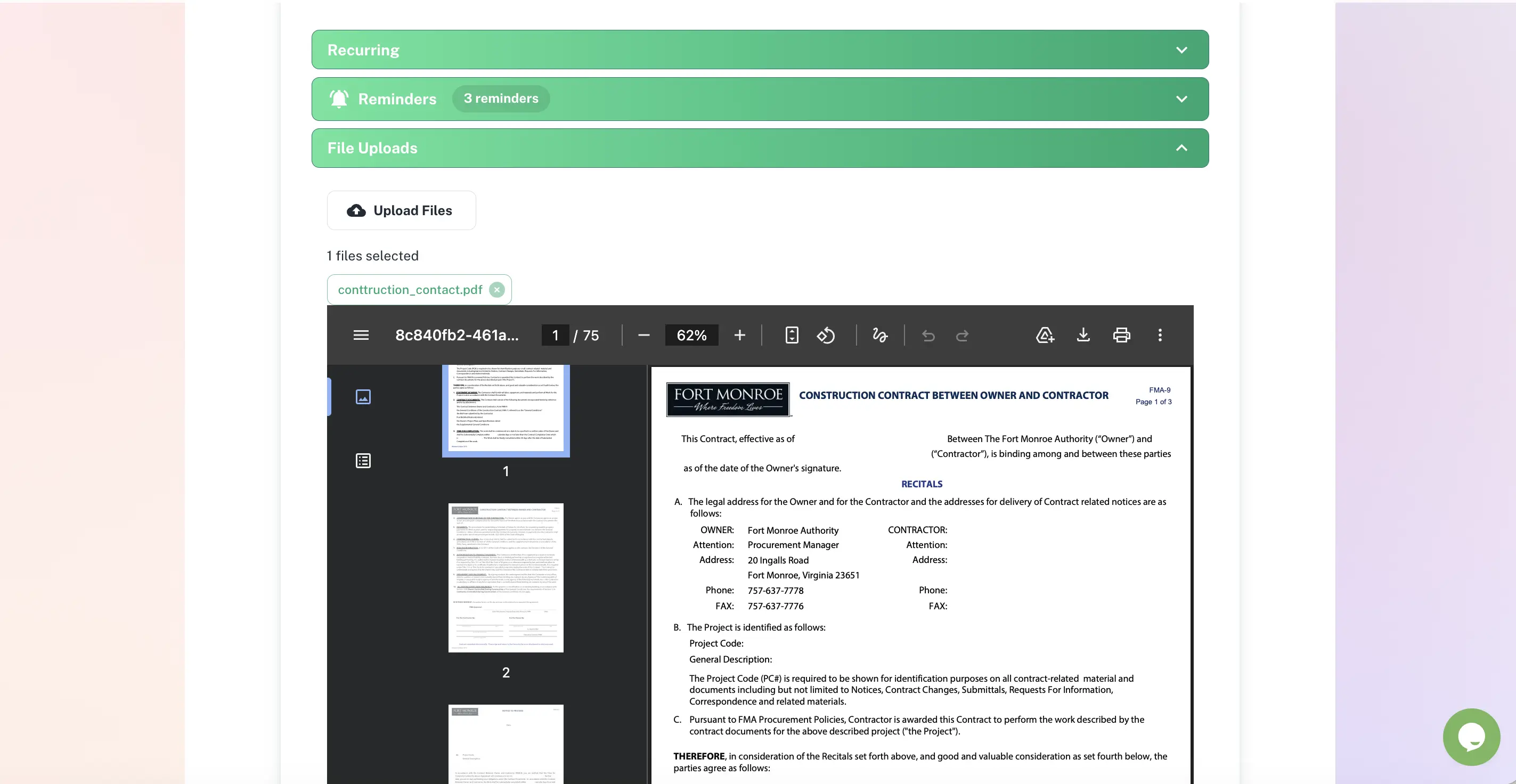
Centralised document management linked directly to expiry dates and renewals
Document expiry linking
Centralised file storage
Version history tracking
Document renewal alerts
Centralized Document Management Features
Everything you need to streamline your workflow and boost productivity
Attach Unlimited Files
Attach contracts, licenses, certificates, insurance policies, and supporting documents directly to deadlines. Keep everything related to a deadline in one place instead of scattered across email and drives.
Full-Text Document Search
Search inside PDFs, Word docs, and other files. Find contracts by clause, licenses by vendor name, or certificates by certification number. Locate documents in seconds, not hours.
In-Browser Document Preview
Preview PDFs, images, and documents without downloading. Quickly verify you have the right file before sharing or making decisions.
Secure External Sharing
Generate secure, time-limited links to share documents with external partners, vendors, or auditors. Links expire automatically for security. Track who accessed what.
Why Use Centralized Document Management?
Real benefits that drive measurable results for your business
End Document Hunting
Stop asking "Where is the contract?" or "Who has the latest version?" All deadline-related documents are automatically organized and instantly accessible.
Reduce Risk of Using Outdated Documents
Version control ensures everyone works from the latest document. Audit trail shows exactly when documents were updated and by whom, critical for compliance.
Accelerate Audits by 75%
Auditors request a license? Share it with one click. All compliance documents are pre-organized by deadline, dramatically reducing audit prep time.
Eliminate Redundant Storage Costs
Stop paying for multiple tools (email attachments, shared drives, separate document management systems). Consolidate deadline-related documents in one secure location.
Who Uses Centralized Document Management?
Designed for teams and businesses across industries
Software License Documentation
Store license keys, purchase orders, invoices, and vendor contracts with each software license. When renewal time comes, everything you need is right there.
Compliance Certificates & Evidence
Attach audit reports, certification documents, evidence files, and remediation plans to compliance deadlines. Auditors access exactly what they need instantly.
Insurance Policy Management
Store policy documents, certificates of insurance, renewal quotes, and claim history with each policy deadline. Quickly provide COIs to vendors and clients.
Legal Contract Tracking
Attach signed contracts, amendments, and related correspondence to contract expiration deadlines. Legal teams access complete contract history before renewals.
Employee Certification Records
Store training certificates, professional licenses, and qualification documents with employee certification deadlines. Instant proof for clients or regulators.
Facility Permits & Inspections
Attach building permits, inspection reports, safety certificates, and maintenance records to facility compliance deadlines. Everything auditors need in one place.
Frequently Asked Questions
Everything you need to know. Can't find the answer? Reach out to our support team.
You can store any file type in ExpiryEdge: PDF certificates, Word documents, Excel files, images of physical documents, insurance schedules, inspection reports, signed contracts, and more. Each document is attached to the relevant compliance item, so the certificate is always one click away from the record it supports.
Yes. When you upload a new version of a document (for example, a renewed certificate), ExpiryEdge stores the new file while retaining the previous version. Auditors and compliance officers can view the complete document history for any compliance item - seeing not just the current certificate but every previous one, with upload dates and uploader identity.
Yes. Documents stored in ExpiryEdge are accessible from any browser on any device. Field managers, remote workers, and site supervisors can access certificates and inspection records on their mobile devices, eliminating the need to carry physical documents or access shared drives.
Documents are stored in a secure cloud environment with encryption at rest and in transit. Access is controlled by role-based permissions, so only authorised users can view or download sensitive compliance documents. ExpiryEdge maintains industry-standard security practices for data protection.
Yes. A single compliance item can have multiple documents attached. A vehicle compliance record, for example, might include the MOT certificate, the insurance certificate, the service record, and a copy of the V5 registration document - all accessible from the same record.
Ready to Get Started?
Join thousands of teams already using ExpiryEdge to streamline their workflows