
Two-Way Email - Replies Land on the Record
ExpiryEdge sends reminder emails from a two-way address. When a contractor, vendor, or client replies, the message is routed straight back into the app and threaded on the record it came from - not scattered across personal inboxes. Every conversation about a deadline lives where the deadline lives.
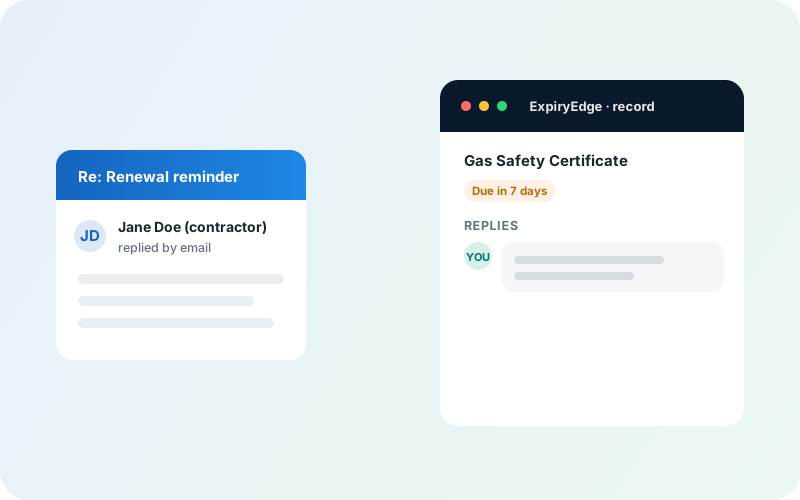
Replies to reminders are captured in the app, attached to the record they belong to - with a full audit trail your team can act on.
Replies routed into the app automatically
Threaded on the exact record they belong to
Visible to the whole team - not one inbox
Instant in-app notification on new replies
Full audit trail per deadline
Survives staff turnover and reassignment
How two-way email replies work in ExpiryEdge
Everything you need to streamline your workflow and boost productivity
Replies route back to the record automatically
ExpiryEdge sends reminders from a two-way address. When a contractor, vendor, or client hits reply, the message is routed into the app and attached to the specific expiry it came from - no manual forwarding, no copy-paste.
The full thread lives on the deadline
The reminder you sent, the reply they gave, and any follow-up all sit together on the record. When you open an expiry, you see the complete conversation alongside the dates, documents, and status - everything in one place.
Your whole team can see it
Any team member with access to the record sees all replies - not just the person who sent the original reminder. Cover for a colleague on leave, take over a client, reassign a record - the conversation history moves with it.
Instant alert when a reply arrives
A new reply triggers an in-app notification immediately. No inbox-watching, no "did they get back to us?" - the right person gets alerted the moment a response lands so action can happen the same day.
Audit-ready by default
Every reply is time-stamped and tied to the record it belongs to. When a regulator, auditor, or manager asks what was said about a specific deadline, you open the record and show the full thread - exactly when each message was sent and received.
Survives staff changes
Because replies are stored on the record - not in a personal inbox - they are there when someone joins, leaves, or changes role. No "can you forward me that email?" No lost context. The record is the single source of truth.
What changes when replies live on the record
Real benefits that drive measurable results for your business
Stop playing email archaeologist
Before ExpiryEdge: a contractor replied to a reminder three weeks ago, the sender is on leave, no one can find the email, and the renewal is at risk. After: open the record, read the thread, act. The reply never left the app.
No extra burden on the people you are chasing
Contractors and vendors reply to the reminder email the normal way - in their own email client. They do not log into a portal, create an account, or click a special link. The two-way routing is invisible to them.
One record covers everything
The expiry date, the assigned contacts, the reminder history, the delivery status, and the reply thread all live on one record. Nothing about this obligation exists anywhere else.
Handovers take seconds, not days
New team member picks up a record and sees every reminder sent, every reply received, and every action taken - without needing anyone to brief them or forward a chain of emails.
Where teams use in-app email replies
Designed for teams and businesses across industries
Contractor certificate and insurance renewals
Send a certificate expiry reminder, capture the contractor's "I have renewed, here are the details" reply on the record, and close the loop without touching a personal inbox.
Compliance and regulatory audits
Show auditors a time-stamped thread proving when each organisation was notified, what they replied, and what follow-up action was taken - all attached to the compliance obligation.
Contract and SLA renewal management
Renewal negotiations and confirmations stay on the contract record. When the account manager changes, the incoming person has the full history without anyone forwarding a single email.
Supplier and vendor qualification
Track supplier requalification conversations - what documents were requested, what was submitted, and any back-and-forth - without it scattering across multiple inboxes.
HR and professional licence tracking
Chase staff for licence renewals or training certificates and keep their responses on the HR record rather than in a manager's mailbox.
Frequently Asked Questions
Everything you need to know. Can't find the answer? Reach out to our support team.
ExpiryEdge does this natively. It sends expiry and deadline reminders from a two-way email address, so when a contractor, vendor, or client hits reply, the response is automatically routed into ExpiryEdge and attached to the specific record the reminder came from. No forwarding rules, no third-party automation tools, and no inbox monitoring required - replies appear on the record the moment they arrive.
Yes. ExpiryEdge is built around the idea that a deadline and every conversation about it belong together. Every reply to a reminder - whether it's a contractor confirming a certificate renewal, a vendor acknowledging an expiry notice, or a client requesting an extension - is threaded directly on the record inside ExpiryEdge. You never have to search an inbox to find what someone said about a specific obligation.
ExpiryEdge stores replies on the record, not in a personal inbox. When a team member leaves, goes on leave, or is reassigned, their reply history stays on the record for whoever picks it up next. The new owner opens the expiry and sees the entire conversation - what was asked, what the contractor said, and when - without anyone needing to forward emails or reconstruct context.
ExpiryEdge sends reminder emails from an address that routes replies back into the platform. When a recipient replies, the message is matched to the record the original reminder was sent from and appended to the thread on that record. The recipient simply replies to the email in their normal email client - they do not need a portal login, a special link, or any account with ExpiryEdge. The routing is entirely transparent to them.
No. Contractors, vendors, clients, and any other external recipients reply to the reminder email the same way they reply to any email - in their own inbox. There is no portal to log into, no account to create, and no special process. ExpiryEdge handles the routing silently in the background.
The reply lands inside ExpiryEdge on the record the reminder was sent from - not in a personal email inbox. If the reminder was about a contractor's public liability insurance, the reply appears on that contractor's expiry record in ExpiryEdge. The team member who manages that record gets an in-app notification and can respond or take action directly from the record.
Yes. In ExpiryEdge, replies are visible to every team member who has access to the record - not only the person who sent the original reminder. This means any colleague can cover an absence, pick up a reassigned record, or check the status of a renewal conversation without asking anyone to forward an email or share their inbox.
Nothing is lost. Because ExpiryEdge stores replies on the record rather than in personal inboxes, the reply history is a permanent part of the record itself. Reassign the record to a new owner and they see the complete conversation from day one. When a team member leaves, their correspondence on any record remains fully accessible to the rest of the team.
ExpiryEdge keeps a time-stamped, immutable thread on every record: the reminder sent, the delivery status, and every reply received - all timestamped and all attached to the obligation they belong to. For audits, you open the record and show the complete communication history without reconstructing anything from email chains. It is always there, always in context, and always in order.
Yes. ExpiryEdge records the date and time each reminder was sent, whether it was delivered, and the full content of any replies received. If a regulator asks for evidence that a contractor was informed about a certificate expiry and responded, you can show the complete thread on the record - notification sent, reply received, follow-up taken - without relying on anyone's personal inbox.
Immediately. ExpiryEdge raises an in-app notification the moment a reply is routed into the platform. You do not need to monitor an inbox, wait for a forwarded email, or check back manually. The notification links directly to the record so you can read the reply and take action without hunting for context.
The most effective approach is to use a system that keeps the communication on the document record itself rather than in email. ExpiryEdge does this: it sends reminder emails for expiring certificates, insurance, and qualifications, captures the contractor's reply on the record automatically, notifies the right team member, and retains a full thread for audit purposes. It removes the dependency on personal inboxes and ensures nothing is lost when people are away or change roles.
A shared inbox collects replies in one place but gives you no connection between a reply and the deadline it belongs to. You still have to read each email, match it to the relevant contract or certificate, and update the right record manually. ExpiryEdge does that matching automatically - every reply is routed to the exact record the reminder was sent from, so the conversation and the obligation are always together. You also get in-app notifications, a structured thread per record, and an audit trail without any manual effort.
Ready to Get Started?
Join thousands of teams already using ExpiryEdge to streamline their workflows