
Asset service and inspection tracking software.
A forklift that runs past its LOLER date is a safety risk, and it may also leave you uninsured if something goes wrong. ExpiryEdge records each service interval, warranty end date and required inspection for every asset. It reminds the owner before each one falls due and keeps the certificate on file, so nothing keeps running out of date.
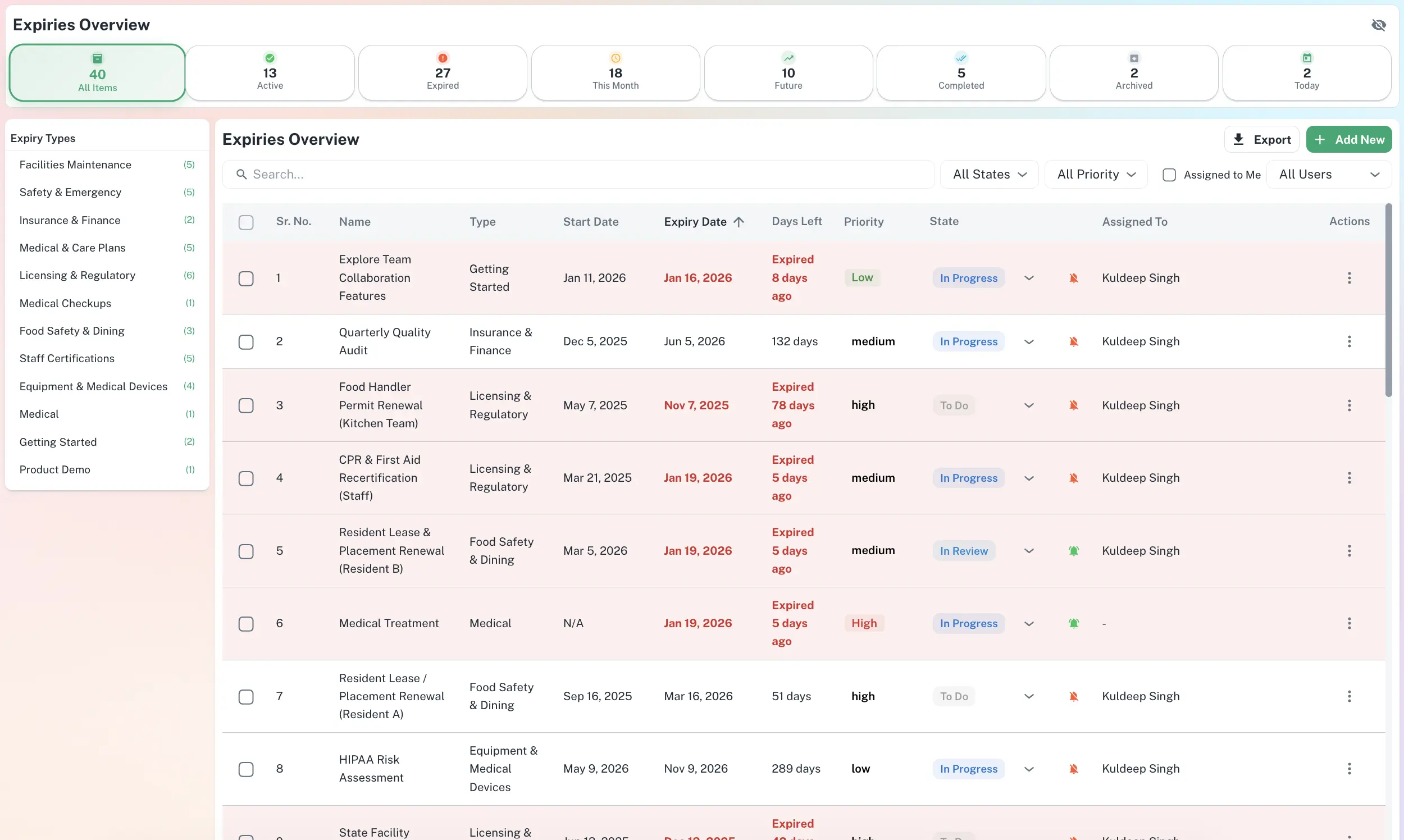
Last updated · ExpiryEdge editorial team
Every asset in service, in date, and on file
Recurring service and inspection intervals
Warranty expiry tracked per asset
Reminders at 90 / 60 / 30 / 7 days
Inspection certificates stored with the record
Quick answer
ExpiryEdge keeps track of the dates that keep equipment safe and insured: service intervals, warranty expiry, and statutory inspections such as LOLER, PUWER, PAT and gas safety. Every asset has a named owner and its own reminder schedule. The inspection certificate sits on the record, and the dashboard shows which assets are in date, due soon or overdue.
Every date that keeps an asset safe and covered
One record per asset, every recurring obligation attached to it.
Scheduled service intervals
Schedule recurring maintenance for machinery, HVAC units, vans or plant by date or by usage, so nobody skips a service or books the same one twice.
Statutory inspections
Each required inspection gets its own renewal schedule: LOLER for hoists, PUWER for machinery, PAT for portable appliances, plus gas safety and fire systems.
Warranties
Note when each warranty ends. Then you claim while you are still covered instead of paying for a repair the manufacturer owed you.
Inspection certificates
Keep each inspection or service certificate on the asset itself. When an insurer or inspector asks for proof, you open the record and there it is.
From a serial number to a maintained, evidenced asset
Stack every obligation on one asset record
One asset can carry its service date, its warranty and several statutory inspections, each with a date and status. Look at the record and you know straight away whether anything has lapsed.
Service, warranty and inspection on one record
Status: valid, expiring or overdue
Recurring intervals that roll forward automatically
Cadenced reminders so service is booked in time
Contractors get booked up, so you need lead time. Set reminders at, say, 90, 60, 30 and 7 days before the due date, and the asset owner and facilities team hear about it while there is still room to act.
90 / 60 / 30 / 7-day cadence per asset
Email, SMS, WhatsApp, Slack, Teams
Escalation if an inspection is missed
The dashboard your insurer and inspector want to see
Filter by site, asset type or status and open any certificate in a click. If your insurance or a safety audit depends on a current inspection, the evidence is already there.
Filter by site, asset type or status
Certificates attached to each asset
One-click export for audits and insurers
Why a maintenance spreadsheet lets assets lapse
| ExpiryEdge | Spreadsheet | Calendar | |
|---|---|---|---|
| Recurring service & inspection intervals | Manual | ||
| Multi-step reminders before due date | One alert | ||
| Warranty expiry tracked per asset | Manual | ||
| Certificates stored with the asset | |||
| Escalation when an inspection is missed | |||
| One-click audit & insurer export | Manual |
Anything with a date that comes round again. Typical examples are plant and machinery, HVAC and building systems, fleet vehicles, lifting and access equipment, electrical and fire safety kit, and IT hardware. One asset can hold several dates, such as its service interval, its warranty expiry and one or more statutory inspections.
Yes. Each inspection type gets its own interval and reminder schedule. ExpiryEdge works out the next due date and warns the owner and facilities team ahead of it. The certificate is stored on the asset, which is how you prove the equipment was tested on time.
Calendar intervals are scheduled automatically. For usage-based servicing, log each service when it is done and the next due date moves forward. The dashboard then lists what is coming up and what is overdue across all your assets.
Enter the warranty end date on the asset. ExpiryEdge reminds you before it runs out, so you can make a claim or book covered work in time. Nobody wants to discover the warranty lapsed last month when the compressor fails.
Yes. Put assets under locations and teams, and each site manager sees only their own equipment. Head office or facilities can still see every site on one screen. Reminders go to whoever owns the asset.
Yes. Each service, inspection and uploaded certificate carries a timestamp and the name of the person who logged it. Export the history for one asset or a whole site as CSV, PDF or XLSX in a click, ready to send to an insurer or safety inspector.
If what you need is dates, owners and evidence, not work orders, spare-parts stock or technician dispatch, a deadline tracker usually does the job. Make a record for each asset or inspection type, set it to repeat at the service interval, attach the last report, and point the reminders at whoever books the engineer. ExpiryEdge is not a CMMS. It covers service dates, statutory inspections, warranties and the audit trail, and its SOP checklists handle the checks your own staff do.
Keep every asset serviced, inspected and in warranty
Free to try. No credit card required.