
A calendar reminder is not a renewal system.
Calendar reminders get dismissed. Spreadsheets go stale. Shared inboxes never remind the right person - and none of it works once the person who set it up leaves. ExpiryEdge is purpose-built renewal reminder software: it tracks every date that matters across contracts, licences, permits, certifications and subscriptions, and sends automated multi-channel alerts to the right owner with the right lead time. Every time.
Renewals belong to the business, not the individual
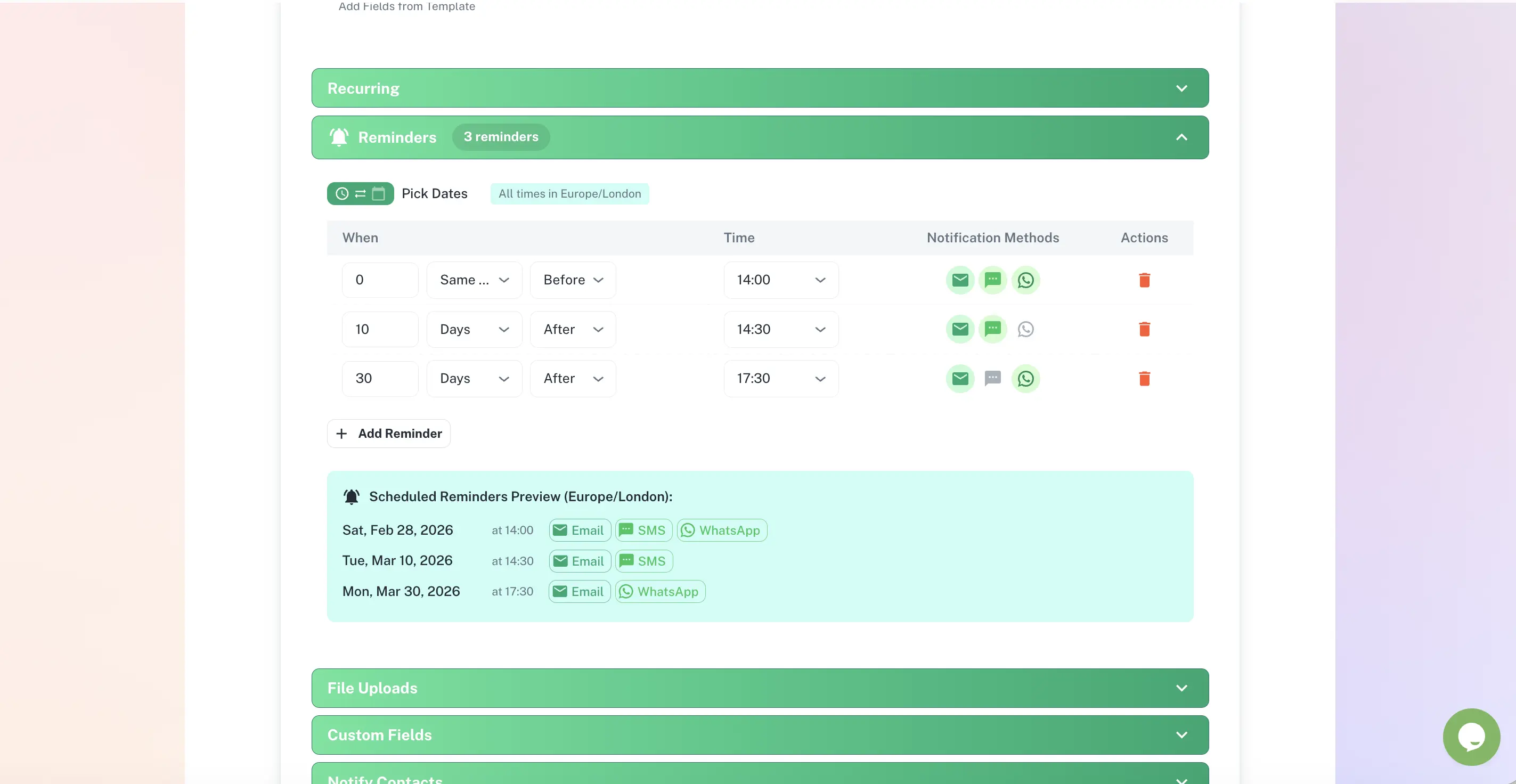
Reminders at 90 / 60 / 30 / 7 days, your cadence
Email, SMS, WhatsApp, Slack and Teams
Escalation when a deadline is missed
Reassign in one click when people leave
Quick answer
Renewal reminder software automatically alerts the right person before any deadline expires - contracts, licences, permits, certifications and subscriptions. ExpiryEdge tracks each item's renewal date and lead time, sends staged reminders across email, SMS, WhatsApp, Slack and Teams, escalates when a deadline is missed, and keeps a timestamped record of every reminder sent - so renewals never depend on someone remembering.
What manual renewal tracking actually costs
94%
of spreadsheets in 85 intensive audits contained errors.
Source: Panko, University of Hawaii (spreadsheet-error research review)62%
of compliance professionals spend 1-7 hours of every week just tracking and analysing what is coming due
Source: Thomson Reuters, Cost of Compliance (2023)5%+
of total contract value is forfeited to poor contract management - much of it decided in the weeks before a renewal date
Source: World Commerce & Contracting (2025)45%
of organisations never measure what compliance costs them, so the price of a missed renewal never shows up anywhere
Source: Thomson Reuters, Cost of Compliance (2023)The renewals currently living in someone's head
Supplier and vendor contracts
Auto-renewing SaaS subscriptions
Business licences and registrations
Operating permits, site by site
Staff certifications and training
Commercial insurance policies
Equipment inspections and servicing
Property and equipment leases
Domains, SSL certificates, warranties
Right-to-work and visa documents
Staged alerts, delivered where people actually look
A reminder schedule that fits each item, not one generic ping
A contract with a 90-day notice period needs a different rhythm than a subscription. Set the cadence per item type - for example 90, 60, 30 and 7 days - and ExpiryEdge counts back from the deadline automatically, no manual chasing.
Cadence set per item type
Counts back from the deadline
Runs automatically once configured
One reminder, fanned out to every channel that reaches the owner
Email gets buried. ExpiryEdge delivers each alert across email, SMS, WhatsApp, Slack and Microsoft Teams, so the reminder lands wherever the responsible person already works.
Email, SMS, WhatsApp, Slack, Teams
Different recipients per stage
Escalation to a manager if missed
Configure who gets reminded, where, and when
Assign an owner, pick the channels, set the lead times - then watch the upcoming renewals dashboard surface what needs attention this week, this month and this quarter.
Owner and recipients per item
Channel and cadence per item type
Upcoming renewals at 30 / 60 / 90 days
Why a calendar or spreadsheet keeps letting renewals slip
| ExpiryEdge | Calendar reminder | Spreadsheet | |
|---|---|---|---|
| Multi-step reminder sequence | |||
| Multi-channel delivery (SMS, WhatsApp, Slack, Teams) | |||
| Escalation when a deadline is missed | |||
| Reminders owned by the business, not a person | |||
| Reassign in one click when someone leaves | Manual | ||
| Documents stored with the item | |||
| Timestamped history of every reminder |
Who relies on ExpiryEdge reminders
Operations & Admin
Managing dozens of deadlines across a growing business with no dedicated compliance function - replacing calendars, spreadsheets and sticky notes with one system.
HR & People Teams
Tracking certifications, DBS checks, right-to-work documents and training renewals, with the right person alerted in time to act.
Procurement & Finance
Owning vendor contracts, subscriptions and service agreements, with advance notice of every renewal to renegotiate, cancel or extend.
Any renewal with a date that matters: contracts, licences, permits, staff certifications, equipment inspections, insurance renewals, software subscriptions, SLAs and leases. If it has an expiry date or a renewal window, ExpiryEdge can track it and remind the right person before the deadline.
As far ahead as you need. Many teams use 90, 60 and 30 days for high-value contracts and 14 and 7 days for subscriptions. You control the cadence per item or per item type, and ExpiryEdge counts back from the deadline automatically.
This is the most common failure point with calendar reminders - they belong to the individual. In ExpiryEdge, renewals are owned at the system level. When someone leaves, you reassign their items to a new owner in one click and the reminders continue uninterrupted.
Email, SMS, WhatsApp, Slack and Microsoft Teams. Each alert is fanned out to the channels the owner actually checks, and you can send different stages of the sequence to different recipients.
Yes. Set a primary owner and additional recipients per item. A key supplier contract might alert the procurement manager first and the finance director at a later stage, so the right people are looped in at the right time.
Calendar reminders are one-time, personal and easy to dismiss. ExpiryEdge sends staged, escalating reminders across multiple channels to the right person every time, automatically. It keeps a history of every reminder sent, every renewal decision and every document uploaded - and it keeps working when people leave.
Set it once. The renewal reminds itself.
Put every renewal on automated, multi-channel reminders that reach the right owner - and escalate if they do not.