
Every contractor on site, with current cover and the paperwork to prove it.
Cleaning, security, lift, fire, electrical and gas contractors each owe you insurance certificates, accreditations, competence cards and RAMS - and each expires on its own date. ExpiryEdge requests them by link, follows up on its own, lets you reject one wrong document without starting again, and reminds you before anything lapses.
Last updated · ExpiryEdge editorial team
For FM teams, managing agents and estates teams who use contractors every week
Request link per contractor, no account needed
Automatic follow-up until everything is in
Reject and re-request a single document
Reminders before each certificate expires
Quick answer
Contractor document management means holding every document a contractor owes you - employers' and public liability certificates, Gas Safe or NICEIC/NAPIT registration, CHAS or Constructionline accreditation, RAMS, signed site rules - on that contractor's record with its expiry date. ExpiryEdge requests documents by a no-login link, follows up automatically, lets you approve or reject each item, and reminds the owner 90, 60, 30 and 7 days before a certificate lapses.
Where contractor paperwork breaks down
Certificates arrive once, then expire quietly
You checked the insurance when the contractor was onboarded. The policy renewed last month and nobody asked for the new certificate.
Chasing by email does not scale
Forty contractors, five documents each, different renewal months. Someone spends every Monday writing reminder emails and searching replies for attachments.
Contractor portals put people off
A small trades firm will not create yet another account to upload one certificate. The request sits unanswered until the job date.
The wrong document comes back
Wrong company name, expired page, missing schedule. Asking again by email restarts the whole exchange.
Site teams can't see who is cleared
The site manager letting a contractor in has no quick way to check that their cover and accreditation are current today.
No proof after an incident
After an accident or a claim, you need to show what cover the contractor held on that date, and that you checked.
Documents FM and property teams commonly collect from contractors
What most UK FM teams ask for and how often it changes. Statutory items are marked; the rest are contractual or client requirements you set.
| Document | Renewal / validity | Why it matters | Basis |
|---|---|---|---|
| Employers' liability insurance certificate | Annual policy | Minimum cover £5m; fines of £2,500 for every day without cover | Employers' Liability (Compulsory Insurance) Act 1969 |
| Public liability insurance certificate | Annual policy | Covers injury or damage to third parties and your property; limit set in your contract | Contractual |
| Gas Safe registration and engineer ID card | Registration renewed annually; ACS reassessment every 5 years | Only Gas Safe registered engineers may work on gas appliances | Gas Safety (Installation and Use) Regs 1998 |
| NICEIC / NAPIT registration | Periodic scheme assessment | Evidence of electrical competence and self-certification | Competent person scheme |
| CHAS, SafeContractor or Constructionline accreditation | Annual renewal | Health and safety pre-qualification; lapses if insurance evidence lapses | Client requirement |
| RAMS (risk assessment and method statement) | Per job or scope of work | Shows how the specific job will be done safely | Management of H&S at Work Regs; contract |
| Permit to work (hot works, roof, confined spaces) | Per task, time-limited | Controls high-risk work in your building | Site procedure |
| Signed site rules and induction record | On first visit; re-sign on change | Proves the contractor was told about site hazards and rules | Site procedure |
One compliance file per contractor
Every document, its status and the next action in one place. Requests run on their own until the file is complete.
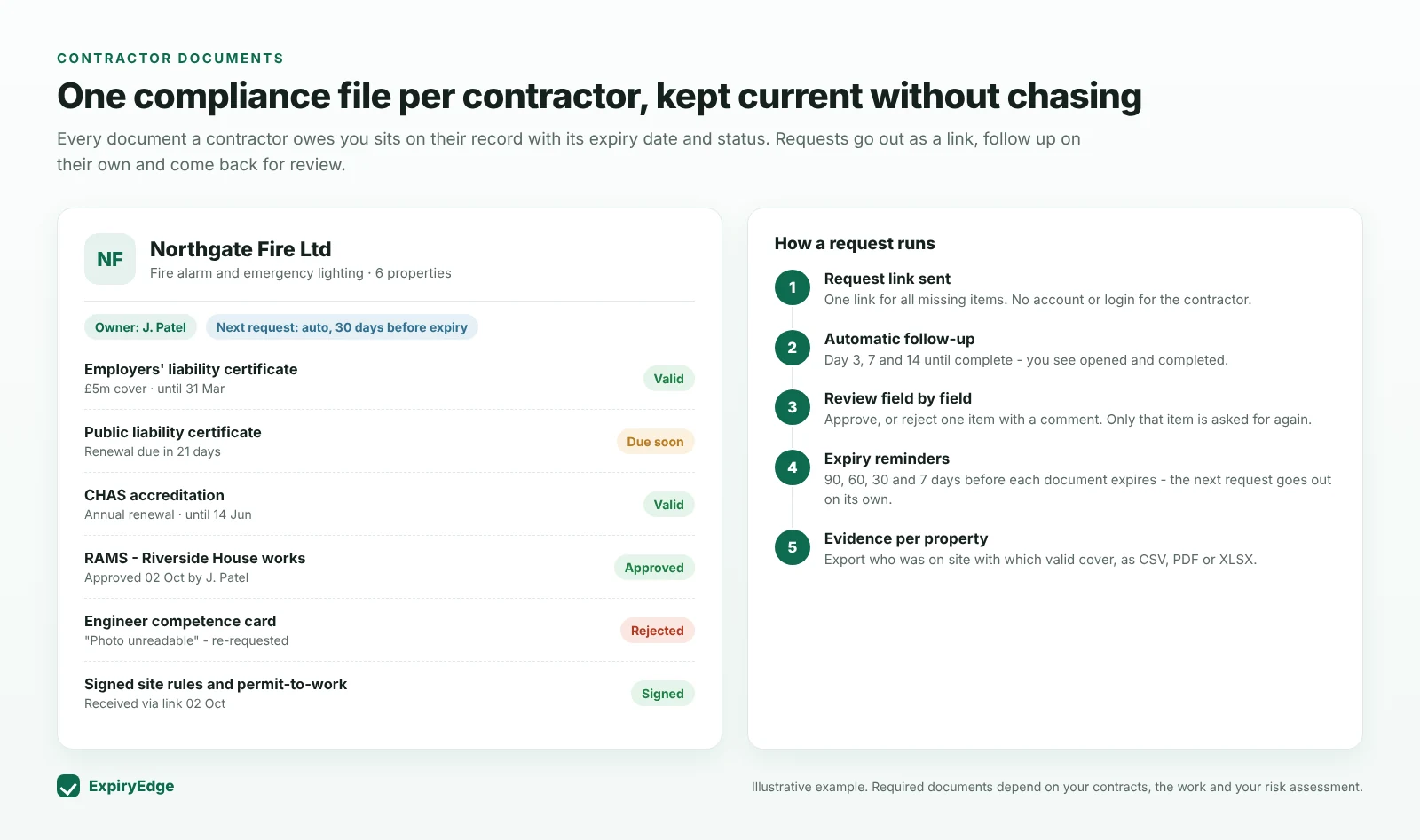
From inbox chasing to a file that keeps itself current
One link for everything a contractor owes you
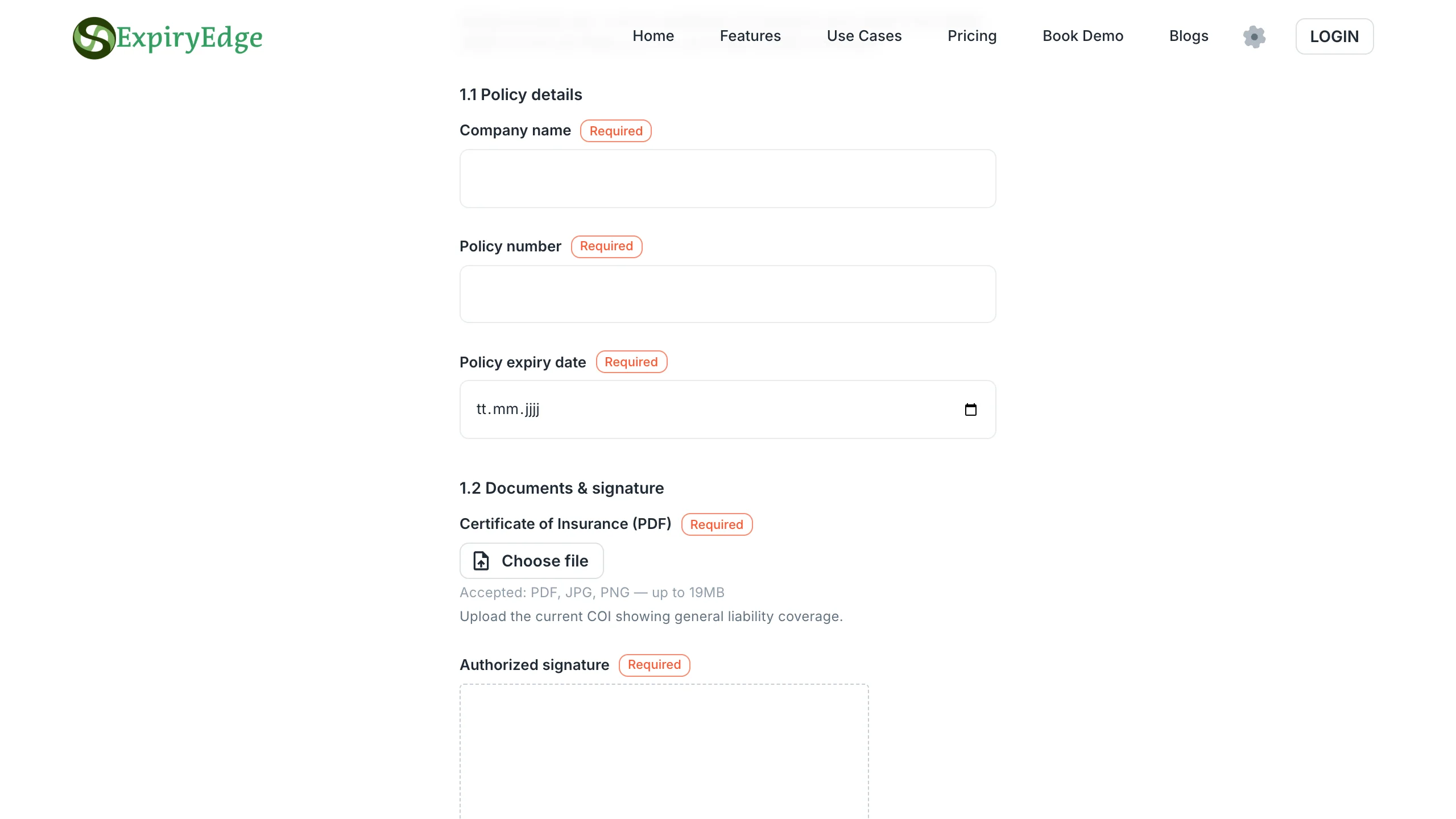
Build a request template once - insurance certificates, accreditation, competence cards, RAMS, signed site rules - and send it to each contractor as a link. They upload files, fill in policy numbers and expiry dates and sign on their phone. No account, no password.
Reusable request templates per contractor type
Files, dates, policy numbers and e-signatures
Works on any device
Automatic follow-up until it is complete
Set the follow-up schedule once, for example day 3, 7 and 14 after sending, and ExpiryEdge chases until the request is done. You see when the link was opened and what is still missing, without opening your inbox.
Follow-up schedule per request
Opened, in progress and completed status
Pause or cancel at any time
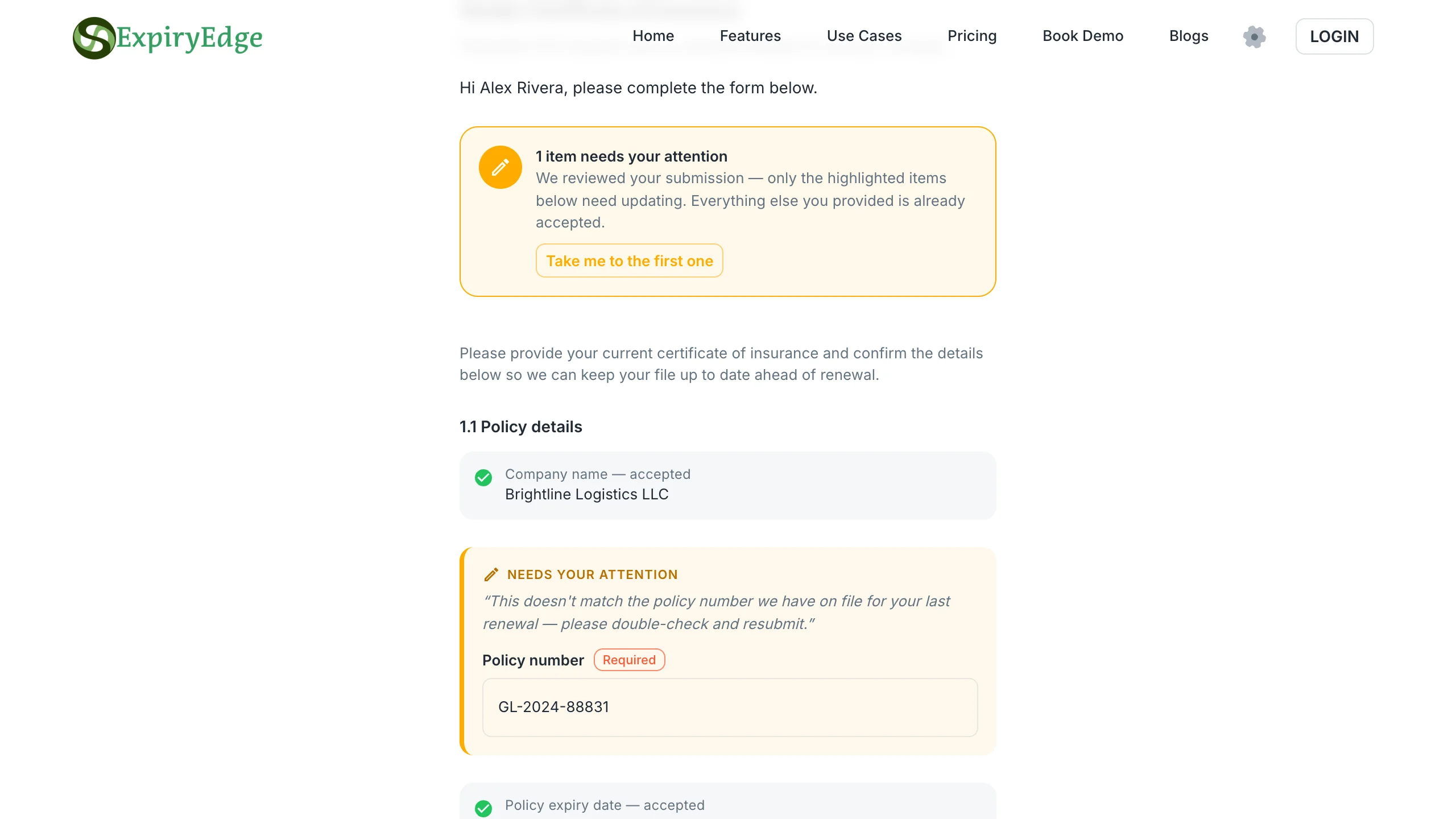
Approve or reject document by document
Wrong company on the certificate, an expired page, a blurry card photo: reject that one item with a comment. The same link reopens for the contractor to fix only what you flagged, and everything already approved stays approved.
Field-level approve or reject
Comment tells the contractor what to fix
Full history of every resubmission
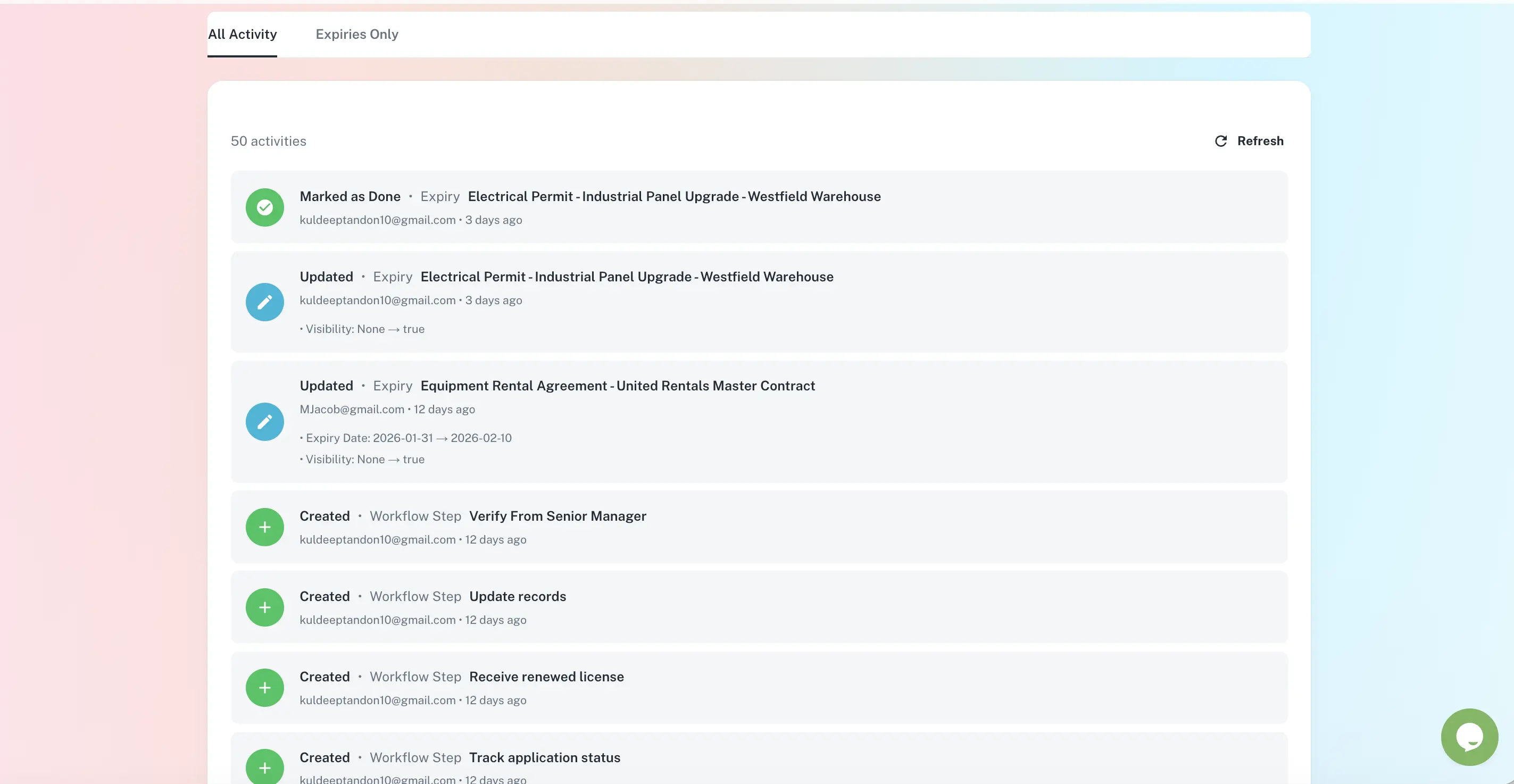
Expiry dates turn into the next request
Each approved document carries its expiry date. ExpiryEdge reminds the contract owner at 90, 60, 30 and 7 days and can send the contractor the next request automatically, so the renewed certificate is on file before the old one runs out.
Reminders to the owner by email, SMS, WhatsApp, Slack or Teams
Status: valid, due soon, expired
Escalation if a document lapses
Evidence by property, contractor or date
Link contractors to the properties they work at. Export who worked where, with which cover and accreditation, and when each document was requested, received and approved - as CSV, PDF or XLSX for an insurer, a client or an investigation.
Contractors grouped by property and client
Timestamped request and approval history
Export in CSV, PDF or XLSX
ExpiryEdge vs email and spreadsheet vs a contractor portal
| ExpiryEdge | Email + spreadsheet | Contractor portal | |
|---|---|---|---|
| No account needed for the contractor | |||
| Automatic follow-up until complete | |||
| Reject and re-request one document | Varies | ||
| Expiry reminders to your contract owner | Manual | ||
| Same system as inspections, leases and insurance | |||
| Timestamped history per document | |||
| Fees charged to your contractors | Often |
Usually an employers' liability insurance certificate (a legal requirement for employers, with at least £5m cover), a public liability certificate at the limit your contract sets, trade registration such as Gas Safe or NICEIC/NAPIT where the work requires it, health and safety accreditation such as CHAS, SafeContractor or Constructionline if you ask for it, RAMS for the job, and signed site rules or induction records. The exact list depends on the work, your contracts and your risk assessment.
Send a request link. The contractor opens it on any device, uploads files, fills in dates and policy numbers and signs if needed - no signup or password. ExpiryEdge follows up on the schedule you set until the request is complete, and every response lands on the contractor record.
If you hold the expiry date, nothing should lapse unnoticed: ExpiryEdge reminds the contract owner 90, 60, 30 and 7 days before, and can send the contractor a request for the renewed certificate automatically. If it does expire, the status turns red and the escalation goes to the next person. What you do about work in progress depends on your contract and risk assessment.
Yes. Approve or reject each document or field individually, with a comment. Rejecting reopens the same link and asks the contractor to fix only that item, while everything already approved stays in place. The history shows each version.
Ask for the engineer's Gas Safe ID card and check it against the Gas Safe Register; registration renews annually. ExpiryEdge does not query the register for you, but it holds the card photo, the registration number and the expiry date on the contractor record and reminds you before it lapses.
Accreditation shows a contractor met a standard at assessment; it does not replace your own records of their current insurance, the RAMS for your job or their site induction. Many teams record the accreditation and its annual renewal date in ExpiryEdge alongside the documents specific to their buildings.
Yes. Link contractors to the properties they work at and filter by property. The view shows each contractor with document status, so a site manager can check before letting someone in. Exports show the same list for a client or insurer.
Send your first contractor request today
Import your contractor list, build one request template, send the link. Free 14-day trial, no credit card.