
Compare · CAFM / CMMS vs ExpiryEdge

Do you need a CAFM system, or do you need your inspection deadlines under control?

CAFM and CMMS platforms are built to run maintenance work: helpdesk, work orders, planned maintenance, assets and space. ExpiryEdge is built for a narrower job: every inspection, certificate, insurance and contract date has an owner, gets booked in time and leaves evidence. This page helps you decide which you need - and when to run both.

Start Free Trial
No credit card required · Setup in minutes
WITHOUTDates in contracto…Excel schedule per…Reminder emails by…Certificates in in…WITH EXPIRYEDGEOne record per ins…Owner and cadence…Reminders and esca…Certificate on the…

Last updated · ExpiryEdge editorial team

A practical guide for FM, estates and property teams

When a CAFM or CMMS is the right call

When a deadline tracker is enough

How teams run both side by side

What to move over from your spreadsheet

Quick answer

Choose a CAFM or CMMS when you run reactive and planned maintenance work yourself across a large estate and need work orders, a helpdesk and asset data. Choose a deadline tracker like ExpiryEdge when your main risk is a missed inspection, certificate, insurance or contract date and contractors do most of the work. Many FM teams run both: the CAFM for work orders, ExpiryEdge for statutory dates, contractor documents and the audit trail.

Decision guide

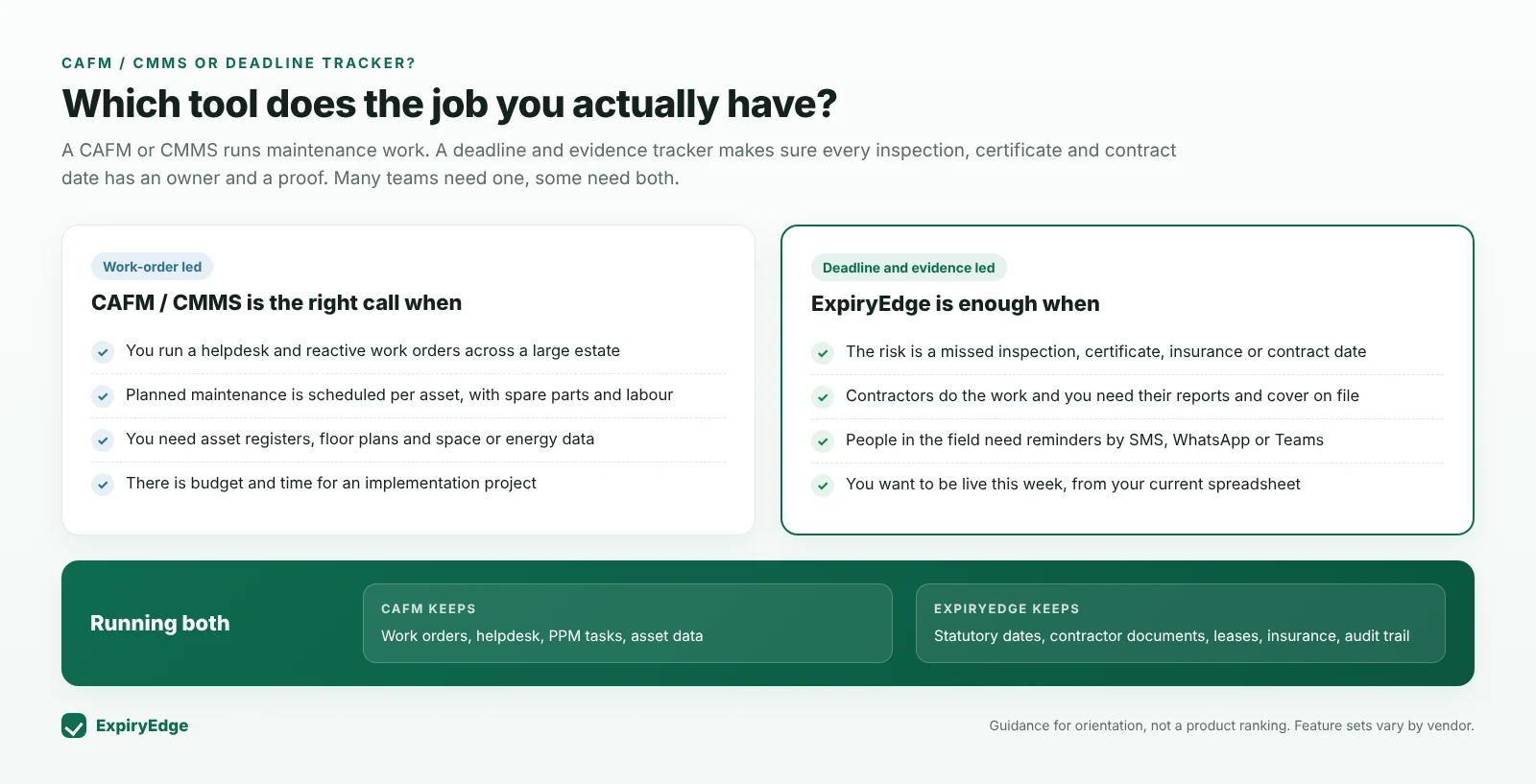
Which tool does the job you actually have?

Decision guide comparing when a CAFM or CMMS is the right choice - helpdesk, work orders, planned maintenance with parts and labour, asset registers - with when ExpiryEdge is enough - missed dates are the risk, contractors do the work, field reminders, live this week - and what each tool keeps when running both
Guidance for orientation, not a product ranking. Feature sets vary by vendor.
How to decide

Four questions that settle it

1. Who does the work - your team or contractors?

If your own technicians carry out most maintenance, you need to plan their time, parts and jobs. That is what a CAFM or CMMS does well: it turns a maintenance plan into work orders and tracks them to completion.

If specialist contractors do most of the statutory work - lift examinations, fire alarm servicing, gas, electrical testing, water hygiene - your job is different. You need to make sure each visit is booked in time, happens, and leaves a certificate on file. That is a deadline and evidence problem.

2. What actually goes wrong today?

Be honest about the failure you are trying to prevent. If jobs are lost between a helpdesk call and a technician, a work order system fixes that.

If the failure is an overdue inspection, an expired contractor insurance certificate, a lease break date nobody saw coming or a missing certificate when the insurer asks, the fix is an owner, a reminder cadence, escalation and a document on the record.

3. How much setup can you absorb?

CAFM platforms model your buildings, assets, spaces and workflows in detail. That depth pays off on a large estate but usually needs an implementation project, data preparation and training.

ExpiryEdge imports your current inspection spreadsheet, assigns owners and starts sending reminders on day one. There is no asset hierarchy to build first.

Rule of thumb: if you are still running inspections from a spreadsheet, you probably need the deadline layer before you need a full CAFM.

4. Who needs to see the reminder?

Site managers, caretakers and contract owners are rarely logged into an FM platform. If reminders only appear inside a system nobody opens, dates still slip.

ExpiryEdge sends reminders by email, SMS, WhatsApp, Slack or Microsoft Teams to the named owner, and escalates to a manager if a date passes.

Running both

Many teams keep their CAFM for work orders and planned maintenance tasks, and use ExpiryEdge for the things a CAFM is not designed to chase: statutory due dates with evidence, documents from contractors who will not log into a portal, insurance and lease dates, and an audit trail for each building.

  • CAFM: helpdesk, work orders, PPM tasks, asset and space data

  • ExpiryEdge: inspection due dates, contractor certificates, leases, insurance, evidence

  • Status changes can be pushed to other systems through the ExpiryEdge API and webhooks

Moving from a spreadsheet

Start with what you already have: one row per inspection per building, with last date, interval, contractor and owner. Import it, check the owners, and set a reminder cadence per inspection type. Then send each contractor a link for their latest certificate, so the evidence lands on the record.

  • Import buildings and inspection dates from Excel or CSV

  • Set the cadence per inspection type (e.g. 90/60/30/7 days)

  • Request the current certificate from each contractor by link

How it compares

Side by side: what each approach is built for

ExpiryEdgeSpreadsheetCAFM / CMMS
Inspection and certificate due dates per building

Manual

Named owner, backup and escalation per date

Varies

Reminders by SMS, WhatsApp, Slack, Teams

Varies

Contractors upload certificates without an account

Rarely

Leases, insurance, contracts and licences in the same place

Manual

Partly

Live from an imported spreadsheet on day one
Helpdesk and work orders
Spare parts, labour planning, asset lifecycle
CAFM and CMMS capabilities vary widely between vendors; check the specific product. ExpiryEdge does not create work orders or manage spare parts.
Frequently asked questions

No. ExpiryEdge does not create work orders, run a helpdesk or manage spare parts. It tracks dates - inspections, certificates, insurance, leases, contracts - with an owner, reminders, escalation, documents and an audit trail. Many FM teams use it alongside a CAFM or instead of one where a CAFM is more than they need.

Yes. Create one record per inspection per building with its interval, owner and contractor. ExpiryEdge reminds the owner 90, 60, 30 and 7 days before the due date, escalates if it passes, rolls recurring dates forward when the visit is logged and keeps the certificate on the record.

Usually because dates still slip: reminders sit inside a system site teams do not open, contractor certificates arrive by email and never reach the asset record, or leases and insurance live elsewhere. ExpiryEdge covers that deadline and evidence layer, and its API and webhooks can pass status changes to other systems.

Keep the spreadsheet structure you have - building, inspection, last date, interval, contractor, owner - and import it into a tool that sends reminders and holds certificates. That avoids rebuilding your estate in a new data model first. ExpiryEdge has a free 14-day trial without a credit card.

Yes. Send a request link tied to the inspection record. The contractor uploads the certificate and confirms the visit date without creating an account, ExpiryEdge follows up until it arrives, and you can reject one wrong item and ask for only that.

No. Your competent persons, risk assessments and insurers determine what applies to your buildings. ExpiryEdge makes sure every agreed date has an owner and evidence. Our building inspection page lists common UK intervals with sources as a starting point.

Start with your inspection spreadsheet

Import it, assign owners, and the reminders start today. Free 14-day trial, no credit card.