
Every client policy, every excess layer, renewed before it lapses.
An insurance renewal for a real estate or construction client is rarely one policy. It is property, general liability, an umbrella, several excess layers, builder's risk and wrap-up cover, each with its own carrier and expiration date. ExpiryEdge gives every policy and every layer a record with its carrier, limit, account manager and client contact, and reminds them at 90, 60, 30 and 7 days so the whole tower renews together.
Last updated · ExpiryEdge editorial team
Built for the people who renew other people's insurance
One record per policy and per excess layer
Folders per client, with the whole program in one view
Client and partner contacts named on the renewal
Timestamped history of every reminder and document
Quick answer
Insurance policy expiration tracking for brokers means giving every policy, and every layer of an excess tower, its own record with carrier, limit, expiration date, account manager and client contact, then starting each renewal 90 to 120 days out. State law sets only the minimum notice before nonrenewal, such as 45 days in Florida. ExpiryEdge files these records by client and sends reminders at 90, 60, 30 and 7 days.
What a brokerage or risk team keeps current
Property and builder's risk policies, per project or location
General liability and master GL programs
Umbrella and layered excess liability towers
Wrap-up programs (OCIP / CCIP) and their excess layers
Pollution, terrorism and difference in conditions (DIC) cover
Commercial auto and workers' compensation
NFIP and private flood policies
Professional liability and D&O for clients that carry it
Nonrenewal and conditional renewal notices received
Loss runs, statements of values and renewal applications
Certificates of insurance issued to lenders, owners and partners
Producer licences and broker agreements
How late can an insurer tell you it will not renew? Rules from five states and two federal programs
| What the rule requires | Where it is written | Checked | |
|---|---|---|---|
| Florida: commercial property, casualty and workers' comp | At least 45 days' written notice of nonrenewal or of the renewal premium. If the insurer is late, cover continues until 45 days after notice or until replacement cover starts, whichever comes first. | Fla. Stat. § 627.4133(1) | Verified 12 Oct 2026 |
| New York: commercial risk, professional liability and public entity policies | Nonrenewal or conditional renewal notice 60 to 120 days before expiration; 30 to 120 days for excess liability policies and jumbo risks. A late notice keeps cover in force on the expiring terms for a set period. | N.Y. Ins. Law § 3426(e) | Verified 12 Oct 2026 |
| Ohio: commercial property, fire and casualty (not auto, surety or medical malpractice) | Nonrenewal notice mailed at least 30 days before expiration, copied to the agent. If it is mailed later, cover stays in effect until 30 days after mailing. | Ohio Rev. Code § 3937.26 | Verified 12 Oct 2026 |
| Washington: most policies (medical malpractice has its own rule) | Written nonrenewal notice at least 60 days before expiration, with the insurer's actual reason. Medical malpractice: 90 days. | RCW 48.18.2901(1)(a) | Verified 12 Oct 2026 |
| North Carolina: lines within Article 41 | Nonrenewal notice at least 45 days before expiration, with the precise reason. Lower limits, higher deductibles or premium rates not requested by the policyholder: 30 days' notice. | N.C. Gen. Stat. § 58-41-20 | Verified 12 Oct 2026 |
| NFIP flood policies (federal) | The policy expires at 12:01 a.m. on the last day of the term, and the renewal premium must be received within 30 days of the expiration date. | 44 CFR Part 61, App. A(1) to A(3) | Verified 12 Oct 2026 |
| Terrorism Risk Insurance Program (federal) | The 2019 reauthorization extended the program through December 31, 2027. Note it against any multi-year policy or program that renews after that date. | U.S. Treasury, Federal Insurance Office | Verified 12 Oct 2026 |
Who uses it
Account managers at independent P&C brokerages
Run renewals for dozens of clients at once and need to see, every Monday, which programs are 120, 90 or 30 days from expiration and what is still missing from the client.
Real estate risk managers
Hold property, GL, umbrella and excess towers for a portfolio of buildings and entities, and answer to lenders who ask for current evidence of cover.
Construction risk managers
Track builder's risk and wrap-up policies against project schedules, so a delayed completion does not outrun the policy term.
In-house risk and insurance teams
Own the company program across several legal entities and need one renewal calendar the CFO and the broker can both read.
Agency principals and producers
See renewal workload by account manager and client, and spot programs that are behind before the client does.
A broker renewal tracker you can build in a spreadsheet in one afternoon
Give every policy and every excess layer its own row
A tower of five layers is five rows, because each layer has its own carrier, policy number and expiration date. Group rows by client and by a Program ID, so all layers of one tower share an ID. Write layer limits in one consistent format, such as "$X part of $Y xs $Z", so you can sort them and see a missing layer at a glance. Add a column for the state whose notice rule applies.
Columns: Client, Program ID, Coverage, Layer / limit, Carrier, Policy number
Then: Effective date, Expiration date, Deductible or SIR, Premium, Account manager, Client contact, Notice state
Keep the bound policy and the last renewal application in a folder per client
Four formulas that catch a layer renewing out of step
With the expiration date in column H and the Program ID in column B, these formulas work in Excel, Google Sheets and LibreOffice. The tower check flags any layer whose expiration date differs from the rest of its program, which is how a single excess layer ends up lapsing while the tower renews. Format Days left red below 30 and amber below 90, and sort by Start by every Monday.
Days left: =H2-TODAY()
Start by (our working rule for layered programs): =H2-120
Tower check: =IF(COUNTIFS($B:$B,B2,$H:$H,"<>"&H2)>0,"Dates differ","OK")
Notice deadline (Florida example): =H2-45, then compare with the date the notice actually arrived
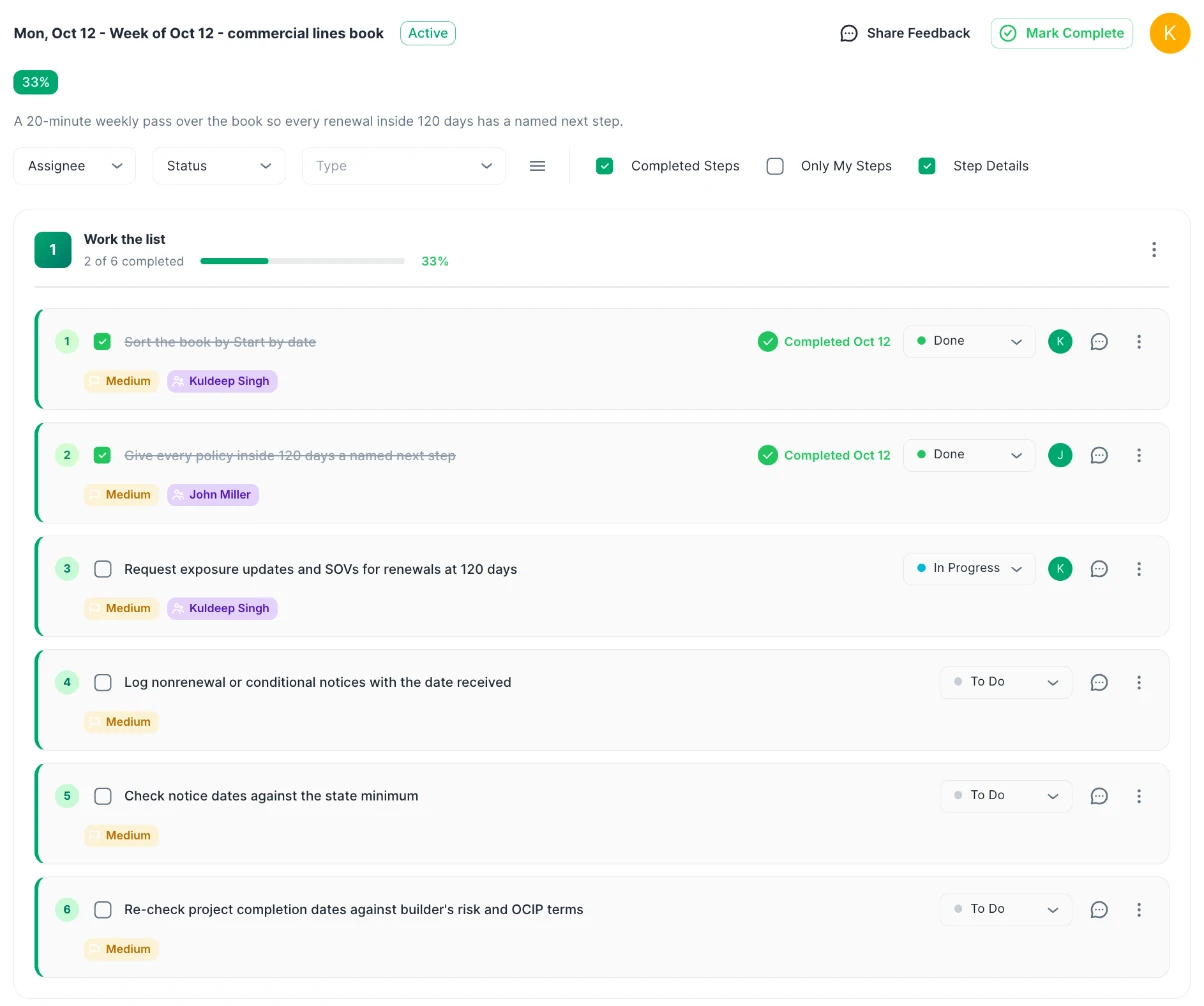
A 20-minute Monday review that keeps the book current
Sort by Start by, then work down the list. Log every nonrenewal or conditional renewal notice the day it arrives, with the date received, and compare it with the state minimum in the table above. For builder's risk and wrap-up programs, add the project's expected completion date next to the policy term and read the policy's own termination wording, because a schedule slip can outrun the term. Time estimates here are our advice, not a rule.
Sort by Start by; anything inside 120 days gets a named next step
Log notices received with the date, and keep the notice in the client folder
Re-check project completion dates against builder's risk and OCIP terms each month
Client folders, the fields you already use, and the client on the record
A folder per client, with the same fields on every policy
One brokerage real estate practice we work with tracks around 500 client policies this way, including layered excess and umbrella towers, OCIP wrap-ups and builder's risk. Each client has a folder, and most policies carry the same custom fields: carrier, policy number, broker, deductible, limit and premium. Because the fields match, "which excess layers with this carrier expire next quarter?" becomes a filter, not a search through binders.
Folders per client or per project
Custom fields for carrier, limit, deductible and premium
Filter by carrier, coverage, account manager or quarter
Assign renewals to client and partner contacts, and collect what you need
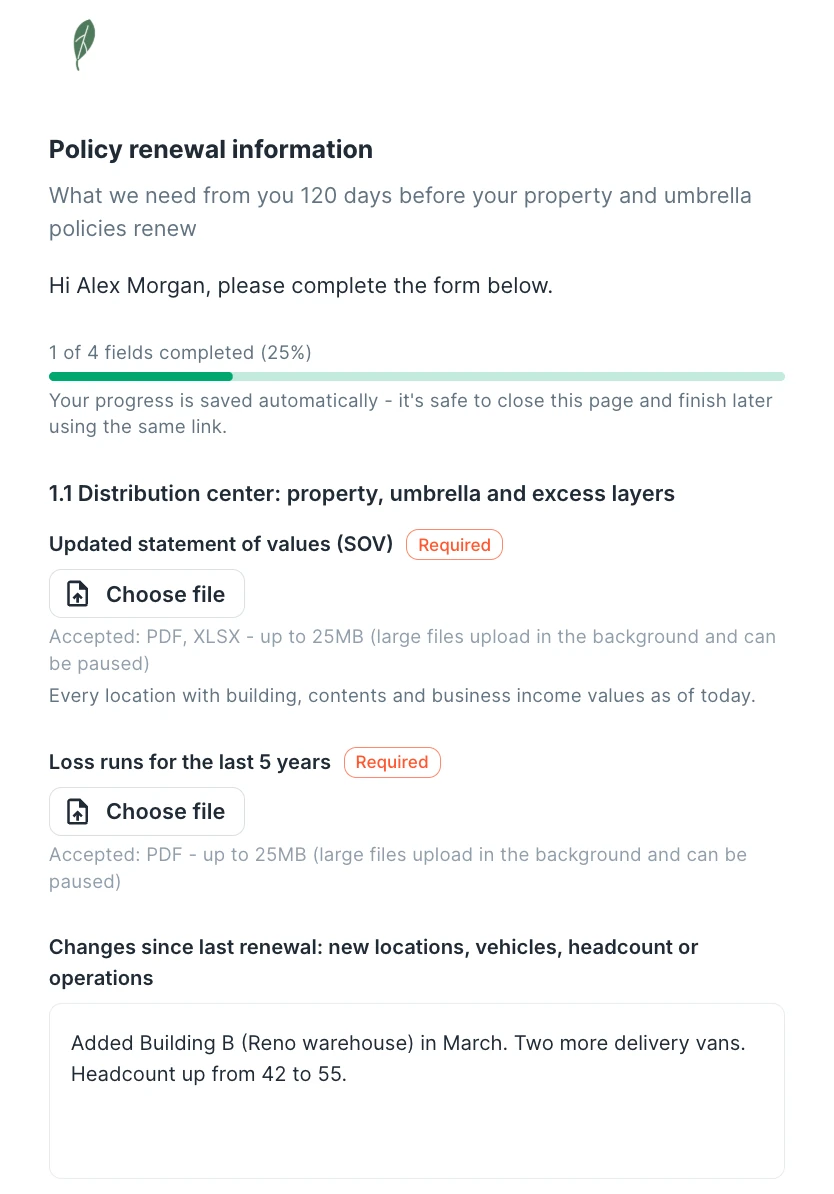
The people who must supply exposure data, statements of values or signed applications can be named on the record from the start, with a backup owner. A document collection request sends them a link to upload the file, so the renewal does not wait on an email chain. Reminders go by email, SMS, Slack or Teams at 90, 60, 30 and 7 days, and you can change the cadence per policy.
Owner and backup owner on every policy
Document requests to clients, partners and carriers
Reminders by email, SMS, Slack or Teams
Renew as a copy, and keep the history of every term
When a policy renews, the record renews as a copy with the new term, so the next cycle's reminders start at once and last year's binder stays on file. Every reminder, upload and change is timestamped. When a client, lender or E&O carrier asks who was told what and when, export the records by client or account manager as CSV, PDF or XLSX.
Renew-as-copy keeps term-by-term history
Timestamped audit trail of reminders and uploads
Export by client, carrier or account manager
What changes for the account manager
Expiration dates live in the agency system, a personal spreadsheet and a calendar. The excess layers of one program were bound at different times, so one of them renews a month early. The client's SOV request sits in an email thread nobody has answered.
Every policy and layer sits in the client's folder with its carrier, limit and expiration date. Reminders reach the account manager and the client contact at 90, 60, 30 and 7 days, the SOV arrives through a document request, and a layer out of step shows up the day it is entered.
Spreadsheet or software? An honest comparison
| ExpiryEdge | Spreadsheet | Calendar | |
|---|---|---|---|
| One record per policy and per excess layer | Manual | ||
| Flags a layer renewing out of step | With formula | ||
| Reminders to account manager and client contact | Manual | ||
| Document requests to clients and partners | |||
| Backup owner when someone is on leave | Manual | ||
| Term-by-term history and audit trail | Manual | ||
| Free | 14-day trial |
Give every policy, and every layer of an umbrella or excess tower, its own record with carrier, policy number, limit, effective and expiration dates, account manager and client contact. Group records by client and program so the whole tower is visible together. Start each renewal from a fixed lead time, such as 120 days for layered programs, and review the list weekly. ExpiryEdge holds these records in folders per client and sends reminders at 90, 60, 30 and 7 days.
For large or layered programs, many teams start 90 to 120 days out so there is time to update exposures, gather loss runs and go to market; that is our working advice, not a legal rule. The law sets only the minimum notice an insurer must give before it declines to renew. That is at least 45 days in Florida and North Carolina, 60 days in Washington, 30 days in Ohio, and 60 to 120 days in New York. If you wait for the notice, you may already be short of time.
Put each layer on its own row with a shared Program ID, and write layer limits in one consistent format. Then flag any layer whose expiration date differs from the rest of its program with =IF(COUNTIFS($B:$B,B2,$H:$H,"<>"&H2)>0,"Dates differ","OK"). A layer that expires early leaves a gap in the tower, so fix the timing at the next renewal rather than at claim time.
It depends on the state. In Florida, cover continues until 45 days after the notice or until replacement cover starts. In Ohio, a late commercial nonrenewal notice keeps cover in effect until 30 days after it was mailed. In New York, cover continues on the expiring terms for a period set by Insurance Law § 3426(e)(5). Log the date each notice arrives so you can check it against your state's rule.
For one account manager with a few dozen policies who reviews the sheet every week, yes. Use the columns and formulas on this page. It stops being enough when several people share the book, when clients and partners must send documents, or when you need evidence of who was reminded and when. That is the point where reminders by person, document requests and an audit trail earn their place.
This page is about the policies a broker or risk team places and renews. COI tracking is about collecting and checking certificates from vendors, subcontractors and tenants who work for you. Many real estate and construction teams need both: the free insurance and COI tracker template covers the vendor side, and ExpiryEdge has a separate certificate of insurance tracking workflow.
No. ExpiryEdge does not rate, quote, place, bill or issue insurance. It tracks expiration dates, owners, documents and reminders, and keeps an audit trail. Teams use it alongside their agency or policy system when renewals involve outside contacts, layered programs or project-based policies that need their own reminders.
Put every client program and every layer on one renewal calendar
Import your policy spreadsheet, create a folder per client and name the client contacts. Free 14-day trial, no credit card.