Builder's Risk Insurance Expiration: 6 Triggers and How to Extend

Builders risk insurance expiration is rarely just the date on the declarations page. Builder's risk policies typically end coverage at the first of several triggers: the policy expiring, construction finishing, the building being occupied or put to use, or your interest ending. If the project could outrun the earliest trigger, get a written extension before that date.
The schedule slipped, the policy did not, and nobody noticed that the first tenants moving in started a second clock. This guide shows you how to find the real end date in your own policy, how to ask for an extension in time, and a spreadsheet you can set up today.
Key takeaways
- A builder's risk policy published by Wisconsin's insurance regulator, which includes ISO material, ends cover at the first of: policy expiry or cancellation, your interest ceasing, abandonment, 90 days after construction is complete, or 60 days after a building is occupied or put to its intended use.
- The day counts are not universal. The same fund's amended endorsement leaves both numbers blank, to be set per policy, and adds "accepted by you" as a trigger.
- Those triggers apply "unless we specify otherwise in writing", so only a written change from the insurer moves them.
- The standard AIA A101-2017 Exhibit A requires the owner to keep builder's risk until substantial completion, then continue or replace the property cover until the correction period ends.
- Under that AIA exhibit, the owner may not occupy any part of the work before substantial completion until the insurer consents in writing.
- A spreadsheet can calculate your real end date with one formula: the earliest of the policy date, completion plus X days and occupancy plus Y days.
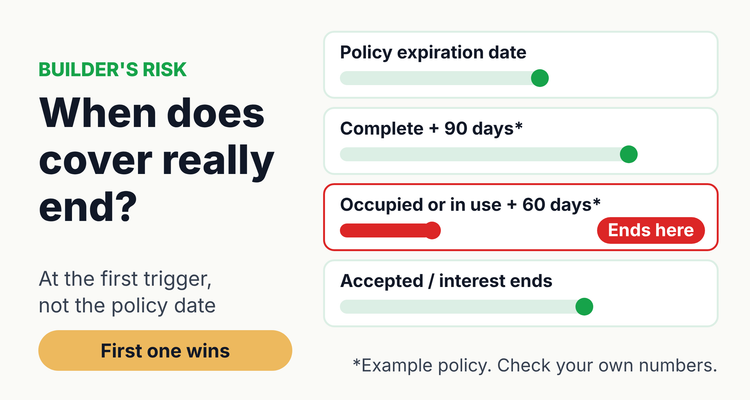 Builder's risk cover usually stops at whichever trigger comes first, not at the policy date.
When does builder's risk insurance expire?
Builder's risk insurance expires at the earliest of several events written into the policy, and the expiration date is only one of them. The clearest public example is the Builder's Risk Policy (OCI 41-104) that Wisconsin's Office of the Commissioner of Insurance publishes for its Local Government Property Insurance Fund. Its footer says it "includes copyrighted materials of ISO Properties Inc.", the organization behind many commercial insurance forms.
Its "When Coverage Ceases" condition says coverage "will end when any one of the following first occurs". Your policy may use different wording, different numbers or extra triggers, so treat the table as a checklist of what to look for, not as your policy.
Builder's risk end triggers: what a published policy says and what to check in yours (last verified 12 October 2026)
| Trigger | Wording in a published policy | Check your policy for |
|---|---|---|
| Policy period ends | "This policy expires or is cancelled" (OCI 41-104, Section VIII.D.1) | Expiration date; whether the term is per project or annual; cancellation notice terms |
| Your interest ends | "Your interest in the property ceases" (D.2) | Sale, handover or transfer of the project to an owner or buyer |
| Abandonment | "You abandon the construction with no intention to complete it" (D.3) | Any vacancy, suspension or work-stoppage conditions |
| Construction complete | "90 days after construction is complete" (D.4.a) | The number of days, and how the policy defines complete |
| Occupied or in use | "60 days after any buildings and structures ... is occupied in whole or in part; or put to its intended use" (D.4.b) | Partial or phased occupancy, model units, early tenant move-ins |
| Accepted | "Accepted by you" (amended endorsement OCI 41-109, which leaves both day counts blank) | Acceptance by the owner or a purchaser as a separate trigger |
Two things stand out. First, the occupancy trigger counts from occupancy "in whole or in part", so one phase moving in can start the clock for the whole building. Second, the triggers apply "unless we specify otherwise in writing". A phone call or an email from your broker saying it should be fine is not the same as an endorsement.
What happens if the project runs past the builder's risk term?
If the project runs past the earliest trigger and nobody extends it, the policy stops covering the work at that point, even though the building is not finished. Under a policy worded like the one above, a fire the week after the term ends would fall outside the cover.
The contract side matters too. The AIA A101-2017 Exhibit A, used on many US projects, says the owner's builder's risk insurance "shall be maintained until Substantial Completion" unless the contract documents or a written agreement say otherwise. A lapse can therefore be both an uninsured risk and a breach of the construction contract. Check which party your contract makes responsible, because the exhibit also allows the duty to be placed on the contractor.
⚠️What happens if you miss it: under a policy like Wisconsin's OCI 41-104, coverage "will end" at the first trigger unless the insurer specifies otherwise in writing. Loss after that date is outside the policy, and under AIA A101-2017 Exhibit A the party required to insure must keep the cover in force until substantial completion. A missed extension can leave the project uninsured and the owner or contractor in breach of contract.
How does occupancy or partial completion end builder's risk cover?
Occupancy can end builder's risk cover before construction is finished, because many policies count from the first occupancy or use, not the last. In the Wisconsin policy the clock is 60 days from a building being "occupied in whole or in part" or "put to its intended use".
The AIA exhibit deals with the same risk from the contract side. Section A.2.3.2 says the owner's occupancy or use of a completed or partially completed portion "shall not commence until the insurance company or companies ... have consented in writing to the continuance of coverage". So before any early move-in, get the insurer's written consent and check what it does to your end date.
After substantial completion, the exhibit (Section A.2.3.1.3) requires the owner to continue the insurance or replace it with property insurance for the total value of the project until the correction period ends. AIA's own guidance describes that period as running one year from substantial completion. Plan the handoff from builder's risk to the permanent property policy so the dates overlap rather than leave a gap.
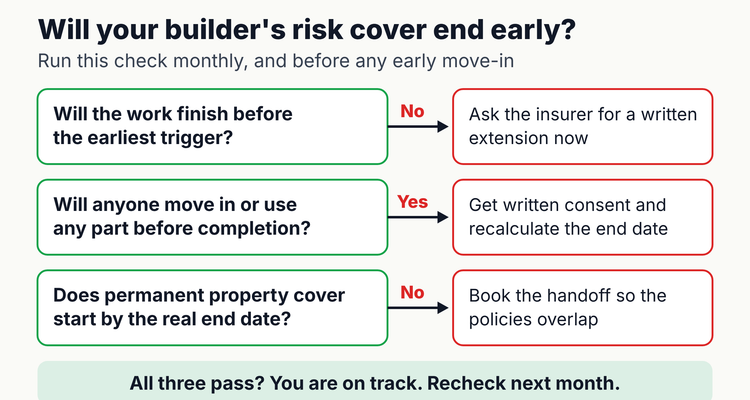 Run this check monthly, and again before any early move-in.
How do you calculate your real builder's risk insurance expiration date?
Your real end date is the earliest of the policy date, the completion trigger and the occupancy trigger, and a spreadsheet can work it out for every project. Set up one row per builder's risk policy, with these columns in row 1. Take the day counts from your own policy, not from this page.
Builder's risk end-date tracker: copyable column layout
| Column | What to enter | Formula or example |
|---|---|---|
| A: Project | Project name and phase | Example: Riverside apartments, phase 1 |
| B: Policy number and carrier | From the declarations page | From the policy |
| C: Policy expiration | Date on the declarations page | 6/30/2027 |
| D: Days after completion | Number in your policy's completion trigger | 90 |
| E: Days after occupancy | Number in your policy's occupancy or use trigger | 60 |
| F: Forecast completion | Latest date from the current schedule | 8/16/2027 |
| G: First occupancy or use | Planned or actual first move-in, if any | 7/1/2027 |
| H: Real end date | Earliest trigger | =MIN(C2,IF(F2="",C2,F2+D2),IF(G2="",C2,G2+E2)) |
| I: Gap days | Positive means the schedule outruns the cover | =F2-H2 |
| J: Ask-by date | When to send the extension request | =H2-90 |
| K: Owner and backup | One named person, plus a backup | Project manager / risk manager |
Worked example (illustrative). The policy expires June 30, 2027. The schedule now shows completion on August 16, 2027, and phase 1 tenants move in on July 1, 2027. The completion trigger falls on November 14, 2027 and the occupancy trigger on August 30, 2027, so the real end date is June 30, 2027. The gap is 47 days, and the ask-by date is April 1, 2027.
Now extend the policy to September 30, 2027 and recalculate. The real end date becomes August 30, 2027, set by the occupancy trigger. The work finishes on August 16, so the extension covers it, but the permanent property policy must start by August 30. Without the formula, most people would read September 30.
Format column I red when it is above 0, and column J amber when it is within 30 days of today. Sort by column J every Monday. Formatting and lead times are our working advice, not a rule.
How do you request a builder's risk extension?
Ask your broker for an extension well before the real end date, in writing, with an updated schedule and values, and do not treat it as done until the endorsement arrives. This is the process we suggest; the lead times are advice.
- Find the real end date (15 minutes per policy). Read the coverage-ceases condition and fill in columns C to H above.
- Compare it with the schedule every month. Update the forecast completion and first-occupancy dates from the latest site meeting.
- Flag the broker at 90 days. If column I is above 0, or an early move-in is planned, raise it now. Underwriters usually want time to review.
- Send an extension package. Include the revised schedule, percent complete, updated completed value, any losses or incidents, and the reason for the delay.
- Ask for the endorsement in writing. Check it changes the right trigger. An extended expiry date does not move an occupancy trigger.
- Update certificates. Lenders and owners may hold a certificate showing the old date. Request revised certificates from the broker.
- Book the handoff. Agree when the permanent property policy starts, so it begins no later than the real end date.
Email template to your broker. Subject: Builder's risk extension request, [project], policy [number]. "Our builder's risk policy for [project] ends on [real end date] based on [trigger]. The current schedule shows completion on [date], with first occupancy of [area] on [date]. Please request an extension to [date] and confirm whether partial occupancy is acceptable to the insurer. Attached: revised schedule, percent complete, updated completed value and loss summary. Please send the endorsement and revised certificates for [lender/owner] by [ask-by date]."
If the project also sits under a wrap-up program, line up those terms at the same time. Our guide to OCIP wrap-up insurance explains how project terms and close-out work.
What are the most common builder's risk expiration mistakes?
- Tracking only the policy date. The completion and occupancy triggers can come first, as the worked example shows.
- Missing partial occupancy. A model unit, an early tenant or a phased handover can start the occupancy clock for the building.
- Accepting a verbal yes. The published policy moves its triggers only when the insurer specifies otherwise in writing.
- Extending the date but not the trigger. Check that the endorsement changes the trigger that actually binds.
- Leaving a gap at handover. Builder's risk ends; the permanent property policy has not started. Overlap the dates.
- Assuming the contract and policy match. AIA A101-2017 Exhibit A says the insurance shall not exclude flood or windstorm, while the Wisconsin policy excludes flood apart from limited surface-water cover. Check your policy for exclusions and sublimits against your contract.
- Forgetting stale certificates. A lender's file can show an old expiration date. Track the certificates you issued, as described in our page on certificate of insurance tracking.
💡 Pro Tip
One brokerage real estate practice we work with keeps builder's risk in the same client folders as wrap-up and excess layers, with carrier, policy number, limit and deductible as fields on every record. The habit worth copying: put the project's forecast completion date beside the policy term, and recheck both each month.
Spreadsheet or software for builder's risk tracking?
A spreadsheet is enough for one person with a handful of projects who updates forecast dates every month. The MIN formula above does the hard part, and the sort by ask-by date keeps you honest.
It gets harder when several project managers feed dates, when lenders and owners need certificates, or when you need proof of who was told and when. That is where a tool such as ExpiryEdge helps: each policy gets an owner and a backup, reminders go out at 90, 60, 30 and 7 days by email, SMS, Slack or Teams, and the audit trail shows who acted. Brokers managing many client projects can see how this works on our insurance broker renewal tracking page, and teams tracking their own program can start with insurance policy tracking for businesses and the commercial insurance renewal checklist.
Frequently asked questions
How long does a builder's risk policy last?
It lasts for the term shown on the declarations page, but cover can end earlier. The policy Wisconsin's insurance regulator publishes ends cover at the first of: expiry, your interest ceasing, abandonment, 90 days after completion or 60 days after occupancy or use. Check your own policy's numbers.
Can you extend a builder's risk policy?
Usually you can ask, but only the insurer can agree. The published policy's triggers apply unless the insurer specifies otherwise in writing, so get an endorsement before the real end date, along with revised certificates for your lender or owner.
Does occupancy end builder's risk coverage?
Often, yes. In the Wisconsin policy, cover ends 60 days after a building is occupied in whole or in part or put to its intended use. AIA A101-2017 Exhibit A also requires the insurer's written consent before any early occupancy.
What happens to builder's risk at substantial completion?
Under AIA A101-2017 Exhibit A, builder's risk must be maintained until substantial completion. After that, the owner continues it or replaces it with property insurance for the total value of the project until the correction period ends.
Who is responsible for keeping builder's risk in force?
The construction contract decides. The AIA exhibit places the duty on the owner by default but allows it to be placed on the contractor. Check your contract, then name one person to watch the dates.
How do I calculate when my builder's risk cover really ends?
Take the earliest of the policy expiration, the forecast completion date plus the policy's completion days, and the first occupancy date plus its occupancy days. In a spreadsheet: =MIN(C2,IF(F2="",C2,F2+D2),IF(G2="",C2,G2+E2)).
Sources
- Wisconsin OCI, Local Government Property Insurance Fund, Builder's Risk Policy Provisions (OCI 41-104)
- Wisconsin OCI, When Coverage Ceases Amended Endorsement (OCI 41-109)
- AIA Document A101-2017 Exhibit A, Insurance and Bonds (public bid copy, Sauk County, Wisconsin)
- AIA Document A101-2017 Exhibit A (public bid copy, Texas A&M AgriLife, 2026)
- AIA Contract Documents, Avoiding later claims by identifying and correcting defective work now
Last reviewed: 12 October 2026
Frequently asked questions
Usually you can ask, but only the insurer can agree. The published policy's triggers apply unless the insurer specifies otherwise in writing, so get an endorsement before the real end date, along with revised certificates for your lender or owner.
Often, yes. In the Wisconsin policy, cover ends 60 days after a building is occupied in whole or in part or put to its intended use. AIA A101-2017 Exhibit A also requires the insurer's written consent before any early occupancy.
Under AIA A101-2017 Exhibit A, builder's risk must be maintained until substantial completion. After that, the owner continues it or replaces it with property insurance for the total value of the project until the correction period ends.
The construction contract decides. The AIA exhibit places the duty on the owner by default but allows it to be placed on the contractor. Check your contract, then name one person to watch the dates.
Take the earliest of the policy expiration, the forecast completion date plus the policy's completion days, and the first occupancy date plus its occupancy days. In a spreadsheet: =MIN(C2,IF(F2="",C2,F2+D2),IF(G2="",C2,G2+E2)).