
Automate Repetitive Processes with Reusable Workflow Templates
Write a process down once as a checklist with steps and owners, then run it every time it comes round. A new starter's first week, a quarterly access review or a licence renewal gets done the same way whoever is on shift.
14-day free trial
No credit card required
Setup in 5 minutes
Powerful Workflow Automation Features
Build a checklist once, hand out the steps, and see where each run has got to
Reusable Workflow Templates
Set up a template once and start a fresh run from it whenever you need one. Onboarding a new hire and preparing for an audit are the usual first two, but any process you repeat will fit.
Stop rebuilding the same list
Same steps every time
New runs start from the template
Multi-Person Task Assignment
Split a workflow across the people who actually do the work. Give a step to a named person, a department or an outside contractor, and the record shows who finished it.
Clear task ownership
Real-time progress visibility
No more "I thought you had it"
Visual Progress Tracking
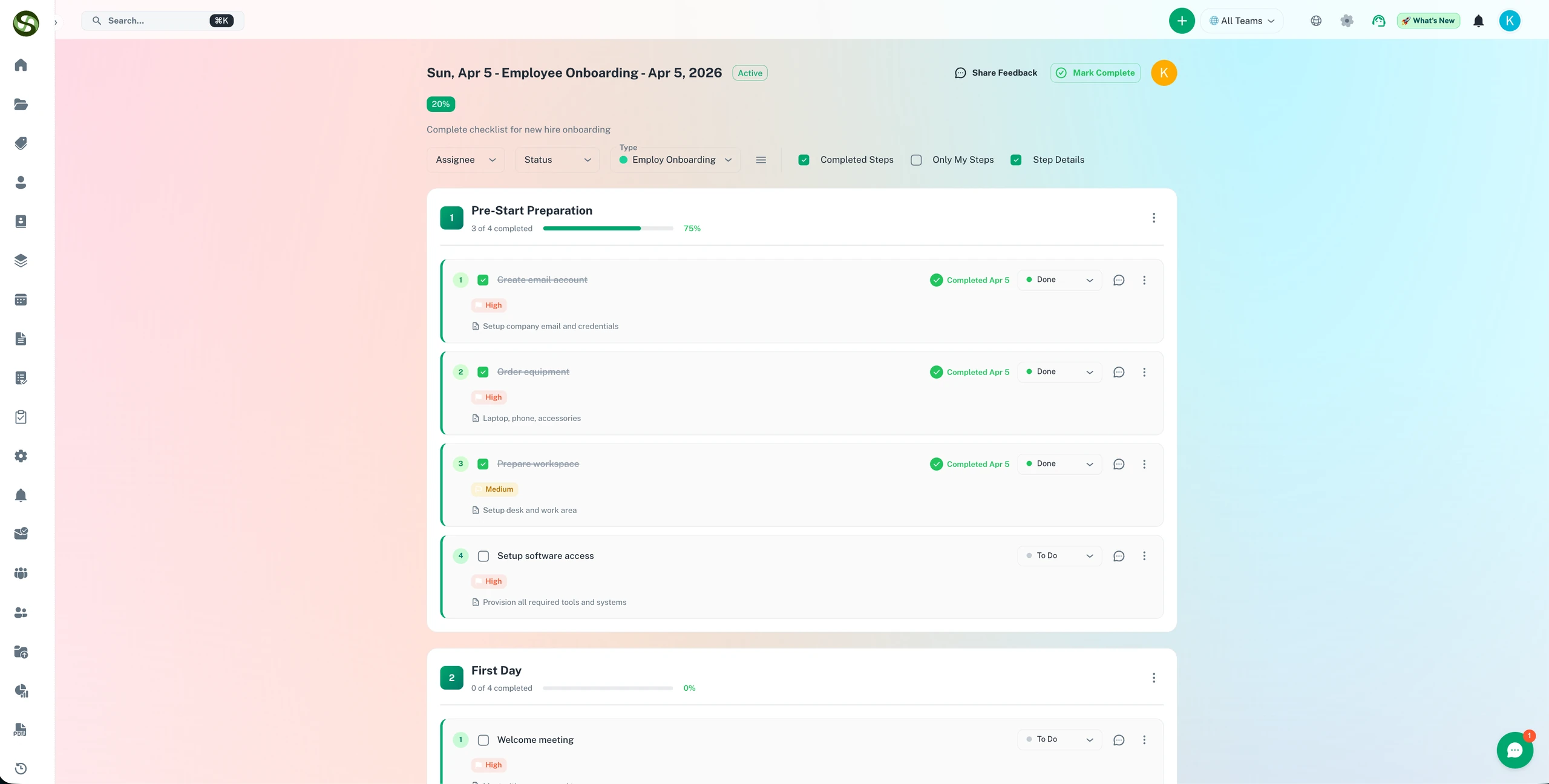
Each run has a progress bar and a percentage complete. Open it and every step shows whether it is done, in progress or still waiting.
See which step is holding things up
Track completion rates
Spot runs that have stalled
Team Collaboration & Audit Trails
Assign whole workflows or single tasks to colleagues. The audit trail records who ticked off each step and when, so you can look back at any past run.
Complete activity tracking
Full audit trails
Team accountability
Workflow Categories & Organization
Group workflows into your own categories, by department or by purpose. Search and filters still find the right one when you have hundreds of templates.
Custom workflow types
Advanced filtering
Scale to hundreds of workflows
Workflow Performance Analytics
See how long each workflow takes from start to sign-off, and which step it usually waits on. Fix that step and check the next few runs to see whether it helped.
Identify process bottlenecks
Measure team performance
Find out what your changes did
Workflow Automation Use Cases
The jobs teams most often turn into reusable checklists, with a typical flow for each
Employee Onboarding
Give every new hire the same start. One workflow covers the laptop and the system logins, the training timetable and the manager check-ins at 30, 60 and 90 days.
Compliance & Audit Reviews
Run each audit from the same checklist. Collect and verify documents, confirm certifications are still valid, review policies and tick off the regulatory checks.
Project & Product Launches
Use one repeatable workflow for every launch, from the pre-launch requirements and go-live checklist to the first weeks of monitoring afterwards.
License & Contract Renewals
When a renewal is due, start a workflow that walks it through gathering documents, internal approval, talking to the vendor, paying and filing the confirmation.
Client Onboarding
Onboard each client the same careful way. Get the contract signed and their account set up, run the training, then check in later to see how it is going.
Security & Access Reviews
Every quarter, run the access review as a workflow: export the user list, have managers confirm who still needs access, and remove the leavers before the auditor finds them.
Why Choose ExpiryEdge Workflows?
What goes wrong when a recurring process lives in email or a spreadsheet
Manual Process Management
Reinvent process each time
Email chaos and lost tasks
No visibility into progress
Unclear task ownership
Reusable templates, so nobody starts from a blank page
Spreadsheet Tracking
Version control nightmares
Manual status updates
No automated reminders
Difficult team collaboration
Real-time sync, automatic reminders, team collaboration
Generic Project Management Tools
Too heavy for a 15-step checklist
Expensive per-user pricing
Not built for recurring workflows
Steep learning curve
Built for processes you repeat, with plans from $41/month
Frequently Asked Questions
Everything you need to know about workflow automation
It is software that runs a repeated, multi-step process for you. You stop keeping track of who has to do what by when. You write a template once, and each time you start it the tool assigns the tasks, sends reminders and shows progress. In ExpiryEdge, teams mostly use it for onboarding new staff, compliance reviews and licence renewals.
You stop rebuilding the same process from memory. Write your onboarding workflow once with all 30 steps, then start it for every new hire. ExpiryEdge hands each task to the right person, chases them with reminders and marks the run complete when the last box is ticked. The hours you used to spend copying old checklists and asking for updates go back to the actual work.
Yes. Each step can go to a different person, a whole department or an external contractor. You can see who owns every task and how far they have got, so a stuck step shows up before it holds up the rest of the run.
Anything with several steps that you do more than once. Common ones are employee onboarding (equipment, logins, training) and compliance reviews (checking documents and certifications). Teams also build them for project launches, licence renewals with their approvals, client onboarding, audit preparation and contract renewals. If you can write the steps down, you can turn them into a workflow.
Every workflow run has a progress bar. Open it and each task is marked done, in progress or pending, with a percentage for the run as a whole. You can also see which steps take longest. The dashboard updates as people tick things off, so you know where each run stands without asking.
Yes. Workflows use the same reminder engine as your expiry dates. Put a due date on the whole workflow or on single tasks, and the owner hears about it by email, SMS or Slack as the date gets close. That way an onboarding checklist gets the same chasing as a licence renewal.
Ready to Automate Your Workflows?
Pick the process your team repeats most, write it up as a checklist this afternoon, and run it with real owners and due dates on the 14-day free trial.
No credit card required • 14-day free trial • Setup in 5 minutes