Expiry Tracking & Compliance
Management Software
Stop Losing Business to Missed Deadlines
Every licence, contract, certification and permit your business depends on - tracked automatically, with reminders going to the right people before the deadline actually hits. The renewal is still your job. Getting there without a last-minute panic isn't.
7,000+
Expiries tracked monthly6
Notification channels98%
On-time renewal rate10 min
Average setup timeAny licence, contract, certification, permit or deadline your business needs to manage
Six Feature Sets. One Compliance Platform.
Expiry tracking, multi-channel notifications, workflow automation, document storage, team management, compliance reporting. Each one works on its own. Together they cover every part of keeping a business compliant.
Automated Expiry Tracking Software
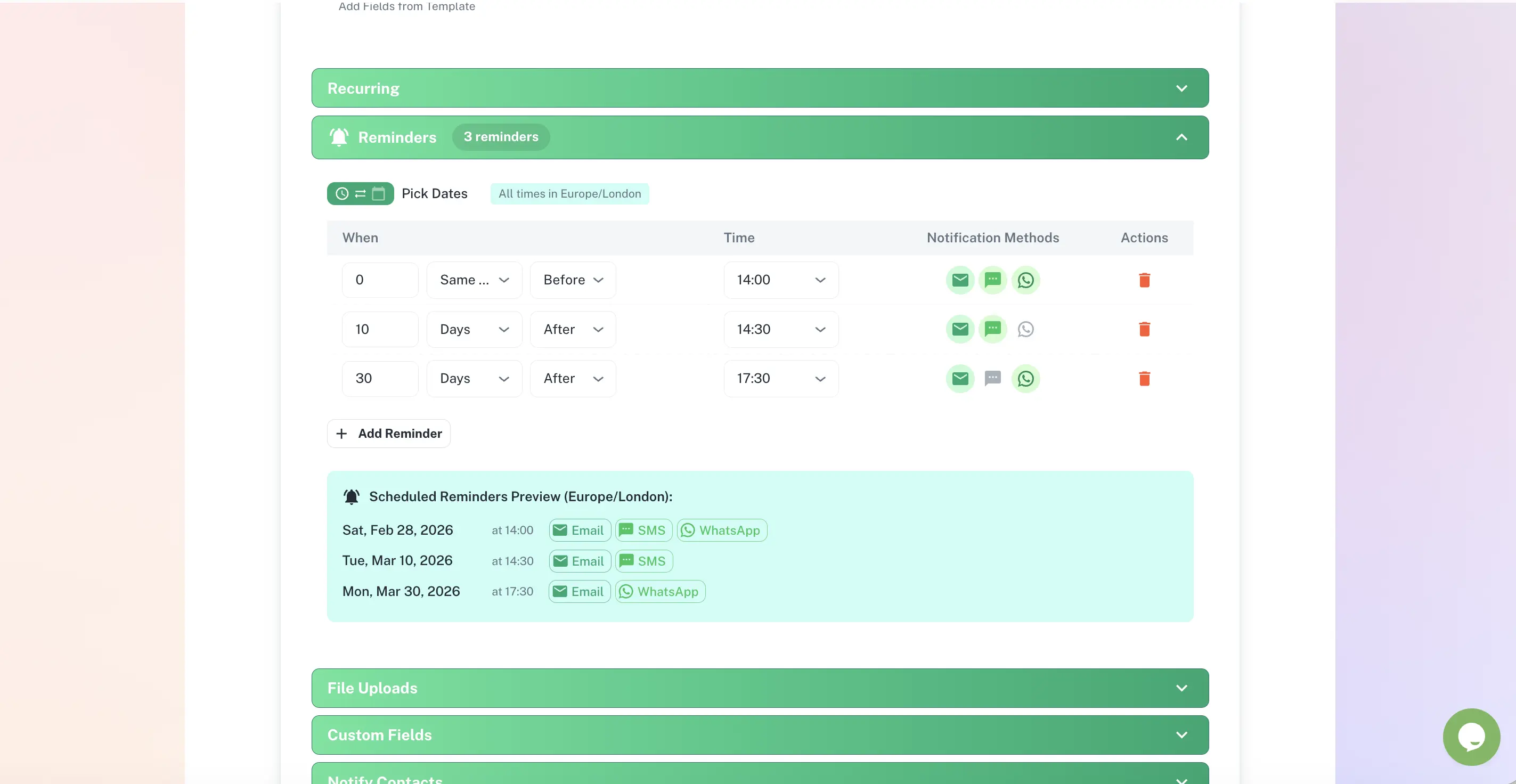
You add the deadline once. ExpiryEdge sends reminders at 90 days, 30, 7 - and the day before if you want. The renewal itself is still your job. Everything leading up to it isn't.
Most teams have a spreadsheet for this. It was last updated six months ago, three people have "the most recent version," and someone just found out the business licence lapsed last Tuesday because nobody checked. ExpiryEdge replaces that entire situation with one system that runs itself.
Automated Expiration Reminders
Set your reminder schedule once - 90 days out, 30, 7, the day before - and that's it. ExpiryEdge sends each alert on time, every time. By the time a deadline is one day away, you've already had four reminders. There are no surprises.
Expiry Deadline Calendar
A visual calendar that shows everything coming up - permits, contracts, certifications, renewals - across every team. Filter by risk level or category so you know what actually needs attention this week versus what can wait.
Custom Reminder Schedules
A contract renewal needs different timing than a forklift inspection. Configure different reminder sequences per category - or per individual item. One rule doesn't fit everything, and you don't have to pretend it does.
Multi-Category Tracking
Licences, contracts, insurance policies, staff certifications, equipment maintenance, vendor agreements, permits. If it's got an expiry date and consequences when it lapses, ExpiryEdge tracks it. You can add your own categories too.
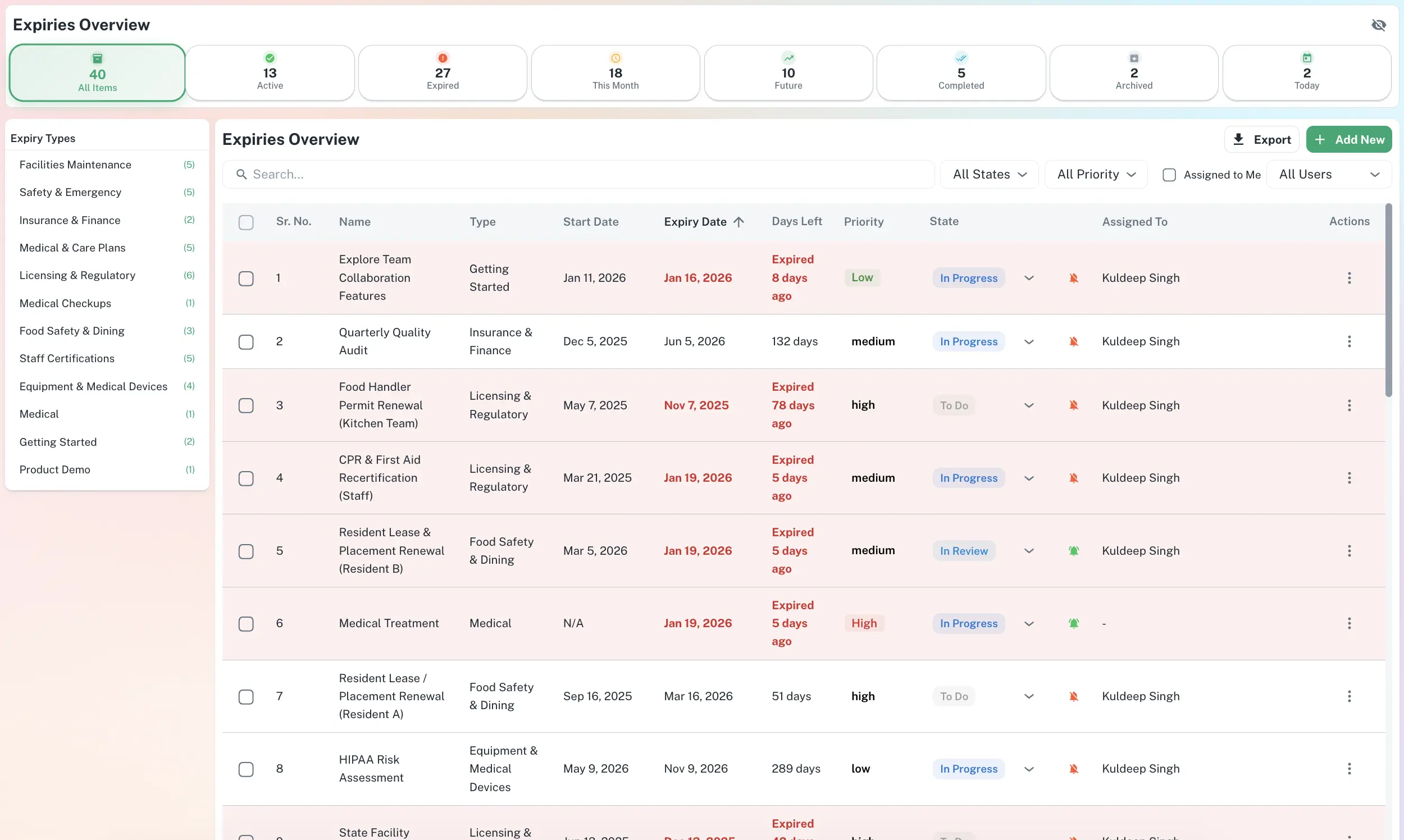
Centralised Expiry Dashboard
One screen. Everything you're responsible for - what's expired, what's expiring soon, what's healthy, who owns what. You don't have to dig through folders or ask around to get a straight answer.
Monthly Expiry Reports
At the start of each month, an automated digest lands in your inbox: what's coming up, what recently lapsed. Share it in your management review. Forward it to whoever needs to know. It just exists - you didn't have to build it.
Multi-Channel Renewal Reminder Notifications
An email sitting in someone's inbox is just an email. Maybe they saw it, maybe they didn't. ExpiryEdge gets the alert to whoever needs to act - by SMS, WhatsApp, Slack or Teams - on the channel they're actually likely to respond to.
The reminder only works if the right person sees it. Most inboxes are so full that a renewal alert slides off the bottom of the screen by 9am. Putting the alert on the channel your team actually lives in changes that.
Email Alerts
Branded reminders you'd actually be proud to send - customisable templates, configurable recipient lists, delivery tracking. You'll know who received it and, crucially, who didn't open it.
SMS Text Reminders
Texts get read. That's just the reality. SMS achieves a 98% open rate - usually within three minutes. For anything time-sensitive, or for team members who don't live in their inbox, this is the channel that actually cuts through.
WhatsApp Business Alerts
Your team is already in WhatsApp. Field staff, mobile workers, anyone not glued to a laptop - they see WhatsApp. Getting a compliance reminder there instead of buried in email is, frankly, just common sense.
Slack Integration
If your team lives in Slack, deadlines should show up in Slack too. Alerts land in the right channel, where the right people will notice them - without anyone switching context or going looking.
Microsoft Teams Reminders
For Teams-first organisations, deadline cards show up directly in the right channels and chats. It fits into how your team already works, rather than asking them to adopt something new.
API & Webhooks
Already using JIRA, ServiceNow or a custom CRM? Connect ExpiryEdge and fire a webhook to any endpoint when a deadline approaches or passes. Handle the rest however your team needs to.
Email Delivery & Open Status
Every reminder shows whether it was delivered and opened, with a timestamp - so a bounced address or an unread alert surfaces before the deadline, not after it lapses.
In-App Email Replies
When a contact replies to a reminder, the response lands on the record inside ExpiryEdge - threaded and team-visible, instead of being buried in one person's inbox.
Combined Daily Digest
Several items due the same day? Turn on one consolidated digest for your organisation and send a single grouped email instead of many - less inbox noise, nothing missed.
SOP & Workflow Checklists - Sections, Steps, Progress Tracking
When a deadline is due or a process needs to run, someone on your team needs to do something. But who? And what, exactly? ExpiryEdge turns that into a defined checklist - sections, named steps, assigned owners, and live progress visible to anyone who needs it.
When there's no structured process, how a task gets done depends entirely on whoever is available that day. When that person leaves or is on holiday, the knowledge goes with them. Workflows in ExpiryEdge turn any repeatable process into a structured SOP checklist - sections and steps - so the process runs the same way every time, regardless of who's in the office.
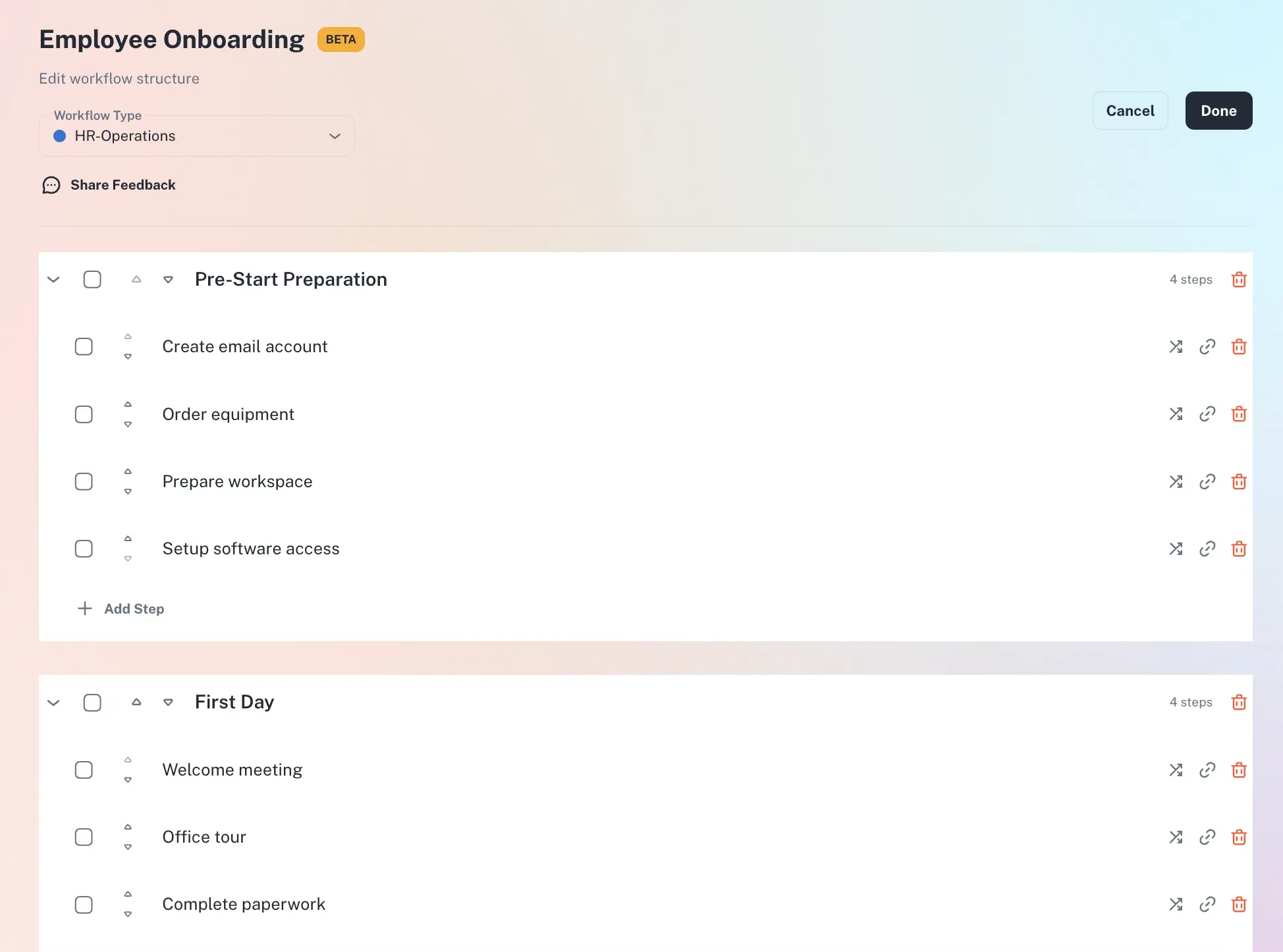
Visual Workflow Builder
Drag steps into order, assign each one to a person, set deadlines, decide what triggers the whole thing. It looks like a simple editor because it is. No developer needed - just your process knowledge.
SOP Templates
Ready-made templates for common processes - onboarding, licence renewal, equipment inspection, contract review. Pick one, adjust the steps to match how you actually do it, and reuse it every time.
Step Assignment & Tick-Off
Every step goes to a named person. They see it, tick it off when done, and you see in real time whether each step is complete - no chasing, no status meetings.
Reusable Process Templates
Build a workflow once, then launch it for every new hire, every location, every renewal cycle. Doesn't matter if you have three sites or thirty - the process is identical each time.
Live Progress Monitoring
See every open workflow run at a glance: what's in progress, what's stuck, what's done, what's overdue. If something is going wrong, you'll know in time to fix it - not after.
Full Audit Trail
Every completed step gets a timestamp and the name of whoever did it. That record can't be changed. When an auditor asks for proof that a process was followed, you export it on the spot.
Document Expiry Management & Secure Certificate Storage
Every compliance document lives alongside its expiry date. When the reminder fires, the current version is right there - the signed contract, the certificate, the policy. Not in someone's email. Not on a shared drive nobody can find.
When renewal is due, the first half hour usually goes to finding the original document. Is it in the old Google Drive? Did someone email it across last year? Is this even the right version? ExpiryEdge stores the document with the deadline from day one, so when the reminder lands, the file is already waiting.
Document Uploads
Attach the PDF, the scanned licence, the signed contract - whatever you have - directly to the expiry record. The document and the deadline are stored together. When renewal comes around, you're not hunting. You're renewing.
Folder Organisation
Organise records by department, location, supplier or category - whatever structure makes sense for your business. You set it up however you like. Finding any document takes seconds, not a ten-minute trawl through a shared drive.
Contract Expiry Tracking
Every contract has a renewal date - and some have auto-renewal clauses that cost money if you miss them. Attach the agreement, set the reminders, and you'll never accidentally roll into another term you didn't mean to sign.
Certification & Licence Records
Each licence or certification gets its own record: expiry date, responsible person, the document itself, the renewal history. Everything you'd need if an inspector or auditor asked to see proof right now.
Secure Cloud Storage
Documents are encrypted and access is role-based. Finance sees finance. HR sees HR. An admin sees everything. Nobody accidentally opens something they shouldn't, and nobody's sharing a folder link with the whole company.
Bulk Export
Need to hand over a full audit pack? Export whichever records you need - with documents attached - in one go. What used to take half an afternoon now takes thirty seconds.
Multi-Team & Multi-Location Compliance Management
Every item has an owner. Every owner sees their responsibilities and nothing else. Managers see their team. Leadership sees everything. It's the kind of clarity that makes "I thought someone else was handling it" structurally impossible.
The problem with a shared spreadsheet isn't just the reminders - it's the ownership. When six people can edit the same file, nobody's truly responsible for it. A deadline slips and everyone assumed someone else was on it. ExpiryEdge puts one name next to every item. That person knows it's theirs. There's no ambiguity.
Departments & Teams
Set up teams the way your organisation actually works. HR manages HR items. Operations handles theirs. Leadership gets a view across all of it - without anyone having to build a report or send a weekly update email.
Role-Based Permissions
Admins set things up. Managers approve and escalate. Team members view and complete their tasks. Nobody sees something they shouldn't, nobody changes something they're not supposed to. Clean, simple, and a lot less drama.
Multi-Location Support
Whether you've got two offices or twenty franchise sites, every location's compliance data lives in the same account. Pull back to see the whole group or filter to a single site. Either view takes about two clicks.
Shared Workspaces
Comments, notes and updates stay attached to the record itself - not buried in an email thread somewhere. When someone needs context on an item, they look at the record, not their inbox from four months ago.
Assign & Delegate
Assign items to individuals, not teams. When someone leaves or changes role, reassign their items in bulk. The history of who owned what, and when, stays on record permanently - accountability doesn't disappear when people do.
Live Activity Feed
A running log of every change: who touched what, when, and with what note. For distributed teams and multi-site operators, this is what keeps everyone on the same page without a weekly all-hands.
Compliance Reporting Software & Audit-Ready Exports
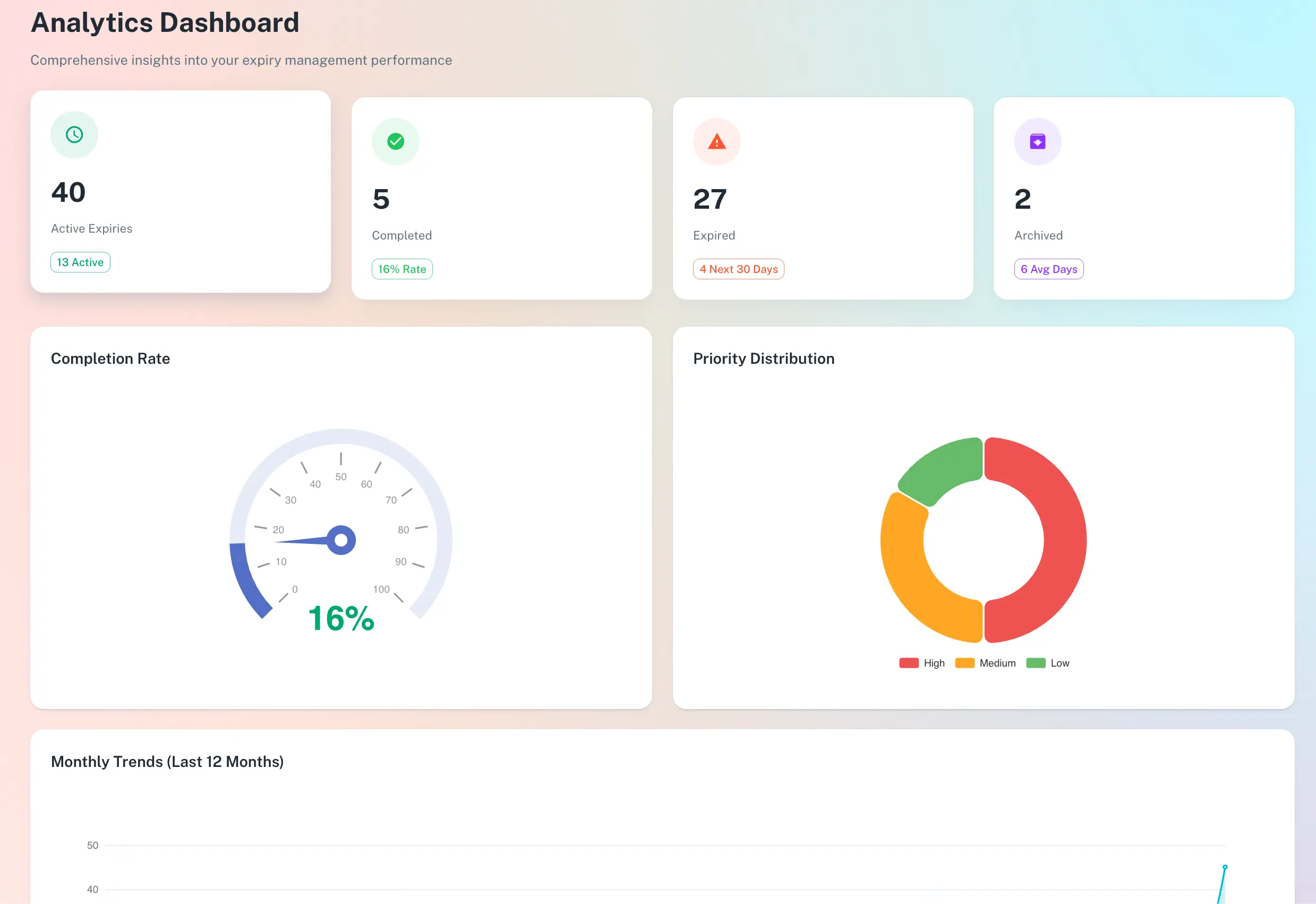
You should know your compliance status before someone else points it out to you. ExpiryEdge gives you live dashboards, scheduled management reports and a one-click audit pack - so the answer to "are you compliant?" is always yes, and you can prove it.
Compliance problems tend to be invisible until they aren't. The licence expired six weeks ago - you find out when a council inspector turns up or an insurance claim gets rejected. By then the damage is done. Real-time risk flagging means you see what's slipping before it becomes someone else's problem to point out.
Compliance Dashboard
Open it and you know exactly where you stand: what's current, what's expiring this week, what's already overdue, which teams are behind. It's the information you used to compile manually - now just always there.
Automated Monthly Reports
At the start of each month, a report lands in whoever's inbox you choose - everything upcoming, everything lapsed, broken out by team. Leadership gets the high level. Ops gets the detail. Neither had to ask for it.
Custom Filters & Views
Filter by team, category, location or risk level. Save the view you check every Monday so it takes two minutes instead of twenty. Build the reports you actually want, not just the defaults.
Audit-Ready Exports
One click generates a full audit pack - records, attached documents, completion history, timestamps. CSV or PDF, whichever the inspector prefers. You hand it over on the day, not three days later after scrambling to pull it together.
Risk Flagging
Items are automatically scored high, medium or low risk based on how close the date is. The things that need urgent action are at the top. You're not hunting through a flat list trying to figure out what actually matters today.
Custom Data Templates
Define which fields matter for each item type. Track what you actually need to track - not just what the default template assumes. Consistent input means the reports you pull out are genuinely useful.
Different People. Different Needs. One Platform.
The operations manager wants a dashboard. The business owner wants to stop thinking about this entirely. The compliance officer needs the audit pack right now. ExpiryEdge is built to give each of them exactly that.
Operations Manager
You already know roughly what's overdue in your operation. The problem is finding out before it costs you. ExpiryEdge gives you one screen - every team, every location, every deadline - so you're not the last person to hear about a compliance gap.
HR Manager
Staff certifications lapse slowly, then suddenly. ExpiryEdge tracks every qualification, licence and ID expiry date for your whole team and sends the reminder to the right person automatically. You're not chasing. You're just reviewing.
Legal & Contracts
The clause that auto-renews the contract you wanted to renegotiate. The software subscription that rolled over at last year's price. Renewal reminders with the signed document attached mean those conversations happen at the right time - not months too late.
Business Owner
The business doesn't need you checking compliance spreadsheets. It needs you to know when something genuinely requires your attention. ExpiryEdge handles the tracking, sends reminders to your team, and escalates to you only when something's at risk.
Compliance Officer
When an auditor arrives, you want to hand over a pack - not spend three hours pulling it together. Every action is logged with a timestamp, every document lives with its record, and the complete compliance history exports in one click.
Expiry Tracking Software vs Spreadsheets & Calendar Reminders
Most businesses start with a spreadsheet. Then a deadline slips. ExpiryEdge is purpose-built to do what spreadsheets and calendar reminders simply cannot.
Automatic multi-step expiry reminders
Multi-channel alerts - SMS, WhatsApp, Slack, Teams
Escalation when deadlines are missed
Named ownership per item with accountability
Documents stored with their deadline record
Role-based team access and permissions
Full audit trail with timestamps
One-click audit-ready export
Frequently Asked Questions About ExpiryEdge
Common questions about expiry tracking, compliance reminders, and how the platform works.
What is ExpiryEdge and what does it do?
ExpiryEdge is a business compliance and expiration tracking platform. It automatically tracks expiry dates for any type of business document or deadline - licences, contracts, insurance policies, staff certifications, equipment maintenance, permits - and sends multi-channel reminder alerts (email, SMS, WhatsApp, Slack, Microsoft Teams) before they expire. It also includes SOP workflows, document storage, team collaboration tools, and compliance reporting.
What types of documents and deadlines can ExpiryEdge track?
ExpiryEdge can track any document or deadline with an expiry date. Common uses include: business licences and permits, professional certifications (first aid, food safety, trade licences), insurance policy renewals, contracts and vendor agreements, equipment maintenance schedules, staff ID and work visa expiry, health and safety inspection dates, software subscription renewals, and lease agreements. You can also create unlimited custom categories for anything specific to your industry.
How does ExpiryEdge send renewal reminder notifications?
You configure reminder sequences for each item type. For example, a licence might trigger alerts at 90 days, 30 days, 14 days and 1 day before expiry. Each reminder can go to different people via different channels - email, SMS, WhatsApp, Slack, Microsoft Teams or API webhook. If the deadline passes without action, ExpiryEdge can escalate automatically to a manager or senior stakeholder.
How is ExpiryEdge different from using Google Calendar or Outlook reminders?
Calendar reminders are manual, one-time, and easy to dismiss or miss. ExpiryEdge provides: multi-step reminder sequences (not just one alert), multi-channel delivery so the right person is reached on the channel they check, escalation when deadlines are missed, document storage attached to each record, team accountability with named owners, audit trail of all actions, and compliance reporting. A calendar tells you something is due. ExpiryEdge ensures it actually gets done - and proves it.
Can ExpiryEdge track staff training and certification expiry?
Yes. This is one of the most common use cases. You can upload each staff member's certifications - first aid, food safety, forklift licences, professional accreditations - set their expiry dates, and configure automatic reminder sequences. When a certification is close to expiry, the staff member and their manager both receive reminders. The current certificate is stored in the record so the renewed version is easy to update when it arrives.
Does ExpiryEdge support multiple teams, departments, or locations?
Yes. ExpiryEdge is built for organisations with multiple teams, departments and locations. You can create separate teams (e.g. HR, Operations, Legal), assign items to the relevant team, set role-based permissions, and filter dashboards by team or location. Leadership and compliance officers see across all teams in one view. Individual managers and staff only see what they are responsible for.
Is ExpiryEdge suitable for franchise operators or multi-location businesses?
Yes. ExpiryEdge has specific functionality for multi-location and franchise operations. You can manage compliance deadlines across all locations from a single account, track location-specific licences and permits, assign tasks to location managers, and see which locations are at risk of non-compliance at a glance. Escalation alerts mean you hear about problems at any location immediately - not when an inspector arrives.
What happens when a deadline is missed? Does ExpiryEdge escalate automatically?
Yes. You configure escalation rules when setting up reminder sequences. If a deadline is not addressed within a defined timeframe, ExpiryEdge automatically sends escalation alerts to a designated manager, team lead or executive. You can set multi-tier escalation - first to the item owner, then to their manager, then to leadership - so critical deadlines are never silently missed.
Can I attach documents like contracts or certificates to my records?
Yes. You can attach PDFs, images and other file types directly to any expiry record. The document and its deadline are stored together. When a renewal reminder fires, the current version of the document is right there - no hunting through email or shared drives. You can also upload the renewed document when it arrives to update the record and reset the next reminder cycle.
Is there an audit trail? Can I prove compliance to a regulator or auditor?
Yes. ExpiryEdge logs every action with a timestamp and user attribution - who added what, when they completed it, what documents were attached, when reminders were sent and to whom. You can export a full audit pack - records, completion history, and documents - in one click. This is specifically designed to be ready for inspectors, insurers or internal audits without any retroactive documentation.
How quickly can I get started with ExpiryEdge?
Most teams are running in under 5 minutes. You can import existing records from a spreadsheet, configure your reminder schedules, invite your team, and immediately start receiving automated reminders. No technical setup is required. ExpiryEdge offers a 14-day free trial with full access - no credit card required.
Every Business Has Its Own Compliance Problem
Franchise operations, absentee owners, HR teams, contract managers - the deadline problem looks different for each of them. See which use case fits yours.
Stop Finding Out About Missed Deadlines After the Fact
Hundreds of operations and compliance teams have already handed the deadline-chasing over to ExpiryEdge. Most were up and running in under five minutes. There's no credit card required to try it.
No credit card · Setup in under 5 minutes · Cancel anytime