
Team-Zusammenarbeitsfunktionen
Arbeiten Sie nahtlos mit gemeinsamen Fristen, Team-Kommentaren, Dateifreigabe und Echtzeit-Updates zusammen. Halten Sie alle auf derselben Seite.
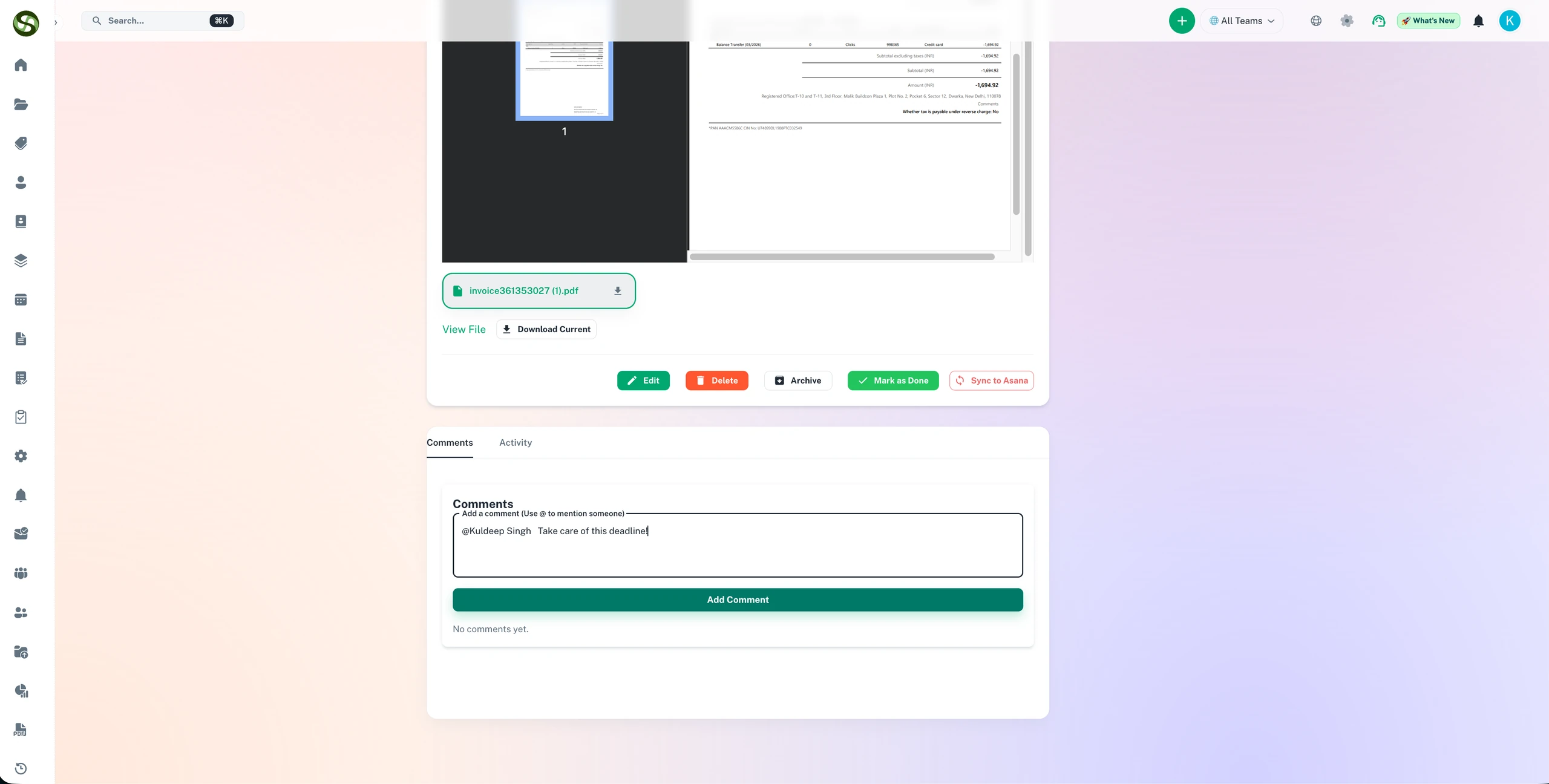
Arbeiten Sie an Compliance-Aufgaben mit gemeinsamen Fristen, Kommentaren und Team-Verantwortung zusammen
Gemeinsame Aufgabenverantwortung
Kommentare & Notizen direkt am Datensatz
Fristenübersicht fürs ganze Team
Kollaborative Workflows
Team-Zusammenarbeitsfunktionen Funktionen
Alles, was Sie brauchen, um Ihre Abläufe zu optimieren und produktiver zu arbeiten
Gemeinsame Team-Arbeitsbereiche
Erstellen Sie dedizierte Arbeitsbereiche für jedes Team, jeden Bereich oder jedes Projekt. Alle sehen dieselben Fristen, Updates in Echtzeit und bleiben ohne ständige Meetings oder E-Mail-Ketten ausgerichtet.
Kontextbezogene Kommentare & Diskussionen
Kommentieren Sie direkt zu Fristen und Aufgaben. Stellen Sie Fragen, geben Sie Updates und diskutieren Sie Probleme, ohne die Plattform zu verlassen. Die gesamte Gesprächshistorie wird mit der Frist gespeichert.
Zentralisierte Dateifreigabe
Hängen Sie Verträge, Lizenzen, Zertifikate und Dokumente direkt an Fristen an. Teammitglieder greifen sofort auf die neuesten Versionen zu – kein Durchsuchen von E-Mails oder Netzlaufwerken mehr.
Granulare Berechtigungssteuerung
Weisen Sie Rollen wie Administrator, Manager oder Betrachter mit spezifischen Berechtigungen zu. Kontrollieren Sie, wer Fristen erstellen, bearbeiten, löschen oder anzeigen kann. Wahren Sie die Sicherheit und ermöglichen Sie gleichzeitig die Zusammenarbeit.
Team-Aktivitätsfeed
Sehen Sie, woran Ihr Team arbeitet, mit einem Live-Aktivitätsfeed. Verfolgen Sie, wer Fristen erstellt, Aufgaben abgeschlossen, Kommentare hinzugefügt oder Dateien hochgeladen hat. Vollständige Transparenz ohne Mikromanagement.
Aufgabenzuweisung & Verantwortung
Weisen Sie Fristen bestimmten Teammitgliedern mit klarer Verantwortung zu. Jeder weiß, wer wofür verantwortlich ist, wodurch Verwirrung beseitigt und die Verantwortlichkeit verbessert wird.
Warum Team-Zusammenarbeitsfunktionen?
Echte Vorteile mit messbarem Ergebnis für Ihr Unternehmen
Reduzieren Sie die E-Mail-Überlastung um 60%
Hören Sie auf, „Was ist der Status?“-E-Mails zu senden. Teammitglieder sehen Updates in Echtzeit, reduzieren das Postfach-Chaos und verbessern die Antwortzeiten von Stunden auf Minuten.
Beseitigen Sie Informationssilos
Durchbrechen Sie Abteilungsbarrieren. Rechts-, HR-, IT- und Compliance-Teams arbeiten alle von derselben Informationsquelle aus, wodurch doppelter Aufwand und Fehlkommunikation reduziert werden.
Integrieren Sie neue Teammitglieder 3x schneller
Neue Mitarbeiter sehen den vollständigen Kontext: Fristen, Dateien, Kommentare und Historie an einem Ort. Keine wiederholten „Wo finde ich …?“-Fragen mehr.
Verbessern Sie die Teamproduktivität um 40%
Verbringen Sie weniger Zeit mit der Suche nach Informationen und mehr Zeit mit der eigentlichen Arbeit. Teams berichten von 40% Produktivitätssteigerungen, wenn alle Fristinformationen zentralisiert und zugänglich sind.
Wer nutzt Team-Zusammenarbeitsfunktionen?
Entwickelt für Teams und Unternehmen aller Branchen
Bereichsübergreifende Compliance
Rechts-, Finanz- und Betriebsteams arbeiten an regulatorischen Fristen zusammen. Anwälte hängen Compliance-Dokumente an, Buchhalter bestätigen das Budget, der Betrieb aktualisiert den Abschlussstatus – alles an einem Ort.
Abteilungsübergreifende Lizenzerneuerungen
IT verfolgt Softwarelizenzen, Beschaffung kümmert sich um Verträge, Finanzen genehmigt Zahlungen. Alle kommentieren zur selben Frist, wodurch Übergabeverwirrung beseitigt wird.
Verfolgung von Kundenlieferungen
Account Manager, Projektmanager und Lieferteams koordinieren Kundenfristen. Interne Diskussionen bleiben privat, während kundenorientierte Updates professionell bleiben.
Sicherheitszertifizierungsverwaltung
Sicherheits-, Compliance- und IT-Teams verwalten ISO-, SOC2- und HIPAA-Zertifizierungen gemeinsam. Verfolgen Sie Audit-Anforderungen, Beweissammlung und Erneuerungsfristen kollaborativ.
Koordination der Anlagenverwaltung
Anlagen-, Sicherheits- und Compliance-Teams verfolgen Baugenehmigungen, Inspektionen und Wartungszertifizierungen. Feldtechniker laden Inspektionsberichte direkt zu Fristen hoch.
Schulungs- und Zertifizierungsprogramme
HR und Abteilungsleiter verfolgen Mitarbeiterzertifizierungen, obligatorische Schulungen und Fristen für die berufliche Weiterentwicklung in der gesamten Organisation.
Häufig gestellte Fragen
Alles, was Sie wissen müssen. Antwort nicht dabei? Unser Support-Team hilft gerne weiter.
ExpiryEdge ermöglicht es Teams, gemeinsam an Compliance zu arbeiten, ohne auf E-Mail-Verläufe oder gemeinsame Tabellen angewiesen zu sein. Fristen werden bestimmten Verantwortlichen zugewiesen, aber jedes Teammitglied mit den passenden Berechtigungen kann sie einsehen, Notizen hinzufügen, Dokumente hochladen oder den Status aktualisieren. Das Aktivitätsprotokoll jeder Frist zeigt lückenlos, wer was wann getan hat.
Ja. Erinnerungen zu jeder Frist lassen sich an mehrere Empfänger senden. Sie benachrichtigen zum Beispiel den Verantwortlichen für das Tagesgeschäft, dessen Vorgesetzten zur Aufsicht und das Compliance-Team zur Überwachung. Jede Person erhält Benachrichtigungen über ihren bevorzugten Kanal nach dem für ihre Benachrichtigungsstufe konfigurierten Plan.
Rollenbasierte Berechtigungen steuern genau, was jedes Teammitglied sehen kann. Sensible Datensätze lassen sich auf bestimmte Rollen beschränken, während der allgemeine Compliance-Status für breitere Teams sichtbar bleibt. Der Dokumentenzugriff lässt sich unabhängig von der Sichtbarkeit des Datensatzes steuern, sodass Teams den Status teilen können, ohne vertrauliche Dokumente offenzulegen.
Ja. Jede Frist hat einen Notiz- und Kommentarbereich, in dem Teammitglieder Kontext ergänzen, Probleme kennzeichnen, Gespräche mit externen Anbietern festhalten oder Gründe für Verzögerungen notieren können. Diese Kommentare sind Teil des Prüfpfads und schaffen ein vollständiges Protokoll aller Diskussionen und Entscheidungen zu jeder Compliance-Pflicht.
Remote- und Hybrid-Teams profitieren am meisten von ExpiryEdge, weil persönliche Abstimmung überflüssig wird. Jedes Teammitglied erhält seine eigenen Erinnerungen über den bevorzugten Kanal. Führungskräfte sehen den Compliance-Status in Echtzeit, ohne bei Einzelnen nachfragen zu müssen. Dokumente und Datensätze sind zentral von jedem Standort aus zugänglich. Compliance hängt nicht von physischer Nähe ab.
Bereit loszulegen?
Schließen Sie sich tausenden Teams an, die mit ExpiryEdge ihre Abläufe organisieren