
Wie ExpiryEdge funktioniert
Verfolgen Sie jede Geschäftsfrist automatisch und führen Sie jeden wiederkehrenden Prozess als strukturierte SOP-Checkliste aus. In Minuten startklar - ganz ohne IT-Team.
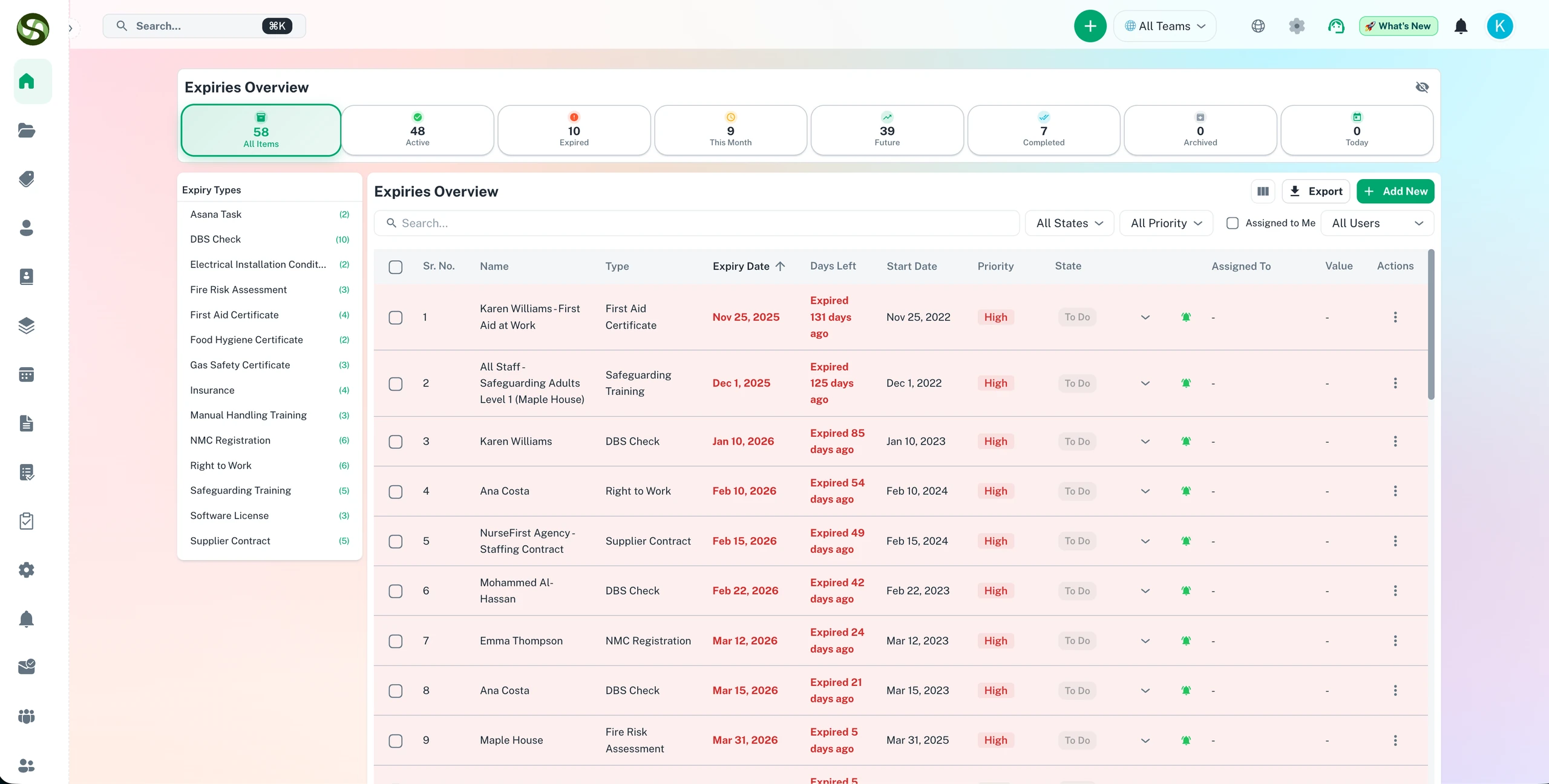
So verfolgt ExpiryEdge Ablaufdaten, versendet Erinnerungen und hält Ihr Team compliant
Schnelle Einrichtung
Einträge in Minuten anlegen
Automatischer Erinnerungsversand
Live-Compliance-Dashboard
Wie ExpiryEdge funktioniert Funktionen
Alles, was Sie brauchen, um Ihre Abläufe zu optimieren und produktiver zu arbeiten
Fügen Sie Ihre Fristen hinzu
Fügen Sie schnell jede Ablauf- oder Frist hinzu - Lizenzen, Verträge, Zertifizierungen, Versicherungen oder benutzerdefinierte Elemente. Geben Sie das Datum ein, weisen Sie verantwortliche Parteien zu und kategorisieren Sie.
Intelligente Erinnerungen festlegen
Konfigurieren Sie automatische Erinnerungen basierend auf Ihren Bedürfnissen. Erhalten Sie Benachrichtigungen Tage, Wochen oder Monate vor Ablauf per E-Mail, SMS, Slack oder WhatsApp.
Verfolgen & Verwalten
Sehen Sie alle Ihre Abläufe in einem zentralisierten Dashboard. Sortieren Sie nach Datum, Kategorie oder Priorität. Markieren Sie Elemente als verlängert und verfolgen Sie die Verlängerungshistorie.
Mit Teams zusammenarbeiten
Teilen Sie Fristen mit Teammitgliedern, weisen Sie Verantwortlichkeiten zu und stellen Sie sicher, dass alle über kritische Termine informiert bleiben.
Benachrichtigt werden
Erhalten Sie rechtzeitige Benachrichtigungen über mehrere Kanäle. Verpassen Sie nie eine Frist mit unserem zuverlässigen Mehrkanalbenachrichtigungssystem.
Verlängern & wiederholen
Markieren Sie Elemente mit einem Klick als verlängert. Richten Sie wiederkehrende Abläufe für Elemente ein, die sich jährlich, vierteljährlich oder monatlich wiederholen.
Warum Wie ExpiryEdge funktioniert?
Echte Vorteile mit messbarem Ergebnis für Ihr Unternehmen
In Minuten einrichten
Keine komplexe Konfiguration oder Schulung erforderlich. Fügen Sie Ihren ersten Ablauf in unter 60 Sekunden hinzu.
Funktioniert überall
Zugriff von jedem Gerät - Desktop, Mobilgerät oder Tablet. Ihre Fristen synchronisieren sich über alle Plattformen.
Nahtlose Integration
Verbinden Sie sich mit Slack, Microsoft Teams und anderen Tools, die Ihr Team bereits verwendet.
Skaliert mit Ihnen
Von der Verfolgung von 10 Elementen bis zu über 10.000 wächst ExpiryEdge mit Ihren Geschäftsanforderungen.
Wie ExpiryEdge funktioniert in der Praxis
Ein visueller Rundgang durch die Plattform
Schritt 1: Datensätze importieren
Importieren Sie bestehende Fristen in Minuten per Massenimport aus einer Tabelle - oder legen Sie Datensätze einzeln über das einfache Formular an.
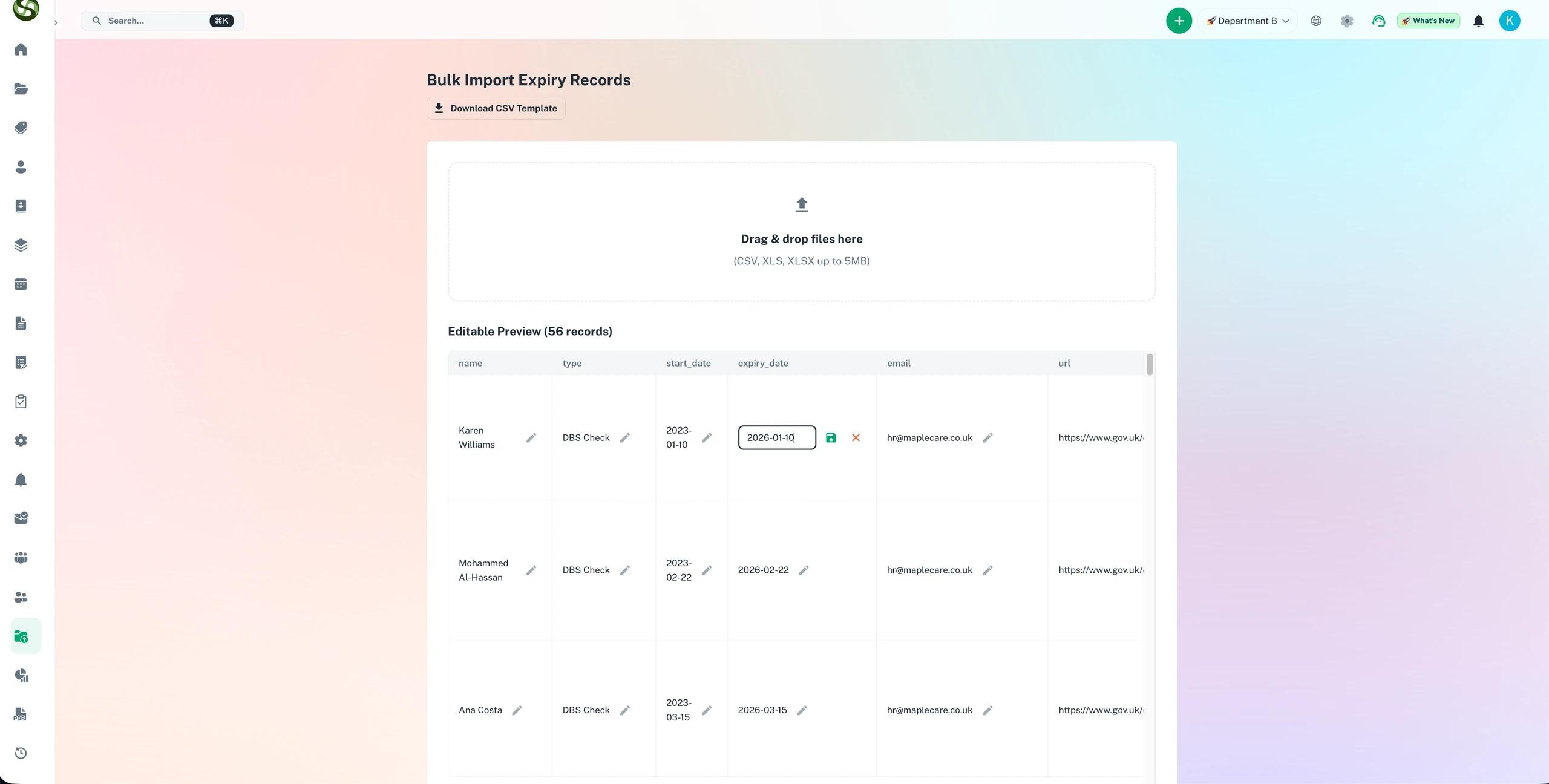
Schritt 2: Alles in einem Dashboard verfolgen
Ihre gesamte Compliance-Lage an einem Ort - Status, Priorität, Verantwortlicher und Termin für jeden Datensatz in Ihrer gesamten Organisation.
Wer nutzt Wie ExpiryEdge funktioniert?
Entwickelt für Teams und Unternehmen aller Branchen
Lizenzverlängerungen
Verfolgen Sie professionelle Lizenzen, Geschäftsgenehmigungen und Software-Abonnements.
Vertragsmanagement
Lassen Sie nie wichtige Verträge ablaufen. Erhalten Sie Warnungen vor Verlängerungsfristen.
Compliance-Verfolgung
Bleiben Sie konform mit Branchenvorschriften durch Verfolgung von Zertifizierungsabläufen.
Mitarbeiterzertifizierungen
Verwalten Sie Team-Qualifikationen, Schulungszertifizierungen und berufliche Qualifikationen.
Fahrzeuge & Ausrüstung
Verfolgen Sie Versicherungen, Zulassungen, Inspektionen und Wartungspläne.
Gesundheitswesen-Qualifikationen
Verwalten Sie medizinische Lizenzen, Zertifizierungen und Anforderungen an Fortbildung.
Häufig gestellte Fragen
Alles, was Sie wissen müssen. Antwort nicht dabei? Unser Support-Team hilft gerne weiter.
Die meisten Teams sind innerhalb eines Arbeitstags voll einsatzbereit. Sie registrieren sich, importieren Ihre bestehenden Compliance-Daten per CSV oder manueller Eingabe, konfigurieren Erinnerungspläne und Benachrichtigungskanäle, weisen Verantwortliche zu und gehen live. Es ist keine IT-Infrastruktur einzurichten, kein Implementierungsprojekt nötig und keine verpflichtenden Schulungen erforderlich.
Nein. ExpiryEdge ist für Compliance-Verantwortliche, Operations-Teams, HR-Fachleute und Unternehmer gemacht - nicht für IT-Spezialisten. Fristtypen, Erinnerungspläne und Teamstruktur richten Sie über eine unkomplizierte Oberfläche ein. Wenn Sie mit einer Tabelle umgehen können, können Sie ExpiryEdge einrichten.
Einmal konfiguriert, läuft ExpiryEdge automatisch. Sie müssen sich nicht einloggen, damit Erinnerungen verschickt werden. Das System prüft laufend alle Fälligkeitstermine und sendet Benachrichtigungen an die festgelegten Empfänger nach dem konfigurierten Plan - per E-Mail, SMS, WhatsApp, Slack, Teams oder einer beliebigen Kombination dieser Kanäle.
Die Erinnerung enthält den Namen der Frist, das Ablaufdatum, den Verantwortlichen und einen Link zum zugehörigen Datensatz in ExpiryEdge. Der Empfänger kann über den Link den vollständigen Datensatz einsehen, Verlängerungsdokumente hochladen und die Frist als verlängert markieren. All das wird im Prüfpfad des Systems festgehalten.
Ja. ExpiryEdge unterstützt den CSV-Import, sodass Sie bestehende Compliance-Daten aus Tabellen schnell übernehmen können. Sie ordnen Ihre Tabellenspalten den ExpiryEdge-Feldern zu und importieren alles auf einmal. Die meisten Organisationen migrieren ihre bestehenden Compliance-Daten in unter einer Stunde.
Bereit loszulegen?
Schließen Sie sich tausenden Teams an, die mit ExpiryEdge ihre Abläufe organisieren