
Zentralisiertes Dashboard
Erhalten Sie eine einheitliche Ansicht aller Fristen, Aufgaben, Teamaktivitäten und Analysen von einem leistungsstarken Dashboard.
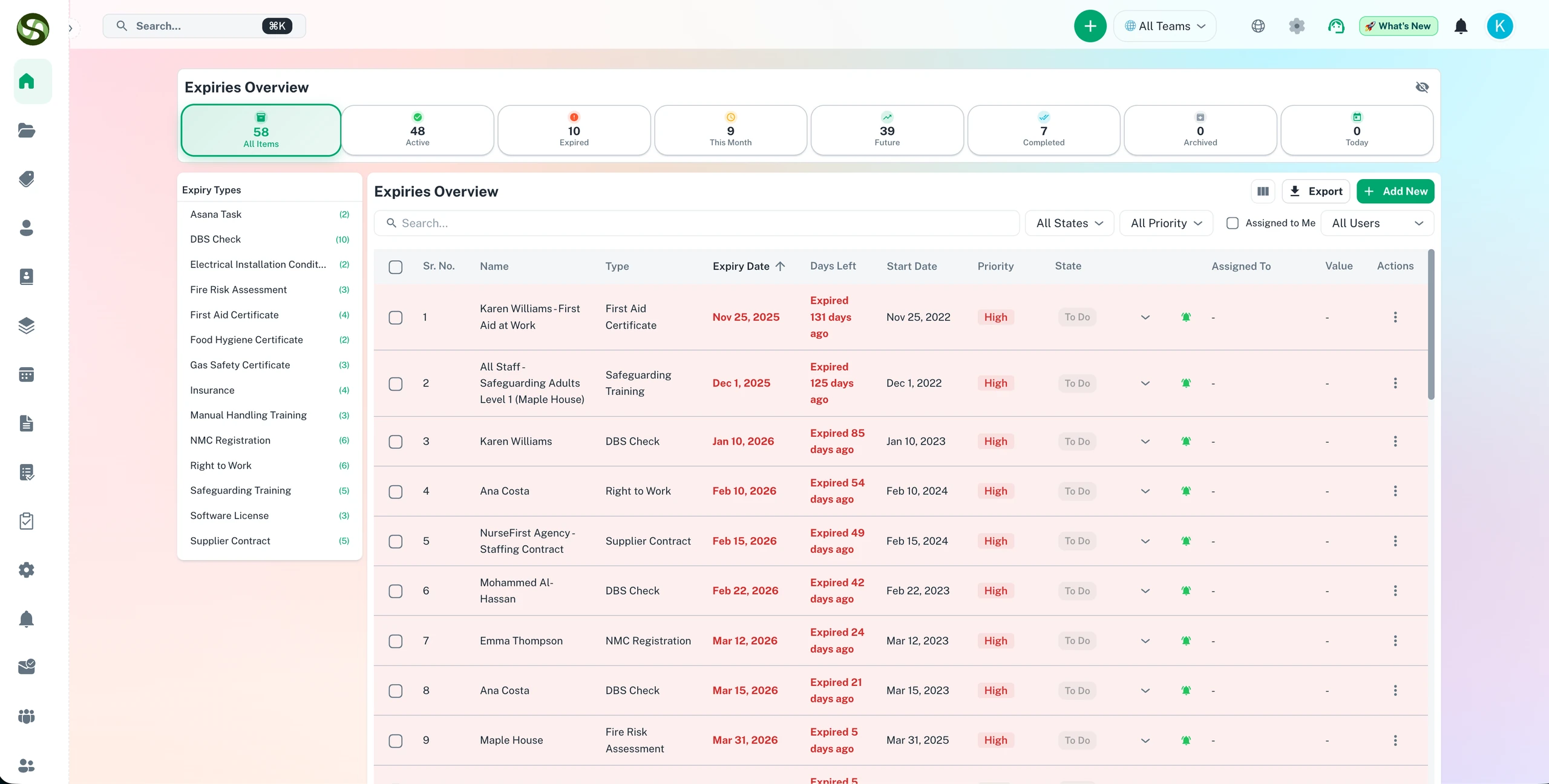
Ein Compliance-Dashboard für alle Fristen, Aufgaben und Verlängerungen in Echtzeit
Einheitliche Fristenübersicht
Aufgaben-Updates in Echtzeit
Anpassbare Widgets
Team-Aktivitätsfeed
Zentralisiertes Dashboard Funktionen
Alles, was Sie brauchen, um Ihre Abläufe zu optimieren und produktiver zu arbeiten
Einheitliche Fristenansicht
Sehen Sie alle Fristen, Aufgaben und Ablaufdaten in einem umfassenden Dashboard. Filtern Sie nach Team, Priorität, Datumsbereich oder Kategorie.
Echtzeit-Updates
Das Dashboard aktualisiert sich automatisch, wenn Aufgaben abgeschlossen werden und Fristen näher rücken. Sehen Sie immer den aktuellsten Status Ihrer Operationen.
Visuelle Analysen
Verstehen Sie Arbeitsbelastungsverteilung, Abschlussraten und Fristentrends mit intuitiven Diagrammen und Grafiken. Treffen Sie datengestützte Entscheidungen.
Anpassbare Widgets
Konfigurieren Sie Ihr Dashboard-Layout mit Drag-and-Drop-Widgets. Zeigen Sie nur die Informationen an, die für Ihre Rolle und Verantwortlichkeiten relevant sind.
Team-Aktivitätsfeed
Überwachen Sie aktuelle Aktionen, Abschlüsse und Updates von Ihrem Team. Bleiben Sie informiert darüber, woran jeder arbeitet.
Intelligente Prioritätsindikatoren
Farbcodierte Dringlichkeitsstufen und automatisierte Priorisierung. Konzentrieren Sie sich zuerst auf das, was Aufmerksamkeit benötigt, mit visuellen Hinweisen.
Warum Zentralisiertes Dashboard?
Echte Vorteile mit messbarem Ergebnis für Ihr Unternehmen
Vollständige Betriebsübersicht
Sehen Sie alles, was in Ihrer Organisation passiert, von einem Bildschirm aus. Keine Überprüfung mehrerer Systeme oder Anfrage nach Statusaktualisierungen mehr.
Schnellere Entscheidungsfindung
Greifen Sie sofort auf Echtzeitdaten und Analysen zu. Reagieren Sie 3-mal schneller auf Probleme mit sofortiger Situationswahrnehmung.
Reduzieren Sie Statusbesprechungszeit
Reduzieren Sie Statusbesprechungen um 60%. Jeder kann aktuellen Fortschritt und Prioritäten auf Abruf von seinem Dashboard sehen.
Verbessern Sie die Ressourcenzuweisung
Identifizieren Sie Engpässe und Arbeitsbelastungsungleichgewichte schnell. Verteilen Sie Arbeit neu, um die Teamproduktivität zu optimieren.
Wer nutzt Zentralisiertes Dashboard?
Entwickelt für Teams und Unternehmen aller Branchen
Führungsübersicht
C-Level und Manager erhalten einen Überblick über alle organisatorischen Fristen und kritischen Prioritäten auf einen Blick.
Teamleiter
Projektmanager überwachen Teamarbeitsbelastung, identifizieren Blocker und gewährleisten ausgewogene Aufgabenverteilung auf Mitglieder.
Compliance-Beauftragte
Verfolgen Sie alle regulatorischen Fristen, Zertifizierungen und Compliance-Anforderungen von einer dedizierten Compliance-Dashboard-Ansicht.
Betriebsleiter
Überwachen Sie Tagesgeschäft, wiederkehrende Aufgaben und Standardbetriebsverfahren über mehrere Abteilungen hinweg.
Einzelne Mitwirkende
Sehen Sie persönliche Aufgabenlisten, bevorstehende Fristen und Teamaktivitäten. Bleiben Sie mit organisatorischen Prioritäten abgestimmt.
Geschäftsanalysten
Greifen Sie auf detaillierte Analysen und Trenddaten zu. Erstellen Sie Berichte über Abschlussraten, Fristeneinhaltung und Teamleistung.
Häufig gestellte Fragen
Alles, was Sie wissen müssen. Antwort nicht dabei? Unser Support-Team hilft gerne weiter.
Das ExpiryEdge-Dashboard gibt Ihnen eine einheitliche Ansicht aller Fristen, sortiert nach Status: aktuell, bald fällig und überfällig. Sie sehen anstehende Termine, zugewiesene Verantwortliche, Fristtypen und Abschlussraten auf einen Blick. Filtern Sie nach Team, Abteilung, Standort oder Kategorie, um sich auf genau das zu konzentrieren, was Sie brauchen.
Ja. Das zentrale Dashboard bündelt den Compliance-Status aus jeder Abteilung, jedem Team und jedem Standort auf einem einzigen Bildschirm. Führungskräfte und Compliance-Verantwortliche sehen das Gesamtbild, ohne Updates von einzelnen Teams anzufordern. Jeder Abteilungsleiter kann zusätzlich eine gefilterte Ansicht erhalten, die nur seinen eigenen Verantwortungsbereich zeigt.
ExpiryEdge nutzt farbcodierte Dringlichkeitsanzeigen, damit Sie sofort sehen, welche Fristen Aufmerksamkeit brauchen. Fristen, die in den nächsten 7 Tagen ablaufen, werden anders hervorgehoben als solche in 30 oder 90 Tagen. Das Dashboard sortiert standardmäßig nach Dringlichkeit, sodass die kritischsten Fristen immer oben stehen.
Ja. Sie können die Compliance-Statusansicht jederzeit als PDF oder CSV exportieren. Das ist nützlich für Berichte an den Vorstand, interne Prüfungen oder als Nachweis gegenüber Aufsichtsbehörden. Der Export zeigt Status, Verantwortlichen, Ablaufdatum und letzte Aktion jeder Frist - alles, was für einen Compliance-Statusbericht nötig ist.
Ja. ExpiryEdge ist webbasiert und über jeden Browser auf Desktop, Tablet oder Smartphone zugänglich. Führungskräfte und Compliance-Verantwortliche können das Dashboard prüfen und dringende Fristen von überall aus einsehen, ohne eine Desktop-Anwendung zu benötigen.
Bereit loszulegen?
Schließen Sie sich tausenden Teams an, die mit ExpiryEdge ihre Abläufe organisieren