Warranty Management Software: Types, Features and Buying Tips

Warranty management software is a label for two different tools. Manufacturers use warranty claims systems to register products, check claims and recover costs from suppliers. Dealers and businesses that own equipment mostly need expiry tracking: one record per serial number with end dates, proof of purchase and reminders. Decide which job you have before comparing vendors.
You searched for warranty management software and got a list that mixes enterprise claims platforms, IT asset tools and reminder apps, all calling themselves the same thing. This guide sorts them by the job they do, lists the features worth paying for, and shows when a spreadsheet will do.
Key takeaways
- "Warranty management software" covers claims processing (for manufacturers and their suppliers) and expiry tracking (for dealers and asset owners). Most buyers need only one.
- Claims software starts from a repair: for example, SAP describes creating a warranty claim "that can then be forwarded to the respective supplier for a reimbursement".
- Expiry tracking starts from a date: one record per serial number, each type of cover with its own end date, and reminders before it ends.
- Asset management tools often store a warranty date as one field and can send expiring-warranty alerts.
- For business equipment, the federal Magnuson-Moss Act "does not apply to warranties on products sold for resale or for commercial purposes", so your contract terms set the dates you must track.
- A spreadsheet with EDATE formulas is enough for a small register; test any tool against your own records before you buy.
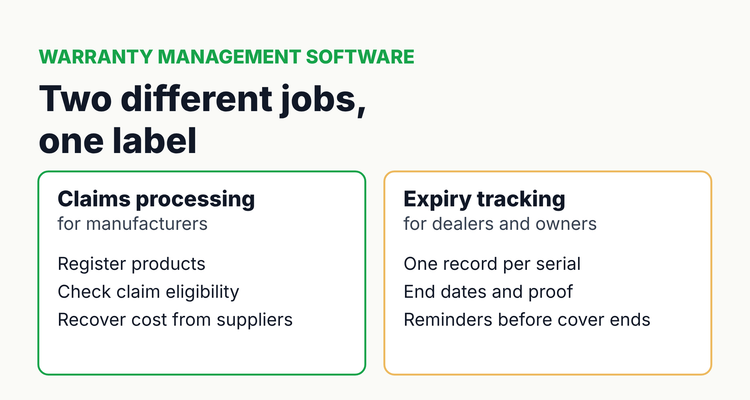 Same label, two jobs: decide whether you process claims or track end dates.
What does warranty management software do?
Warranty management software keeps track of what is covered, until when, and what happened when something failed. Depending on the type, that means processing claims, storing coverage end dates, or both.
Look at who files the claim. A manufacturer receives claims from dealers or customers and pays them, so it needs entitlement checks, parts and labor pricing, approval workflows and supplier recovery. A dealer or equipment owner submits claims, so it mainly needs to know which machine is still covered and to act before cover ends.
This guide is about buying. If you already know you need date tracking, our page on warranty tracking software shows the method in detail, and the guide for equipment dealers covers selling cover before it lapses.
What types of warranty management software are there?
There are four common types of warranty management software, plus the spreadsheet most teams start with. The type matters more than the brand.
Types of warranty management software compared (examples from official vendor documentation, checked 12 October 2026)
| Type | Built for | Core jobs | Example from vendor documentation | You probably need it if |
|---|---|---|---|---|
| Claims management (often an ERP module or specialist platform) | Manufacturers, importers and their suppliers | Claim intake, entitlement and completeness checks, parts and labor pricing, supplier recovery, posting to finance | SAP S/4HANA warranty claim management: claims checked for completeness and eligibility, sent to the supplier for reimbursement, settled amount posted to finance | You pay warranty claims and want to recover costs from component suppliers |
| Dealer claim submission | Dealers and service centers | Submitting claims to each manufacturer, tracking approvals and payments | Usually the manufacturer's own dealer portal or your dealer management system (check your agreements) | You repair under several manufacturers' warranties |
| Asset management or CMMS (maintenance software) | IT teams, facilities, fleets | Asset register, maintenance, tickets; warranty date as one field | Snipe-IT sends an expiring alert "when/if there are assets those warranties are about to expire" | You already need an asset or maintenance system and warranties are a side field |
| Expiry and contract tracker | Dealers, owners, compliance teams | One record per serial number or contract, end dates, owners, files, reminders | Tools in this group track any dated record, not only warranties | You have many end dates, contracts and people to chase |
| Spreadsheet | Small registers | Rows, EDATE formulas, conditional formatting | Our free warranty and service contract tracker | A small register with one person in charge |
Two warnings before you shortlist. First, a claims platform will not fix a missed renewal: it acts after something breaks. Second, an asset tool's warranty field is often a single date, which can't show that parts cover ends on a different day from labor cover. Ask about both in every demo.
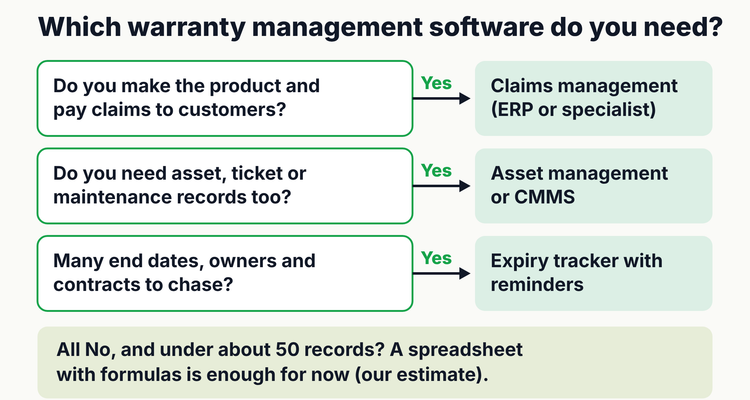 Answer three questions to find the right type before you compare brands.
Which warranty management software features matter most?
The features that matter most are the ones that stop a missed date or a lost claim, so test those first. Use this table as a demo script.
Warranty management software features: why they matter and how to test them
| Feature | Why it matters | How to test it in a trial |
|---|---|---|
| One record per serial number | Cover lives per machine, not per customer | Import 20 real serials; check each gets its own record |
| Several end dates per record | Parts, labor and component cover often end on different days | Add a machine with 12-month labor and 24-month parts |
| Start-date rule | Some programs start at install, others at invoice or shipping | Check you can record which date starts the clock |
| Proof of purchase and registration on the record | Claims need the invoice; some warranties need registration | Attach a PDF and find it again from a phone |
| Reminders with lead times and channels | A date nobody sees is a missed date | Set 90, 60, 30 and 7 days; check email and chat delivery |
| Owner and backup | Reminders to a shared inbox get ignored | Assign a person and a backup; reassign when someone leaves |
| Service contract notice and auto-renew dates | Cancellation notice can fall months before the end date | Enter a contract with a 60-day notice clause |
| Claim log | Repeat failures and open claims need a history | Log a claim and its outcome on one machine |
| Import and export (CSV or XLSX) | You must be able to leave with your data | Export everything on day one of the trial |
| Audit trail and permissions | Shows who changed a date and when | Edit a date and check the history |
| Pricing model | Per user, per asset and per record pricing scale differently | Price your size today and at double the records |
Integration with accounting or an ERP is worth asking about if invoice dates start your warranties, but it is rarely the reason a date is missed. Ownership and reminders are.
When is a spreadsheet enough for warranty management?
A spreadsheet is enough when one person owns a small register, every warranty has one or two end dates, and nobody else needs reminders. In our experience that is up to about 50 records, though that is an estimate, not a rule.
Do this now: build a warranty register in 30 minutes
Create one row per serial number with these columns, starting in row 2. Times are our estimates.
Warranty register: columns and formulas (row 2 = first machine)
| Column | Header | Formula or example |
|---|---|---|
| A | Customer or site | Example: Plant 2 |
| B | Model and serial number | Example: CH-2207 / SN 48113 |
| C | Install date | 3/3/2025 |
| D | Invoice date | 4/14/2025 |
| E | Start rule | Install or Invoice (dropdown) |
| F | Warranty start | =IF(E2="Invoice",D2,C2) |
| G | Labor months | 12 |
| H | Labor end | =EDATE(F2,G2) |
| I | Parts months | 24 |
| J | Parts end | =EDATE(F2,I2) |
| K | Next end | =IF(MIN(H2,J2)>=TODAY(),MIN(H2,J2),MAX(H2,J2)) |
| L | Days left | =K2-TODAY() |
| M | Owner and backup | Service manager / office manager |
| N | Proof of purchase | Link to the invoice PDF |
Format column L red at 30 days or less and amber at 90 or less, and sort by it every Monday (about 10 minutes). EDATE returns the date a set number of months after the start date in both Excel and Google Sheets. Our free warranty and service contract tracker has this layout built in.
Do this now: score vendors before the demo
If you are buying, rank three shortlisted tools in the same sheet. Give each feature from the table above a weight from 1 to 5 in column B, then score each tool from 0 to 3 in columns C, D and E.
- Total per tool: =SUMPRODUCT($B$2:$B$12,C2:C12), copied across to D and E.
- Must-haves: mark them with a weight of 5, and disqualify any tool that scores 0 on one.
- Tie-breaker: price at double your current record count.
How do you choose warranty management software, step by step?
Choose by matching the tool to your job and testing it with your own records, not the vendor's sample data.
- Name the job. Paying and recovering claims, submitting claims, or tracking end dates.
- Count what you track. Machines, cover types per machine, service contracts, and people who need reminders.
- List who acts on each date. A record without an owner is the most common reason a date is missed.
- Shortlist by type, then brand. Two or three tools of the right type beat ten of mixed types.
- Trial with 20 real records. Include one with split cover and one service contract with a notice period.
- Export on day one. Confirm you can get every record and file back out.
- Score and price. Use the scorecard and price at your size and at double.
- Decide and migrate. Import the full register and set owners before switching off the old method.
What warranty dates does the law care about?
For business equipment, the law mostly leaves the dates to your contract, so the document's terms decide what you track. The Federal Trade Commission's guide to federal warranty law says the Magnuson-Moss Act "does not apply to warranties on products sold for resale or for commercial purposes", and that "Service contracts, unlike warranties, are purchased separately from a product."
For consumer products the Act does apply, and the FTC says "Requiring customers to return a registration card is an unreasonable duty that is not allowed in a full warranty." Under the Uniform Commercial Code (UCC) section 2-725, a claim for breach of a sales contract must be brought within four years, which the contract can shorten to no less than one year. States adopt the UCC with their own changes, so this is a summary, not legal advice.
⚠️What happens if you miss it: once a written warranty's term ends, its own terms decide whether a failure is covered, and for business equipment Magnuson-Moss "does not apply" to fill the gap (FTC). Separately, a lawsuit for breach of warranty generally has to start within four years under UCC 2-725, and the contract can cut that to one year. A missed end date usually means paying for the repair yourself.
💡 Pro Tip
One equipment dealer we work with keeps the original warranty and the extended contract on the same machine record, with the invoice end date pulled from accounting. Whoever opens the machine sees every type of cover and the next date to act on, so the extended offer goes out before the original cover ends.
Spreadsheet or software?
Stay with a spreadsheet while one person owns a small register and has time to check it weekly. Spreadsheets are fragile at scale: Raymond Panko's review of field audits found errors in 94% of the business spreadsheets studied. Move to software when several people need reminders, records need files attached, or you must show who changed a date.
ExpiryEdge is an expiry tracker, not a claims-processing system. It holds each machine, warranty or service contract as a record with an owner and backup, files, reminders at 90, 60, 30 and 7 days by email, SMS, Slack or Teams, recurring records for contracts that renew, and an audit trail. For the next steps, read equipment warranty tracking for businesses, extended warranty renewal strategy and the service contract renewal process.
Frequently asked questions
What is warranty management software?
It is software that records what is under warranty, until when, and what happened when something failed. Manufacturers use claims management systems to check and pay claims and recover costs from suppliers. Dealers and equipment owners mainly use expiry tracking to see which machines are covered and act before cover ends.
What is the difference between warranty claims software and warranty tracking?
Claims software starts from a repair: it checks eligibility, prices parts and labor and recovers costs. Warranty tracking starts from a date: it stores each machine's end dates and proof of purchase and reminds the owner before cover ends. Many businesses only need tracking.
Can I manage warranties in Excel or Google Sheets?
Yes, for a small register owned by one person. Use one row per serial number and calculate end dates with =EDATE(start_date, months), which works in both Excel and Google Sheets. Add conditional formatting for 90 and 30 days and review it weekly.
What features should warranty management software have?
At minimum: one record per serial number, several end dates per record for split cover, a start-date rule, proof of purchase attached, reminders with an owner and backup, service contract notice dates, export to CSV or XLSX and an audit trail. Test each with your own records.
Does the Magnuson-Moss Warranty Act apply to business equipment?
No. The FTC says the Act does not apply to warranties on products sold for resale or for commercial purposes. For business equipment, the written warranty and your contract set the terms, and the UCC sets a four-year limit for breach claims that a contract can shorten to one year.
Is an extended warranty the same as a service contract?
Often not, legally. The FTC says service contracts, unlike warranties, are purchased separately from a product. Whatever it is called, track its end date and any notice or auto-renew date in the contract as separate dates.
Sources
- FTC: Businessperson's Guide to Federal Warranty Law
- UCC 2-725, statute of limitations in contracts for sale (LII)
- SAP Learning: Introducing warranty claim management, supplier recovery processing
- Snipe-IT documentation: Email alerts
- Microsoft Support: EDATE function
- Google Docs Editors Help: EDATE
- Panko, What We Don't Know About Spreadsheet Errors Today (arXiv:1602.02601)
Last reviewed: 12 October 2026
Frequently asked questions
Claims software starts from a repair: it checks eligibility, prices parts and labor and recovers costs. Warranty tracking starts from a date: it stores each machine's end dates and proof of purchase and reminds the owner before cover ends. Many businesses only need tracking.
Yes, for a small register owned by one person. Use one row per serial number and calculate end dates with =EDATE(start_date, months), which works in both Excel and Google Sheets. Add conditional formatting for 90 and 30 days and review it weekly.
At minimum: one record per serial number, several end dates per record for split cover, a start-date rule, proof of purchase attached, reminders with an owner and backup, service contract notice dates, export to CSV or XLSX and an audit trail. Test each with your own records.
No. The FTC says the Act does not apply to warranties on products sold for resale or for commercial purposes. For business equipment, the written warranty and your contract set the terms, and the UCC sets a four-year limit for breach claims that a contract can shorten to one year.
Often not, legally. The FTC says service contracts, unlike warranties, are purchased separately from a product. Whatever it is called, track its end date and any notice or auto-renew date in the contract as separate dates.