Warranty Tracking Software for Dealers: A 90/60/30/7 Renewal Plan

Warranty tracking software keeps one record per machine serial number, with a separate end date for each type of cover, and reminds the right person before each one runs out. For an equipment dealer, those reminders double as a sales calendar: offer an extended warranty or service contract at 90, 60, 30 and 7 days before the end date, and expiring cover turns into renewal revenue instead of a surprise repair bill.
Most dealers find out a warranty has ended when the customer rings about a fault. The customer gets an invoice they weren't expecting, you get a complaint, and the service contract you could have sold is gone. You can fix that this week, with a spreadsheet or with software. This guide shows both.
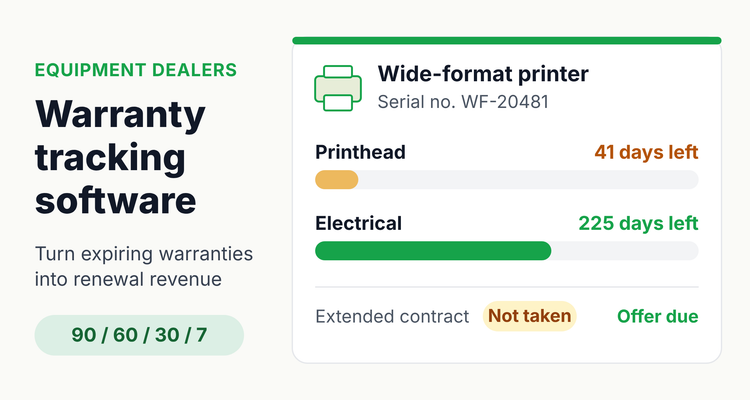 One record per machine: each type of coverage gets its own end date and days-left count.
Why equipment warranties slip through: the data is shaped wrong
People aren't careless. The records just don't match how warranties work. Five patterns cause most misses:
- Warranties live per serial number, but a CRM (customer relationship management) system has one row per account. A customer with eight machines hides seven end dates.
- Cover is split. Parts can end on a different day from labor.
- Nobody agrees on the start date. Programs count from install, invoice or shipping, and those can be weeks apart.
- Extended contracts sit somewhere else, usually in accounting.
- The person who set the reminder has left, and it lived in their calendar.
Tracking equipment your own business owns? Our guide to equipment warranty tracking for businesses covers claims and proof.
Build a warranty tracker in a spreadsheet this afternoon
Use one row per serial number, calculate every end date with a formula rather than typing it, and add a status column that shows where each offer stands. For 50 machines whose paperwork is all in one system, plan on an afternoon (that's our estimate, not a benchmark):
- Set up the columns (20 minutes). Copy the layout below into Excel or Google Sheets, with the first machine in row 2.
- Enter your installed base (2 hours). One row per serial number, never one per customer.
- Add formulas and colors (20 minutes). Copy row 2 down, then add the three row rules.
- Assign owners and book the weekly review (15 minutes). Every row gets an owner and a backup.
Prefer a ready-made file? Our free warranty and service contract tracker has all of this built in, with no sign-up.
Warranty tracking spreadsheet: columns and formulas (row 2)
| Column | Header | What goes in it |
|---|---|---|
| A | Customer | Account and site |
| B | Contact email | Who approves purchases |
| C | Model | Decides which plans you offer |
| D | Serial number | The unit the warranty covers |
| E | Install date | From the install job sheet |
| F | Invoice date | From accounting |
| G | Start rule | Dropdown: Install or Invoice |
| H | Warranty start | =IF(G2="Invoice",F2,E2) |
| I | Parts months | e.g. 12 |
| J | Parts end | =EDATE(H2,I2) |
| K | Labor months | e.g. 18 |
| L | Labor end | =EDATE(H2,K2) |
| M | Next end | =IF(MIN(J2,L2)>=TODAY(),MIN(J2,L2),MAX(J2,L2)) |
| N | Days left | =M2-TODAY() |
| O | Touch due | =IF(OR(Q2="Taken",Q2="Declined"),"",IF(N2<0,"Lapsed",IF(N2<=7,7,IF(N2<=30,30,IF(N2<=60,60,IF(N2<=90,90,"")))))) |
| P | Last touch sent | Dropdown: 90, 60, 30, 7 |
| Q | Status | Dropdown: Offer due, Offered, Taken, Declined |
| R | Owner | Account manager |
| S | Backup | Covers absences |
| T | Notes | Quote number, decline reason |
EDATE returns the date a given number of months after a start date, and it works the same in Excel and Google Sheets. Format columns H, J, L and M as dates and N as a number. Then add three conditional formatting rules:
- Amber row, a touch is due and hasn't been sent: =AND($O2<>"",$O2&""<>$P2&""). The &"" lets the text dropdown values match the numbers.
- Red row, under 30 days and no decision yet: =AND($N2>=0,$N2<=30,$Q2<>"Taken",$Q2<>"Declined").
- Gray row, done: =$Q2="Taken".
Worked example: one printer through the formulas
Take a printer installed on Mar 3, 2025 (the dates are illustrative). The start rule is Install, with 12 months of parts cover and 18 of labor.
- Warranty start (H2) is Mar 3, 2025, because the rule is Install.
- Parts end (J2): =EDATE(H2,12) gives Mar 3, 2026. Labor end (L2): =EDATE(H2,18) gives Sep 3, 2026.
- Next end (M2): on Jan 21, 2026 the earlier date is still ahead, so it shows Mar 3, 2026.
- Days left (N2) is 41. Labor still has 225.
- Touch due (O2): 41 sits between 31 and 60, so it shows 60. The last touch sent was the 90, so the row turns amber. Send the quote.
- The four touch dates are Dec 3, 2025 (90), Jan 2, 2026 (60), Feb 1, 2026 (30) and Feb 24, 2026 (7).
Now suppose the program counts from an invoice dated six weeks before install. Every date moves six weeks earlier. That's why the Start rule column exists.
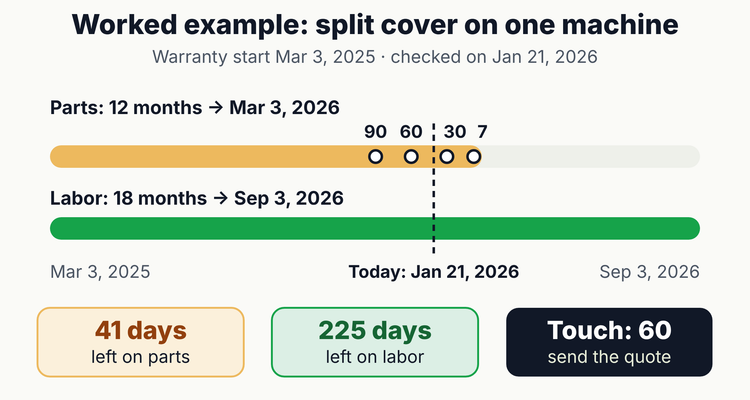 Split cover on one machine: the sequence runs from whichever cover ends first.
Missing install dates? Work down the paperwork
Go from the most reliable record to the least, and only use the invoice date when nothing better exists:
- The install or commissioning job sheet. This is your best evidence.
- The delivery note. Install can't come before delivery.
- The warranty registration, which shows the start date the manufacturer itself uses.
- The customer's asset register or the first service ticket.
- The invoice date, as a last resort. Write "install date estimated from invoice" in Notes.
If the machine was installed after it was invoiced, using the invoice date makes your reminders early. That's the safe side to err on. Either way, set Start rule to match each program's terms.
Warranty, service contract or extended warranty: the legal difference
A warranty comes with the product. A service contract is bought separately. The Federal Trade Commission (FTC) puts it plainly in its guide to federal warranty law: "Service contracts, unlike warranties, are purchased separately from a product." "Extended warranty" is a sales term, and federal rules treat most of them as service contracts.
Warranty, service contract and extended warranty: official definitions (last verified 12 Oct 2026)
| Term | Official wording | Paid on top of the price? | How to track it | Source |
|---|---|---|---|---|
| Written warranty (manufacturer warranty) | "any written affirmation of fact or written promise made in connection with the sale of a consumer product" | No. The buyer "must not give any consideration beyond the purchase price" (16 CFR 700.11(b)) | Months per cover type | 15 U.S.C. 2301(6); 16 CFR 700.11(b) |
| Implied warranty | "a warranty that the goods shall be merchantable is implied in a contract for their sale if the seller is a merchant with respect to goods of that kind" | No. Arises under state law | File sales terms with the machine | UCC 2-314(1); 15 U.S.C. 2301(7) |
| Service contract | "a contract in writing to perform, over a fixed period of time or for a specified duration, services relating to the maintenance or repair (or both)" of a product | Yes, or entered after the sale | Own row and 90/60/30/7 cycle | 15 U.S.C. 2301(8); FTC guide |
| "Extended warranty" | Not defined in 15 U.S.C. 2301. An agreement "entered into at some date after the purchase" or calling for extra payment "is a service contract" | Usually yes | Track as a service contract | 16 CFR 700.11(c) |
| Maintenance or inspection plan | An agreement "which relates only to the performance of maintenance and/or inspection services" is a service contract | Even when free at the time of sale | Own row plus visit dates | 16 CFR 700.11(c) |
One limit matters for dealers. The Magnuson-Moss Warranty Act "covers only warranties on consumer products," and the FTC guide says it "does not apply to warranties on products sold for resale or for commercial purposes." For business equipment, use these definitions as vocabulary; your program and contract terms set the cover. Under the model Uniform Commercial Code (UCC), an action for breach of a sales contract must be commenced within four years (UCC 2-725); states adopt the UCC with changes.
Official sources: 15 U.S.C. 2301, 16 CFR 700.11, FTC Businessperson's Guide to Federal Warranty Law, UCC 2-314.
Send the first renewal offer 90 days before cover ends
Ninety days gives the customer time to find budget, and three follow ups keep it moving. If cover is split, count from whichever part ends first.
- At 90 days, review the cover. Say what's covered and when it ends, and offer a check visit.
- At 60 days, send a quote for the option that fits how hard the machine works.
- At 30 days, ask for a decision. Give the end date and what repairs cost after it.
- At 7 days, phone the decision maker. Then set Status to Taken or Declined, with the reason.
- After the end date, a renewed contract gets its own row and its own cycle.
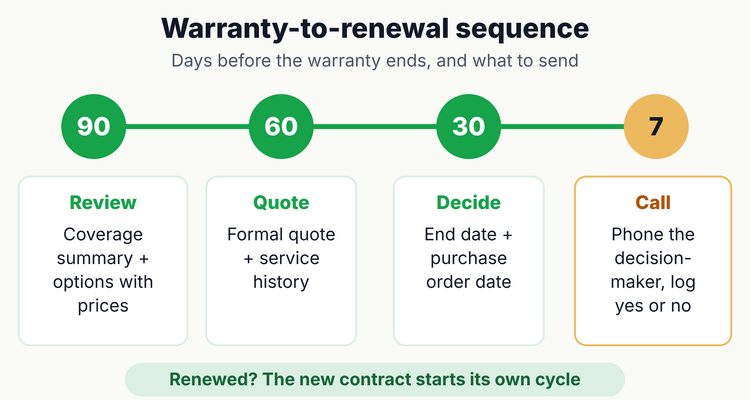 The warranty-to-renewal sequence: one action at each reminder.
Here are three emails you can adapt. Swap the bracketed parts for your own details.
Email 1, at 90 days: the coverage review
Subject: Your [model] warranty: what's covered until [end date]
Hi [first name], the [parts] warranty on your [model] (serial [serial]) ends on [end date]. Until then, covered faults are repaired free. Could we book a check visit on [date] or [date], so anything we find gets fixed while it's still covered? Cover after that starts from [price] a year.
Email 2, at 60 days: the quote
Subject: Cover options for your [model] after [end date]
Hi [first name], thanks for having us in on [visit date]. We found [condition]. Given how much the machine runs, I'd suggest [option], covering [parts/labor/visits] for [term] at [price]. The quote's attached. Who else needs to sign off, and is there a budget date we should work to?
Email 3, at 30 days: the decision request
Subject: [model] warranty ends [end date]: decision needed by [date]
Hi [first name], your [model] warranty ends on [end date]. After that, repairs are billed at [labor rate] an hour plus parts, and a [common repair] typically runs [price]. To avoid a gap in cover we'd need the purchase order by [date]. Not renewing? Just reply and I'll send our rate card.
⚠️If you miss the window, the customer usually learns their warranty has ended when a repair invoice lands. The renewal conversation becomes a billing complaint. And before you promise that cover can be added after a lapse, check what your manufacturer's program actually allows.
Use the end of a warranty as a reason to visit
Expiring cover gives you a natural reason to get on site and offer choices. These tips come from how we'd run it, not from industry benchmarks:
- Book a check visit 45 to 60 days before the end date. Faults get fixed while they're covered, and your quote has something real behind it.
- Price from your own service records. Take the out-of-warranty repair cost per machine per year, then add admin and margin.
- Offer tiers. For example parts only; parts and labor; or parts, labor and a preventive visit.
- Fold split cover into one contract with a single end date.
- Co-term customers with several machines. Prorate each one to a shared renewal date, so they sign one purchase order a year instead of eight.
- Treat a decline as a later renewal. Record the reason and offer again at the next service visit.
For tier pricing, co-terming formulas and decline codes, see our extended warranty renewal strategy guide.
Run a 15-minute warranty pipeline review every Monday
Pick a fixed slot, say Monday at 9:00, and let the backup run it when the owner's away. The timings below are a suggestion.
- Sort and filter (2 minutes). Days left, smallest first, with Taken and Declined hidden.
- Send the amber rows (5 minutes), then update Last touch sent and Status.
- Book the 7-day calls (3 minutes) straight into the owner's calendar.
- Clear the lapsed rows (3 minutes). Record the decision and send the rate card.
- Look 120 days ahead (2 minutes). Book check visits and check for owner holidays.
Once a month, compare Taken with Declined and read through the decline reasons. They'll tell you whether price, scope or timing is losing you deals.
When a spreadsheet stops being enough
A spreadsheet works for a few dozen machines and one person who opens it every week. It breaks down with hundreds of serial numbers, several account managers, or the day the person who built it leaves. Nothing reminds anyone unless the file is open.
Formula errors are the other risk. Raymond Panko of the University of Hawai'i compiled six field audits covering 85 real business spreadsheets and reported: "Collectively, these studies found errors in 94% of the spreadsheets studied." Your tracker probably isn't the exception.
Warranty tracking spreadsheet vs warranty tracking software
| What you need | Spreadsheet | Warranty tracking software |
|---|---|---|
| Reminders | None unless someone opens the file | Sent at 90, 60, 30 and 7 days to the record's owner |
| Ownership | A name typed in a cell | Assigned owner and backup who receive the reminders |
| Annual service contracts | Copy the row and retype the dates | Recurring record, renewed as a copy for the next term |
| Proof | Files in shared folders | Certificate, contract and invoice attached to the record |
| Change history | Overwritten on every edit | Audit trail of who changed what |
| Error risk | Errors in 94% of audited spreadsheets (Panko) | Dates set on the record, no formulas to copy down |
💡 Pro Tip
Keep the original warranty and any extended contract side by side on the same machine record. It works in a spreadsheet too, and it stops anyone offering cover to a customer who has already bought it.
If reminders need to reach people without anyone opening a file, ExpiryEdge is one option. Each machine or contract becomes a record with an end date, an owner and a backup, and the attached paperwork. Reminders go out by email, SMS, WhatsApp, Slack or Teams, overdue items escalate to a manager, and every change lands in an audit trail you can export. Our warranty tracking page shows the dealer view, and the warranty management software buyer's guide covers what to compare across tools.
Warranty tracking checklist
- ✓
One row or record per serial number, not per customer
- ✓
Install date, invoice date and start rule recorded
- ✓
End dates calculated with EDATE, one per coverage type
- ✓
Extended warranties and service contracts on their own rows
- ✓
Owner, backup and status on every machine
- ✓
Certificate, contract and invoice filed with the machine
- ✓
15-minute pipeline review booked every week
Frequently asked questions
What is warranty tracking software?
It stores warranty and service contract end dates for each product or serial number, then reminds the right person before each one ends. Equipment dealers use it to time extended warranty and service contract offers. Businesses that own equipment use it to get repairs done while the machine is still covered.
What formula calculates a warranty end date in Excel or Google Sheets?
Use =EDATE(start_date, months). For a 12-month warranty starting on the date in H2, that's =EDATE(H2,12). EDATE works in both Excel and Google Sheets. Format the result as a date, then put =M2-TODAY() in a number-formatted column to see the days left.
Is an extended warranty a warranty or a service contract?
Usually a service contract. Under 16 CFR 700.11(c), an agreement made after the purchase, or one that costs extra on top of the product price, is a service contract rather than a warranty. Track it on its own row with its own start and end dates, so the renewal cycle runs separately.
When should I send an extended warranty renewal offer?
Start 90 days before the warranty ends, then follow up at 60, 30 and 7 days. Use the first contact for a coverage review, the second for a quote, the third to ask for a decision and the last for a phone call. If parts and labor end on different days, count from whichever ends first.
What if I don't know a machine's install date?
Check the install job sheet, the delivery note and the warranty registration first. Only then fall back to the invoice date, and mark it as estimated. If the machine went in after it was invoiced, the invoice date makes your reminders early rather than late. Record which start rule each manufacturer program uses.
Can I track warranties in a spreadsheet?
Yes, for a few dozen machines and one owner who opens the file every week. A spreadsheet sends no reminders, though, and Raymond Panko's review of six field audits found errors in 94% of 85 business spreadsheets. With hundreds of serial numbers or several account managers, software with assigned owners and automatic reminders is the safer choice.
Sources
- Federal Trade Commission, Businessperson's Guide to Federal Warranty Law (page updated March 11, 2025)
- 15 U.S.C. 2301, Magnuson-Moss Warranty Act definitions (Cornell LII)
- 16 CFR 700.11, Written warranty, service contract, and insurance distinguished (eCFR, up to date as of 9/25/2026)
- Uniform Commercial Code 2-314, Implied warranty: merchantability (Cornell LII)
- Uniform Commercial Code 2-725, Statute of limitations in contracts for sale (Cornell LII)
- Raymond R. Panko, What We Don't Know About Spreadsheet Errors Today, EuSpRIG 2015 proceedings, Table 2 (arXiv:1602.02601)
- Microsoft Support, EDATE function
- Google Docs Editors Help, EDATE
Last reviewed: 29 October 2026
Frequently asked questions
Use =EDATE(start_date, months). For a 12-month warranty starting on the date in H2, that's =EDATE(H2,12). EDATE works in both Excel and Google Sheets. Format the result as a date, then put =M2-TODAY() in a number-formatted column to see the days left.
Usually a service contract. Under 16 CFR 700.11(c), an agreement made after the purchase, or one that costs extra on top of the product price, is a service contract rather than a warranty. Track it on its own row with its own start and end dates, so the renewal cycle runs separately.
Start 90 days before the warranty ends, then follow up at 60, 30 and 7 days. Use the first contact for a coverage review, the second for a quote, the third to ask for a decision and the last for a phone call. If parts and labor end on different days, count from whichever ends first.
Check the install job sheet, the delivery note and the warranty registration first. Only then fall back to the invoice date, and mark it as estimated. If the machine went in after it was invoiced, the invoice date makes your reminders early rather than late. Record which start rule each manufacturer program uses.
Yes, for a few dozen machines and one owner who opens the file every week. A spreadsheet sends no reminders, though, and Raymond Panko's review of six field audits found errors in 94% of 85 business spreadsheets. With hundreds of serial numbers or several account managers, software with assigned owners and automatic reminders is the safer choice.