Automated Alerts for Legal Teams: A Practical 2026 Guide

Automated Alerts for Legal Teams: A Practical 2026 Guide

TL;DR:
Automated alert systems help legal and compliance teams track deadlines, turning reactive tasks into deliberate decisions. They automate escalation, ensure responsible ownership, and provide verifiable audit trails, reducing missed renewals and compliance risks. Using platforms like Expiryedge improves deadline management with automated extraction, tiered alerts, and comprehensive record-keeping.
Automated alerts turn hidden notice deadlines and renewal windows into deliberate decisions. For in-house legal, compliance, procurement, HR, and facilities teams, the core job is simple: know what is due, who owns it, and when action is required before the window closes. Platforms like Expiryedge, combined with audit trails and immutable logs, convert that job from a manual calendar exercise into a tracked, accountable workflow. The role of automated alerts in legal teams is not just convenience; it is the difference between a renewal you chose and one that happened to you.
What an automated alert system actually does for your team
A mature alert platform does more than send emails. Here is what legal teams should expect from any serious solution:
- Escalation rules — When a primary owner does not act, the system automatically notifies a backup, then a manager, then a compliance lead. Automated escalation prevents single-person failure modes.
Pro Tip: Tier your alert cadences by contract criticality and assign a backup owner to every record. A single-owner setup with one reminder cadence is the fastest path to alert fatigue and missed escalations.
High-value use cases to automate first
Not every deadline carries the same risk. Triage by value at risk and operational complexity, then automate in this order:
- Regulatory filing windows — IRS returns, OSHA incident reports, state license renewals: assign a named owner per the compliance calendar standard and require completion evidence.
For organizations with cross-border operations, a global compliance calendar should layer a global master view over country-specific and functional views so HR, payroll, finance, and legal each see only what they own.
What to require when evaluating alert and deadline platforms
Must-have features:
- AI/OCR date extraction from uploaded documents
- Configurable escalation rules with named backup owners
- Immutable audit trails with timestamps and action logs
- Role-based access controls and SSO support
- Multi-channel notification delivery (email, SMS, in-app)
- Integration with calendar, HRIS, and ERP systems
- Data residency options that satisfy your organization’s security policy
Nice-to-have:
- Pre-built templates for common obligation types (OSHA, state licenses)
- Dashboard views by department, risk tier, or deadline proximity
- E-signature collection tied to renewal workflows
Sample RFP language to copy: “The platform must deliver notifications within [X] minutes of a scheduled trigger, maintain an immutable log of all alerts sent and actions taken, and support role-based access controls with SSO integration. Data must remain within U.S. data centers.”
Practical rollout plan from pilot to full deployment
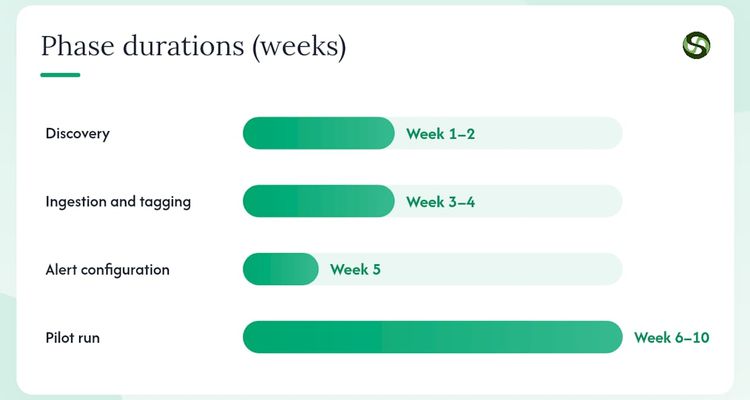
| Phase | Timeline | Key Activities |
|---|---|---|
| Discovery | Week 1–2 | Identify pilot cohort (top 10 contracts by value or next 30–90 days of notice deadlines); audit existing data |
| Ingestion and tagging | Week 3–4 | Upload contracts; validate AI-extracted dates; assign owners and backups |
| Alert configuration | Week 5 | Set reminder cadences by criticality tier; configure escalation rules |
| Pilot run | Week 6–10 | Run live alerts; track missed actions and escalations |
| Review | — | Measure KPIs against baseline; identify data gaps |
| Full roll-out | — | Expand to full contract and obligation portfolio |
Common cost drivers: data clean-up for legacy contracts, integration development, seat licensing, and initial training. The fastest way to reduce pilot cost is to start with a narrow cohort of high-value contracts where the value at risk is obvious and the data is already reasonably clean.
Common pitfalls and best practices when deploying alerts
Do:
- Assign a named owner and a backup to every record before going live.
- Require a completion attachment (signed notice, filing receipt) for every closed task. Scheduled does not mean done.
- Validate AI-extracted dates against source documents during the pilot phase.
- Run a quarterly governance review: spot-check audit logs, test escalation rules, and retire stale records.
Don’t:
- Send the same alert to a distribution list with no named owner. Shared inboxes create diffused accountability.
- Configure a single reminder cadence for all contracts regardless of value. High-value agreements need earlier and more frequent alerts.
- Ignore in-term obligations. Missed performance checkpoints and reporting windows carry the same legal exposure as a missed renewal.
Keep proof-of-action attachments with every alert record. A signed notice or filing receipt stored alongside the audit log is your evidence if a dispute or regulatory inquiry arises.
How Expiryedge helps legal teams manage deadlines
A mid-size operations team managing roughly 200 active vendor and service contracts faced a recurring problem: renewals surfaced only when an invoice arrived or a vendor called. The team migrated their contract portfolio into Expiryedge, used automated date extraction to populate notice deadlines and expiry dates, and configured tiered alert cadences by contract value. Each contract received a named owner and a backup.
Within the first 90-day pilot, the team eliminated unplanned auto-renewals on their top-value agreements and completed every notice action before the deadline. Escalations fired automatically when owners were slow to act, and every completed action carried an attached confirmation. Auditors reviewing the portfolio found a complete, timestamped action history rather than a spreadsheet with no evidence trail.
Expiryedge’s automated extraction, escalation rules, and audit trails gave the team a verifiable record of every decision made on every contract. The shift from reactive to deliberate was not gradual — it happened in the first renewal cycle.
The Expiryedge platform covers contracts, certifications, licenses, inspections, insurance, and recurring compliance obligations from a single dashboard, with multi-channel alerts and immutable logs built in.
Key takeaways
Automated alerts convert deadline management from a reactive scramble into a governed, auditable process.
| Point | Details |
|---|---|
| Anchor alerts to notice deadlines | The operative deadline is the expiration date minus the notice period; teams must act before the notice deadline, not at expiry. |
| Require named owners and backups | Every record without a named owner and backup is a single-person failure mode waiting to happen. |
| Tier cadences by contract value | High-value agreements need earlier and more frequent alerts than standard renewals. |
| Capture completion evidence | Require an attachment for every closed task to convert “scheduled” into “done” for auditors. |
| Start with Expiryedge | Expiryedge covers automated extraction, escalations, audit trails, and multi-channel alerts for the full obligation portfolio. |
Why the “just use a calendar” argument keeps failing legal teams
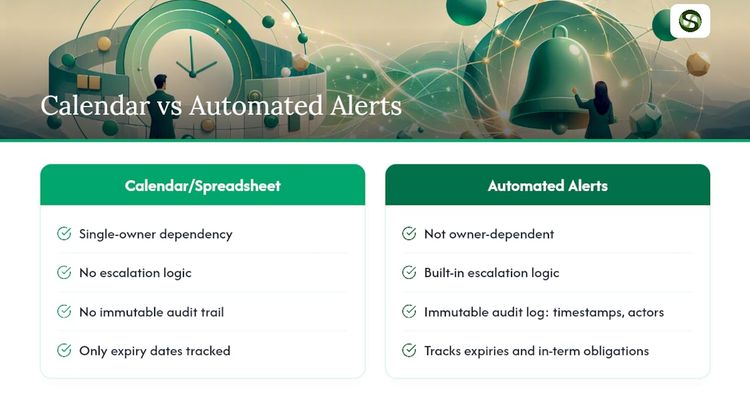
The conventional wisdom is that a shared calendar or a spreadsheet with conditional formatting is “good enough” for deadline tracking. It is not, and the failure mode is predictable: the spreadsheet owner leaves, the calendar has no escalation logic, and the first missed renewal costs more to remediate than a year of SaaS licensing.
What most articles on this topic understate is the evidence problem. A calendar entry proves nothing to a regulator or a counterparty. An immutable audit log with timestamps, named actors, and attached documents does. That distinction matters most when a dispute arises, not before.
The other underrated issue is in-term obligations. Most teams focus on expiry dates and ignore the performance checkpoints, reporting windows, and compliance milestones that sit inside an active contract. Those obligations carry the same legal exposure. An alert system that only tracks expiry dates is solving half the problem.
Expiryedge: deadline tracking built for legal and operations teams
Missed renewals and lapsed certifications cost more to fix than to prevent. Expiryedge gives in-house legal, compliance, procurement, HR, and facilities teams a single platform to track every contract, certification, license, inspection, and regulatory obligation with automated multi-channel alerts, configurable escalation rules, and a complete audit trail.

The pilot setup is lightweight: upload your top contracts, validate extracted dates, assign owners, and configure your first alert cadences. No lengthy implementation project required. Start a free trial at Expiryedge and see your first renewal cycle run without a missed notice window.
Useful sources and further reading
- What Is a Compliance Calendar and How to Build One? - LegalClarity
- How to Build a Global Compliance Calendar (2026 Guide) | SG
- Expiration Reminder & Deadline Tracking Software | ExpiryEdge
- Contract Expiry and Renewal Management for Legal Ops
- Benefits of Automated Compliance Tracking for Teams
- Deadline Escalation Workflow Guide for Ops and Compliance
FAQ
What is the role of automated alerts in legal teams?
Automated alerts notify named owners before contract notice deadlines, regulatory filing windows, and certification expirations expire, converting reactive scrambles into deliberate, documented decisions.
How do automated alerts help prevent missed contract renewals?
They anchor reminders to the notice deadline rather than the expiry date, giving teams enough lead time to renegotiate or exit before auto-renewal clauses trigger.
What KPIs should legal teams track to measure alert system effectiveness?
Track missed notice rate (percentage of notice deadlines that passed without action), on-time action rate, total value at risk, average time-to-action after alert, and escalation rate. Target a missed notice rate below 5% within 90 days.
What security features should a legal alert platform include?
Role-based access controls, SSO integration, immutable audit logs with timestamps, and U.S. data residency are the minimum requirements for a legal-grade deployment.
How does Expiryedge support legal deadline management?
Expiryedge automates date extraction from uploaded documents, sends multi-channel alerts on configurable cadences, escalates to backup owners when primary owners do not act, and maintains a complete audit trail for every obligation.
Recommended
Frequently asked questions
They anchor reminders to the notice deadline rather than the expiry date, giving teams enough lead time to renegotiate or exit before auto-renewal clauses trigger.
Track missed notice rate (percentage of notice deadlines that passed without action), on-time action rate, total value at risk, average time-to-action after alert, and escalation rate. Target a missed notice rate below 5% within 90 days.
Role-based access controls, SSO integration, immutable audit logs with timestamps, and U.S. data residency are the minimum requirements for a legal-grade deployment.
Expiryedge automates date extraction from uploaded documents, sends multi-channel alerts on configurable cadences, escalates to backup owners when primary owners do not act, and maintains a complete audit trail for every obligation.
Not legal advice
This article is for general informational purposes and does not constitute legal advice. Laws, regulations and contract requirements vary by jurisdiction and change over time. Consult a qualified attorney in your jurisdiction before making decisions that depend on the specific legal interpretation discussed here.