Deadline Escalation Workflow Guide for Ops and Compliance


A deadline escalation workflow moves an unfinished task to someone with more authority at set points before its due date, and keeps doing so until somebody confirms it's handled. To build one you have to settle four things: the tiers and when each one fires, who receives each tier, what counts as confirmation, and when a person can override the timetable.
This guide walks through each decision with examples from compliance work: licence renewals, inspection certificates, contract notice dates. The same logic works for any deadline that costs you something when it's missed.
Set the tiers from renewal lead time, not the expiry date
Most teams use four or five tiers. Each tier has its own trigger, its own recipient and a specific thing that person must do. The mistake is counting back from the expiry date. Count back from the date the work has to be finished instead.
Take a licence that expires on 1 March and needs about 60 days for the board to process. The application has to go in by early January, so the first heads-up belongs in early December. Here's how that might look as a ladder. The timings are our suggested starting point, not a rule from any regulator.
| Tier | When it fires (60-day processing example) | Who hears | What they must do |
|---|---|---|---|
| Heads-up | 90 days before expiry | Owner | Start the renewal and mark it in progress |
| Reminder | 60 days before expiry, the submit-by date | Owner | Submit, or record what's blocking it |
| Warning | 45 days, still no confirmation | Owner and team lead | Lead clears the blocker or reassigns the task |
| Urgent | 21 days | Department manager | Pay to expedite, reassign, or plan for a lapse |
| Critical | 7 days, or once expired | Senior leader | Act on the contingency: pull staff from the rota, pause the work, tell the client |

Notice the gap between the urgent and critical tiers. A manager who hears about a problem three weeks out can still fix it. One who hears a week out is mostly limiting the damage. If you're laying this out for several teams, our escalation matrix guide has a template.
Start the clock when the deadline is created
Run the timer from the moment a deadline enters the system, not from when someone gets assigned to it. A renewal that sits unassigned for three weeks after a contract is signed has already burned three weeks of lead time. If the clock only starts at assignment, nobody sees that loss.
The fix is simple. An unassigned item should trigger its own alert, to whoever runs the register, within a couple of working days.
Write escalation messages someone can act on in one read
Every escalation path has to answer three questions: who receives it, what information goes with it, and whether the new person takes over the task or just leans on the original owner. Skip the second one and the manager inherits a deadline with no history. They spend a day finding out what happened, which is the day the escalation was meant to buy.
Compare two messages. "Reminder: item due soon" gets ignored. This one gets a reply:
Fire alarm service certificate, Leeds warehouse, expires 14 November. Owner: Priya, no response to three reminders. Contractor quote is attached but not approved. You need to approve the quote or assign someone else today.
Use triggers that catch silence, not just time
Time alone tells you a deadline is close. It doesn't tell you whether anyone is working on it. Set up three kinds of trigger:
- Time triggers fire at fixed points before the due date, as in the ladder above.
- Progress triggers fire when a checkpoint arrives and required steps are still open. Say the CPD certificates aren't uploaded 45 days out, even though the owner said they'd started.
- Silence triggers fire when the owner hasn't confirmed anything within a set window. Treat no answer as a no.
Confirmation is what makes this work. When the owner confirms, the sequence pauses. Make every confirmation carry a next check-in date, though, or "in progress" becomes a way to switch the reminders off for good. Confirm on the 10th, next check on the 24th, and if nothing has moved by then, the ladder picks up again.
Give risky deadlines a longer ladder
Send the same reminders for everything and people stop reading them. A software subscription renewal and a multi-site operating licence don't deserve the same schedule.
Score each deadline type once, when you set it up. Two questions are enough: how long does the renewal really take, and what stops if it lapses? High scores start earlier and climb faster. A licence that halts trading might start at 120 days and reach a manager by day 45. A low-risk subscription might get a 30-day note and a 7-day one, and never go past the owner.
Roll it out in six steps
- List every deadline type you manage, and mark the ones that slipped or needed a scramble last year. Those are your first targets.
- Measure real lead times. Check past renewals for how long each type actually took, from first action to new document in hand. Use that, not the official processing time.
- Send alerts where people already look. For a site team that might be SMS or WhatsApp; for an office team, Slack or Teams. An alert in an unread inbox does nothing.
- Replay last year. Run your new ladder against last year's deadlines on paper. Would the late ones have reached a manager in time? If not, move the tiers earlier.
- Name who can override. Someone has to be able to jump a task straight to urgent when a renewal suddenly needs legal review, or pause it when the owner is in hospital.
- Check the tier counts monthly. If most tasks only get done at the urgent tier, your early tiers fire too late. If people ignore the first reminder, they may be getting too many.
Measure where tasks get resolved
One number tells you most of what you need: the tier at which each deadline was finally confirmed. In a healthy workflow, most finish at the heads-up or reminder stage. Track two more things alongside it: how long owners take to confirm, and how long a task sits at each tier before someone acts.
Three problems show up again and again:
- The manager gets it and nothing happens. Usually the message lacked context. Add the history, the blocker and the decision you need.
- Low-risk items escalate constantly. People learn to ignore the alerts. Shorten the ladder for those items.
- The same team is always late. That's a capacity problem, not a reminder problem, and it needs a conversation, not another alert.
After any deadline that reaches the urgent or critical tier, spend ten minutes on why. Was the lead time wrong? Was the owner the wrong person? Then change the ladder. Teams that skip this review tend to hit the same failure every year.
Leave room for a person to step in
Automation is good at the predictable part: firing alerts on time, routing them and logging every step. It can't tell that a filing has suddenly picked up a legal review, or that the owner has gone on unplanned leave.
Picture a ladder that keeps sending polite reminders to someone who's off sick while the submit-by date passes. The configuration was fine. Nobody had the power to skip a tier. So build the override in from day one, name who holds it, and log every time it's used.
How ExpiryEdge handles escalation

ExpiryEdge tracks contract, licence, permit and certificate dates. It reminds the owner by email, SMS, WhatsApp, Slack or Teams, and escalates overdue items to a manager. It can also request the renewed document from whoever holds it, and it keeps an audit trail you can export when an auditor asks who knew what and when.
There's a 14-day free trial with no credit card. Load the deadlines that slipped last year first and see whether the ladder would have caught them. For what a lapse can cost, read our guide to preventing regulatory fines with centralised licence tracking.
FAQ
What is a deadline escalation policy?
It's the written rule set behind your escalations. For each type of deadline it says when reminders start, what counts as confirmation, who hears about it at each stage if nobody confirms, and who can change the timetable. Keep it to one page so people actually read it, and review it after any deadline that reached the top tier.
How do escalation workflows work in practice?
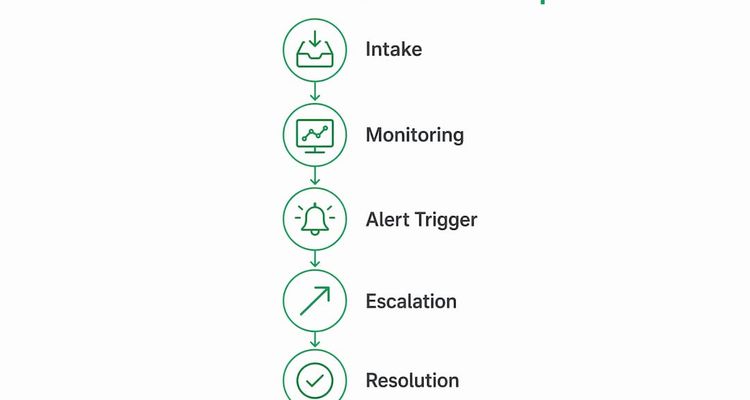
The system watches each task's due date and status. The owner gets reminders first. If they don't confirm progress by a set point, the task goes to their team lead, then a manager, then a senior leader. A confirmation pauses the sequence until a new check-in date, and silence moves it up a level.
What does escalation path mean in workflows?
It's the ordered list of people a task passes to as it escalates, from the owner up to whoever can make the final call. A good path also says what information travels with the task at each step and whether the new person takes over the task or just oversees the original owner.
What types of triggers are used in deadline escalation workflows?
Three cover most cases. Time triggers fire at set points before the due date. Progress triggers fire when required steps or documents are still missing by a checkpoint. Silence triggers fire when the owner hasn't confirmed anything within a set window. The silence trigger catches the most problems, because it spots tasks nobody is actually working on.
What is the role of escalation in compliance workflows?
It makes sure a regulatory deadline, such as a licence renewal or an inspection, gets more senior attention the closer it gets without a confirmed plan. That gives a manager time to reassign the work, pay for an expedited service or plan around a lapse, and it leaves a dated record of who knew what and when.
Recommended
Frequently asked questions
The system watches each task's due date and status. The owner gets reminders first. If they don't confirm progress by a set point, the task goes to their team lead, then a manager, then a senior leader. A confirmation pauses the sequence until a new check-in date, and silence moves it up a level.
It's the ordered list of people a task passes to as it escalates, from the owner up to whoever can make the final call. A good path also says what information travels with the task at each step and whether the new person takes over the task or just oversees the original owner.
Three cover most cases. Time triggers fire at set points before the due date. Progress triggers fire when required steps or documents are still missing by a checkpoint. Silence triggers fire when the owner hasn't confirmed anything within a set window. The silence trigger catches the most problems, because it spots tasks nobody is actually working on.
It makes sure a regulatory deadline, such as a licence renewal or an inspection, gets more senior attention the closer it gets without a confirmed plan. That gives a manager time to reassign the work, pay for an expedited service or plan around a lapse, and it leaves a dated record of who knew what and when.