License Renewal Software: What IT & Procurement Need

License Renewal Software: What IT & Procurement Need

A centralized, deadline-driven system that links contract entitlements to live usage data stops surprise auto-renewals and surfaces cost-saving opportunities before the renewal window closes. That’s the single most important thing you can do to protect your software budget. Here’s where to start this week:
- Centralize your contracts. Pull every software agreement into one repository with renewal dates, quantities, and auto-renew clauses visible in a single view.
- Export current renewal dates. Build a 12-month calendar and flag every event that falls within the next 90–120 days.
- Connect one usage source. Even a single SaaS usage report or license server log gives you the entitlement-vs-active-seat gap you need to negotiate.
- Schedule a joint review. Book a procurement and IT session at least 90 days before your next major renewal to align on quantities and negotiation targets.
IT Asset Management (ITAM) and Software Asset Management (SAM) platforms serve as the systems of record for entitlements. Platforms like Expiryedge layer deadline-driven automation on top, so the right people get escalating alerts well before a contract auto-renews. The metric worth watching first: reducible seats identified at renewal. Even a modest reduction on a mid-market SaaS contract can return meaningful budget.
Pro Tip: Don’t wait for a missed renewal to build this process. The best time to set up automated reminders and a renewal calendar is the day you sign a new contract, not 30 days before it expires.

What is a software license renewal, and what can it lead to?
A software license renewal is the formal process of extending a software agreement before its current term expires, and it typically leads to one of three outcomes: renewing as-is, renegotiating quantities or terms, or letting the license lapse and decommissioning the product.
Most procurement teams treat renewal as an administrative task. That’s a costly mistake. The renewal window is often the only contractual moment when you can reduce seat counts, switch editions, or push for price concessions. Outside that window, most enterprise software agreements lock you into current quantities and pricing. Miss it, and you’re either auto-renewed at the same (or higher) cost, or you’re scrambling to negotiate mid-term without leverage.
The risk of missing a renewal window is not just financial. Avalara’s license management guidance notes that missed renewals and lapsed licenses can trigger regulatory penalties, operational disruption, and service interruptions — especially when licenses span multiple jurisdictions with different filing deadlines.
Auto-renew clauses are the most common trap. A contract auto-renews at full price, sometimes with a built-in price escalation, because no one flagged the termination window well in advance. Expiryedge addresses this directly as a date-driven control: it tracks every renewal date, fires multi-channel alerts on a configurable schedule, and escalates to the right stakeholders before the window closes.
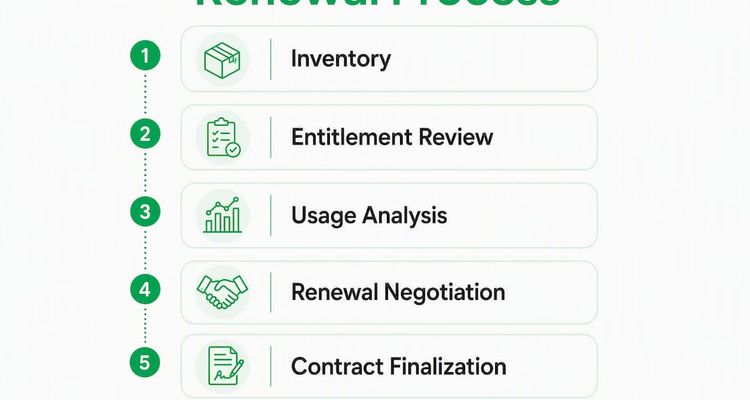
How does the license renewal process work? A step-by-step checklist
The renewal process should start several months before expiry, depending on contract complexity. Enterprise agreements with large vendors typically need more lead time, while mid-market SaaS contracts can be handled with shorter notice, but starting earlier gives you negotiation room.
Ordered renewal checklist
- Inventory verification (Day 1, SAM/ITAM lead). Confirm the contract exists, locate the current agreement, and verify quantities, editions, and entitlement terms.
- Entitlement vs. usage analysis (Days 1–14, SAM/IT ops). Pull active seat counts and usage telemetry. Compare against contracted entitlements to identify over-purchased or underused licenses.
- Contract clause review (Days 7–21, procurement + legal). Flag auto-renew clauses, termination notice windows, price escalation terms, and downgrade restrictions. Renewal workflows that include contract parsing can surface risk and negotiation angles in minutes rather than days.
- Cross-functional stakeholder meeting (Day 21–30, all teams). Align procurement, IT, finance, security, and legal on the renewal strategy. Confirm budget, required quantities, and any product changes.
- Negotiation prep (Days 30–60, procurement lead). Benchmark pricing, prepare entitlement evidence, and draft a negotiation brief with target outcomes.
- Vendor negotiation and execution (Days 60–90, procurement). Conduct negotiation, finalize terms, and execute the agreement. Legal reviews before signing.
- Post-renewal audit (Days 1–30 after signing, SAM/ITAM). Update the contract repository, verify the new entitlements are provisioned correctly, and set the next renewal reminder.
Renewal timeline and ownership
| Task | Lead Time Before Expiry | Owner |
|---|---|---|
| Inventory verification | 90–120 days | SAM/ITAM lead |
| Entitlement vs. usage analysis | 90–120 days | IT ops / SAM |
| Contract clause review | 90–120 days | Procurement + legal |
| Stakeholder alignment meeting | 60–90 days | Procurement |
| Negotiation prep and benchmarking | 30–90 days | Procurement |
| Vendor negotiation | 30–60 days | Procurement |
| Contract execution | 14–30 days | Procurement + legal |
| Post-renewal audit | 1–30 days after signing | SAM/ITAM |

Each of these steps maps directly to a workflow task or ticket assignment. If your team uses a service desk or project management tool, these become assignable items with due dates. Platforms like Expiryedge convert these into SOP checklists with automated reminders and escalation paths, so nothing waits on someone remembering to check a spreadsheet.
Which data sources should you connect for renewal decisions?
The difference between a renewal calendar and a negotiation advantage is data. Renewal leverage comes from combining contract clarity with live usage data so teams can justify quantity reductions and negotiate from a position of strength.
Here are the data sources that matter most, and what each one contributes:
| Data Source | What It Tells You | Integration Pattern |
|---|---|---|
| Contract entitlements | Quantities, editions, and terms you’re paying for | Manual import or contract parser |
| SaaS usage telemetry | Active users, feature adoption, login frequency | API connector or CSV export |
| License server logs | Concurrent usage, idle sessions, peak demand | Agent or log collector |
| Cloud billing records | Actual spend vs. committed spend | Cloud provider API |
| HR / Active Directory | Current headcount and role assignments | AD/Okta connector |
| Finance / PO records | Historical spend and budget allocation | ERP integration or CSV |
Integration priority for fastest ROI: Start with contract entitlements and SaaS usage telemetry. Those two sources alone will surface the entitlement gap. Add HR/AD next to validate seat assignments against active employees. License server logs and cloud billing come after, once the core reconciliation is running.
A typical reconciliation output looks like this: 120 seats owned, 84 seats active in the last 90 days, 36 seats reducible at renewal. That single figure, backed by usage data, is what turns a renewal conversation into a negotiation. Flexera’s entitlement library approach demonstrates how enterprises use standardized product metric mappings to automate this reconciliation at scale across hundreds of vendors.
Pro Tip: Before your next renewal, run a 90-day active-user report from your SaaS admin console. That one export, compared against your contracted seat count, is often enough to identify immediate savings without any additional tooling.
Where do renewal costs come from, and where can you save?
Most software overspend at renewal comes from five sources:
- Unused seats. Employees who left, changed roles, or simply stopped using the product remain on the license roster.
- Overlapping subscriptions. Two tools doing the same job, often acquired by different departments at different times.
- Edition mismatch. Teams paying for enterprise-tier features when standard-tier covers their actual workflow.
- Automatic price escalations. Contracts with built-in annual increases of 5–10% that renew without review.
- Multi-jurisdiction compliance fees. Business licenses and regulatory software that carry state- and local-level filing costs, often duplicated or missed.
The savings opportunities at renewal map directly to those cost drivers. Reclaiming unused seats is the fastest win. Consolidating overlapping products takes more stakeholder coordination but often delivers larger savings. Downgrading unused premium editions requires usage evidence, which is why the entitlement-vs-usage analysis in the checklist above is non-negotiable.
Automated compliance tracking reduces the administrative burden of multi-jurisdiction renewals and helps teams avoid the penalties that come from missed filing windows. For organizations managing licenses across multiple states, Avalara’s research on license management shows that real-time dashboards and alerts are the most reliable way to address jurisdictional licensing needs before deadlines pass.
A simple worked example: if your team identifies 36 reducible seats on a $150-per-seat-per-year SaaS contract, that’s $5,400 in annual savings from a single renewal event. Scale that across five or six contracts and the number becomes a meaningful budget recovery.
One caveat: some vendors contractually restrict downward quantity adjustments below a minimum commitment or require advance notice of 90+ days. Always check the contract terms before building savings assumptions into your budget.
What negotiation levers actually work at renewal?
Procurement teams that walk into renewal negotiations without usage data are negotiating blind. The contract levers below only work when you have evidence to back them.
- Auto-renew clause removal or modification. Request that auto-renew be replaced with a mutual written confirmation requirement. This alone prevents the most common budget leak.
- Termination-for-convenience window. Negotiate a 60–90 day window before renewal where you can exit or reduce without penalty.
- Downgrade rights. Secure the right to reduce seat counts or switch editions at renewal without renegotiating the entire agreement.
- Quantity reset windows. Some enterprise agreements allow a one-time quantity reset at renewal. Know whether yours does before the conversation starts.
- Price-cap clauses. Cap annual price escalations at a fixed percentage (typically 3–5%) to prevent unchecked increases at future renewals.
- Service-level commitments. Renewal is the right moment to tighten SLA terms, add uptime guarantees, or negotiate credits for past service failures.
Timing matters. Vendors are most flexible in the 30–60 day window before renewal, when they’re motivated to retain the contract. Legal should review any clause changes before you sign. Bring your entitlement evidence, your usage data, and a clear walk-away position.
Concessions worth asking for, and when they’re realistic:
- Short-term discounts (10–20%): Realistic when you have competitive pricing data or a credible alternative.
- Phased rollouts: Useful when you’re expanding and want to delay full-seat commitment until adoption is confirmed.
- Free pilot seats for new modules: Common when a vendor wants to upsell; use it to validate before committing.
- Rollback rights: The right to revert to a previous edition or seat count if adoption targets aren’t met. Harder to get but worth asking.
What features should you require from license renewal software?
Not all license management tools are built for the same job. Some focus on entitlement tracking; others on usage analytics; others on deadline automation. The best procurement and IT teams require all three. Here’s the feature checklist to use when evaluating any platform:
Core feature requirements
- Centralized contract library with document storage and metadata (vendor, quantity, expiry, auto-renew flag)
- Renewal calendar with configurable multi-channel alerts and escalation paths
- Entitlement store that maps contracted quantities to product editions and metrics
- Usage reconciliation that compares entitlements to active deployment data
- Workflow automation with assignable SOP checklists and approval routing
- Audit trails for every action, change, and notification
- Role-based access controls so procurement, IT, legal, and finance each see what they need
- Reporting dashboards showing renewal hit rate, days-to-expiry, and cost-savings identified
Integration and connector requirements
| Feature Category | Required Data Input | Implementation Effort |
|---|---|---|
| Renewal calendar | Contract dates, auto-renew flags | Low |
| Entitlement tracking | Contract PDFs, PO records | Low–Medium |
| Usage reconciliation | SaaS telemetry, AD/Okta, license server logs | Medium–High |
| Cloud billing analysis | Cloud provider APIs | Medium |
| Workflow automation | HR system, ticketing system | Medium |
| Audit and compliance | All above sources | Low (once integrated) |
ITAM/SAM integration produces the fastest ROI because it connects the entitlement record to live deployment data without manual reconciliation. Identity source connectors (Active Directory, Okta) are the second priority, since they validate seat assignments against current employees. Finance and ERP integrations come later but are needed for full spend visibility.
Flexera One’s ITAM platform demonstrates the enterprise end of this spectrum, with automated data collection and use-rights intelligence across major vendors. For teams that need deadline-driven automation layered on top of existing ITAM data, Expiryedge provides the multi-channel alert and workflow layer that turns a renewal date into a managed, accountable process.
Security requirements worth specifying: data residency controls, single sign-on (SSO) support, role-based access with audit logs, and SOC 2 compliance documentation from the vendor.
Does deadline-driven automation actually reduce missed renewals?
The evidence is consistent: centralizing license data and using automated tracking and alerts reduces missed renewals and the regulatory disruption that follows. The operational chain is straightforward.
When a renewal date is detected, the system validates the current entitlement, surfaces reducible seats from usage data, and triggers the negotiation playbook — all before the auto-renew window closes. That sequence, automated and escalating, is what separates teams that recover budget at renewal from teams that simply pay the invoice.
KPIs worth tracking to measure the impact of your renewal management process:
- Days before expiry when action began: — Tracks whether teams are starting early enough. Below 30 days is a red flag.
Consider a procurement team managing 40 SaaS contracts. Without a centralized system, renewal awareness depends on someone checking a spreadsheet or remembering a date. With automated reminders firing at 120, 90, 60, and 30 days before expiry, the team starts every renewal with enough lead time to run the entitlement analysis, prepare negotiation evidence, and engage the vendor from a position of strength. The result: fewer auto-renews, fewer overpayments, and a documented audit trail for finance and compliance.
Preventing regulatory fines through license tracking follows the same logic. When alerts fire early and workflows assign accountability, the probability of a lapsed license causing a compliance gap drops sharply. Expiryedge’s platform is built around exactly this chain: detect the date, assign the task, escalate if no action is taken, and close the loop with an audit trail.
Key Takeaways
A centralized, deadline-driven system that connects contract entitlements to live usage data is the single most reliable way to prevent missed renewals and recover software spend at renewal.
| Point | Details |
|---|---|
| Start 90–120 days early | Begin the renewal process at least 90 days before expiry to preserve negotiation leverage and avoid auto-renew traps. |
| Connect usage to entitlements | Comparing active seats to contracted quantities is the fastest way to identify reducible seats and justify cost reductions. |
| Use contract levers at renewal | Auto-renew removal, downgrade rights, and price-cap clauses are only negotiable at renewal — not mid-term. |
| Track renewal hit rate | Aim for 95%+ of renewals actioned before the auto-renew or expiry date as your primary process KPI. |
| Expiryedge automates the chain | Expiryedge’s deadline-driven platform centralizes renewal dates, fires multi-channel escalating alerts, and assigns SOP checklists so every renewal is actioned on time. |
The part most teams get wrong about renewal management
The most common mistake I see in renewal management isn’t missing a date. It’s treating a deadline system as if it were a usage intelligence system. They’re not the same thing.
A calendar reminder tells you a renewal is coming. Usage intelligence tells you what to do when it arrives. Teams that rely on calendar alerts alone walk into vendor negotiations without the one thing that matters most: evidence. They know the contract is renewing; they don’t know whether they’re over-licensed by 30% or under-licensed by 10. That’s the difference between a vendor who grants concessions and a vendor who doesn’t.
The fix isn’t complicated, but it requires deliberate setup. Connect at least one usage source before your next major renewal. Even a 90-day active-user export from your SaaS admin console is enough to start. Then focus your attention on the top 10 renewal events by spend. Those contracts represent the majority of your software budget, and automating evidence collection for those 10 events alone will deliver more value than building a perfect process for 200 smaller contracts.
Cross-functional accountability is what makes the process stick. Procurement owns the negotiation, but IT ops owns the usage data, legal owns the contract review, and finance owns the budget sign-off. Without a shared workflow that assigns each step to a named owner with a deadline, the process collapses into whoever shouts loudest closest to the renewal date.
Expiryedge gives your renewal checklist a deadline engine
Most teams have the checklist. What they’re missing is the system that makes every item on it happen on time, with the right person accountable, and a paper trail to prove it.

Expiryedge is built for exactly this: centralized expiry tracking, multi-channel escalating reminders, assignable SOP checklists, and audit trails across every renewal event. The mapping to your renewal checklist is direct. The renewal calendar becomes a set of automated alerts firing at 120, 90, 60, and 30 days. Entitlement tracking becomes a structured record with contract attachments and metadata. Negotiation readiness becomes an evidence export you can walk into any vendor meeting with.
Before requesting a demo, prepare three things: your top renewal events by spend, the contract PDFs for those agreements, and one usage data source (even a CSV). That’s enough to configure a working renewal workflow in your first session. Start your free trial at ExpiryEdge or sign up directly to see the deadline-driven workflow in action.
Useful sources for procurement and IT teams
The following resources support the recommendations in this article and offer deeper reading on specific topics:
- License Management Software | Avalara — explains multi-jurisdiction license tracking, automated renewal alerts, and regulatory risk reduction.
- ExpiryEdge Deadline Tracking Platform — deadline-driven renewal management with multi-channel alerts, SOP checklists, and audit trails.
- Renewal Alerts in Procurement: A 2026 Strategy Guide | ExpiryEdge — procurement-focused guidance on alert configuration and workflow integration.
- Certification Expiration Tracking Checklist | ExpiryEdge — checklist-style guidance for tracking expirations across compliance and license categories.
- Reduce Admin Workload in Your Dental Lab | Dental Lab Guru — example of how automation reduces administrative overhead in deadline-driven professional services workflows.
FAQ
What happens when a software license expires?
When a software license expires without renewal, the software typically stops functioning or reverts to a restricted mode. Depending on the vendor and contract terms, you may also face compliance gaps, service interruptions, and in regulated industries, potential penalties for operating without a valid license.
What are three common types of software licenses?
The three most common types are perpetual licenses (a one-time purchase with optional maintenance), subscription licenses (annual or monthly recurring agreements), and concurrent-use licenses (a shared pool where a set number of users can access the software simultaneously). Each type has different renewal mechanics and cost structures.
How do you process a software license renewal?
Start 90–120 days before expiry: verify your current entitlements, compare them against active usage data, review auto-renew and termination clauses, align procurement and IT on quantities, then negotiate and execute before the window closes. Platforms like Expiryedge automate the reminder and workflow steps so the process runs on schedule without manual follow-up.
What is the easiest way to manage multiple renewal dates?
Centralize all contracts in a single repository with renewal dates, quantities, and auto-renew flags visible in one view, then configure automated alerts to fire at 120, 90, 60, and 30 days before each expiry. That combination eliminates the manual calendar-checking that causes most missed renewals.
Why does connecting usage data to entitlements matter at renewal?
Usage data tells you how many seats are actually active versus how many you’re paying for. That gap, quantified and documented, is the primary negotiation lever at renewal. Without it, you’re renewing at current quantities by default, with no evidence to justify a reduction or a price concession.
Recommended
Frequently asked questions
The three most common types are perpetual licenses (a one-time purchase with optional maintenance), subscription licenses (annual or monthly recurring agreements), and concurrent-use licenses (a shared pool where a set number of users can access the software simultaneously). Each type has different renewal mechanics and cost structures.
Start 90–120 days before expiry: verify your current entitlements, compare them against active usage data, review auto-renew and termination clauses, align procurement and IT on quantities, then negotiate and execute before the window closes. Platforms like Expiryedge automate the reminder and workflow steps so the process runs on schedule without manual follow-up.
Centralize all contracts in a single repository with renewal dates, quantities, and auto-renew flags visible in one view, then configure automated alerts to fire at 120, 90, 60, and 30 days before each expiry. That combination eliminates the manual calendar-checking that causes most missed renewals.
Usage data tells you how many seats are actually active versus how many you're paying for. That gap, quantified and documented, is the primary negotiation lever at renewal. Without it, you're renewing at current quantities by default, with no evidence to justify a reduction or a price concession.
Not legal advice
This article is for general informational purposes and does not constitute legal advice. Laws, regulations and contract requirements vary by jurisdiction and change over time. Consult a qualified attorney in your jurisdiction before making decisions that depend on the specific legal interpretation discussed here.