Why Procurement Teams Need Expiry Tracking

TL;DR:
Expiry tracking is essential for procurement teams to prevent financial losses, operational disruptions, and regulatory fines caused by missed expiration dates. Implementing a centralized, integrated, and risk-segmented system transforms expiry management from a manual task into an effective risk control process. Regular cross-functional reviews and proactive workflows ensure expired documents and products are identified and addressed before they cause critical issues.
Expiry tracking is the systematic monitoring of dates on which contracts, compliance documents, certifications, and inventory items become invalid or require renewal. Procurement teams that lack this discipline face a predictable chain of failures: missed vendor certificate renewals trigger customs holds, expired insurance policies void supplier agreements, and lapsed compliance documents invite regulatory fines. The financial exposure is not theoretical - World Commerce & Contracting, in research published with Icertis, puts the cost of poor contract management at more than 5% of contract value, with nearly 70% of organizations reporting serious disconnects between risk management and revenue goals. Understanding why procurement teams need expiry tracking starts with recognizing that expiration management is not an administrative task. It is a core risk control function.
Why procurement teams need expiry tracking: the real cost of missing a date
Missed expirations cost procurement teams in three distinct ways: financial write-offs, operational disruptions, and regulatory penalties. Each category compounds the others when expiry management is weak.
The financial impact is measurable, but it has to be measured on your own portfolio rather than borrowed from a benchmark. Pull last year's write-offs, disposals, and expired-stock adjustments, and express them as a percentage of total procurement spend. The arithmetic makes the case on its own: say that comes out at 3% across a $10 million portfolio - that is a $300,000 annual loss, and most finance teams would not tolerate it if they could see it as a single line rather than scattered across a hundred adjustments. The point of expiry tracking is to make it visible before it becomes a write-off.
Operational disruptions are the second cost, and they are often invisible until they cause a crisis. When a supplier’s insurance certificate expires unnoticed, purchase orders tied to that supplier can be blocked at customs or rejected during an audit. Expiry alerts not linked to ERP purchase order lifecycles lead to reactive risk management and fulfillment failures. The alert exists, but it does not stop the order from processing until the damage is done.

Regulatory penalties form the third cost. Procurement teams in healthcare, food manufacturing, and defense contracting operate under FDA, CDC, and ISO frameworks that require current, verifiable compliance documentation from every active vendor. An expired certificate from a single supplier can trigger a broader audit of the entire vendor portfolio.
Key risks procurement teams face without expiry tracking:
- Expired vendor insurance or certification documents blocking purchase orders at customs
- Inventory write-offs from products consumed or discarded past their use-by dates
- Regulatory fines from audits that expose lapsed compliance documentation
- Broad product recalls caused by missing batch-level expiry data rather than targeted, surgical ones
- Contract auto-renewals at unfavorable terms when renewal windows are missed
How can procurement teams implement effective expiry tracking systems?
Effective expiry tracking requires a system, not a habit. Relying on calendar reminders or spreadsheet tabs creates what practitioners call shadow inventory: a fragmented record of expiration dates spread across emails, shared drives, and individual notebooks. Shadow inventory across spreadsheets and emails creates false security and causes audit failures precisely because no single person has a complete view.
A practical implementation follows four steps:
- Centralize all expiry data into one system. Every vendor certificate, contract renewal date, product batch expiry, and compliance document deadline belongs in a single platform. Procurement teams that consolidate this data gain a real-time view of what expires next and who owns the renewal.
- Integrate expiry alerts with the ERP purchase order lifecycle. An alert that fires in isolation does not prevent a bad order from processing. Alerts must trigger automatic PO holds when a supplier’s compliance document lapses. This is the difference between knowing about a problem and stopping it.
- Segment expirations by urgency and risk. Not every expiration carries equal weight. High-risk compliance documents require 30-day notifications, while lower-risk items allow longer lead times. Urgency-based segmentation prevents teams from treating a routine subscription renewal with the same priority as an FDA-required supplier certificate.
- Assign clear ownership for each expiry category. Every expiration needs a named owner and an escalation path. When the primary owner misses a deadline, the system escalates to their manager automatically.
Pro Tip: Set your highest-risk compliance document alerts at 45 days before expiry, not 30. The extra two weeks absorbs supplier response delays and internal approval cycles that routinely consume the standard window.
What are the benefits of integrating expiry tracking with procurement systems?
Integration between expiry tracking and procurement systems changes two specific mechanics rather than delivering a headline percentage. First, expiry data captured automatically - by barcode scan, document extraction, or a direct ERP feed - is not retyped, so the date in the system is the date on the document. Second, an expiry that lives inside the purchase order lifecycle can block an order, not merely warn about one. Those two changes address the two failure modes in manual expiry management: holding stock past its date because nobody was watching, and recording the date wrongly in the first place.
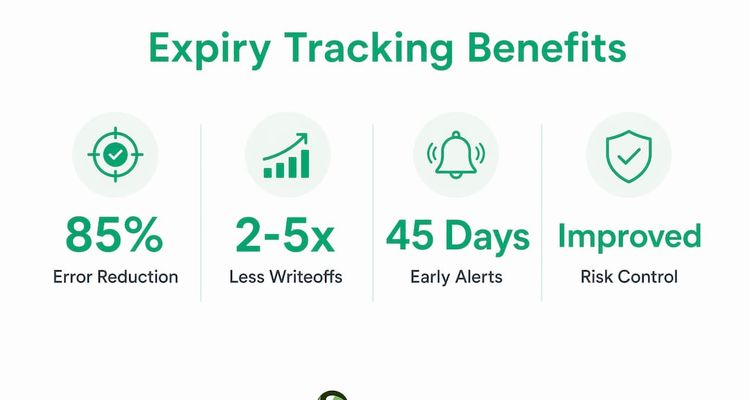
Transcription is worth dwelling on, because it is the quiet failure. A date typed from a certificate into a spreadsheet can be wrong by a digit, a month, or a year, and nothing in the process will ever catch it - the reminder fires confidently on the wrong day. Automated capture removes that class of error entirely rather than reducing it, which is a different and stronger claim than any efficiency percentage.
Businesses with automated expiry tracking write off 2 to 5 times less expired stock than those relying on manual processes. That ratio holds across industries because the underlying mechanism is the same: automation surfaces expiring items before they cross the threshold, giving procurement teams time to act.
| Failure mode | Manual process | Automated tracking |
|---|---|---|
| Stock reaches its expiry date unnoticed | Depends on someone opening the sheet | Alert fires on a schedule, before the date |
| Expiry date recorded incorrectly | Typed by hand, never re-checked | Captured from the document or ERP feed |
| Non-compliant PO still processes | Warning only, if anyone sees it | PO held automatically when a document lapses |
| Recall scope | Broad and costly to trace | Targeted by batch and supplier |
Linking expiry data to spend analytics adds another layer of value. When procurement teams can see which suppliers account for the highest spend alongside which of those suppliers have documents expiring within 60 days, they can prioritize renewal outreach by business impact rather than alphabetical order.
Pro Tip: Connect your expiry tracking platform to your spend cube. Suppliers in the top 20% of spend with documents expiring in the next 90 days should receive a dedicated renewal workflow, not a generic email reminder.
How should procurement teams prioritize and respond to different types of expirations?
Not all expirations are equal, and treating them as if they were is one of the most common mistakes procurement teams make. One-size-fits-all expiry alert thresholds are ineffective. Segmentation by document type and business risk is the correct approach.
Procurement teams manage two fundamentally different categories of expiration:
Inventory expiry covers physical goods with use-by or best-before dates. The risk here is financial write-off and, in regulated industries, patient or consumer safety. The response is consumption-based: rotate stock using FEFO (First Expired, First Out) protocols, flag slow-moving items for redistribution, and trigger purchase order holds when remaining shelf life falls below the minimum acceptable threshold for use.
Compliance document expiry covers vendor certificates, insurance policies, licenses, and regulatory approvals. The risk here is operational and legal. A lapsed document can void a supplier agreement, block a shipment, or expose the organization to regulatory action. The response is renewal-based: notify the supplier, track their response, and block new purchase orders until the renewed document is on file.
A practical urgency framework for compliance documents:
- Critical (expires within 30 days): Escalate immediately to procurement manager and supplier account owner. Freeze new PO releases against that supplier.
- High (expires within 60 days): Assign renewal task to supplier relationship owner. Set daily reminders.
- Standard (expires within 90 days): Send automated renewal request to supplier. Monitor response.
- Routine (expires beyond 90 days): Log in the tracking system. No immediate action required.
Cross-functional monthly shelf-life reviews involving procurement, warehouse, and quality teams reduce write-offs by aligning purchasing volumes with actual consumption rates. These reviews catch the slow-moving items that automated alerts alone miss because the items have not yet crossed an expiry threshold but are trending toward one.
Key Takeaways
Procurement teams that integrate expiry tracking into their workflows prevent financial losses, compliance failures, and operational disruptions that manual processes consistently miss.
| Point | Details |
|---|---|
| Expiry tracking is risk control | Missed expirations cause write-offs, PO holds, and regulatory fines, not just administrative gaps. |
| Automation cuts write-offs sharply | Automated systems reduce expired stock write-offs by 2–5 times compared to manual tracking. |
| Integration with ERP is non-negotiable | Alerts must trigger PO holds automatically; standalone alerts fail to stop bad orders from processing. |
| Segment by urgency and risk | High-risk compliance documents need 30-day or earlier alerts; routine items allow longer windows. |
| Cross-functional reviews close the gaps | Monthly reviews with procurement, warehouse, and quality teams catch slow-moving items before they expire. |
The pitfall most procurement teams never see coming
The most dangerous expiry tracking failure is not the one that triggers a fine. It is the one that never gets noticed at all.
Procurement teams I have worked with almost always start with the same setup: a shared spreadsheet, a folder of supplier certificates, and a calendar reminder someone set up three years ago. That system feels adequate until the day a supplier’s insurance lapses, a shipment gets held at customs, and the procurement manager learns about it from the logistics team rather than from their own tracking process.
The real problem is not the spreadsheet. The problem is that expiry management sits outside the procurement workflow entirely. It is a parallel process that depends on someone remembering to check it. When that person is on leave, the system fails silently.
What actually works is wiring expiry alerts directly into the procurement lifecycle. When a supplier document expires, the system should automatically block new purchase orders against that supplier. That single integration converts expiry tracking from a monitoring activity into an enforcement mechanism. Procurement teams that make this connection stop chasing renewals reactively and start managing them proactively.
The second pitfall is treating all expirations the same. A routine software subscription renewal and an FDA-required supplier quality certificate are not the same risk. Teams that apply identical alert windows to both end up either overwhelmed by low-priority notifications or blindsided by high-stakes lapses. Segmentation by document type and spend tier is not optional. It is the difference between a functional system and a noisy one that people learn to ignore.
— Kuldeep
Expiryedge: built for procurement teams managing critical deadlines
Procurement teams tracking vendor certificates, contract renewals, and compliance documents across dozens of suppliers need more than a reminder system. They need a platform where every expiration is visible, owned, and connected to a workflow.

Expiryedge is a deadline tracking platform built specifically for this work. It centralizes expiry dates for contracts, supplier compliance documents, licenses, and certifications in one place. Automated multi-channel alerts fire at configurable thresholds, escalate when owners do not respond, and connect directly to procurement workflows. Teams using Expiryedge eliminate shadow inventory, reduce manual follow-up, and maintain audit-ready compliance documentation without building a second job around it. For procurement teams ready to move from reactive to proactive expiry management, Expiryedge is where that shift starts.
FAQ
What is expiry tracking in procurement?
Expiry tracking in procurement is the systematic monitoring of dates on which vendor contracts, compliance documents, certifications, and inventory items become invalid. It enables procurement teams to renew, replace, or act on expiring items before they cause operational or compliance failures.
How do missed expirations affect procurement operations?
Missed expirations trigger purchase order holds, regulatory fines, inventory write-offs, and supplier agreement lapses. The cost is rarely a single large event - it is an accumulation of small ones spread across cost centres, which is exactly why it goes unmeasured until someone adds it up.
What is the best way to manage expiry dates across a vendor portfolio?
The most effective approach centralizes all expiry data in one platform, integrates alerts with the ERP purchase order lifecycle, and segments notifications by urgency and business risk. Automated systems reduce expired stock write-offs by 2 to 5 times compared to manual tracking.
Why does expiry tracking need to connect to ERP systems?
Expiry alerts that operate outside the ERP purchase order lifecycle fail to block non-compliant orders from processing. Connecting expiry data to ERP triggers automatic PO holds when supplier documents lapse, converting monitoring into enforcement.
How often should procurement teams review expiry data?
Monthly cross-functional reviews involving procurement, warehouse, and quality teams are the recognized best practice. These reviews align purchasing volumes with consumption rates and catch slow-moving items before they cross expiry thresholds.
Recommended
Frequently asked questions
Missed expirations trigger purchase order holds, regulatory fines, inventory write-offs, and supplier agreement lapses. The cost is rarely one large event; it accumulates as small write-offs and delays spread across cost centres, which is why it usually goes unmeasured until someone adds it up.
The most effective approach centralizes all expiry data in one platform, integrates alerts with the ERP purchase order lifecycle, and segments notifications by urgency and business risk. The decisive step is enforcement rather than notification: when a supplier document lapses, the system should hold the purchase order automatically instead of sending a warning somebody may not read.
Expiry alerts that operate outside the ERP purchase order lifecycle fail to block non-compliant orders from processing. Connecting expiry data to ERP triggers automatic PO holds when supplier documents lapse, converting monitoring into enforcement.
Monthly cross-functional reviews involving procurement, warehouse, and quality teams are the recognized best practice. These reviews align purchasing volumes with consumption rates and catch slow-moving items before they cross expiry thresholds.