FortiGate License Renewal: What Stops at Expiry and What to Do

FortiGate license renewal means renewing the FortiCare support contract and FortiGuard subscriptions registered to each unit's serial number. They do not auto-renew. When they lapse, the FortiGate still works as a firewall, but signatures stop updating, category web filtering stops, and a late renewal is backdated to the day after expiry.
You look after one FortiGate or fifty, and the renewal quote always seems to arrive late, after the dashboard has already gone red. This guide sets out, from Fortinet's own documentation, what actually stops on expiry day, how renewal dates work, and how to build a renewal list for every unit this week.
Key takeaways
- Fortinet service contracts "are for a set duration and do not auto-renew", and each unit needs its own contract (Fortinet Service Terms, 5.1).
- An expired FortiGate "will still function as a firewall". Antivirus, IPS and application control keep scanning with the last signatures they downloaded.
- Category-based web and DNS filtering stops at expiry. By default, all web and DNS traffic is then dropped.
- Spam filtering, outbreak prevention and paid security rating checks also stop working.
- Since FortiOS 7.4.9 and 7.6.4, a FortiGate with an invalid firmware license schedules a forced upgrade to the latest patch of its minor version. You can delay it 7 days at a time but not cancel it.
- A renewal starts the day after the old contract expired, even if you buy it late. Register more than 180 days late and the start date is set to 180 days before registration.
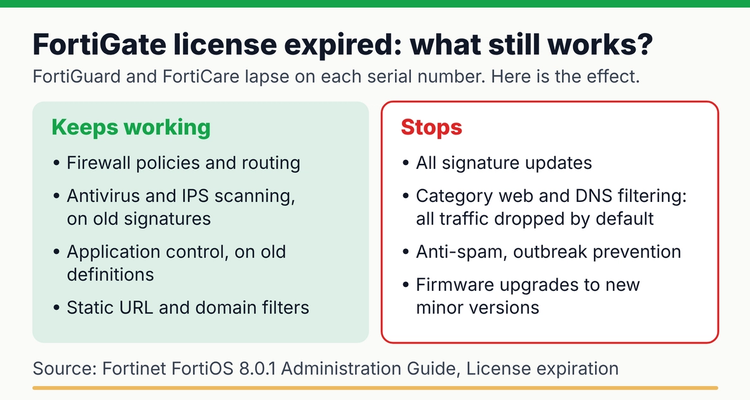 What keeps working and what stops when FortiGuard licenses expire, summarized from the FortiOS 8.0.1 Administration Guide (checked 12 October 2026).
What is the difference between FortiCare and FortiGuard?
FortiCare is Fortinet's support contract and FortiGuard is its security subscription service. You usually renew both together, often as a bundle, but they expire as separate entitlements on each serial number.
- FortiCare is technical support. Fortinet's service terms list the tiers as FortiCare Essential, Premium and Elite, plus hardware replacement (RMA) contracts. FortiCare also carries the Firmware & General Updates (FMWR) entitlement, which controls firmware upgrades and base signatures such as application control and the Internet Service Database.
- FortiGuard is the set of "signature packages and querying services" delivered from Fortinet's servers: antivirus, IPS, web and DNS filtering, anti-spam, outbreak prevention and others. Some work from a downloaded database; others look up every request in real time.
That second point matters at expiry. A service that runs from a local database keeps working with old data. A service that asks FortiGuard in real time stops working.
What happens when a FortiGate license expires?
The FortiGate keeps passing and blocking traffic by its firewall policies, but its security services either freeze or stop. Fortinet's "License expiration" page lists the effect of each license. We compiled it into one table, with the risk in plain English.
FortiGate license expiration: what each service does after expiry (FortiOS 8.0.1, last verified 12 October 2026)
| License | After expiry | Why it matters |
|---|---|---|
| Firmware & General Updates (part of FortiCare) | Application control, device and OS identification, virtual patch, inline-CASB, Internet Service Database and PSIRT definitions keep working but are not updated. A forced patch upgrade is scheduled | Policies keep matching on old definitions; you lose major and minor firmware upgrades |
| Intrusion Prevention (IPS) | IPS scanning continues; databases not updated, no new signatures | New attacks and zero-days are not detected |
| Botnet IPs and domains | Botnet C&C blocking continues; botnet databases not updated | New command-and-control servers are missed |
| AntiVirus | Scanning continues; antivirus database not updated | New malware passes |
| Web and DNS filtering | Category-based filtering stops. By default all web and DNS traffic is dropped. Static URL and domain filters still work | Users may lose web access on expiry day, or traffic passes unfiltered if "allow on rating error" is on |
| Email filtering | Spam filtering stops; anti-spam signatures not updated. Local spam rules still work | Spam and phishing checks against FortiGuard end |
| Outbreak prevention | Stops working (it uses real-time lookups) | No protection from that layer |
| Security Rating and CIS Compliance | Paid security rating checks stop; CIS mappings disabled | Audit and posture reports lose those checks |
| OT threat definitions | OT signatures keep working; not updated | New OT attack definitions are missed |
Source: Fortinet, FortiOS 8.0.1 Administration Guide, License expiration. The same text appears in the 7.6.4 guide.
Expired firmware licenses now trigger forced upgrades
Since FortiOS 7.4.9 and 7.6.4, a FortiGate with an invalid Firmware & General Updates license must upgrade to the latest patch of its current minor version. It checks FortiGuard daily. Fortinet says "You cannot cancel required upgrades after they are scheduled". You can run execute auto-upgrade delay-installation to push the install back 7 days, as often as you like, but not on the day it is due (Fortinet). Upgrades to a new major or minor version stay blocked until the contract is renewed (Fortinet).
When does a FortiGate license renewal start?
A renewal starts the day after your previous contract expired, not the day you buy it. Fortinet's service terms say a renewal's effective date "shall begin the next calendar day following the expiration date of the previous Service Contract" to keep service continuous (section 5.3). The FortiOS guide says the same in shorter words: "Any lapses in the service will require coverage back to the contract expiration date."
There is one limit. If you register a renewal more than 180 days after the old contract expired, the start date becomes 180 days before the registration date. Renewing late never saves money; it only shortens the time you get with working updates.
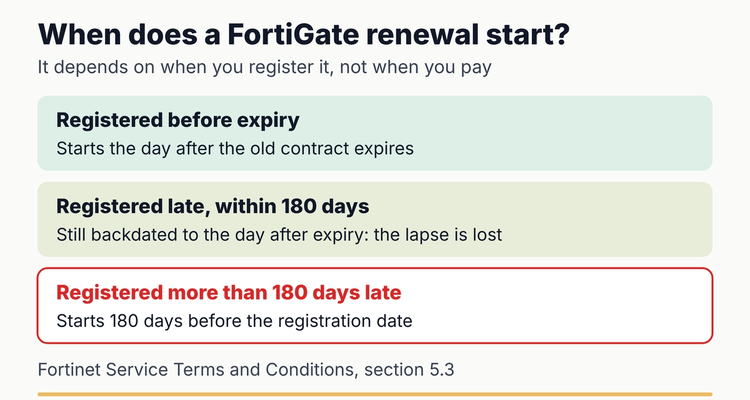 How Fortinet sets a renewal's start date, from the Fortinet Service Terms and Conditions, section 5.3.
Worked example: a late renewal
Say a FortiGate's bundle expired on 1 March 2026 and nobody noticed until the web filter complaints. The one-year renewal is registered on 15 October 2026, which is 228 days late. Because that is more than 180 days, the new term starts 180 days before registration: on 18 April 2026. It ends about a year later, in April 2027. Half the year you paid for was gone before you registered it.
How do you check a FortiGate's license status?
Check each unit in FortiOS, then check the whole estate in the FortiCloud support portal. The device shows what it believes; the portal shows what Fortinet has on record.
- In the GUI. Go to System > FortiGuard. The Subscriptions tab shows "support contract information and expiration dates, expired licenses, and licenses available for purchase" (Fortinet). You can also hover over the Updates tile in the Licenses widget on Dashboard > Status.
- In the CLI. Run diagnose test update info contract | grep FMWR to see the Firmware & General Updates expiry date (Fortinet). Drop the grep to see every contract.
- In FortiCloud. Asset Management has dedicated views for "assets with expired licenses, assets about to expire (30, 60, 90 days)" (Fortinet). Switch to the Entitlement view to filter by support type.
- For HA clusters. Fortinet's troubleshooting steps ask whether "all members of the cluster have the same level of support" (Fortinet). Check both serial numbers, not just the primary.
- After you renew. If the unit still shows expired, Fortinet's technical tip is to confirm it can reach FortiGuard, then run execute update-now to force a license and signature update (Fortinet Community technical tip).
How do you renew FortiGate licenses step by step?
Most organizations renew through a Fortinet partner, with a quote by serial number. Allow about 90 days so the quote, purchase order and registration all land before expiry (our planning advice, not a Fortinet rule).
- 90 days out: list every serial number with its model, site, current bundle and expiry date. Include HA pairs and spare units.
- Decide what to renew. Keep, change or drop each bundle. Retiring a unit? Do not renew it; record the decision instead.
- Request one quote for the batch from your partner, listing serial numbers. US and Canada accounts with fewer than 50 units can also use Online Renew in Asset Management (Fortinet).
- 30 days out: raise the purchase order. Internal approval is the step that most often runs late.
- Register the renewal contract against the serial number in FortiCloud. Fortinet may register it for you, but its terms say "registration is the responsibility of the customer."
- Confirm on the device. Check System > FortiGuard shows the new dates. Run execute update-now if it does not.
- Record the new expiry date and file the proof: the invoice, contract number and a screenshot of the new dates.
Can you co-term FortiGate contracts so they expire together?
Yes, in practice, but it is a quoting question for your partner rather than a setting you can change. Because each renewal starts the day after the old contract ends, renewing early does not move your end date. To line several units up on one date, partners can quote contracts for a non-standard length. Fortinet's public documentation we checked does not describe co-term pricing or terms, so ask your partner how they quote it and what it costs.
One renewal date means one quote, one purchase order and one registration session a year.
How should an MSP track FortiGate renewals across clients?
Track renewals per client and per serial number, and treat the renewal as a job with a start date, not just an expiry date. FortiCloud helps: partners see an aggregated product list that includes their connected accounts (Fortinet), and My Assets folders let you group units by client or site.
The portal shows dates but does not chase quotes or purchase orders, so keep a register with one row per unit, the client contact who signs the order and a quote-by date. Our guide for managed service providers covers per-client tracking across every vendor.
Do this now: a 45-minute FortiGate renewal audit
You can build a reliable renewal list in under an hour with a spreadsheet and the FortiCloud portal. Time estimates are ours, for an estate of about 10 to 20 units.
FortiGate renewal audit
- ✓
Open FortiCloud Asset Management and list assets expiring in 90 days (10 minutes)
- ✓
Add every serial number to one sheet with model, site and client (10 minutes)
- ✓
Record each entitlement's end date: FortiCare, FMWR and each FortiGuard service (10 minutes)
- ✓
Check HA pairs have matching coverage on both units (5 minutes)
- ✓
For each unit, check whether web filter profiles drop or allow on rating errors, so you know what happens at expiry (5 minutes)
- ✓
Name an owner and a backup for every unit, and set a quote-by date (5 minutes)
Copy-paste spreadsheet layout
- Columns: A Client, B Site, C Model, D Serial number, E HA peer serial, F Contract or bundle, G Expiry date, H Quote-by date, I Days left, J Status, K Owner, L Backup, M Partner, N Proof link.
- Quote-by (90 days before expiry): =IF(G2="","",G2-90)
- Days left: =IF(G2="","",G2-TODAY())
- Status: =IF(G2="","CHECK",IF(I2<0,"EXPIRED",IF(I2<=30,"ORDER NOW",IF(TODAY()>=H2,"GET QUOTE","OK"))))
- Formatting: red for EXPIRED, amber for ORDER NOW and GET QUOTE. Sort by column I.
Worked example: a unit expiring on 31 January 2027 gets a quote-by date of 2 November 2026 and shows GET QUOTE from that day. From 1 January 2027 it shows ORDER NOW. Prefer a ready-made file? Our free software, domain and SSL renewal tracker has the date formulas and color rules built in.
How can you make FortiGate renewals easier next year?
These habits go beyond keeping the lights on and cost little.
- Co-term at the next renewal. Pick one month and ask for quotes that bring every unit to it.
- Keep firmware current while covered. Once the firmware license lapses, you can only move within your current minor version.
- Store the proof. Contract numbers and invoices answer the auditor's question, "was this firewall covered in March?"
- Add the rest of the estate. Certificates on the FortiGate's SSL VPN and admin portal expire too; see our guide to SSL certificate expiration monitoring.
What happens if you miss a FortiGate renewal?
⚠️What happens if you miss it: signatures stop updating and category web and DNS filtering stops, dropping all web and DNS traffic by default (FortiOS Administration Guide, License expiration). On FortiOS 7.4.9, 7.6.4 or later, an invalid firmware license triggers a forced patch upgrade. And the renewal is still backdated to the day after expiry, capped at 180 days before registration (Fortinet Service Terms, 5.3).
💡 Pro Tip
Before expiry day, open each web filter profile and check the setting for website or DNS requests when a rating error occurs. Off (the default) means users lose browsing when the license lapses. On means browsing continues with no category filtering. Neither is right for everyone, but you should choose it, not discover it.
Spreadsheet or software?
A spreadsheet is enough for a single site with a few FortiGates and one person who checks it every month. It starts to fail with multiple clients or sites, staggered expiry dates and renewals that depend on someone else's purchase order. A spreadsheet also cannot remind anyone; someone has to open it.
A tracking tool earns its place when you need reminders to reach the right person in time. In ExpiryEdge, each FortiGate contract is a record with an owner and a backup, reminders at 90, 60, 30 and 7 days by email, SMS, Slack or Teams, the quote and invoice attached, and renew-as-copy for next year. ExpiryEdge does not read your FortiCloud account; you enter or import the dates. For SaaS and other subscriptions, see our software license tracking guide, and for the wider picture, our domain, SSL and IT renewal tracking hub. Running Meraki too? See what happens when a Meraki license expires.
Frequently asked questions
Does a FortiGate stop working when the license expires?
No. Fortinet says it "will still function as a firewall" when FortiGuard licenses expire. Signature services keep running on old data, but real-time services such as category web filtering, anti-spam and outbreak prevention stop.
What is the difference between FortiCare and FortiGuard?
FortiCare is the support contract: technical support, hardware replacement and the Firmware & General Updates entitlement. FortiGuard is the security subscription that supplies signatures and real-time lookups. Both are registered to the unit's serial number and expire separately.
If I renew late, does the new term start from the renewal date?
No. Fortinet's service terms backdate a renewal to the day after the previous contract expired. If you register it more than 180 days after expiry, the start date is 180 days before the registration date, so the lapsed time is still lost.
How do I check my FortiGate license expiry date?
In the GUI, go to System > FortiGuard or hover over the Licenses widget on Dashboard > Status. In the CLI, run diagnose test update info contract. For all units at once, use the expiring views in FortiCloud Asset Management.
Will my FortiGate upgrade itself after the support contract expires?
On FortiOS 7.4.9, 7.6.4 and later, yes. With an invalid Firmware & General Updates license, it schedules an upgrade to the latest patch of its current minor version. You can delay it 7 days at a time, but not cancel it.
Can I align renewal dates across several FortiGates?
Yes, by asking your Fortinet partner to quote contracts that end on the same date. Renewing early does not move the end date, because each renewal starts the day after the old contract ends.
Why does my FortiGate still show expired after I renewed?
Check the renewal is registered to the right serial number in FortiCloud and the unit can reach FortiGuard, then run execute update-now, as Fortinet's technical tip suggests. In HA clusters, register all members under the same FortiCare account.
Sources
- Fortinet, FortiOS 8.0.1 Administration Guide: License expiration
- Fortinet, FortiOS 7.6.4 Administration Guide: License expiration
- Fortinet, Required firmware upgrades for FortiGates with invalid support contracts or that have reached EOES
- Fortinet, How the FortiGate firmware license works
- Fortinet, FortiGuard (System > FortiGuard)
- Fortinet, Troubleshooting process for FortiGuard updates
- Fortinet, Service Terms and Conditions for FortiCare, FortiGuard and other service offerings (PDF)
- Fortinet, Service Contract Activation and Grace Period Policy
- Fortinet, FortiCloud Asset Management
- Fortinet, FortiCloud Asset Management: Online renew
- Fortinet, FortiCloud Asset Management: Partner aggregated view
- Fortinet Community, Technical Tip: The license still shows as expired after renewal
- Last reviewed: 12 October 2026
Frequently asked questions
FortiCare is the support contract: technical support, hardware replacement and the Firmware & General Updates entitlement. FortiGuard is the security subscription that supplies signatures and real-time lookups. Both are registered to the unit's serial number and expire separately.
No. Fortinet's service terms backdate a renewal to the day after the previous contract expired. If you register it more than 180 days after expiry, the start date is 180 days before the registration date, so the lapsed time is still lost.
In the GUI, go to System > FortiGuard or hover over the Licenses widget on Dashboard > Status. In the CLI, run diagnose test update info contract. For all units at once, use the expiring views in FortiCloud Asset Management.
On FortiOS 7.4.9, 7.6.4 and later, yes. With an invalid Firmware & General Updates license, it schedules an upgrade to the latest patch of its current minor version. You can delay it 7 days at a time, but not cancel it.
Yes, by asking your Fortinet partner to quote contracts that end on the same date. Renewing early does not move the end date, because each renewal starts the day after the old contract ends.
Check the renewal is registered to the right serial number in FortiCloud and the unit can reach FortiGuard, then run execute update-now, as Fortinet's technical tip suggests. In HA clusters, register all members under the same FortiCare account.