SSL Certificate Expiration: Why It Happens and How to Monitor It

SSL certificate expiration is built in: every publicly trusted TLS certificate has an end date, and the CA/Browser Forum is cutting the maximum from 398 days to 200 days (from 15 March 2026), 100 days (15 March 2027) and 47 days (15 March 2029). Automate renewal with ACME, then monitor each certificate's live expiry date separately.
Want to check a certificate right now? Our free SSL checker shows when any website SSL certificate expires and who issued it.
The site was fine on Friday. On Monday every visitor gets a browser warning, the API clients fail, and the person who bought the certificate left last year. This guide explains why certificates expire, what the new limits mean for your renewal workload, and a monitoring checklist you can run today with free tools.
Key takeaways
- Under the CA/Browser Forum Baseline Requirements (version 2.3.1, 4 October 2026), certificates issued from 15 March 2026 may be valid for at most 200 days, then 100 days from 15 March 2027 and 47 days from 15 March 2029.
- The period for reusing domain validation shrinks on the same dates: 200, 100 and finally 10 days, so you will prove domain control far more often.
- Let's Encrypt stopped sending expiration notification emails on 4 June 2025. If you relied on them, you now have no warning unless you set up your own.
- Let's Encrypt's default certificates move from 90 to 64 days on 10 February 2027 and to 45 days on 16 February 2028.
- Let's Encrypt advises renewing at about two thirds of a certificate's lifetime; Certbot 4.0 and later treats a certificate as due when less than a third of its lifetime remains.
- NIST's TLS certificate guide (SP 1800-16) names outages from expired certificates as a core risk and recommends building a certificate inventory within 90 days.
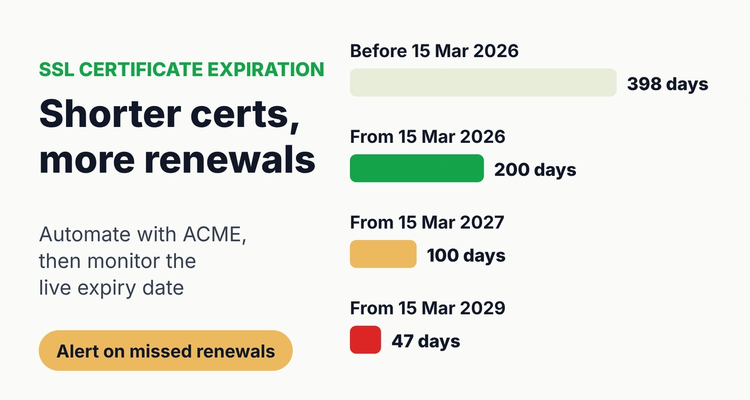 Shorter lifetimes mean more renewals. Automate them, then watch the live dates.
Why do SSL certificates expire?
SSL certificates expire because a certificate is a time-limited statement by a certificate authority (CA) that a key belongs to a domain. A shorter life limits how long a stolen key or wrongly issued certificate stays usable. Let's Encrypt says shorter validity helps "by limiting the scope of compromise, and making certificate revocation technologies more efficient".
The limits are set by the CA/Browser Forum, a group of certificate authorities and browser makers. Its Ballot SC-081v3, approved in April 2025 with Apple, Google, Microsoft and Mozilla voting yes, set a schedule to reduce maximum validity from 398 days to 47 days between March 2026 and March 2029. ("SSL" is the old name; today's certificates are TLS certificates, but the search term stuck.)
How long are SSL certificates valid now?
A publicly trusted TLS certificate issued today (October 2026) can be valid for at most 200 days. The limit depends on the issue date, not the renewal date, so a certificate issued on 14 March 2026 at 398 days could last until about 16 April 2027.
Maximum TLS certificate validity by issue date (CA/B Forum Baseline Requirements 6.3.2 and 4.2.1, last verified 12 October 2026)
| Certificate issued | Maximum validity | Domain validation reuse | Renewals a year (about) |
|---|---|---|---|
| Before 15 March 2026 | 398 days | 398 days | 1 |
| 15 March 2026 to 14 March 2027 (now) | 200 days | 200 days | 2 |
| 15 March 2027 to 14 March 2029 | 100 days | 100 days | 4 |
| From 15 March 2029 | 47 days | 10 days | 8 |
Two details matter for your calendar. The Baseline Requirements say certificates "SHOULD NOT be issued for the maximum permissible time by default", so expect slightly shorter lives than the cap. And many CAs already issue shorter certificates: Let's Encrypt issues 90-day certificates by default, offers opt-in 45-day certificates through its tlsserver profile since May 2026, and has announced the change below.
Let's Encrypt lifetime changes (announced 2 December 2025)
| Date | Change for new certificates |
|---|---|
| 13 May 2026 (deployed 14 May) | Opt-in tlsserver profile switches to 45-day certificates |
| 10 February 2027 | Default classic profile issues 64-day certificates, with a 10-day authorization reuse period |
| 16 February 2028 | Classic profile issues 45-day certificates, with a 7-hour authorization reuse period |
What does ACME automate, and what does it miss?
ACME (Automatic Certificate Management Environment, RFC 8555) lets software request, validate and install certificates without a person. It is the main fix for SSL certificate expiration, and Let's Encrypt says manual renewal "is not recommended" as lifetimes shrink. But automation covers only the certificates it was set up for.
- Renewal timing. ACME Renewal Information (ARI, RFC 9773, June 2025) lets the CA suggest a renewal window to your client. Let's Encrypt recommends enabling ARI; without it, schedule renewal at about two thirds of the lifetime. A fixed 60-day interval will fail with 45-day certificates.
- Manual certificates. Certbot's own documentation says certificates obtained with the --manual plugin "will not renew automatically" unless you add hook scripts.
- Places ACME does not reach. Load balancers, firewalls and VPN appliances, CDNs, email servers, vendor-hosted pages, internal tools and anything with a certificate uploaded by hand. These are where most surprises come from.
- Silent failures. A renewal job can fail because of a DNS change, an expired API token or a firewall rule. Let's Encrypt advises monitoring that alerts "if certificates aren't renewed when expected".
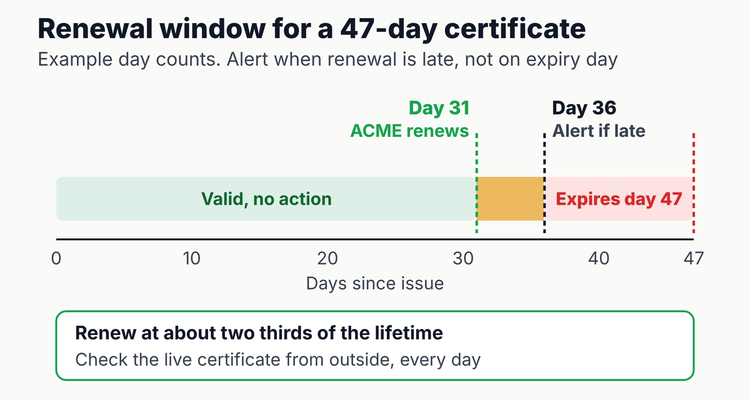 Alert on a missed renewal, not on expiry day. Day counts are an example for a 47-day certificate.
How do you monitor SSL certificate expiration?
Monitor the certificate your users actually receive, from outside your network, and alert when it has not been renewed on schedule. Work through these steps once, then keep them running:
- Build the inventory. List every hostname and port that serves TLS, including appliances and vendor-hosted names. Certificate Transparency logs (searchable on sites such as crt.sh) show certificates issued for your domains, which often reveals ones you forgot.
- Record the owner and the renewal method for each: ACME client, paid CA order, platform-managed, or manual upload.
- Check the live expiry date. Run: echo | openssl s_client -connect example.com:443 -servername example.com 2>/dev/null | openssl x509 -noout -enddate
- Script a threshold check. Add -checkend 864000 to the x509 command. OpenSSL exits non-zero if the certificate expires within that many seconds (864000 is 10 days). Run it daily from cron or your monitoring system.
- Set alert points relative to lifetime. For automated certificates, alert when less than about one third of the lifetime remains (the renewal should have happened). For manual ones, alert early enough to buy, validate and install.
- Use an external monitor as a second check. Let's Encrypt lists third-party options, including one free for up to 250 certificates.
- Send alerts to a channel people watch, with a named owner and a backup, not a mailbox of someone who has left.
- Test after every renewal: full chain served, correct names, and every server behind the load balancer updated.
SSL certificate expiration monitoring methods compared
| Method | Catches | Misses | Effort |
|---|---|---|---|
| ACME client logs | Failed renewal attempts on that server | Certificates the client does not manage; servers not reloaded | Low once set up |
| openssl -checkend script | Live certificate close to expiry on hosts you list | Hosts not on the list | Low |
| External monitoring service | Live expiry from the user's view, chain errors | Internal-only hosts unless you add an agent | Low to medium |
| Certificate Transparency search | Certificates issued for your domains, including forgotten ones | Where each certificate is installed | Medium, periodic |
| Register with owners and dates | Manual, appliance and vendor certificates, plus who renews them | Live state, unless checked against a monitor | Medium |
⚠️What happens if you miss it: an expired certificate is outside its validity period, so browsers and API clients refuse or warn on the connection and your site, checkout or integration effectively goes down. NIST's guide on TLS server certificate management lists "application outages caused by expired TLS server certificates" as a core challenge. If it has already happened, follow our steps for an [SSL certificate or domain that has expired](https://expiryedge.com/answers/ssl-certificate-domain-expired/).
Do this now: a 60-minute certificate inventory
You can find most of your certificates in about an hour (our estimate for a small business with up to 20 hostnames). Make a sheet with these columns and fill one row per hostname and port:
Copy-paste certificate inventory layout
| Column | Header | Formula or entry |
|---|---|---|
| A | Hostname:port | shop.example.com:443 |
| B | Issued (notBefore) | Date from openssl -startdate or the browser |
| C | Expires (notAfter) | Date from openssl -enddate |
| D | Renewal method | ACME, paid CA, platform-managed, manual |
| E | Owner / backup | Two names |
| F | Days left | =C2-TODAY() |
| G | Renew-by (two thirds) | =B2+ROUND((C2-B2)*2/3,0) |
| H | Status | =IF(F2<0,"EXPIRED",IF(TODAY()>G2,"RENEWAL LATE",IF(F2<=30,"DUE 30","OK"))) |
Worked example: a certificate issued on 1 October 2026 with the full 200 days expires around 19 April 2027; its two-thirds renew-by date is about 11 February 2027. If the live certificate still shows the old dates after that, your automation has failed. Sort by column G, and fix every RENEWAL LATE row first. The free software, domain and SSL renewal tracker has the same date logic with colour coding.
How can you make certificate renewals more reliable?
- Move manual certificates to ACME where the platform supports it, and note the ones that cannot move.
- Enable ARI in clients that support it, so the CA can ask for early renewal.
- Prepare for more validation. With domain validation reuse falling to 10 days in 2029, DNS-based validation that runs unattended will matter. Let's Encrypt expects a new DNS-PERSIST-01 method that does not change the DNS record each renewal.
- Keep certificates and domains on one list. A certificate cannot outlive a lapsed domain; domain expiration has its own notice periods and grace rules.
💡 Pro Tip
List the certificate next to the thing it protects. One health-tech IT team we work with keeps its wildcard certificate on the same list as its current and legacy brand domains and its SaaS subscriptions, each with an owner, so a rebrand or a departing admin does not orphan a renewal.
Spreadsheet or software for SSL certificate expiration?
For automated certificates, the best tool is the automation plus an external monitor; a spreadsheet adds little. For a handful of manual certificates with one responsible person, the inventory sheet above and a calendar reminder are enough.
A tracker earns its place when certificates sit on appliances, vendor platforms and client sites, owners change, and you need to show who renewed what. ExpiryEdge does not scan your servers; you enter or import each certificate, domain and subscription, give it an owner and backup, and it sends reminders at 90, 60, 30 and 7 days by email, SMS, Slack or Teams with an audit trail. See domain and SSL expiry tracking. Network subscriptions follow the same pattern; see our FortiGate license renewal guide, and for registrations our domain renewal reminder best practices.
Frequently asked questions
How long is an SSL certificate valid in 2026?
Certificates issued from 15 March 2026 can be valid for at most 200 days under the CA/Browser Forum Baseline Requirements. The maximum falls to 100 days for certificates issued from 15 March 2027 and 47 days from 15 March 2029.
What happens when an SSL certificate expires?
Browsers and other clients treat the certificate as invalid, so visitors see a security warning and many API and app connections fail. The fix is to renew or reissue the certificate and install it, with its chain, on every server that serves the name.
How do I check when my SSL certificate expires?
Click the padlock in your browser and view the certificate, or run: echo | openssl s_client -connect example.com:443 -servername example.com 2>/dev/null | openssl x509 -noout -enddate. Check the live site, not the file on disk, so you see what users receive.
Does Let's Encrypt still send expiry emails?
No. Let's Encrypt ended its expiration notification emails on 4 June 2025 and points users to third-party monitoring services instead, including one that is free for up to 250 certificates.
When should an automated certificate renew?
At about two thirds of its lifetime, which is Let's Encrypt's guidance; Certbot 4.0 and later renews when less than a third of the lifetime remains. Clients that support ACME Renewal Information (ARI) can follow the window the CA suggests.
Is SSL certificate expiration the same as domain expiration?
No. A certificate expires on the date in the certificate and is renewed with your certificate authority. A domain expires with your registrar under separate rules. Track both, because a certificate cannot keep a site up once the domain has lapsed.
Sources
- CA/Browser Forum, Baseline Requirements for TLS Server Certificates, version 2.3.1 (4 October 2026)
- CA/Browser Forum, Ballot SC-081v3 (April 2025)
- Let's Encrypt, Decreasing Certificate Lifetimes to 45 Days (2 December 2025)
- Let's Encrypt community, profile changes on 13, 20 and 27 May 2026 (API Announcements category)
- Let's Encrypt, Expiration Notification Service Has Ended (26 June 2025)
- Let's Encrypt, FAQ
- Let's Encrypt, Monitoring Service Options (updated 13 July 2026)
- Certbot documentation, User Guide
- RFC 8555, Automatic Certificate Management Environment (ACME)
- RFC 9773, ACME Renewal Information (ARI) Extension
- OpenSSL 3.0 documentation, openssl-x509
- NIST SP 1800-16A, Securing Web Transactions: TLS Server Certificate Management
Last reviewed: 12 October 2026
Frequently asked questions
Browsers and other clients treat the certificate as invalid, so visitors see a security warning and many API and app connections fail. The fix is to renew or reissue the certificate and install it, with its chain, on every server that serves the name.
Click the padlock in your browser and view the certificate, or run: echo | openssl s_client -connect example.com:443 -servername example.com 2>/dev/null | openssl x509 -noout -enddate. Check the live site, not the file on disk, so you see what users receive.
No. Let's Encrypt ended its expiration notification emails on 4 June 2025 and points users to third-party monitoring services instead, including one that is free for up to 250 certificates.
At about two thirds of its lifetime, which is Let's Encrypt's guidance; Certbot 4.0 and later renews when less than a third of the lifetime remains. Clients that support ACME Renewal Information (ARI) can follow the window the CA suggests.
No. A certificate expires on the date in the certificate and is renewed with your certificate authority. A domain expires with your registrar under separate rules. Track both, because a certificate cannot keep a site up once the domain has lapsed.