Meraki License Expiration: What Happens and How to Renew in Time

When a Meraki license expires you get 30 days of grace. What happens on day 31 depends on your licensing model. On co-termination, every Meraki device in the organization shuts down. On per-device licensing, only the expired device does. On subscription licensing, the devices keep forwarding traffic but you lose the ability to manage them.
So the date on your dashboard could mean a warning banner, one dead access point, or a dark office. The answer changed when Cisco added subscription licensing, and a lot of guides still only describe the old co-term model. Everything below comes from Cisco Meraki's own documentation, followed by the renewal steps for each model and a tracking sheet you can build today.
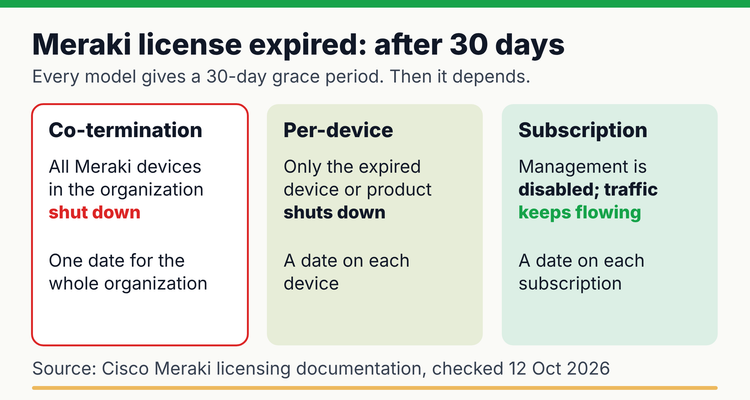 What each Meraki licensing model does after the 30-day grace period, from Cisco Meraki documentation (checked 12 October 2026).
First, find out which licensing model you're on
Open the license page in your dashboard. Co-term and per-device organizations have Organization > Configure > License info. Subscription organizations have Organization > Subscriptions & license info instead, and each subscription there carries a Subscription ID.
Don't skip this step. The model decides what an expiry switches off, and nothing else on this page matters until you know it. It's also shifting under people's feet. Cisco has stopped accepting new per-device conversions ("Conversions to PDL will no longer be accepted", says Cisco Meraki), and subscription licensing is now offered to new and renewing customers in most regions (Cisco Meraki). Plenty of organizations will find themselves on a new model at their next renewal.
What happens when a Meraki license expires, model by model
Same 30 days of grace in all three. Then they go in very different directions. We've put Cisco's rules side by side.
Meraki license expiration by licensing model (Cisco Meraki documentation, last verified 12 October 2026)
| Co-termination | Per-device (PDL) | Subscription | |
|---|---|---|---|
| What expires | One co-term date for every license in the organization | Each device's own license | Each subscription (bound to one or more networks) |
| Grace period | 30 days after the co-term date | 30 days after the device's license expires | 30 days after the subscription end date |
| After the grace period | All Meraki devices in the organization shut down | Only that device or product shuts down | Management disabled; devices keep their last configuration and keep forwarding traffic |
| How to recover | Buy new licensing for all active devices | Apply a new license; grace days used are deducted from it | Renew through your partner; after a longer lapse a new subscription is needed |
| Reminders | Email when out of compliance; status on License info page | Customer is notified when out of compliance | No email reminders; dashboard notices up to 120 days before |
| Official page | Co-Termination Licensing Overview | Per-Device Licensing Overview | Subscription Licensing Renewals and License Compliance |
Sources: Co-termination, per-device, subscription renewals and subscription compliance.
Co-termination: one date for the whole organization
Co-term licensing averages every license in the organization into a single expiry date. Miss it and the whole organization enters grace together. Getting back is expensive, too. Once the co-term date has passed, Cisco says the only fix is "the purchase of all new licensing for active devices." Thirty days later the dashboard reads "This network has been disabled for non-payment", and an email turns up titled "Your Meraki networks are now inactive" (Cisco Meraki).
Per-device: one device goes dark, and grace days cost you
Here every device has its own expiry date. When one lapses, "Meraki will only shut down that device or product (after the 30 grace period)", and everything else carries on. The sting is in the arithmetic. Use 10 days of grace, then apply a 1-year license, and it runs out after 355 days rather than 365 (Cisco Meraki).
Subscription: the network stays up, but you can't touch it
A subscription is tied to specific networks, not the whole organization. When it ends, those networks get 30 days of grace and then drop into what Cisco calls a "disabled management state." Devices hold their last compliant configuration and keep forwarding traffic. Your admins, though, can't change settings, view monitoring data, push firmware or open a support case for those devices (Cisco Meraki). Users won't notice. You will, the first time a switch port needs changing or a firmware fix comes out.
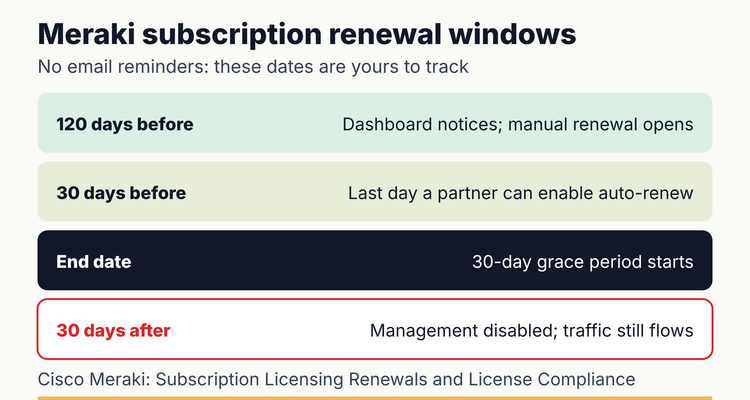 Subscription renewal windows, from Cisco Meraki's Subscription Licensing Renewals and License Compliance pages.
How Cisco calculates the co-term date
It's a weighted average: all the license time in the organization, spread across the number of licensed devices. Cisco's worked example goes like this (Cisco Meraki).
- Take each license's days and multiply by its device count. A 1-year license for 2 APs is 365 x 2 = 730 device-days. A 5-year license for 1 AP is 1,825 x 1 = 1,825 device-days.
- Add them up: 730 + 1,825 = 2,555 device-days.
- Divide by the number of licensed devices: 2,555 / 3 = about 851 days. All three APs share a co-term date 851 days from the start.
- If one license is applied part-way through another, only the remaining time counts. Cisco's example of the 5-year key applied halfway through the 1-year key gives 730 days.
That's why adding one device with a long license barely shifts the date. It's also why a renewal key covering fewer devices than you actually run can leave you out of compliance.
How to renew a Meraki license, step by step
Each model renews differently. We'd start about 120 days out. That's when subscription renewals open, and it's a sensible lead time for co-term and per-device too (our advice, not Cisco's rule).
Co-termination renewals
- Count the devices in your networks against your license limit on the License info page. Devices only in inventory do not count.
- Buy one renewal key that covers all devices for the term you want. Cisco calls this "the recommended practice."
- Go to Add licenses, enter the key and choose Renew my Dashboard license. Choose License more devices only for extra devices.
- Apply the key straight away. "Holding onto a license does not delay its activation date."
- Confirm the new co-term date and that no device type shows red.
The claim type is where people slip. Claim a key as a renewal and your license limit resets to match only that key, so a short key can push you out of compliance overnight. If that happens, Cisco's undo license claim tool can reverse it.
Per-device renewals
- Buy licenses for the devices you are renewing; you can renew all or some.
- Queue the new license on each device before its 90-day pre-activation window ends, so it starts when the current one expires.
- To bring several devices to one date, use one-day licenses to "true-up" the earlier dates.
Subscription renewals
- Find the Subscription ID under Organization > Subscriptions & license info > View Details.
- Send it to your partner. Manual renewal can be set up from 120 days before the end date and lets you change SKUs, tiers and term.
- For auto-renewal, the partner must enable it at least 30 days before expiry. It renews for one year on the same terms.
- Either way, the renewal takes effect the day after the current end date, with no key to claim. Check Recent Changes on the subscription to confirm.
A word on timing once a subscription has expired. Cisco's renewal page mentions the 30-day grace period, and also a 90-day window in which an expired subscription can still be renewed manually; after that, "a new subscription will be needed" (Cisco Meraki). Plan around the 30 days. The 90 is a lifeline, not a schedule.
Do this today: a 20-minute license check
Give each organization about 20 minutes (our estimate) and you'll know exactly where it stands. Then put the dates somewhere that will actually remind you.
Meraki license check
- ✓
Note the licensing model of each organization (2 minutes)
- ✓
Record the co-term date, each device's expiry, or each subscription's end date and ID (5 minutes)
- ✓
Compare device counts with license limits, by device type (5 minutes)
- ✓
Check who receives dashboard alerts and email, and add a shared mailbox where you can (3 minutes)
- ✓
Write down your partner contact and the renew-by date (90 to 120 days before expiry) (5 minutes)
Copy-paste spreadsheet layout
- Columns: A Organization or client, B Licensing model, C Network or device, D Subscription ID or license key, E Expiry or co-term date, F Devices in use, G License limit, H Renew-by date, I Days left, J Status, K Owner, L Backup, M Partner.
- Renew-by (120 days before expiry): =IF(E2="","",E2-120)
- Days left: =IF(E2="","",E2-TODAY())
- Shutdown or lockout date (30-day grace): =IF(E2="","",E2+30)
- Status: =IF(E2="","CHECK",IF(F2>G2,"OVER LIMIT",IF(I2<0,"IN GRACE OR EXPIRED",IF(TODAY()>=H2,"RENEW NOW","OK"))))
Looking after lots of organizations? The Dashboard API endpoint GET /organizations/{organizationId}/licenses/overview returns status and expiration date for co-term organizations, and counts of expiring licenses for per-device ones (Cisco Meraki Developer Hub). A short script can fill column E for every client. If you'd rather start from a template, use our free software, domain and SSL renewal tracker.
Habits that make Meraki renewals boring (in a good way)
Don't rely on Cisco's emails. Subscription customers don't get any, and co-term emails go to whoever happens to be on the account, which may be someone who left last year. Put the date in a shared calendar or tracker.
Under co-term, renew early. A renewal key's time counts from purchase, so applying it the day it arrives costs you nothing.
Watch device counts all year. Plug an unlicensed device into a network and it starts its own 30-day grace period, months before your renewal date.
Line Meraki up with your other network renewals. If you also run FortiGate firewalls, our FortiGate license renewal guide covers those.
If you miss a Meraki renewal
⚠️What happens if you miss it: under co-termination, once licensing has been invalid for more than 30 days, "all Cisco Meraki devices will be shutdown until licensing is returned to compliance", and the only fix is new licensing for all active devices (Co-Termination Licensing Overview). Under per-device licensing, the expired device shuts down after 30 days. Under subscription licensing, management of the affected networks is disabled after 30 days: no configuration changes, monitoring, firmware updates or support (License Compliance Cloud Experience).
💡 Pro Tip
Under co-term, a device added to a network counts against your license limit, but one left in inventory does not. If you are over the limit, you can move the extra device out of its network and back into inventory which brings the organization back into compliance while the new license is ordered (Co-Termination Licensing Overview).
Should you track this in a spreadsheet or software?
One organization on co-term? A spreadsheet is fine: one date, one owner, a monthly glance. It gets harder with per-device or subscription licensing, where every device or network can carry its own date, and harder again once you're an MSP juggling client organizations. A spreadsheet also can't remind anyone of anything, which matters when Cisco won't email subscription customers.
In ExpiryEdge, each Meraki organization, subscription or device group becomes a record with an owner and a backup, with reminders at 90, 60, 30 and 7 days by email, SMS, WhatsApp, Slack or Teams. Overdue items escalate to a manager. To be clear, ExpiryEdge doesn't connect to your Meraki dashboard; you enter or import the dates. MSPs can see how per-client tracking works on our managed service providers page. For your other IT renewals, see the domain, SSL and IT renewal tracking hub and our software license tracking guide.
Frequently asked questions
Is there a grace period when a Meraki license expires?
Yes. All three licensing models give you 30 days. During co-term grace, Cisco says network clients won't notice anything. Once the 30 days are up the models split: a co-term organization shuts down, per-device licensing switches off just the expired device, and subscription networks keep passing traffic while you lose the ability to manage them.
Will my Meraki network stop working if the license expires?
That depends on your licensing model. Co-termination is the harsh one: after the 30-day grace period every Meraki device in the organization shuts down. Per-device licensing only stops the device whose license ran out. Subscription is the gentlest. Traffic keeps flowing, but you can't change configuration, see monitoring or push firmware.
Does Meraki send license expiration reminders?
Not if you're on subscription licensing. Cisco says those customers "will not receive email reminders" and get dashboard notices up to 120 days before expiry instead. For co-term, Cisco documents emails once an organization is out of compliance, which is late. Keep your own reminder, with a second person on it.
How do I renew a Meraki co-term license?
Buy a single renewal key covering every device in the organization. Then open License info, choose Add licenses and claim it as Renew my Dashboard license. Apply it the day it arrives. The term counts from the purchase date, so a key sitting in someone's inbox is quietly losing days.
Should I wait until my Meraki license is about to expire before renewing?
No. A co-term renewal license starts counting down from the day you buy it, and Cisco says "there is no time benefit gained from delaying a renewal." Per-device works differently. Queue the new license on the device and it starts when the current one ends, so buying early costs you nothing there either.
Can I move from co-term to subscription licensing?
Only at the right moment. Subscription keys can be claimed by a new organization, an expired one or one in its grace period. An organization with active co-term or per-device licensing can't claim them. So the switch usually lines up with your co-term date. Talk to your partner a few months before it.
Sources
- Cisco Meraki, Co-Termination Licensing Overview
- Cisco Meraki, Per-Device Licensing Overview
- Cisco Meraki, Cisco Networking Subscription Licensing overview
- Cisco Meraki, Subscription - Licensing Renewals
- Cisco Meraki, Subscription - License Compliance Cloud Experience
- Cisco Meraki Developer Hub, Get Organization Licenses Overview
- Last reviewed: 12 October 2026
Frequently asked questions
That depends on your licensing model. Co-termination is the harsh one: after the 30-day grace period every Meraki device in the organization shuts down. Per-device licensing only stops the device whose license ran out. Subscription is the gentlest. Traffic keeps flowing, but you can't change configuration, see monitoring or push firmware.
Not if you're on subscription licensing. Cisco says those customers "will not receive email reminders" and get dashboard notices up to 120 days before expiry instead. For co-term, Cisco documents emails once an organization is out of compliance, which is late. Keep your own reminder, with a second person on it.
Buy a single renewal key covering every device in the organization. Then open License info, choose Add licenses and claim it as Renew my Dashboard license. Apply it the day it arrives. The term counts from the purchase date, so a key sitting in someone's inbox is quietly losing days.
No. A co-term renewal license starts counting down from the day you buy it, and Cisco says "there is no time benefit gained from delaying a renewal." Per-device works differently. Queue the new license on the device and it starts when the current one ends, so buying early costs you nothing there either.
Only at the right moment. Subscription keys can be claimed by a new organization, an expired one or one in its grace period. An organization with active co-term or per-device licensing can't claim them. So the switch usually lines up with your co-term date. Talk to your partner a few months before it.