Ops Teams: Five Steps to an Equipment Maintenance Schedule That Works

Ops Teams: Five Steps to an Equipment Maintenance Schedule That Works

An equipment maintenance schedule is a documented plan that tells you which asset gets which task, how often, and who owns it, tracked against a next due date and status field. Every working version needs three things at minimum: an Asset ID, a Task with its frequency, and an Owner paired with a Next Due/Status marker. If you have none of this yet, the first move isn’t a template. It’s a walk through your facility to build a list of critical assets and tag them before anything else gets scheduled.
TL;DR:
High-criticality assets require more frequent updates based on failure history, not solely on OEM intervals, to optimize maintenance effectiveness.
Using condition monitoring data, such as vibration or oil analysis, can justify tightening or loosening scheduled intervals, reducing unnecessary service or missed failures.
Automated tracking, reminders, and escalation paths improve PM compliance and ensure tasks like calibration and inspections are not overlooked.
A maintenance schedule should include SOP references, owner assignment, and real-time status updates to make it actionable and audit-ready.
Pilot programs on critical assets, measuring compliance over 90 days, allow for interval adjustments and improve fleet-wide program success.
What Goes Into an Equipment Maintenance Schedule: Task Frequencies and Examples
Most working schedules organize tasks into five frequency bands, running from daily checks to annual overhauls. A standard task-frequency matrix built this way covers everything from a five-minute visual check to a full teardown, and mapping your equipment onto it is faster than designing frequencies from scratch.
Daily or per-shift tasks catch problems before they become failures. These are typically operator-run: visual inspections for leaks or damage, fluid level checks, testing emergency stops, and confirming guards and safety devices are in place. None of this requires a technician, which is exactly why it belongs at this frequency. It’s cheap, fast, and catches the obvious stuff.
Weekly and monthly tasks move into hands-on work. Lubrication schedules, filter changes, belt or chain tension checks, and general cleaning fall here. A conveyor belt that runs three shifts a day needs weekly tension checks; the same conveyor running one shift might only need it monthly. Duty cycle drives the interval, not the calendar alone.
Quarterly and semi-annual tasks bring in condition monitoring. Vibration analysis, infrared thermography on electrical panels, oil sampling, and shaft alignment checks typically happen on this cadence. These tasks usually require a technician with specific training and, often, dedicated equipment like a vibration analyzer or infrared camera.
Annual tasks are the heavy lifts: full overhauls, calibration of instrumentation, and condition-based rebuilds triggered by what the quarterly monitoring turned up. A pump that showed rising vibration trends all year might get bumped from “annual inspection” to “annual rebuild” based on that data.
Every task on the schedule should point to a standard operating procedure. A line item that just says “lubricate motor” tells a new technician nothing about grease type, quantity, or access panel location. A task that says “lubricate motor per SOP-MTR-014” gives them everything they need without a phone call to a supervisor.
- Daily: visual inspection, fluid levels, e-stop test, safety device check
- Weekly/Monthly: lubrication, filter replacement, belt/chain tension, cleaning
- Quarterly/Semi-annual: vibration analysis, thermography, oil sampling, alignment check
- Annual: overhaul, instrument calibration, condition-based rebuild
Pro Tip: If a task doesn’t have an SOP number attached, it’s not ready for the schedule yet. Write the procedure first, then schedule the task, not the other way around.
Industry guidance built around OEM manuals, engine hours, and failure history points to a specific compliance target once the schedule is running: 90% PM completion across the fleet overall, and 95% for assets flagged as critical. That’s the number that tells you whether the schedule is a working document or a spreadsheet nobody opens.
Five Steps to Build a Preventive Maintenance Schedule From Scratch
Building a schedule from zero follows a logical sequence. Skip a step and you’ll end up rebuilding the whole thing in six months once gaps show up in the field.
- Inventory every asset with a unique ID and metadata. Record manufacturer, model, install date, and a runtime meter reading where applicable. This sounds tedious. It is. It’s also the single most skipped step, and the reason so many maintenance programs collapse within a year, because nobody can answer “which pump is this, exactly?” during an audit.
- Rank assets by criticality. Score each one on production impact, safety risk, and cost of failure. A backup air compressor that sits idle 340 days a year ranks lower than the single chiller keeping a server room cool. Criticality decides not just what gets maintained, but how often and how tightly.
- Pull PM tasks from OEM manuals and your own failure history, then map each to an SOP. OEM baselines are the starting point, not the final answer. If a bearing has failed three times in two years despite following the manual’s interval, that failure history should override the manufacturer’s default.
- Set initial frequencies and convert any hour-based OEM intervals into calendar equivalents. A 500-hour service interval on a generator that runs 8 hours a day converts to roughly every two months. Get this math wrong and you’ll either over-service equipment that barely runs or miss intervals on equipment running around the clock.
- Assign ownership, set next-due dates, and define your compliance metric. The formula is simple: PM tasks completed on time divided by PM tasks scheduled. Without an owner attached to each task, “assign ownership” becomes the step everyone assumes someone else handled.
A validated interval library covering 20 equipment categories can shortcut steps three and four considerably. Instead of researching baseline intervals for motors, pumps, compressors, and conveyors one by one, you start with numbers that already reflect common failure patterns across those categories and adjust from there.
Converting OEM Hours to Calendar Dates and Tuning Intervals
OEM manuals speak in engine hours. Your schedule needs to speak in calendar dates, because nobody wants to check a runtime meter every morning just to know if today is a maintenance day.
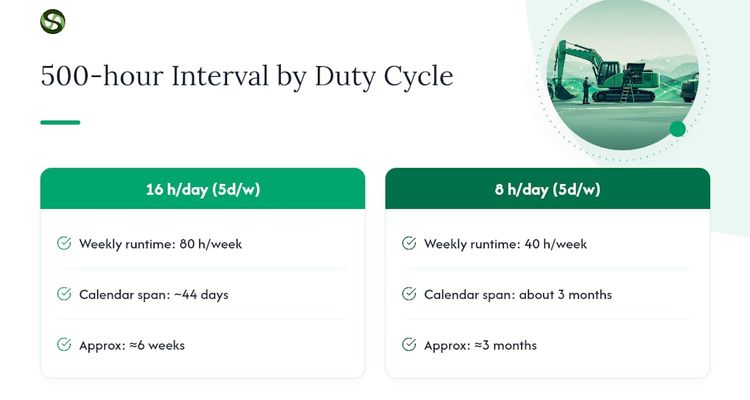
The math is straightforward once you know the duty cycle. Take a 500-hour service interval on a piece of equipment running 16 hours a day, five days a week. That’s 80 hours a week, so 500 hours arrives in about 44 calendar days, or roughly six weeks. Drop that same equipment to an 8-hour, five-day cycle, and the same 500-hour interval stretches to about three months. Two machines, identical manuals, wildly different service dates. That gap is exactly why calendar-only schedules built without checking actual runtime create either wasted service visits or missed ones.
Environment changes the equation further. Equipment running in a dusty foundry, a coastal humid plant, or a subzero outdoor yard wears faster than the same model in a climate-controlled facility. A common rule of thumb increases frequency for harsh-environment assets meaning that the 44-day interval might tighten substantially.
Condition-monitoring data should override both the calendar and the rule of thumb whenever it disagrees with them. If vibration readings or oil analysis show a bearing degrading faster than the calendar interval assumes, move the date up. If the same readings stay flat well past the scheduled date, that’s a legitimate signal to loosen the interval instead of servicing equipment that doesn’t need it yet.
Build an annual interval review into your governance calendar, not as an optional nice-to-have but as a fixed date on the operations calendar. Documenting the hours-per-shift conversion factor inside the asset record matters here too. When an auditor asks how you arrived at a due date six months from now, you want that math sitting in the record, not in someone’s memory.
Maintenance Schedule Templates: What to Build in Excel and When to Move Off It
A spreadsheet is a perfectly legitimate starting point, and pretending otherwise wastes money on software you don’t need yet. The template only works if it has the right columns from day one.
- Asset and ID: unique identifier tied to the physical equipment tag
- Location: building, line, or zone for fast physical lookup
- Manufacturer and model: needed for parts ordering and OEM manual reference
- Task and frequency: what gets done and how often
- Trigger type: time-based, hour-based, or condition-based
- Owner: the specific person or role responsible
- Last done and next due: the two dates that make the schedule actionable
- Status: on track, due soon, or overdue
- SOP link: the procedure document for that exact task
- Estimated hours and parts needed: for labor planning and inventory
Templates with Next due and Status fields are what separate an executed maintenance program from a wish list. Skip those two columns and you have a task list, not a schedule.
Excel works fine for a single production line or a few dozen assets managed by one or two people. Three triggers usually signal it’s time to move to a dedicated system: you’re managing multiple sites, you have enough technicians that version control on a shared file becomes a mess, or a regulator or customer audit requires evidence trails that spreadsheets can’t produce reliably. A planning-first PM scheduler pre-seeded with interval libraries can get a working program running in under an hour for common equipment categories, and it auto-generates the rolling queue of work orders that a spreadsheet leaves to whoever remembers to check it.
Turning the Schedule Into Work: Tracking, KPIs, and Audit Evidence
A schedule only earns its keep once it starts generating real work orders with the right SOPs and parts lists attached automatically, rather than requiring someone to look up which procedure applies every time a task comes due.
Four KPIs tell you whether the program is working:
- PM compliance percentage: tasks completed on time divided by tasks scheduled, targeting roughly 90% overall and 95% on critical assets
- Overdue jobs: the count sitting past their next-due date at any given moment
- MTTR (mean time to repair): how long a failure keeps equipment down
- MTBF (mean time between failures): how long equipment runs between breakdowns, and backlog days, the accumulated queue of unfinished work
That 90/95 split isn’t arbitrary. It reflects the reasoning that preventive maintenance catches problems before they cause downtime, and critical assets carry a tighter tolerance for slippage because the cost of a miss is so much higher.
Evidence capture matters just as much as completion. Photos of the finished job, a technician sign-off, and readings logged against the SOP give you something to hand an auditor besides a verbal assurance that the work happened. A regulator reviewing your program doesn’t want to hear it got done. They want to see it.
Build a monthly feedback loop where failure data actually changes the schedule. If a motor keeps failing between scheduled lubrication cycles, that’s not bad luck, it’s a signal the interval is wrong. Tightening it based on real failure history is a better use of that data than leaving the interval untouched and hoping the next failure doesn’t happen on a production day.
A Worked Example: Sample Preventive Schedule for a Centrifugal Pump
Here’s a copy-paste-ready snippet for a single centrifugal pump, structured the way a real PM record should look before it goes into a spreadsheet or gets imported into a system.
A few notes on reading this table correctly:
- The Operator-level daily check takes six minutes and needs zero special tools, which is exactly why it happens every day instead of every week.
- Quarterly vibration and oil sampling by Reliability staff feeds directly into the decision on whether the annual task becomes a routine inspection or a full bearing replacement.
- The annual contractor visit assumes bearing wear consistent with normal operation; a pump running in a corrosive environment might need this bumped to semi-annual per the harsh-environment adjustment covered earlier.
- Every SOP reference in this table should exist as an actual document your technicians can pull up on a phone or tablet standing next to the pump, not a filename that only lives on someone’s desktop.
This same structure scales to motors, compressors, and conveyors with different tasks slotted into the same five frequency rows.
Where Deadline Tracking Fits Alongside Your PM Program
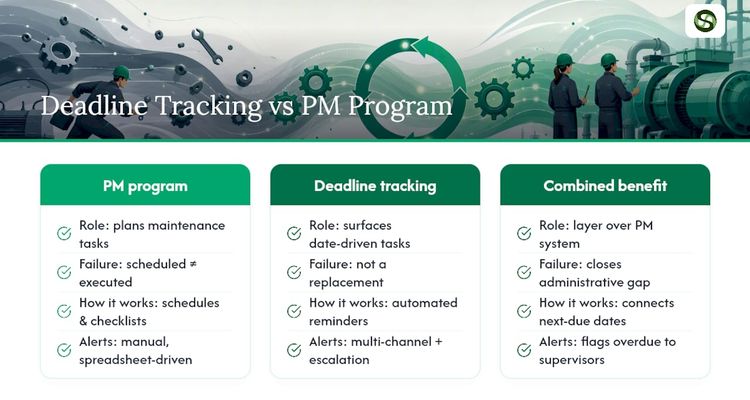
A maintenance schedule can be built correctly and still fail in execution, because the gap between “scheduled” and “done” is almost always an administrative one. Someone forgets to check the spreadsheet. A next-due date passes quietly on a Friday afternoon. Nobody escalates until the equipment fails.
Date-driven tracking sits at that exact failure point, not as a replacement for your PM system but as the layer that makes sure scheduled dates actually surface to the right person before they’re missed. This is the same operational problem many deadline tracking solutions aim to solve: tracking anything tied to a fixed date, whether that’s a contract renewal, a certification, or an inspection deadline, and making sure it gets a reminder, not silence.
For maintenance programs specifically, the practical benefit is visibility and reduced administrative drag. Multi-channel alerts mean a next-due date doesn’t rely on one person remembering to open one spreadsheet. Escalation paths mean an overdue task gets flagged to a supervisor automatically instead of sitting unnoticed. If you’re piloting this approach, start narrow: pick your critical assets, connect their next-due dates to automated reminders, and measure whether PM compliance moves before rolling it out fleet-wide.
What Most Maintenance Rollouts Get Wrong
The programs that fail rarely fail on the frequency math. They fail on three quieter mistakes: tasks with no SOP attached, so execution quality depends on whoever happens to be free that day; tasks with no named owner, so “someone” becomes the default owner and nobody actually does the work; and intervals borrowed straight from an OEM manual with zero adjustment for actual duty cycle or environment, which either wastes labor or misses real degradation.
My advice after seeing this pattern repeat: pilot the schedule on ten to twenty critical assets before rolling it out fleet-wide. Measure PM compliance for ninety days. Adjust intervals based on what the data actually shows, not what the manual assumed. A schedule that isn’t measured isn’t a program. It’s a document.
— Kuldeep
Keep Your Maintenance Schedule From Slipping Through the Cracks
Building the schedule is the easy part. Keeping every next-due date visible to the right person, every week, for years, is where most programs quietly break down. Some dedicated tracking platforms exist specifically for that second problem: centralized tracking for anything tied to a deadline, with automated reminders that go out across multiple channels so a due date never depends on one person remembering to check a spreadsheet.

For a maintenance program, that means your critical-asset PM dates, calibration deadlines, and inspection windows all live in one dashboard instead of scattered across spreadsheets and calendar invites. Escalation rules mean an overdue task gets flagged automatically rather than surfacing three weeks later during an audit. If you’re ready to see how automated reminders and escalation paths hold up against your own maintenance calendar, start a free trial with Expiryedge and load your critical assets first.
Sources
The Dovient equipment maintenance schedule template gives you a downloadable starting point with the Next due and Status columns already built in. For interval baselines across 20 equipment categories, the PM Interval Reference Library saves you from researching starting frequencies from scratch. Fleetio’s guide to heavy equipment maintenance best practices covers the 90/95 compliance benchmarks in more depth, and FleetPoint’s coverage of predictive maintenance explains how condition-based triggers work alongside calendar PMs. For asset-level tool tracking on top of your schedule, RFID-based tracking systems offer a practical example from aviation maintenance operations.
- Free Equipment Maintenance Schedule Template (Excel & Digital) | Dovient Blog
- Heavy Equipment Maintenance: Best Practices and Tips
- PM Interval Reference Library: 20 Equipment Types | Maintenance Planning Manager
- Predictive fleet maintenance: driving down costs in the US | FleetPoint
FAQ
What is the 80/20 rule in maintenance?
It’s the principle that roughly 20% of your assets, the critical ones, drive 80% of your downtime risk and cost, which is why criticality ranking should come before frequency assignment when building a schedule.
What should a maintenance schedule include?
At minimum, an Asset ID, a Task with its frequency, an Owner, and a Next due/Status field; stronger schedules also link an SOP, log estimated labor hours, and list required parts.
What is a typical maintenance schedule?
Most programs run five frequency bands: daily visual and safety checks, weekly or monthly lubrication and cleaning, quarterly or semi-annual condition monitoring like vibration analysis, and annual overhauls or calibration.
Can you provide an example of a maintenance schedule?
A centrifugal pump schedule might run a daily seal leak check by an operator, weekly coupling inspection by a technician, monthly bolt torque checks, quarterly vibration analysis and oil sampling by reliability staff, and an annual strip-and-inspect with bearing replacement by a contractor.
How do I know if my equipment maintenance schedule is actually working?
Track PM compliance, tasks completed on time divided by tasks scheduled, and aim for around 90% overall and 95% on critical assets; a tool like Expiryedge can help surface overdue tasks before they slip past that threshold.
Recommended
Frequently asked questions
At minimum, an Asset ID, a Task with its frequency, an Owner, and a Next due/Status field; stronger schedules also link an SOP, log estimated labor hours, and list required parts.
Most programs run five frequency bands: daily visual and safety checks, weekly or monthly lubrication and cleaning, quarterly or semi-annual condition monitoring like vibration analysis, and annual overhauls or calibration.
A centrifugal pump schedule might run a daily seal leak check by an operator, weekly coupling inspection by a technician, monthly bolt torque checks, quarterly vibration analysis and oil sampling by reliability staff, and an annual strip-and-inspect with bearing replacement by a contractor.
Track PM compliance, tasks completed on time divided by tasks scheduled, and aim for around 90% overall and 95% on critical assets; a tool like Expiryedge can help surface overdue tasks before they slip past that threshold.