Inspection Deadline Automation: A 2026 Ops Guide

Inspection Deadline Automation: A 2026 Ops Guide

Inspection deadline automation means software tracks every inspection due date, reminds the owner, escalates when nothing happens, and keeps the evidence. The part most teams miss is what comes after the visit: the defect the inspector said must be fixed within a set period, and the next due date, which should run from the day the inspection actually happened.
Get those two right and you've solved most inspection compliance problems. This guide shows how, with examples from real rules.
Where manual inspection tracking breaks
Spreadsheets and shared calendars work while the team is stable, the asset list is short and nobody's on holiday. None of that lasts.
The facilities coordinator who built the sheet leaves, and nobody else knows how it works. The site adds a second forklift and a new lift, and their inspection cycles never make it into the file. These aren't edge cases. They're what normally happens as a business grows.
Three failures come up again and again:
- Calendar drift. An inspection slips a fortnight, but the next one is still calculated from the original date. Or the reverse. Either way, the sheet and reality drift apart.
- No owner. Someone changes role, the reminder still goes to their old inbox, and nobody notices until an auditor asks.
- The follow-up deadline. The inspection happens on time, but the repair, the re-test or the paperwork that follows has its own deadline, and nobody tracks it.
Here's a quick test. Take your last twelve months of findings from audits, insurers or inspectors, and sort each one into "inspection missed", "follow-up missed" or "paperwork wrong". You'll see where your process actually leaks.
The follow-up deadline, with a real example
The UK's lifting equipment rules (LOLER) show the problem clearly. HSE guidance says lifting equipment used to lift people, and all lifting accessories, need a thorough examination every 6 months. Other lifting equipment needs one every 12 months, unless a competent person draws up an examination scheme.
If the examiner finds a defect that isn't immediately dangerous, the equipment can stay in use, but the defect must be fixed (or the equipment taken out of use) within the time stated on the report. A serious defect also has to be reported to the enforcing authority.
So one examination creates at least two dates: the next examination, and the repair deadline on the report. A spreadsheet that marks the job "done" when the engineer leaves will only ever show the first.
US fire extinguishers work the same way on a smaller scale. OSHA 29 CFR 1910.157 requires a monthly visual inspection and an annual maintenance check, and the employer has to record the annual check date and keep that record. Two cycles, one record-keeping duty, per extinguisher.
What automation should actually do
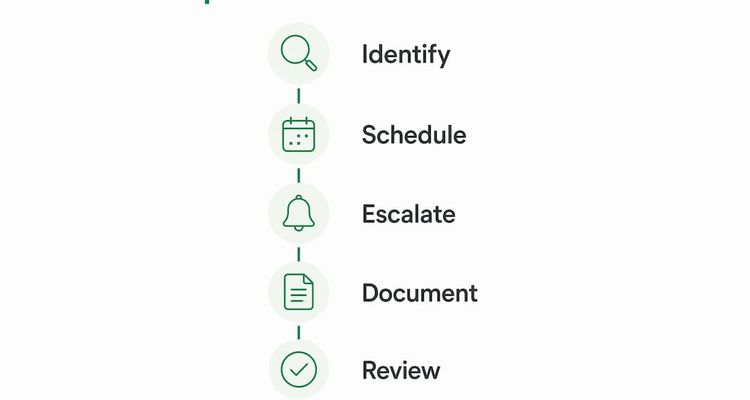
The main benefit isn't speed. It's consistency. The same steps happen for every inspection, whoever's on shift and however busy the week.
- Next due date from the real completion date. When a job is closed, the system works out the next due date from the date it was actually done, so the calendar stays right without anyone resetting it.
- Reminders timed to the lead time. A job needing an outside contractor gets its first reminder 30 days out. A monthly walk-round needs a few days.
- Follow-up deadlines as separate items. Closing an inspection with a defect opens a new item with its own date and owner, and its own escalation if it slips.
- Evidence on the record. The report, photos and sign-off sit with the inspection, so an audit is a matter of exporting, not hunting.
💡 Pro Tip
When you look at software, ask the vendor to show you what happens after an inspection is marked complete. If the workflow stops there, it won't catch the follow-up deadlines that cause most trouble.
Features to look for, and what each one prevents
The difference between a reminder tool and inspection automation is how much of the job it covers after the reminder fires.
| Feature | What it prevents |
|---|---|
| Different interval per asset | A lift on a 12-month cycle and its slings on 6 months sharing one wrong date |
| Next date from completion date | Calendar drift after a late or early inspection |
| Staged reminders and escalation | Jobs nobody booked until the week they were due |
| Qualification check on assignees | Work signed off by someone whose certification has lapsed |
| Evidence required before closing | Jobs marked done with no report to show an auditor |
| Linked follow-up items | Repairs and re-tests that quietly never happen |
ExpiryEdge covers the date side of this. It tracks inspection and certificate due dates per asset or site, reminds the owner by email, SMS, WhatsApp, Slack or Teams, escalates overdue items to a manager, and keeps the uploaded reports in an exportable audit trail. For the escalation design itself, see our deadline escalation workflow guide.
Setting it up in five steps
Map the workflow before you pick a tool. Buying a reminder system and expecting it to fix a workflow problem is the most common mistake.
- List every inspection obligation. For each asset: how often, which rule or insurer requires it, who does it, and what evidence proves it was done.
- Map what happens after each inspection. Repairs, re-tests, reports to an authority, certificates to file. Note which of those has its own deadline.
- Pilot on one site or one asset type. Run the new system alongside your current one for 60 days, and count late items in both.
- Set escalation before go-live. Decide who gets the first reminder, when, and who it goes to next if nothing happens. Every step needs a person with authority to act.
- Move the know-how into the system. Access arrangements, contractor contacts, quirks of specific equipment. When someone leaves, it stays.
After launch, check three numbers each month: inspections done on time, follow-up items closed on time, and escalations that reached the last step without being resolved. That third number tells you where the process is still broken.
A view from the founder: treat it as a workflow, not a calendar
Teams that buy inspection automation hoping for a better calendar usually get a slightly better calendar. The teams that see a real change are the ones that use it to run the whole job, from booking to repair to filed report.
The common mistake is bolting reminders onto a manual process. The emails get better, but the follow-up deadline still catches you, because nothing is tracking what happens after the visit.
So before you choose a tool, ask to see the screen after "inspection complete". If there's nothing there, keep looking.
Kuldeep, ExpiryEdge
Your next step
Pick one asset type with a clear legal cycle, such as lifting equipment or fire extinguishers, and list every unit, its last inspection date and any open defect from the last report. That list will show you quickly whether follow-up deadlines are being tracked.

If you want to run that list with reminders and escalation built in, ExpiryEdge has a 14-day free trial with no credit card. See how the deadline tracking platform works.
FAQ
What is inspection deadline automation?
It's software that tracks when each inspection is due, reminds the person responsible, escalates if nothing happens, and stores the evidence once it's done. Good setups also track the deadlines that follow an inspection, such as a defect the report says must be fixed within a set period, and set the next due date from the date the inspection actually happened.
Why do manual inspection tracking systems fail?
Because they depend on one person and one file. When the facilities coordinator leaves, the spreadsheet stops being updated. When you add equipment, nobody adds its inspection cycle. And a spreadsheet marks a job done when the engineer leaves site, so it never tracks the repair or the report that's still owed.
What is the secondary deadline trap?
It's when the inspection happens on time but the follow-up deadline is missed. Under the UK's LOLER rules, for example, a thorough examination can find a defect that must be fixed within a period stated on the report. If nobody tracks that date, you're out of compliance even though the examination itself was done on schedule.
How much time can inspection automation save?
It depends on how many assets you have and how much chasing your team does by hand today. The fair way to find out is to measure it: log the hours spent on tracking and follow-up for a month, run automated reminders on one site for 60 days, and compare missed or late items before and after.
What escalation intervals should inspection deadline systems use?
Work back from how long the job takes to arrange. If an outside contractor needs booking, start at 30 days, then remind at 14 and 7. Escalate to a manager at 3 days if the job isn't booked. For a monthly in-house check, a reminder a few days ahead plus an escalation on the due date is usually enough.
Recommended
Frequently asked questions
Because they depend on one person and one file. When the facilities coordinator leaves, the spreadsheet stops being updated. When you add equipment, nobody adds its inspection cycle. And a spreadsheet marks a job done when the engineer leaves site, so it never tracks the repair or the report that's still owed.
It's when the inspection happens on time but the follow-up deadline is missed. Under the UK's LOLER rules, for example, a thorough examination can find a defect that must be fixed within a period stated on the report. If nobody tracks that date, you're out of compliance even though the examination itself was done on schedule.
It depends on how many assets you have and how much chasing your team does by hand today. The fair way to find out is to measure it: log the hours spent on tracking and follow-up for a month, run automated reminders on one site for 60 days, and compare missed or late items before and after.
Work back from how long the job takes to arrange. If an outside contractor needs booking, start at 30 days, then remind at 14 and 7. Escalate to a manager at 3 days if the job isn't booked. For a monthly in-house check, a reminder a few days ahead plus an escalation on the due date is usually enough.