Expiration Date Management: A Guide for Ops Teams

Expiration date management: a guide for ops teams

Expiration date management means you record the expiry date of every lot when it arrives, pick the earliest-expiring stock first, and act on alerts well before anything runs out of life. Get those three habits right and most write-offs, recalls and awkward audit questions never happen. Get them wrong and "in stock" quietly turns into "in the bin".
This guide covers how to set each habit up, when FEFO (first expired, first out) beats FIFO, which alert windows to use, and what records you'll need when a regulator or customer asks.
Why expiry dates are an operations problem, not a housekeeping one
In regulated sectors the same work goes by "shelf-life management". Either way, the job is to know when each unit expires and do something about it before that date.
The cost of getting it wrong lands in several places. Expired stock is a write-off. Selling it can be a regulatory breach or a customer complaint. In pharma or medical devices it can be a patient safety issue. And the waste adds up: the USDA estimates that 30 percent of the food supply is lost or wasted at the retail and consumer levels.
The rules differ by sector, so check which ones apply to you. In US food, the USDA notes that product dating isn't required by federal regulations except on infant formula, although many states have their own rules. Traceability is a separate duty. Under the FDA's Food Traceability Rule (FSMA 204), covered businesses must be able to hand records to the FDA within 24 hours of a request, and the FDA says it won't enforce the rule before 20 July 2028. Pharma distributors in the EU work to Good Distribution Practice, covered below.
The four parts of an expiry system
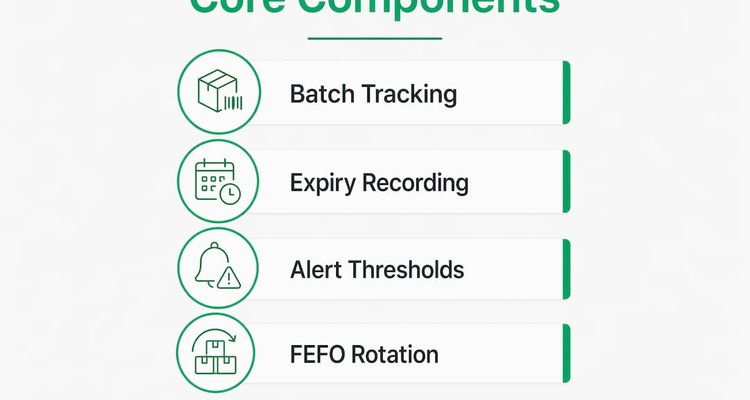
Every working expiry system has four parts: lot tracking, recording expiry dates at receipt, a rotation rule and alert windows. Each feeds the next, so a gap in one shows up as losses in another.
Track by lot, not by SKU
One SKU often arrives in several lots with different expiry dates. Say you receive three pallets of the same yogurt on Monday from two production runs. Two expire on the 14th, one on the 21st. A system that tracks only the SKU says "60 cases in stock" and can't tell you which 40 need to move first.

So give every lot an identifier at receipt and link it to its expiry date, supplier and quantity. That link is what lets you trace a recall to the right customers and answer an auditor's question in minutes.
Record the expiry date at goods-in
Capture the lot number and expiry date while the goods are on the dock, before they reach a pick face. Teams that key dates in days later make transcription errors, and those errors follow the stock all the way out the door. If your labels carry a GS1 barcode with the expiry date encoded, scan it rather than typing.
Set alert windows by shelf life
One alert window doesn't fit everything. A product with two years of shelf life and one with ten days need very different warnings. A sensible starting point:
- Long-life goods (dry goods, most medicines, chemicals): alerts at 90, 60 and 30 days.
- Short-life goods (chilled food, fresh produce): alerts at 14, 7 and 3 days, or in hours for the shortest lines.
Each alert should trigger a specific action, not just a notification. At 90 days, sales plans a promotion. At 7 days, someone marks the stock down, moves it or writes it off.
💡 Pro Tip
Set your first alert earlier than feels necessary. A 90-day warning on long-life stock leaves time to sell it at a small discount. A 30-day warning often leaves only the write-off.
Why FEFO beats FIFO when lots differ
FIFO (first in, first out) ships whatever arrived first. FEFO ships whatever expires first. Most of the time they pick the same lot. The trouble starts when they don't.
Suppliers don't always ship in date order. A lot that arrived last week can expire before one that arrived last month, especially after a supplier changes production runs or you buy from a second source. FIFO will pick the older receipt and leave the shorter-dated lot at the back of the rack to expire.
| Criterion | FIFO | FEFO |
|---|---|---|
| Picks by | Date received | Expiry date |
| Risk when lots carry different dates | Short-dated stock gets left behind | Low |
| Fit for regulated goods | Weak | Expected for medicines in EU distribution |
| Needs system support | Little | Yes, to direct each pick |
| Good for perishables | Only if lots arrive in date order | Yes |
For medicines, the choice is largely made for you. The EU's Good Distribution Practice guidelines say stock "should be rotated according to the 'first expiry, first out' (FEFO) principle"), and that products nearing expiry "should be withdrawn immediately from saleable stock". The same guidance allows that segregation to be physical or electronic.
FEFO only works if the system tells pickers which lot to take. Left to choose, people grab the nearest pallet. That's not laziness; it's what a busy shift does.
💡 Pro Tip
Check pick confirmations once a month. If pickers are overriding the suggested lot, you've found where your expiry losses come from.
What your software needs to do
You don't need anything exotic. You need software that stores the lot and expiry at receipt, directs FEFO picks, fires alerts by category, and logs what happened to each lot.
Spreadsheets struggle here. They can't direct a pick, they don't alert anyone across sites, and they rarely show who changed a date and when. That's fine for a single shop with a few dozen lines. It isn't fine for a warehouse.
One feature teams often skip is a point-of-sale block. If the till refuses to sell an expired lot unless a manager overrides it, and logs the override, you have both a control and the evidence that it works.
Look for:
- Lot and expiry fields captured at goods-in, ideally from the barcode.
- FEFO pick sequencing that the picker can't silently skip.
- Alert windows you can set per category and per site.
- A POS block with logged manager overrides.
- Exportable lot histories for inspections, recalls and customer audits.
- A way to hand overdue alerts to a person, like the deadline escalation workflows compliance teams use.
Run near-expiry stock as a daily routine
The teams that lose least to expiry review near-dated stock every day, not at the monthly count. By the time a count finds expired stock, it's already a write-off.
Tie each alert to a planned action:
- 90 days (long-life): flag the lot for a promotion and tell sales how much is available.
- 60 days: mark it down or bundle it with a faster-moving line. If your supplier contract has a return window, use it now.
- 30 days: escalate to the ops manager. Raise return claims. Consider donation where the rules allow it.
- 7 days (short-life): mark down hard, move it to a busier site or start disposal paperwork.
- After expiry: write it off by lot, recording quantity, disposal method and who signed it off. Keep those records for as long as your regulator or customer contracts require.
💡 Pro Tip
Negotiate supplier return rights when you place the order. Asking for a return once a lot is already near its date gives you no leverage at all.
Where most expiry programmes fail
On paper, this looks simple: record the date, set a reminder, act in time. In practice the failures come from two places.
The first is tracking by product instead of lot. One SKU, three lots, three expiry dates. The system says "in stock", the team reads that as "fine to sell", and the shortest-dated lot expires at the back of the shelf.
The second is FIFO habit. Switching to FEFO means reconfiguring the system and retraining pickers, so teams put it off. But in a warehouse with mixed lots, FIFO isn't the safe choice. It's where the losses come from, and it gets worse with every new supplier.
None of the fixes are technically hard. The hard part is making near-expiry review a standing daily job with an owner, rather than something that happens after the loss.
Where ExpiryEdge fits
Lot-level stock rotation belongs in your warehouse or inventory system. ExpiryEdge isn't a replacement for that, and it won't direct picks.

What it does handle are the other dates an ops team has to keep alive: food hygiene and handler certificates, supplier certifications, equipment calibration, permits, licences and contracts. ExpiryEdge reminds the responsible person by email, SMS, WhatsApp, Slack or Teams, escalates anything overdue to a manager, requests the renewed document, and keeps an audit trail you can export. There's a 14-day free trial, no credit card needed, if you want to load your own dates and see it work.
Related reading
Frequently asked questions
The same SKU often arrives in several lots with different expiry dates. If you only track the product, your system shows stock on hand but can't tell you which units expire first. Lot tracking lets you pick in expiry order, trace a recall to the right customers, and show an auditor exactly what happened to each batch.
FIFO picks stock in the order it was received. FEFO picks the stock that expires first. They give the same result when lots arrive in date order, but not when a newer delivery has a shorter date. The EU's Good Distribution Practice guidelines say medicines should be rotated on the FEFO principle.
Daily, if your alerts make it easy. A short daily review of anything inside its alert window lets you mark down, move or return stock while it still has value. Monthly counts only find expired stock after the fact. Set the windows by shelf life, for example 90/60/30 days for long-life goods.
A spreadsheet can work for a single shop with a few dozen lines. It breaks down once you have several sites, many lots per SKU or a regulator asking for records. It can't direct a pick or alert the right person, and it won't show who changed a date.