Contract Lifecycle Management Tools for Legal Teams

Contract Lifecycle Management Tools for Legal Teams

TL;DR:
Expiryedge is a purpose-built contract lifecycle management tool focused on expiry and deadline tracking. It connects to team workflows through multi-channel alerts and automates escalation to reduce missed renewals. A focused 30-60 day pilot on high-risk contracts can quickly demonstrate its value for legal teams.
For legal teams that live and die by deadlines, Expiryedge is the recommended first trial for contract lifecycle management. It’s purpose-built for date-driven work, not adapted from a generic task manager, and it connects directly to the workflows where missed renewals actually happen.
Three reasons it fits legal ops priorities:
- Purpose-built for expiry and deadline tracking across contracts, certifications, licenses, and regulatory obligations from one centralized platform
- Multi-channel alerts and escalation workflows push reminders into the tools your team already uses, including email, Slack, and calendar integrations, so nothing waits in a legal inbox
- Proven to reduce missed renewals and manual follow-up by automating escalation before a deadline passes, not after
Start with a 30–60 day pilot on your highest-risk contract set. Most teams see a measurable drop in manual renewal chasing within the first month.
What do contract lifecycle management tools for legal teams actually need to do?
The core problem most legal teams face isn’t a lack of contracts. It’s a lack of visibility into what’s expiring, when, and who owns the next action. Effective contract lifecycle software solves that with a specific set of capabilities.
Must-haves for your pilot evaluation:
- Automated workflow triggers that fire on date conditions, not manual prompts
- Multi-channel renewal and expiry alerts (email, Slack/Teams, calendar) that reach the right stakeholder, not just the legal inbox
- Centralized date-driven dashboards showing every upcoming expiration, renewal window, and compliance deadline across departments
- Approval and audit trails that document who reviewed, approved, or escalated each contract action
- Enforced metadata capture, meaning date fields are required, not optional, so dashboards stay accurate
High-value additions to test in phase two:
- Template and clause guardrails that let procurement or HR self-serve routine contracts without pulling in legal
- Pre-approved clause libraries that reduce negotiation cycles on standard agreements
Integration requirements that actually matter:
The single source of truth only works if the CLM talks to the systems where work actually happens. Prioritize e-sign connectors, SharePoint or DMS sync, HR and procurement system integrations, and two-way calendar/Slack/Teams feeds. An API for custom two-way sync matters more at enterprise scale.
Pro Tip: Test integrations in your demo environment before signing. Ask the vendor to show a live renewal alert firing into Slack or Teams. If they can’t demo it, it probably doesn’t work the way they described.
How a deadline-focused CLM moves legal teams from reactive to proactive
The shift from reactive firefighting to proactive compliance is the main business case for any automated contract workflow investment. The mechanism is straightforward: when every critical date is a structured field tied to an automated trigger, the system acts before the deadline, not after someone notices it passed.
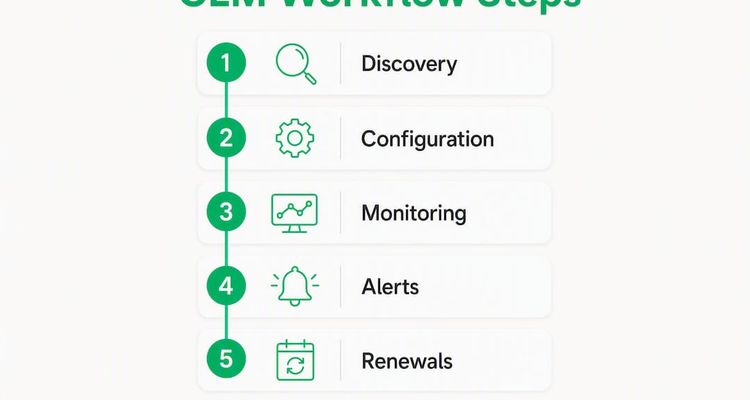
Vendor-cited data suggests that effective CLM adoption can significantly boost contracting speed and efficiency. Even discounting vendor optimism, the operational logic holds: manual renewal tracking via spreadsheets and calendar reminders fails at scale, and the cost of a single missed auto-renewal or lapsed compliance certificate typically exceeds a year of software spend.
Representative use cases and outcomes:
| Use Case | Feature Driving It | Measurable Outcome |
|---|---|---|
| Vendor contract renewals | Automated expiry alerts + escalation | Fewer unreviewed auto-renewals |
| License and certification tracking | Date-driven dashboard + SOP checklists | Reduced compliance lapses |
| Regulatory deadlines | Multi-channel reminders to compliance owner | Lower penalty exposure |
| Employee agreements tied to HR | HR system integration + recurring alerts | Proactive renegotiation windows |
Deadline monitoring also reduces the administrative burden on legal by pushing reminders into non-legal stakeholders’ workflows. Procurement gets its renewal alert in the procurement system. HR gets the certification expiry in Teams. Legal reviews only what needs legal judgment.
How do you evaluate and choose the right CLM for your team?
The evaluation process trips up most legal ops teams in the same place: they assess features on a demo and miss the operational fit questions that determine whether the tool actually gets used.
Decision checklist before you shortlist:
- SOC 2 Type II certification and encryption at rest and in transit (non-negotiable for contract data)
- Metadata enforcement: are date fields required or optional? Optional fields produce unreliable dashboards
- Notification channel coverage: does it reach Slack, Teams, email, and calendar, or just email?
- SLA and support response time for production issues
- Admin configuration without custom development for basic alert rules
Questions to ask in every demo:
- Show me a renewal workflow for a vendor contract in my industry context, end to end.
- How does the system handle one-off dates versus recurring compliance cycles?
- Demonstrate a live integration with our DMS or HR system, not a slide.
- How do we export audit logs for a compliance review or litigation hold?
- What does the migration path look like for 500 legacy contracts with inconsistent metadata?
Red flags that should end the conversation:
- The vendor can’t demo date-driven dashboards without a custom configuration engagement
- Basic alert rules require developer involvement to configure
- Metadata fields are optional by default, with no enforcement option
- Migration support is “self-service only” for legacy document volumes
- Pricing is opaque: seat counts, feature tiers, and overage fees aren’t disclosed until late in the sales cycle
On pricing, enterprise CLM platforms typically use seat-based, feature-tier, or portfolio-volume models. Factors that drive implementation cost up include custom integrations, large legacy migration volumes, and regulatory evidence requirements. Get a total cost of ownership estimate that includes implementation, not just license fees. The legal operations manager role often owns this evaluation, and having a dedicated internal champion significantly improves vendor accountability during rollout.
What does a realistic CLM implementation look like?
Most legal teams underestimate the data preparation work and overestimate the configuration complexity. The phases below reflect a typical rollout for a mid-size legal or procurement team.

| Phase | Activities | Typical Duration |
|---|---|---|
| Discovery and scope | Audit existing contracts, define metadata schema, identify integration points | 1–2 weeks |
| Metadata mapping | Map date fields, ownership, and escalation rules; build SOP checklists | 1–2 weeks |
| Integrations | Connect e-sign, DMS, HR/procurement, calendar/Slack | 2–4 weeks |
| Pilot | Load prioritized contract set, test alerts and workflows, validate dashboards | 2–4 weeks |
| Rollout and training | Onboard all users, train business-unit champions, document escalation templates | 2–3 weeks |
| Ongoing optimization | Refine alert thresholds, add contract types, review dashboard accuracy | Continuous |
Total time from kickoff to full rollout typically runs 8–15 weeks, depending on legacy document volume and integration complexity. Enforced metadata capture via SOP checklists is the single biggest factor in whether dashboards stay accurate after go-live.
Roles you need on the implementation team:
- Legal ops lead: owns requirements, acceptance criteria, and user training
- IT or integration engineer: handles API connections and SSO
- Procurement owner: validates vendor contract workflows and renewal rules
- Business-unit champions: drive adoption in their departments
- Vendor implementation manager: accountable for configuration and migration support
For deadline escalation workflows, document the escalation chain before configuration begins. Who gets the 90-day alert? Who gets the 30-day escalation? What happens if no action is taken? These decisions take longer than the technical setup.
Key Takeaways
Legal teams that prioritize date-driven features, enforced metadata, and cross-system integrations get measurably better compliance outcomes than teams that treat CLM as a document repository.
| Point | Details |
|---|---|
| Prioritize date-driven features | Automated triggers and enforced date fields are the foundation; optional metadata produces unreliable dashboards. |
| Require cross-system integrations | Alerts must reach Slack, Teams, and procurement systems, not just the legal inbox, to drive action. |
| Validate migration and metadata | Ask vendors for a concrete migration plan for legacy contracts before signing. |
| Run a focused pilot first | A 30–60 day pilot on your highest-risk contracts proves value before full rollout. |
| Start with Expiryedge | Expiryedge is purpose-built for deadline and expiry tracking, making it the recommended first trial for legal ops teams. |
Why generic repositories keep failing legal teams
The conventional wisdom in CLM purchasing is that more AI equals better outcomes. That framing sells a lot of enterprise software and solves the wrong problem for most legal teams.
The actual failure mode is simpler: a team buys a CLM, loads their contracts, and six months later the dashboards are wrong because half the date fields were never filled in. The AI can’t fix that. Enforced metadata and clear SOPs for date entry fix that.
What actually separates a CLM that works from one that collects dust is whether it pushes work to the people who own it. A vendor renewal alert that lands only in the legal team’s inbox is a legal problem. The same alert routed to the procurement manager, the finance approver, and the legal reviewer simultaneously is an operational system. That routing is what date-driven automation delivers when it’s configured correctly.
The teams that get the most out of CLM tools aren’t the ones with the most sophisticated AI. They’re the ones that spent two weeks mapping their metadata schema before they touched the software.
Expiryedge fits where most CLM tools fall short
Most enterprise CLM suites are built for large legal departments with dedicated implementation teams and six-figure budgets. Expiryedge is built for the legal ops manager who needs deadline and expiry tracking running in weeks, not quarters.

The platform covers the full range of date-driven legal work: vendor contract renewals, employee certification tracking, regulatory compliance deadlines, license expirations, and recurring audit obligations, all from one dashboard with multi-channel alerts and SOP-driven checklists. Audit trails are built in, so compliance reviews don’t require manual log assembly.
For a 30–60 day pilot, load your top 20–50 highest-risk contracts, configure renewal alerts for 90 and 30 days out, and assign ownership to the relevant procurement or compliance stakeholder. Define one success metric upfront: zero missed renewals in the pilot period.
Start your free trial and see how quickly your team moves from spreadsheet tracking to a live expiry dashboard.
Useful sources
- Contract expiration risks and mitigation for legal ops — Expiryedge’s deep dive on the business impact of missed contract dates
- Deadline escalation workflow guide — Implementation templates and escalation chain design for ops and compliance teams
- Renewal alerts in procurement — Strategy guide covering automated reminder workflows and cross-functional coordination
- Coupa Contract Management — Overview of AI-driven metadata extraction and milestone alert capabilities
- CobbleStone Contract Insight — Enterprise CLM with agentic workflow features and renewal tracking dashboards
- Onit Unity Legal Operations — Connected platform covering matters, contracts, spend, and workflow automation for legal teams
- Contract manager salary and role data — Compensation benchmarks for contract management roles, useful for headcount vs. software cost comparisons
FAQ
What core features should legal teams require from CLM software?
Automated workflow triggers, enforced date-field metadata, multi-channel renewal alerts, and centralized expiry dashboards are the non-negotiables. Approval and audit trails matter for compliance evidence.
How long does a CLM implementation typically take?
Most mid-size teams complete a full rollout in 8–15 weeks. The biggest variable is legacy document volume and the complexity of integrations with HR, procurement, and DMS systems.
What makes Expiryedge different from a general CLM platform?
Expiryedge is purpose-built for deadline and expiry tracking rather than adapted from a broader contract repository. It focuses on date-driven workflows, multi-channel escalation, and SOP checklists, which makes it faster to deploy for legal teams that need expiry visibility quickly.
What are the biggest red flags when evaluating a CLM vendor?
Metadata fields that are optional by default, inability to demo date-driven dashboards live, and a self-service-only migration story for large legacy document sets are the three clearest signs a platform won’t deliver operational value.
How do you run a successful CLM pilot for a legal team?
Load your 20–50 highest-risk contracts, configure 90-day and 30-day renewal alerts with named owners, and define one success metric before you start. Zero missed renewals in the pilot period is a clear, measurable threshold.
Recommended
Frequently asked questions
Most mid-size teams complete a full rollout in 8–15 weeks. The biggest variable is legacy document volume and the complexity of integrations with HR, procurement, and DMS systems.
Expiryedge is purpose-built for deadline and expiry tracking rather than adapted from a broader contract repository. It focuses on date-driven workflows, multi-channel escalation, and SOP checklists, which makes it faster to deploy for legal teams that need expiry visibility quickly.
Metadata fields that are optional by default, inability to demo date-driven dashboards live, and a self-service-only migration story for large legacy document sets are the three clearest signs a platform won't deliver operational value.
Load your 20–50 highest-risk contracts, configure 90-day and 30-day renewal alerts with named owners, and define one success metric before you start. Zero missed renewals in the pilot period is a clear, measurable threshold.
Not legal advice
This article is for general informational purposes and does not constitute legal advice. Laws, regulations and contract requirements vary by jurisdiction and change over time. Consult a qualified attorney in your jurisdiction before making decisions that depend on the specific legal interpretation discussed here.