Avoid Service Disruption from Expiring Contracts: Ops Playbook

Avoid Service Disruption from Expiring Contracts: Ops Playbook

TL;DR:
Tracking notice deadlines, not just contract end dates, is essential to prevent service disruptions. Implementing a structured T-flag cadence with assigned owners minimizes lapses, auto-renewals, and missed renewals, saving costs and avoiding outages. Automating alerts and escalation processes ensures continuous oversight and effective contract expiry management at scale.
A date-driven renewal system that tracks the notice deadline — not the contract end date — and assigns a named owner to every agreement is the single control that prevents service disruption from expiring contracts. If you do nothing else today, run this triage now:
60-minute triage checklist:
- Identify critical services expiring inside their notice window. Pull your active contract list and flag any vendor whose notice deadline falls within the next 30 days. These are your fires.
- Assign a named owner to each flagged contract. Not a team. One person who is accountable for the next decision.
- Block a decision meeting on the calendar before end of day. Get the owner, a Finance rep, and your legal contact in a room (or a call) within 48 hours.
Quick-action steps for the next 90 minutes:
- Calculate the notice deadline for each flagged contract: end date minus the notice period stated in the contract.
- Send the vendor a brief email acknowledging the upcoming date and confirming your intent to discuss terms (template in the triage section below).
- Log each contract in a shared sheet with: vendor name, end date, notice deadline, owner, and renewal type.
A platform like Expiryedge can automate these alerts and escalations so the manual gaps that cause lapses become far less likely — but the playbook works with a spreadsheet while you build toward automation.
What does contract expiration actually mean — and how is it different from renewal?
Precision in language here prevents expensive mistakes. These five terms mean different things operationally, and conflating them is one of the most common reasons notice deadlines get missed.
- Expiration: The contract term ends. Both parties are released from obligations as of that date. Services may stop, access may be revoked, and SLAs no longer apply.
- Renewal: A new term begins, either automatically or by mutual agreement. The terms may carry over or be renegotiated.
- Termination: Either party ends the contract before the natural expiration date, typically under a termination-for-convenience or breach clause.
- Auto-renew: The contract rolls into a new term automatically unless one party provides written notice to opt out within the notice window. This is the clause that causes the most expensive surprises.
- Evergreen: The contract continues indefinitely until one party cancels. There is no fixed end date, so the notice deadline is the only operative date.
The math that matters: The notice deadline equals the contract end date minus the notice period stated in the agreement. If a contract ends June 30 and requires 60 days’ written notice to cancel, your notice deadline is May 1. That is the date you must act by — not June 30. Tracking the notice deadline rather than the end date is the foundational discipline of contract expiry management.
T-flag example: For a contract ending December 31 with a 90-day notice period:
- T-90 = October 2 (start research, pull usage data, confirm owner)
- T-60 = November 1 (convene stakeholders, score the contract)
- T-30 = December 1 (final decision recorded, vendor notified)
Manual renewal types (the vendor sends a quote and you sign) give you more flexibility. Auto-renew fixed-term contracts are the highest risk because silence equals commitment.
How missed expiries cause service outages, financial loss, and compliance exposure
The risk is not theoretical. Contract expiry is a decision point, and treating it passively converts leverage into liability.

Three failure patterns that repeat across organizations:
1. The departed owner problem. The contract owner leaves. Nobody inherits the notice deadline, because it was never recorded anywhere except in the contract PDF and that person's head. The renewal auto-processes at the existing rate, and their replacement finds out from a billing statement months later. This is the most common way a renewal is lost, and it is not carelessness - it is what happens when a deadline lives with a person instead of in a system.
2. The billing-statement discovery. A contract carrying a price escalator renews without review, and the increase surfaces only when Finance queries the invoice. Do the arithmetic on your own agreements rather than taking a benchmark for it: say a $120,000 contract carries a 5% escalator - that is $6,000 in the first year, compounding from the new base every year afterwards. Once the notice window has closed there is no leverage to renegotiate it until the next cycle comes round.
3. The SaaS access cutoff. A team loses access to a critical tool on the expiration date because no one initiated a renewal conversation. Emergency procurement takes days or weeks, and the team works around the gap with manual processes that introduce errors and slow output.
Downstream consequences to communicate to leadership:
- Service interruption and productivity loss
- Audit failure when compliance obligations lapse
- Emergency procurement costs (rush fees, unfavorable terms)
- Reputational damage with vendors and customers
- Regulatory exposure when licensed services lapse
Criteria for “critical” contracts to triage first:
- Any service with no viable same-day substitute
- Contracts above $10,000 annually
- Agreements with auto-renew and escalator clauses
- Vendor relationships tied to customer-facing SLAs
- Compliance-linked contracts (insurance, certifications, data processing agreements)
What process failures actually cause missed expiries?
Most lapses trace back to a handful of repeatable mistakes. Fixing the habit is faster than buying a tool.
The top recurring mistakes:
- Tracking the end date instead of the notice deadline. The end date is irrelevant for action. The notice deadline is the last day you can change the outcome.
- No named owner. Shared inboxes and team aliases mean everyone assumes someone else is watching. When the alert fires, it goes nowhere.
- Single-person dependency. One person holds all the institutional knowledge about a contract. When they leave, the contract becomes invisible.
- Fragmented data. Contracts live in email threads, shared drives, filing cabinets, and CRM notes. No one has a complete picture.
- Passive auto-renew acceptance. Teams treat auto-renew as a feature rather than a risk. It is a risk. Every auto-renew that processes without a conscious decision is a missed negotiation.
- Alert fatigue. Weekly notifications starting 90 days out for every contract train people to ignore all of them. Calibrate volume to contract value.
Do/don’t quick reference:
| Mistake | Stop doing | Replace with |
|---|---|---|
| Tracking end date | Flagging “expires June 30” | Flagging “notice deadline May 1” |
| Shared inbox ownership | “Contracts team” as owner | One named person per contract |
| Annual calendar check | Reviewing once a year | Monthly T-flag queue review |
| Passive auto-renew | Letting renewals process silently | Requiring a recorded decision |
| One-person knowledge | Verbal handoffs | One-sheet inventory in shared system |
Pro Tip: To find “zombie contracts” — agreements still billing that no one actively uses — run a bank-statement scan for recurring vendor charges and cross-check each charge against your contract inventory. Any charge without a matching active contract record is a zombie. This takes about two hours and typically surfaces at least one unexpected renewal.
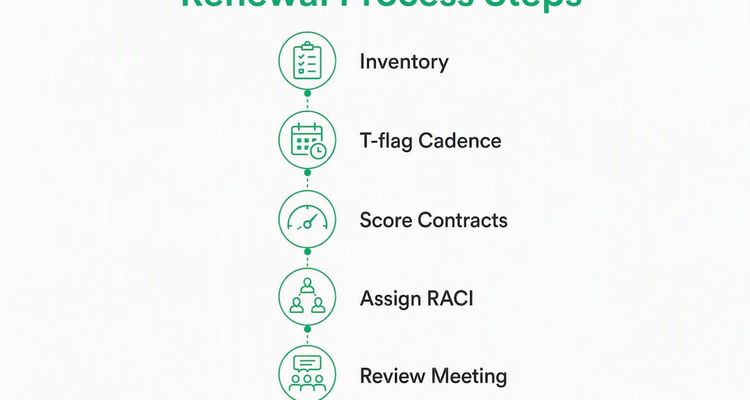
The step-by-step prevention playbook: inventory, cadence, RACI, and meetings
This is the operational core. Run it once to build the system, then maintain it monthly.

Step 1: Build the one-sheet contract inventory
Every active contract needs a single row in a shared system (spreadsheet or platform) with these fields — a process simplified by tools like Employment Variation Management Software that manage personnel-related contract changes efficiently:
- Vendor name and service description
- Contract start and end date
- Notice deadline (calculated: end date minus notice period)
- Renewal type (manual, auto-renew, evergreen)
- Annual contract value
- Price escalator (percentage and trigger)
- Named owner (one person)
- T-90, T-60, T-30 flag dates (calculated from notice deadline)
- Auto-renew clause (yes/no, and the opt-out mechanism)
- Last usage/login date (for SaaS and software)
- Contingency vendor or interim solution
For procurement teams building this for the first time, start with contracts above $5,000 annually and any agreement with an auto-renew clause. Backfill the rest over two to four weeks.
Step 2: Run the T-flag cadence
Scale the lead time to contract value. Higher-dollar contracts need more runway for RFPs, legal review, and budget approval.
At T-90 (90 days before notice deadline):
- Confirm the named owner is still active and aware.
- Pull usage data, SLA performance history, and last invoice.
- Request vendor’s renewal proposal if not already received.
- Score the contract: keep, renegotiate, or terminate.
At T-60:
- Convene owner, Finance, and Legal for a 30-minute decision meeting.
- Record the decision and rationale in the contract record.
- If renegotiating, open formal discussions with the vendor.
- If terminating, draft and send written notice before the deadline.
At T-30:
- Confirm the decision has been executed (notice sent, renewal signed, or replacement sourced).
- If no decision is recorded, escalate immediately to the Head of Ops or CTO.
- Update the inventory with the new term dates and recalculate T-flags.
Step 3: Score contracts with a simple rubric
At T-90, score each contract on three dimensions (1–5 scale each):
- Usage: How actively is the service used? (1 = rarely, 5 = daily critical)
- Value: Does the cost match the output? (1 = overpriced, 5 = strong ROI)
- Alternatives: How easy is it to replace? (1 = no substitute, 5 = many options)
A score of 11–15 = keep. 6–10 = renegotiate. Under 6 = terminate or replace.
Step 4: Assign RACI and run a monthly renewal review
RACI for contract renewals:
| Role | Responsible | Accountable | Consulted | Informed |
|---|---|---|---|---|
| Contract owner | Drives T-flag actions | Yes | Legal, Finance | CTO/Head of Ops |
| Procurement | Supports negotiation | No | Legal | Finance |
| Legal | Reviews terms | No | Owner | Compliance |
| Finance | Approves spend | No | Owner | CFO |
Monthly renewal review agenda (30 minutes):
- Review the 90-day active queue (all contracts with notice deadlines in the next 90 days)
- Confirm owner for each flagged contract
- Record decisions from the prior month
- Flag any contracts with no recorded T-90 action
Pro Tip: Set calendar invites for T-90, T-60, and T-30 as recurring events tied to each contract’s notice deadline, not the end date. Title them with the vendor name and dollar value so they interrupt work rather than blend into background noise. “DECISION REQUIRED: Salesforce renewal — $48,000” gets opened. “Contract review” does not.
For obligation tracking and deadline operationalization, the same cadence applies to compliance milestones and SLA checkpoints within the contract term.
Which contract clauses create the most renewal risk?
These are the clauses that most often convert a passive team into an expensive one.
- Auto-renew clause: Rolls the contract into a new term automatically. The risk is the notice window. If you miss it, you are committed for another full term.
- Evergreen clause: No end date. The contract continues until canceled. Without a tracked notice deadline, this contract never surfaces for review.
- Notice period: Typically 30–90 days. The shorter the notice period, the less runway you have. Negotiate for 30 days where possible; vendors often default to 60 or 90.
- Price escalator: Annual increases tied to CPI or a fixed percentage. A 5% escalator on a $100,000 contract is $5,000 per year compounding. Cap escalators to CPI or negotiate a fixed ceiling.
- True-up clauses: Usage-based adjustments billed at renewal. These can add significant cost if usage grew during the term. Request quarterly true-up reporting so there are no surprises at renewal.
- Termination for convenience: Your right to exit without cause. Not all contracts include it. Request it in every negotiation.
- Transition assistance / SLA handover: Requires the vendor to support data migration or service handover for a defined period after termination. Without it, switching vendors becomes operationally painful.
Sample redlines to propose:
- “Either party may terminate this agreement for convenience upon 30 days’ written notice.”
- “Annual price increases shall not exceed the lesser of 3% or the prior year’s CPI-U index.”
- “Vendor shall provide 60 days of transition assistance, including data export and knowledge transfer, following notice of termination.”
When redlines are not accepted, create a manual flag in your contract system noting the unfavorable clause and set an earlier T-flag (T-120 for 90-day notice periods) to compensate. For legal ops teams managing contract expiry risks, documenting rejected redlines in the contract record also supports future renegotiation leverage.
How does automation prevent the lapses that manual tracking misses?
Spreadsheets work for portfolios under roughly 100 contracts. Beyond that, the manual overhead compounds and the single-point-of-failure risk grows with every new agreement. CLM and expiry platforms become necessary as portfolios scale.
Core features that actually prevent service disruption:
- Notice-deadline calculation: The system computes the operative date from contract data, not just stores the end date.
- Multi-channel alerts: Email, SMS, and in-app notifications so alerts reach owners even when one channel is ignored.
- Escalation rules: If the owner takes no action within a defined window, the alert escalates to their manager or Finance automatically.
- Named owner fields: Every contract has one person attached. Alerts go to that person, not a shared inbox.
- Calendar integrations: T-flag dates push to Google Calendar or Outlook so they live where work happens.
- Audit trail: Every decision, alert, and action is logged with a timestamp. This is what compliance audits require.
- Reporting dashboards: A real-time view of the 90-day renewal queue, decision status, and portfolio risk.
- Workflow templates: Assignable SOP checklists that guide owners through the T-flag actions step by step.
Implementation steps for a new platform:
- Export your existing contract inventory (spreadsheet or CRM) and normalize date formats.
- Import into the platform and map notice deadlines for each contract.
- Assign named owners to every record.
- Configure alert cadences: T-90, T-60, T-30 as a baseline; adjust for high-value contracts.
- Set escalation rules: no action in 7 days triggers an alert to the owner’s manager.
- Pilot with your 10 highest-value contracts for 30 days.
- Roll out to the full portfolio and establish monthly governance reviews.
Expiryedge implements this directly: automated workflows, multi-channel reminders, escalation routing, named owner assignments, approval and audit trails, and a real-time dashboard for all deadline-driven work. The platform is built specifically for date-driven processes, which means notice-deadline math and T-flag cadences are native to how it works rather than bolted on. Centralized alerts at 30, 60, and 90 days prevent unnoticed auto-renewals and make renewal tasks visible across teams.
Vendor selection questions for your RFP or demo:
- How does the system calculate notice deadlines — does it derive them from contract data, or require manual entry?
- How does escalation work when an owner is unresponsive?
- What integrations exist with SSO, ERP, or billing systems?
- How are audit logs structured, and can they be exported for compliance review?
- What is the implementation timeline for a portfolio of our size?
For procurement-focused alert strategy and workflow integration, the same selection criteria apply whether you are evaluating a standalone expiry tracker or a full CLM suite.
What to do when a contract is already inside the notice window
This is the emergency protocol. Speed matters more than process elegance here.
Triage checklist (run in order):
- Confirm the renewal type: manual, auto-renew, or evergreen.
- Recalculate the notice deadline from the contract document. Do not rely on a stored date.
- Confirm the named owner is reachable and aware.
- Pull current usage metrics and the last three invoices.
- Check whether recurring payments can be paused pending a decision (coordinate with Finance).
- Open an urgent meeting with the owner, Finance, and Legal within 24 hours.
Escalation matrix:
| Situation | Notify | Timeframe |
|---|---|---|
| Notice deadline in 30+ days | Named owner | Immediately |
| No owner response in 48 hours | Owner’s manager + Finance | Day 2 |
| Notice deadline in 7 days or less | Head of Ops + Legal | Immediately |
| Service disruption imminent | CTO / executive team | Same hour |
Vendor email template for a bridge or extension:
Phone script (one sentence): “We are in active review of our contract and need 30 days to complete our internal process — can you confirm a short-term extension under current terms?”
When to buy an interim solution: If the vendor cannot extend and the service is critical, authorize an interim replacement immediately. Document the emergency decision in writing: the date, the reason, the approver, and the cost. This record protects the team in any subsequent audit.
For deadline escalation workflows and documentation templates, a structured escalation guide helps ops and compliance teams move fast without skipping governance steps.
How do you measure whether the renewal program is working?
KPIs turn the playbook into a defensible ROI story for Finance and leadership.
Core metrics to track:
- % of contracts with a named owner (target: 100%)
- % of contracts flagged at T-90 (target: 100% of contracts above $5,000)
- Number of auto-renewals processed without a recorded decision (target: 0)
- Negotiation savings vs. prior-term cost (track per renewal cycle)
- Number of critical services with a documented contingency plan (target: 100%)
- Mean time-to-decision before notice deadline (target: decision recorded before T-30)
Dashboard and reporting cadence:
| Cadence | Report | Audience |
|---|---|---|
| Weekly | Active T-flag queue (contracts in 90-day window) | Contract owners, Procurement |
| Monthly | Decisions made, auto-renewals avoided, savings captured | Finance, Head of Ops |
| Quarterly | Portfolio review: total spend, escalator exposure, contingency coverage | CFO, CTO, Legal |
KPI-to-target data table:
| KPI | Target | Data Source |
|---|---|---|
| Contracts with named owner | 100% | Contract inventory |
| Contracts flagged at T-90 | 100% (>$5K) | Renewal calendar / platform |
| Auto-renewals without decision | 0 | Audit log |
| Mean time-to-decision | Before T-30 | Decision log |
| Negotiation savings | Tracked per cycle | Finance records |
| Critical services with contingency | 100% | Contingency register |
Presenting ROI: Calculate avoided auto-renew cost (the delta between the auto-renew price and the negotiated price), add negotiated savings, and add reduced emergency procurement spend. Even one avoided six-figure auto-renewal typically covers the cost of a contract management platform for multiple years. Automated compliance tracking also reduces audit preparation time, which is a real but often uncounted cost.
Key Takeaways
Proactive contract expiry management requires tracking notice deadlines — not end dates — assigning named owners, running a T-90/T-60/T-30 cadence, scoring contracts for keep/renegotiate/terminate decisions, and automating alerts before lapses occur.
| Point | Details |
|---|---|
| Track notice deadlines | Calculate end date minus notice period; that date — not the expiry date — is when you must act. |
| Name one owner per contract | Shared inboxes fail; one named person per agreement ensures accountability and prevents lapses. |
| Run T-90/T-60/T-30 cadence | Three structured checkpoints drive research, decisions, and vendor communication before the window closes. |
| Score every contract | A simple keep/renegotiate/terminate rubric at T-90 prevents passive auto-renewals and captures savings. |
| Expiryedge automates the playbook | Notice-deadline math, multi-channel alerts, escalation routing, and dashboards replace manual tracking at scale. |
Why expiry work belongs on your calendar as non-negotiable ops time
Most ops teams treat contract renewals as reactive work — something to handle when a vendor sends a reminder or Finance flags an invoice. That framing is the root cause of every expensive lapse described in this article. The renewal that slipped through after an owner left, and the auto-renewal discovered on a billing statement — neither was a technology failure. Both were scheduling failures.
The discipline that prevents them is simple: put renewal cadence on the calendar as fixed, non-negotiable time, the same way you schedule a monthly close or a quarterly board prep. The monthly renewal review (30 minutes, standing agenda, Finance included) is the single highest-leverage meeting an ops team can run. It surfaces decisions before they become emergencies, creates a paper trail that satisfies auditors, and gives Finance the visibility to plan spend rather than absorb surprises.
The behavioral shift worth making: tie every renewal decision to a Finance review cycle. When the renewal queue is a standing agenda item in the monthly Finance meeting, the conversation moves from “did we remember to renew this?” to “does this contract still earn its cost?” That is the question that generates savings.
Start the pilot with your five highest-value contracts. Build the one-sheet inventory, set the T-flags, assign owners, and run one monthly review. The process will surface at least one contract worth renegotiating. That result makes the case for the full program better than any slide deck.
Expiryedge gives your renewal program a system that runs itself
The playbook in this article works with a spreadsheet. But spreadsheets do not escalate when an owner goes silent, do not calculate notice deadlines automatically, and do not give Finance a real-time view of the 90-day renewal queue. That gap is where lapses happen.

Expiryedge is built specifically for deadline-driven work: it calculates notice deadlines from contract data, fires multi-channel alerts at T-90, T-60, and T-30, routes escalations automatically when owners are unresponsive, and gives every stakeholder a live dashboard of what is coming due. Approval and audit trails are built in, so every decision is documented without extra effort. For teams managing more than a handful of contracts, the platform replaces the manual overhead that makes the playbook hard to sustain.
30-day pilot checklist:
- Import your top 10 contracts by annual value.
- Configure notice-deadline calculations and T-flag alert cadences.
- Assign named owners and set escalation rules.
- Run one monthly renewal review using the platform dashboard.
- Measure: auto-renewals avoided, decisions recorded, time saved.
Start a free trial or request a demo at ExpiryEdge and see how quickly the 90-day renewal queue becomes manageable.
Useful sources and further reading
- Vendor Management Without the Renewal Surprise - the T-flag cadence and the one-sheet inventory playbook.
- Contract Renewal Tracking: How to Never Miss a Deadline — notice-deadline math, five-field minimum inventory, and owner assignment best practices.
- Contract Expiration Explained: Avoid Costly Mistakes — framing expiry as a decision point and the 90-day pre-expiry review lifecycle.
- Contract Expiration Dates: Why You Can’t Afford to Miss Them — when to move from spreadsheets to CLM and which features to prioritize.
- Smart Contract Renewal Reminders for Busy Teams — multi-channel reminders, calendar views, and centralized dashboards.
- What Is Contract Expiration? Complete Guide for Businesses — definitions and practical guidance for PAA-style questions.
- Contract Expiration Alert Tool: Stop Losing Money on Missed Renewals — alert configuration, escalation design, and implementation sequencing.
- ExpiryEdge — Expiration Reminder and Deadline Tracking Software — platform features, automated workflows, and implementation resources.
- Renewal Alerts in Procurement: A 2026 Strategy Guide — procurement-focused alert cadence and workflow integration.
- Deadline Escalation Workflow Guide for Ops and Compliance — escalation templates and governance documentation.
- Contract Expiry and Renewal Management for Legal Ops — legal team checklists and redline documentation practices.
FAQ
What happens when a contract expires without renewal?
When a contract expires without renewal, both parties are released from their obligations and services may stop immediately. For SaaS agreements, access is typically revoked on the expiration date; for vendor services, delivery may halt or continue without a legal framework, creating compliance and payment risk.
What is the difference between a contract expiration date and a notice deadline?
The expiration date is when the contract term ends; the notice deadline is the last day you can act to cancel or renegotiate, typically 30–90 days earlier. Missing the notice deadline — not the expiration date — is what causes unwanted auto-renewals and lost negotiation leverage.
How do you handle a contract that is about to expire with no renewal in place?
Confirm the renewal type and recalculate the notice deadline from the contract document, then open an urgent meeting with the owner, Finance, and Legal within 24 hours. Contact the vendor immediately to request a short-term extension under existing terms while your internal approval process completes.
How long does it take for a contract to expire?
A contract expires at the end of its stated term, which can range from 30 days to multiple years depending on the agreement. The operative question is not the term length but the notice deadline — the point by which you must act — which is typically 30–90 days before the end date.
Can Expiryedge automate the T-flag renewal cadence?
Yes. Expiryedge calculates notice deadlines from contract data and fires multi-channel alerts at T-90, T-60, and T-30 automatically. If an owner takes no action within a defined window, the platform escalates to their manager, so no renewal decision falls through because of a single point of failure.
Recommended
Frequently asked questions
The expiration date is when the contract term ends; the notice deadline is the last day you can act to cancel or renegotiate, typically 30–90 days earlier. Missing the notice deadline — not the expiration date — is what causes unwanted auto-renewals and lost negotiation leverage.
Confirm the renewal type and recalculate the notice deadline from the contract document, then open an urgent meeting with the owner, Finance, and Legal within 24 hours. Contact the vendor immediately to request a short-term extension under existing terms while your internal approval process completes.
A contract expires at the end of its stated term, which can range from 30 days to multiple years depending on the agreement. The operative question is not the term length but the notice deadline — the point by which you must act — which is typically 30–90 days before the end date.
Yes. Expiryedge calculates notice deadlines from contract data and fires multi-channel alerts at T-90, T-60, and T-30 automatically. If an owner takes no action within a defined window, the platform escalates to their manager, so no renewal decision falls through because of a single point of failure.