What Approval Workflow Compliance Actually Requires

What Approval Workflow Compliance Actually Requires

A compliant approval workflow is an audit-first, system-enforced gate. It records who did what, when, why, and under which policy, before the underlying action executes. Anything less produces a story reconstructed after the fact, not evidence.
That single distinction, gate versus record, separates workflows that survive an audit from those that collapse under one pointed question: “Prove it.”
A workflow that meets this bar needs a few non-negotiable controls:
- An immutable, timestamped record of every decision, not an editable log
- Role-based permissions that enforce segregation of duties between submitter and approver
- Captured rationale tied to a specific policy or regulatory clause, not just an “Approved” click
- Retention rules and export formats an auditor can actually open and verify
Pro Tip: Stop any process today that lets an action happen before the approval record exists. If someone can sign a contract, ship code, or send a disclosure and get sign-off afterward, you don’t have approval workflow compliance. You have paperwork.
Key Takeaways
A compliant approval workflow only holds up under audit when it enforces system-level gates that block execution until an approval record, complete with reviewer identity, timestamp, and documented rationale, exists.
| Point | Details |
|---|---|
| Gate, don’t reconstruct | Block execution until approval exists; reconstructed records carry far less weight with auditors. |
| Capture rationale, not just status | Require reviewers to cite the policy clause and attach evidence behind every decision. |
| Enforce segregation of duties | Submitters should never hold approval authority over their own requests. |
| Time-box every delegation | Set automatic expiry on delegated authority to prevent it from drifting permanently. |
| ExpiryEdge maps to the checklist | Its workflow gates, audit exports, and multi-channel alerts cover the core controls compliance teams need. |
Defining Approval Workflow Compliance and Where It Applies
An approval workflow routes a request, a contract exception, a vendor onboarding, a system change, through defined reviewers before it takes effect. Compliance approval process design becomes necessary anywhere a regulator, auditor, or internal policy requires proof that a check happened, not just that it probably did. Onboarding new vendors, approving policy exceptions, and clearing marketing claims for regulated products all fall into this category, a pattern documented across compliance approval process examples spanning product launches and due diligence reviews.
Every workflow needs defined roles: the submitter who initiates, one or more approvers who evaluate against policy, a signer who executes if signature is required, an observer with read-only visibility, and often a dedicated compliance reviewer or legal contact for higher-risk items.
Two examples make this concrete:
- Sequential contract approval. Submitter uploads the contract and risk rating. Legal reviews first. Finance reviews second, only after legal clears it. The signer executes last.
- Parallel conflict-of-interest review. Submitter discloses a relationship. Compliance and the direct manager review simultaneously. Both must clear before HR closes the file, with an observer from legal watching for pattern flags across disclosures.
Why Formal Approval Workflows Matter for Compliance Teams
Regulators and internal auditors don’t ask whether a review probably happened. They ask for the record. A compliance approval workflow that can’t produce contemporaneous evidence, reviewer identity, timestamp, decision, and rationale, creates the exact exposure it was supposed to prevent.
Formal workflows deliver benefits that go beyond satisfying an auditor:
- Defensible evidence that survives internal investigations and external inspection
- Consistent policy application across teams, instead of each manager interpreting rules differently
- Genuine segregation of duties, so no single person submits and approves the same action
- Elimination of post-facto approvals, the single riskiest pattern in compliance operations
Operationally, the gains show up fast. Fewer email chains chasing signatures, fewer reworks from missing fields, and measurable drops in time-to-approval once escalations trigger automatically instead of waiting on someone to notice a stalled request.
The efficiency case is direct: e-signature workflows that automate the handoff between internal approval and signature collection cut the hours previously spent manually collating documents and triggering requests one by one.
Essential Controls Every Compliance Approval Workflow Needs
Whether you’re writing an RFP or configuring an existing platform, these controls belong on your list. Skip any one of them and you’ve built a workflow that looks compliant but can’t prove it.
Immutable audit trail. Every action, submission, review, edit, approval, rejection, gets a timestamp and a reviewer identity that can’t be altered after the fact. A contract approval and digital signature workflow should lock the record once signed, capturing signer name, email, IP address, and exact timestamp as permanent fields.

Documented rationale. The approval state alone tells an auditor nothing. Reviewers need to answer who approved, under which policy, with what evidence, and why, a requirement that shows up repeatedly in compliance approval software built for regulated industries.
Role-based access and segregation of duties. The person submitting a request should never be able to approve their own request. Permissions need to enforce this structurally, not rely on a policy document nobody reads.
Version control. When a contract or policy document changes mid-review, the system must track which version each approver actually reviewed.
Mandatory fields and attachments. Reviewers can’t submit a decision without completing required fields, policy reference, risk rating, supporting documents.
Automated escalation and SLAs. A request that sits untouched for 48 hours should escalate automatically, not wait for someone to remember it.
Conditional branching. High-risk requests route to additional reviewers. Low-risk ones move faster. The workflow decides this based on submitted data, not manual triage.
Retention and export. Records need to survive as long as your regulatory retention period requires, in a format an auditor can actually use.
Tamper evidence. Any edit to a submitted record after approval should be visible, flagged, and traceable.
A simple checklist for your requirements document:
Pro Tip: Structure the rationale field as three parts: the specific policy or regulatory clause cited, the evidence attached (a document, a screenshot, a prior approval), and a one-line explanation of why that evidence satisfies the clause. A blank “notes” box invites vague answers that fall apart under audit scrutiny.
How Do You Build a Compliant Approval Workflow Step by Step?
Building this correctly takes six stages, and skipping ahead to configuration before mapping the process is the most common way teams end up rebuilding six months later.
- Map processes and triggers. Identify every action requiring approval, contract exceptions, disclosures, system changes, and what triggers the workflow to start.
- Define decision criteria and evidence fields. Specify exactly what a reviewer needs to see before approving: risk rating, policy reference, supporting documents.
- Configure roles, escalations, and gates. Build the segregation of duties into permissions directly, set escalation timers, and make sure the system blocks execution until approval exists.
- Integrate e-signature, DMS, and identity systems. Connect the workflow to where documents live and where identity gets verified, so approvals and signatures share one record instead of living in separate silos.
- Pilot with a high-value use case. Choose one process, vendor onboarding or contract exceptions work well, and run it in parallel with the old process for one cycle.
- Measure and iterate. Track time-to-approval, exception rates, and audit export quality before rolling out further.
At submission, capture these fields at minimum:
- Requester name and department
- Policy or regulation reference
- Risk rating (low, medium, high)
- Supporting attachments
- Proposed effective date
Before calling the pilot successful, run it against acceptance criteria that actually test compliance, not just usability:
- Can you export a complete audit packet for any single approval in under five minutes?
- Does the system reject an attempt to edit a record after approval (the tamper test)?
- What’s the time-to-approval SLA for standard versus high-risk requests?
- What percentage of submissions required an exception or manual override?
If the exception rate stays above a certain moderate percentage after the first pilot cycle, the decision criteria probably need revision before you scale further.
Sequential vs. Parallel Approvals: Which Pattern Fits?
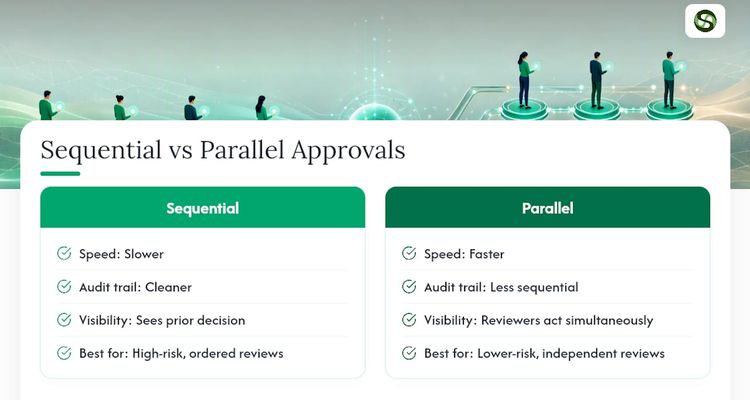
Sequential approval routes a request through reviewers one at a time, each seeing the prior decision before acting. It’s slower but produces a cleaner audit narrative: reviewer B saw reviewer A’s rationale before adding their own. Use it for high-risk decisions where the order of review matters, legal before finance on a contract exception, for instance.
Parallel approval sends the request to multiple reviewers simultaneously. It’s faster and works well for lower-risk items or when reviewers evaluate different dimensions independently, like a conflict-of-interest disclosure reviewed by compliance and a manager at the same time.
Approver versus signer is a distinction worth enforcing structurally. An approval workflow guide covering standard platform behavior treats these as separate roles by design: the approver clears the decision, the signer executes it. Never let a signer sign before an approver has recorded a decision, that ordering is what makes post-facto approval possible in the first place.
Delegation needs its own safeguards. When an approver is unavailable, delegation should be time-boxed with an automatic expiry, logged as a distinct event, and revalidated once the original approver returns.
Pro Tip: Set every delegation to expire automatically after a fixed window, seven days is a reasonable default for most compliance workflows. Open-ended delegation is how authority quietly drifts to people who were never supposed to hold it.
What Do Auditors Actually Check in an Approval Record?
Auditors look for a specific set of elements on every record: reviewer identity, role, timestamp, the decision itself, documented rationale tied to a policy reference, attached evidence, a version hash showing which document version was reviewed, and a complete exportable history.
The central failure auditors flag isn’t a wrong decision. It’s a decision that can’t be proven to have happened the way the record claims. A compliance approval workflow that lacks contemporaneous evidence forces you into reconstruction, which auditors treat with far less confidence than a live record.
Export format matters more than most teams expect. Structured formats like CSV or JSON with field-level timestamps work for technical audits and system reconciliation. A PDF packet bundling the submission, each approval step, attachments, and the relevant policy excerpt works better for human auditors reviewing a specific case.
Pro Tip: Build a single export function that bundles the full story, submission, every approval with rationale, attachments, and the cited policy language, into one packet. When an auditor asks about a specific approval, you should be able to hand over that packet in minutes, not reconstruct it from three systems.
Which Technical Integrations Make a Workflow Actually Enforceable?
A workflow diagram means nothing if the underlying system doesn’t block execution until approval exists. That’s the difference between a policy and an enforced control.
Core integrations to configure:
- E-signature provider, connected so signature requests trigger automatically once approval clears, not through a manual handoff
- Document management system, so the approved version and the executed document stay linked
- Identity provider via SAML or OIDC, so reviewer identity is verified, not just typed into a form
- SIEM or log export, so security and compliance teams can monitor the workflow alongside other systems
- Ticketing or ERP connectors, so approvals tied to procurement or IT changes flow into existing operational systems
Integrating approval steps with a digital signature tool via webhook or API keeps the internal approval history and the signature record in one place, eliminating the manual handoff where errors and delays creep in.
The system itself needs specific API behaviors: immutable timestamping on every state change, field-level change history so you can see what was edited and when, delegation logs distinct from standard approval logs, and dedicated export endpoints for pulling full audit packets on demand. Without these, integrations become just another place data can go stale or get out of sync with the actual decision record.
Where Approval Workflows Usually Break Down
Most compliance failures trace back to the same handful of patterns, and nearly all of them are preventable once you know to look for them.
- Post-facto approval. The system lets an action execute, a contract gets signed, a campaign launches, before the approval record exists. This is the single riskiest pattern because it turns your audit trail into a reconstruction instead of evidence.
- Incomplete submissions. Reviewers approve requests missing required fields because the system didn’t enforce them.
- Delegation without expiry. Authority quietly transfers and never transfers back.
- Poor version control. An approver reviews one version of a document while a different version gets executed.
- Siloed audit trails. Approvals live in email threads or spreadsheets instead of one governed system.
Stop post-facto approvals immediately, that’s a system gate problem, not a training problem. Fix version control and mandatory fields in your next configuration sprint. Monitor for workaround patterns, like approvals clustering right before deadlines, which often signal reviewers rubber-stamping under time pressure rather than actually evaluating.
How ExpiryEdge Supports Audit-Ready Approval Workflows
ExpiryEdge maps directly onto the checklist above. Its workflow engine enforces gates so approvals must exist before a linked deadline action, a renewal, a certification lapse, a vendor recertification, proceeds. Every step generates a timestamped, exportable record, and role-based permissions keep submitters and approvers separated by design.
Common configurations compliance teams run:
- Contract renewals and exception approvals, routed sequentially through legal and finance before a renewal date locks in
- Certification and license renewals, with multi-channel alerts escalating to a backup approver if the primary reviewer misses the SLA window
- Vendor compliance checks, paired with document collection and e-signature so the approval and the signed agreement live in the same record
Teams using this structure for contract expiry and renewal management typically see fewer last-minute scrambles and cleaner audit exports, since the rationale and policy reference get captured at the point of decision rather than reconstructed later.
An Implementer’s View on Rolling This Out
Roll this out one process at a time, not all at once. Pick the process with the clearest audit exposure, vendor onboarding or contract exceptions usually work, and run it in parallel with the old system for one full cycle before retiring anything.
Expect resistance from reviewers who see mandatory rationale fields as extra work. Frame it differently: it’s the field that protects them personally if a decision ever gets questioned. That reframing does more for adoption than any training deck.
Get Audit-Ready Approval Workflows Without Building From Scratch
Configuring the controls covered above, immutable timestamps, role-based gates, rationale capture, escalation logic, from spreadsheets or generic project tools usually means stitching together three or four systems that were never designed to talk to each other. ExpiryEdge builds these controls into a single platform designed specifically for deadline-driven, compliance-sensitive work.

Every approval tied to a contract renewal, certification expiry, or vendor recertification runs through system-enforced gates, meaning the downstream action simply can’t fire until the approval record exists. Multi-channel alerts catch escalations before they become missed deadlines, and every decision exports as a complete, auditor-ready packet with rationale and policy references intact.
A practical way to start: scope a 30-day pilot around one high-exposure process, contract exceptions or vendor compliance checks work well, and measure it against the same acceptance criteria covered earlier, audit export speed, tamper resistance, and time-to-approval. You can explore ExpiryEdge’s platform and start that pilot directly from a free trial.
Sources
FAQ
What Is an Approval Workflow?
An approval workflow is a structured process that routes a request, like a contract or policy exception, through defined reviewers who must approve it before it takes effect, with each decision recorded for audit purposes.
What Is Workflow Compliance?
Workflow compliance means an approval process meets regulatory and internal policy requirements by producing a contemporaneous, tamper-evident record of who approved what, when, and why, tied to a specific policy reference.
Can You Give an Example of an Approval Workflow?
A common example is a contract exception: the submitter uploads the request, legal reviews and documents rationale against policy, finance reviews next, and only after both approve does the signer execute the document. Platforms like ExpiryEdge configure this exact sequence with system-enforced gates.
What Are the Steps of an Approval Workflow?
A typical build follows six steps: map the processes needing approval, define required evidence fields, configure roles and escalation rules, integrate signature and identity systems, pilot with one use case, then measure and iterate based on time-to-approval and exception rates.
Recommended
Frequently asked questions
Workflow compliance means an approval process meets regulatory and internal policy requirements by producing a contemporaneous, tamper-evident record of who approved what, when, and why, tied to a specific policy reference.
A common example is a contract exception: the submitter uploads the request, legal reviews and documents rationale against policy, finance reviews next, and only after both approve does the signer execute the document. Platforms like ExpiryEdge configure this exact sequence with system-enforced gates.
A typical build follows six steps: map the processes needing approval, define required evidence fields, configure roles and escalation rules, integrate signature and identity systems, pilot with one use case, then measure and iterate based on time-to-approval and exception rates.