Domain Renewal Reminder Best Practices Beyond Registrar Emails

A good domain renewal reminder system does not rely on your registrar's emails alone. For .com and other generic domains, ICANN requires only two notices before expiry, about a month and a week out, sent to the registrant. Add your own reminders at 90, 60 and 30 days, a named owner and backup, and auto-renew on a current card.
Want to see your renewal dates now? Our free domain expiry checker looks up when up to 20 domains expire, straight from the registry.
The renewal email went to someone who left, the card on file expired, or the domain sits in an account from a company you bought two years ago. Then the website and email stop. This guide shows what ICANN actually guarantees, where auto-renew breaks, and how to build a reminder system that survives staff changes, rebrands and mergers.
Key takeaways
- ICANN's Expired Registration Recovery Policy (ERRP) requires at least two expiry notices: about one month and about one week before expiry (26 to 35 days and 4 to 10 days count as compliant).
- If the domain is not renewed or deleted, the registrar must send one more notice within 5 days after expiry.
- Registrars "may delete registrations at any time after they expire", and must cut DNS for at least the last 8 days the name is renewable, so the website and email stop.
- For .com, the registry's Auto-Renew Grace Period is 45 days, the Redemption Grace Period after deletion is 30 days, and pending delete is 5 days. Your registrar's own window can be shorter.
- Registrars must publish their renewal, late renewal and restore fees, and explain how they send notices. ICANN suggests adding the sender address as a safe sender.
- Most lost domains are an ownership problem, not a policy one: the notice reached an inbox nobody reads, or the card on file had expired.
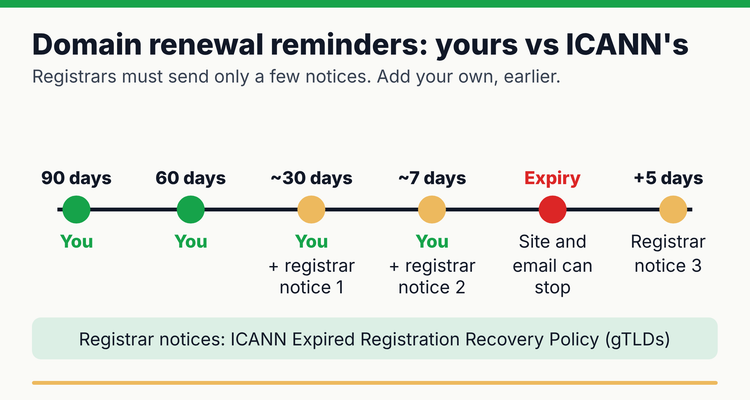 Your reminders versus the registrar's minimum notices under ICANN's Expired Registration Recovery Policy (checked 12 October 2026).
What domain renewal reminders does ICANN require?
ICANN requires registrars to send at least three notices for a generic top-level domain (gTLD), such as .com, .net or .org: two before expiry and one after. Section 2.1.1 of the ERRP says registrars "must notify the Registered Name Holder of the expiration at least two times", one "approximately one month prior to expiration" and one "approximately one week prior." ICANN's notes accept 26 to 35 days and 4 to 10 days as compliant (ICANN ERRP).
Three details matter for a reminder plan:
- Who gets them. The notices go to the Registered Name Holder, which is whatever contact sits on the registration. If that is a former employee's address, the notices are going nowhere.
- How they arrive. Notices must come in a way that "does not require affirmative action to receive the notification", such as email. Registrars must describe their method on their website and name the sending address, and ICANN suggests saving it as a safe sender to avoid spam filters.
- What they cover. ICANN policy applies to gTLDs. Country-code domains such as .uk, .de or .ca follow their own registry's rules, so check each registry separately.
Two emails, three to five weeks apart, to one inbox, is a thin safety net. Treat them as a backup to your own reminders.
What happens after a domain expires?
The domain does not vanish on day one, but it can stop working on day one. Here is the lifecycle for a .com domain, with what your reminder plan should do at each stage.
Domain expiry lifecycle and your reminder plan (.com; last verified 12 October 2026)
| When | What ICANN or the .com registry sets | What you should do | Source |
|---|---|---|---|
| 90 days before | Nothing required | First internal reminder: confirm owner, card, auto-renew and whether to keep the name | Our advice |
| 60 days before | Nothing required | Second reminder: fix any account, card or contact problems | Our advice |
| 26 to 35 days before | Registrar's first notice (about one month) | Third reminder; renew manually if anything is uncertain | ERRP 2.1.1 |
| 4 to 10 days before | Registrar's second notice (about one week) | Escalate to the backup owner if not yet renewed | ERRP 2.1.1 |
| Expiry day onwards | Registrar may delete at any time. While renewable, DNS is cut for at least the last 8 days, so web and email stop | Renew now; renewal must be allowed through the DNS cut-off period | ERRP 2.2.1 to 2.2.5 |
| Within 5 days after | One more notice with renewal instructions, if not renewed or deleted | Renew, then check DNS is restored | ERRP 2.1.2 |
| Up to 45 days after | Auto-Renew Grace Period at the .com registry | Do not wait for it: your registrar can delete sooner | .com Appendix 7, 3.1.3 |
| 30 days after deletion | Redemption Grace Period: DNS off, transfers blocked, restore through the registrar | Restore at once; expect a restore fee | ERRP 3.1, 3.2, 4.1 |
| Then 5 days | Pending delete: cannot be restored, then released | Too late; the name is open to anyone | .com Appendix 7, 3.3.2 |
Sources: ICANN ERRP and .com Registry Agreement, Appendix 7. Other gTLD registries set their own grace periods, and each registrar decides how long it keeps an expired name renewable before deleting it.
Worked example: one .com domain
Say a .com expires on 15 March 2027. Your reminders fall on 15 December 2026 (90 days), 14 January 2027 (60 days) and 13 February 2027 (30 days). The registrar's first notice should arrive between 8 and 17 February, the second between 5 and 11 March, and a post-expiry notice by 20 March. The registry's auto-renew grace runs to 29 April 2027, but your registrar may delete the name well before that.
Why does domain auto-renew fail?
Auto-renew fails when the payment, the account or the person behind it has changed. It is the right default, but it is a setting, not a guarantee. These are the common failure points, with the fix for each.
Common domain auto-renew failures and how to prevent them
| What goes wrong | Why it happens | Fix |
|---|---|---|
| Card declined | Card expired, was replaced after fraud, or belonged to someone who left | Put a company card on file, owned by a role, and set its expiry date as its own reminder |
| Notices never read | Registrant or account email is a personal inbox or an old alias | Use a shared role mailbox, such as domains@, on the account and the registration |
| Auto-renew was off | Turned off at transfer, at a plan change, or never turned on | Check the setting on every name during your quarterly review |
| Not enough funds in a prepaid account | Some registrars renew from an account balance | Check the balance before your busiest renewal month |
| Name in an account nobody can log into | Agency, former employee or acquired company holds it | Recover access well before expiry; it can take weeks |
| Wrong renewal term | One year at a time means a renewal every year | Renew important names for several years at once |
All six are fixed by the same two things: a named owner for every domain, and reminders that go to more than one person.
How do you manage a domain portfolio after a rebrand or acquisition?
Find every domain you now own, decide what each one does, and keep the ones that still carry traffic or email as live records with an owner. Legacy domains are risky because they look unused. In fact they often still redirect old links, receive email to old addresses, or sit behind single sign-on and certificates.
- Gather every account (1 to 2 hours). List each registrar account across both companies, including agencies and resellers. Ask finance for domain charges on old cards.
- Look up each domain (2 minutes each). Use ICANN's registration data lookup to confirm the registrar, expiry date and status codes.
- Find what depends on it (5 minutes each). Check DNS for mail (MX) records, redirects, subdomains and certificates.
- Classify it. Primary, legacy redirect, email-carrying, defensive (typos and brand protection), or retire.
- Consolidate accounts. Move names into as few registrar accounts as practical, with role-based logins and two-factor authentication. Avoid transfers in the last month before expiry (our advice).
- Set term, auto-renew and owner. Multi-year renewals for primary and email-carrying names; a decision date for everything else.
- Lock what matters most. Ask about registry lock for the domains that run your business.
- Set reminders at 90, 60, 30 and 7 days for every name you keep, to the owner and a backup.
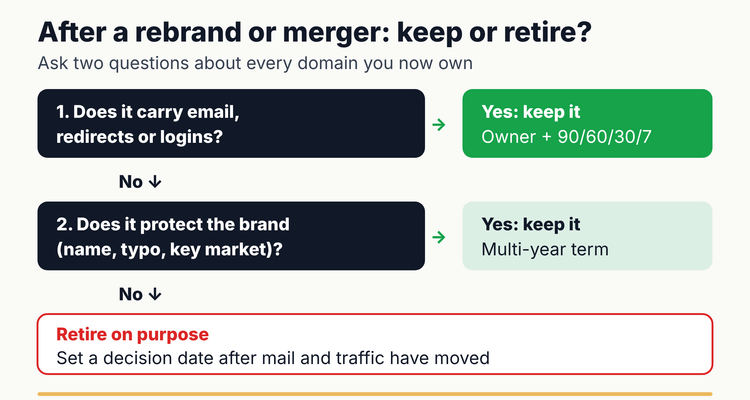 Keep, protect or retire: deciding what to do with each domain after a rebrand or acquisition.
Retiring a domain is a decision, not a lapse. Let it expire only after mail has moved and redirects have run long enough for your traffic to follow. Otherwise someone else can register it once it is released.
What does registry lock protect against?
Registry lock stops unauthorized changes at the registry, above your registrar account. ICANN explains that some registries offer a Registry Lock Service that sets server-level statuses (serverUpdateProhibited, serverDeleteProhibited and serverTransferProhibited), and that removing them "can take longer" because your registrar must ask the registry (ICANN). Verisign, which runs .com and .net, says its Server Delete Prohibited status "confirms a domain name cannot be deleted or lapsed" (Verisign).
It is worth asking about for your primary domains. But it is a security control, not a billing plan: renewals still have to be paid under your registrar's terms, and unlocking for a legitimate change takes time. Plan DNS changes and transfers around it.
Do this now: a 30-minute domain renewal reminder setup
You can put every domain on a reliable reminder in about half an hour for up to 20 names (our estimate). No software needed.
Domain reminder setup
- ✓
List every domain from every registrar account (10 minutes)
- ✓
Look up the expiry date of each on lookup.icann.org (5 minutes)
- ✓
Name an owner and a backup for each (5 minutes)
- ✓
Check auto-renew, the card on file and the account email (5 minutes)
- ✓
Add the four reminder dates to a shared calendar or the sheet below (5 minutes)
Copy-paste spreadsheet layout
- Columns: A Domain, B Purpose (primary, legacy, email, defensive), C Registrar, D Account login owner, E Expiry date, F Auto-renew (Y/N), G Card or payment owner, H Owner, I Backup, J Days left, K Status, L Registry lock (Y/N).
- Days left: =IF(E2="","",E2-TODAY())
- Status: =IF(E2="","CHECK",IF(J2<0,"EXPIRED",IF(J2<=30,"RENEW NOW",IF(J2<=90,"CHECK CARD AND OWNER","OK"))))
- Registrar notice window: =TEXT(E2-35,"d mmm")&" to "&TEXT(E2-26,"d mmm")
- Formatting: red for EXPIRED and RENEW NOW, amber for CHECK CARD AND OWNER. Sort by column J.
If no notice arrives in that window, the registrar's email is probably going to the wrong place. Our free software, domain and SSL renewal tracker has these columns and color rules ready to use.
How can you make domain renewals more resilient?
- Renew primary domains for several years. Fewer renewals means fewer chances to miss one.
- Separate the notice inbox from the person. A role mailbox survives job changes.
- Track certificates with the domain. A renewed domain with an expired certificate still shows visitors a warning; see our guide to SSL certificate expiration monitoring.
- Review quarterly. Fifteen minutes to check cards, owners and auto-renew settings across all accounts.
- Write down the recovery path. If the worst happens, our guide to an expired SSL certificate or domain covers the first 48 hours.
What happens if you miss a domain renewal?
⚠️What happens if you miss it: your registrar may delete the domain at any time after expiry, and DNS must be cut for at least the last 8 days it is still renewable, so your website and email stop (ICANN ERRP 2.2). After deletion, a gTLD enters a 30-day Redemption Grace Period, when only you can restore it through your registrar, usually for a restore fee (ERRP 3.1, 4.1). For .com, a 5-day pending delete follows, after which anyone can register the name (.com Registry Agreement, Appendix 7).
💡 Pro Tip
IT teams we work with keep legacy-brand domains as their own records after a rebrand, each with an owner and reminders, rather than folding them into the new brand's entry. Those names often still carry redirects and old email addresses, and a separate record keeps the renewal visible after the rebrand project closes.
Spreadsheet or software?
A spreadsheet and a shared calendar are enough for a handful of domains, one registrar account and an owner who checks them every month. They start to fail with dozens of names across several accounts, after an acquisition, or when the owner changes jobs. A sheet does not send reminders, and calendar invites belong to whoever created them.
ExpiryEdge treats each domain as a record with an owner, a backup and reminders at 90, 60, 30 and 7 days by email, SMS, Slack or Teams, with an audit trail of who renewed what. It does not check your registrar for you; you enter or import the dates. MSPs managing client domains can see how it works on our managed service providers page. For domains, certificates and IT subscriptions together, see our domain and SSL expiry tracking hub.
Frequently asked questions
How many renewal reminders must a registrar send?
For gTLDs such as .com, ICANN's Expired Registration Recovery Policy requires at least two before expiry, about one month and about one week out, plus one more within 5 days after expiry if the name has not been renewed or deleted. Registrars may send more.
Is domain auto-renew enough?
It is a good default, not a guarantee. Auto-renew fails when the card expires, the account email is out of date, or the setting was switched off at a transfer. Pair it with your own reminders to a named owner and backup.
How long do I have to renew a domain after it expires?
It depends on your registrar. ICANN lets registrars delete a gTLD any time after expiry, but the name must stay renewable while its DNS is cut for at least the last 8 days. The .com registry's auto-renew grace runs up to 45 days, then a deleted name has 30 days of redemption, usually with a restore fee.
Why did my website and email stop when the domain expired?
ICANN requires registrars to interrupt DNS resolution for at least the last 8 days that an expired name is still renewable, and many registrars do it from the expiry date. Renewing restores DNS, though changes can take time to spread.
Should we keep old domains after a rebrand?
Keep any domain that still carries email, redirects old links or protects the brand, and give it an owner and reminders. Retire others only after traffic and mail have moved, because once released, anyone can register the name.
Do ICANN's rules apply to .uk, .de or .ca domains?
No. ICANN's Expired Registration Recovery Policy covers generic top-level domains. Country-code domains follow their own registry's rules for notices, grace periods and deletion, so check each registry separately.
What is registry lock and do I need it?
Registry lock sets server-level statuses at the registry that block unauthorized updates, transfers and deletions, and takes longer to remove than a registrar lock. It suits domains your business depends on. Ask your registrar whether it is offered for your extension.
Sources
- ICANN, Expired Registration Recovery Policy (updated 21 February 2024)
- ICANN, .com Registry Agreement Appendix 7: Functional and Performance Specifications
- ICANN, Life Cycle of a Typical gTLD Domain Name
- ICANN, EPP Status Codes: What Do They Mean, and Why Should I Know?
- ICANN, Registration Data Lookup Tool
- Verisign, Registry Lock Service Status
- Last reviewed: 12 October 2026
Frequently asked questions
It is a good default, not a guarantee. Auto-renew fails when the card expires, the account email is out of date, or the setting was switched off at a transfer. Pair it with your own reminders to a named owner and backup.
It depends on your registrar. ICANN lets registrars delete a gTLD any time after expiry, but the name must stay renewable while its DNS is cut for at least the last 8 days. The .com registry's auto-renew grace runs up to 45 days, then a deleted name has 30 days of redemption, usually with a restore fee.
ICANN requires registrars to interrupt DNS resolution for at least the last 8 days that an expired name is still renewable, and many registrars do it from the expiry date. Renewing restores DNS, though changes can take time to spread.
Keep any domain that still carries email, redirects old links or protects the brand, and give it an owner and reminders. Retire others only after traffic and mail have moved, because once released, anyone can register the name.
No. ICANN's Expired Registration Recovery Policy covers generic top-level domains. Country-code domains follow their own registry's rules for notices, grace periods and deletion, so check each registry separately.
Registry lock sets server-level statuses at the registry that block unauthorized updates, transfers and deletions, and takes longer to remove than a registrar lock. It suits domains your business depends on. Ask your registrar whether it is offered for your extension.