Why Compliance Teams Need Workflow Automation

Why compliance teams need workflow automation

Compliance teams need workflow automation because auditors and regulators want proof that a control ran on time, and memory doesn't produce proof. An automated workflow fires on a date or an event, sends the task to a named person, escalates if they don't act, and records each step with a timestamp. The evidence builds up as the work gets done.
Without it, you're running obligations from spreadsheets, calendar invites and email threads. That works until the one person who watches the licence spreadsheet goes on holiday the week a renewal window opens.
This guide covers what automation is (and isn't), where manual processes break, which workflows to automate first, how to roll out in phases and how to measure whether it worked.
What compliance workflow automation actually means
It means writing your controls and policies down as repeatable workflows that software runs for you. Each one starts on a schedule or a trigger, captures evidence at every step, and routes exceptions to the right person without anyone having to remember.
That separates it from two tools people often confuse it with. A document repository stores evidence after the fact. A task manager reminds you to do something. A workflow does both, and adds the rules: what happens next, who gets it if the owner doesn't respond, and where the proof goes.
The parts you'll need:
| Part | What it does |
|---|---|
| Triggers and schedules | Start a workflow on a date or an event, such as a licence 90 days from expiry |
| Rules | Route tasks, escalate overdue items, or stop a process when a condition fails |
| Integrations | Pull data from HR, your identity provider and document stores |
| Append-only log | Record each action and approval with a timestamp that nobody can edit |
| Evidence tagging | Attach each document to the control it proves |
| Dashboard | Show what is due, overdue and done, by owner |
One governance rule from day one: every workflow has a named owner, and changes to a live workflow go through change control. If anyone can edit production workflows without a version history, your audit log will drift away from your written procedures. An auditor will notice.
Where manual compliance breaks
Manual processes rarely fail dramatically. They fail quietly, then all at once when an audit or an investigation arrives.
Three patterns come up again and again. A licence renewal date sits in a spreadsheet one person checks, and that person is off when the window opens. An access review gets done over email, with approvals scattered across three inboxes and no single timestamp. A supplier's insurance certificate lapses, and nobody notices until a claim or a contract dispute brings it up.
The US Department of Justice tells prosecutors to ask three questions about a company's compliance program, and the third is blunt: "Does the corporation's compliance program work in practice?" Its Evaluation of Corporate Compliance Programs (updated September 2024) also asks whether compliance has the staff to "audit, document, analyze, and act on" the results.
That's the standard you're working to. A control you can't evidence looks, in an investigation, much like a control that never ran.
Retention rules raise the stakes. HIPAA, for example, requires covered entities to keep required security documentation for 6 years from when it was created or last in effect, whichever is later (45 CFR 164.316). Evidence that lives in a departed employee's mailbox won't last that long.
What automation changes, and what it doesn't
Each benefit maps to something you can measure and report.
- Fewer handoff errors. The workflow routes to the approver named in the rule, not whoever someone remembers.
- Evidence as a by-product. Approvals and uploads are logged as the work happens, so audit prep becomes an export, not a week of reconstruction.
- Deadlines that enforce themselves. If a task is overdue, the escalation fires whether or not anyone opened the spreadsheet.
- One view of every open obligation, its owner, its due date and its status, without a status meeting.
- New obligations without new headcount. Adding a requirement means adding a workflow.
What it doesn't change is judgment. A risk rating, a waiver or a regulatory interpretation still needs a qualified person. Automation should enforce the process and capture the decision. The decision stays human.
💡 Pro Tip
Start with the two or three workflows where a missed deadline carries the biggest penalty or attracts the most audit attention. Licence renewals, periodic access reviews and supplier certificates are good candidates, because a failure there is easy to see and easy to measure.
Which workflows to automate first
Each of these has a deadline or a recurring obligation that has to be documented. The details differ by industry. The shape doesn't.
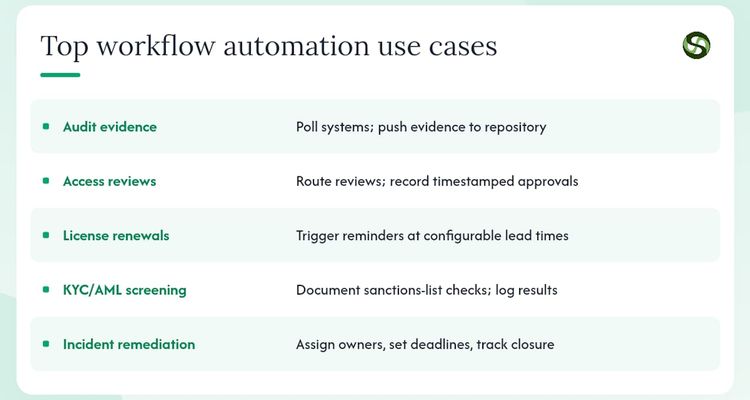
Audit evidence collection
A SOC 2 Type 2 report tests whether controls operated across a whole period of months, not just on one day. Pulling that evidence by hand for every month of the period is a big job. A workflow can request each export on schedule, from the right owner, and file it against the control.
Periodic access reviews
Someone has to confirm, on a set schedule, who still needs access to sensitive systems. The workflow sends each manager their list, records approve or remove decisions with a timestamp, and chases anyone who doesn't respond.
Licence and certification renewals
Professional licences, facility permits and staff certifications all expire. A workflow starts reminders at set lead times and keeps the renewed document. In healthcare, a lapsed clinical licence is both a patient-safety problem and a regulatory one, so this is often the first workflow to build.
Supplier compliance checks
Vendor insurance certificates, SOC 2 reports and other certifications carry expiry dates. Automation tracks them, asks the supplier for the updated document and flags gaps before a contract renewal or an audit. See how supplier compliance tracking works for procurement teams for the full workflow.
Remediation and inspections
When an audit finding or a control failure turns up, a remediation workflow assigns an owner and a deadline and tracks the item to closure. Inspections work the same way. If a permit depends on an annual inspection, book it from the workflow, not from someone's memory. Without that, findings sit in a spreadsheet and age past their target dates.
Most of these depend on data from elsewhere. An access review needs a feed from your identity provider. A licence workflow needs expiry dates from HR. Get the integration right, or you've built another manual step with a nicer screen.
What to require from a platform
Most evaluations go wrong by scoring features in isolation. Ask instead: which control objective does this feature satisfy?
| Feature | Why compliance needs it |
|---|---|
| Triggers and schedules | Controls run on time, not on memory |
| Append-only audit log | A record of every action that can't be edited after the fact |
| Evidence tagging | Proof sits against the control it satisfies, not in a general folder |
| HR and identity integrations | Reviews use live data, not a list someone last updated in March |
| Role-based approvals | Only authorised people can approve a step, and the log shows who did |
| Escalation rules | Overdue tasks reach a manager before the deadline, not after |
| Security controls | Role-based access, encryption and data residency options for regulated data |
No-code tools speed up adoption, because compliance staff can build workflows without waiting for IT. The catch is governance. If anyone can change a live workflow, you lose the change control your auditor expects. Pick a platform that lets non-developers design workflows but forces versioning and approval before changes go live.
Roll it out in phases
A phased rollout limits the damage if something's wrong, and gives you a result to show before you ask for more.
- Pick your highest-risk manual processes. Choose the three where a missed deadline or a documentation gap hurts most. They're your pilot.
- Name owners and approvers. Every workflow gets an accountable owner and someone who approves exceptions, before you build anything.
- Connect the source systems that hold the dates and data your pilot needs.
- Build and test with real scenarios, including edge cases. Check the log captures what an auditor would want to see.
- Walk your auditor through the output before go-live, and confirm the evidence format works for them. Finding out a year later is the expensive way.
- Train the people who'll receive escalations. They need to know what the workflow does and what to do when it lands on them.
- Go live and measure for 60 to 90 days, then add the next control family, say vendor certificates after licence renewals.
Keep a change log for workflows, version every definition, set a retention period for logs that matches your regulatory requirements, and review each workflow against current policy every quarter. Our deadline escalation workflow guide covers the reminder and escalation logic in more detail.
How to measure whether it worked
Take a baseline before you start, then track a small set of numbers.
| Measure | How to get it |
|---|---|
| Missed-deadline rate | Tasks that reached their due date unfinished, divided by all tasks due in the period |
| Evidence response time | Hours from an auditor's request to delivery |
| Hours per review cycle | Staff hours per cycle, compared with your baseline |
| Escalations per period | Should fall as the process beds in |
| Cost per compliance action | Staff hours per action times your loaded hourly rate |
For the business case, use a simple formula: hours saved per year times loaded hourly rate, plus any penalty you expect to avoid, minus the annual cost of the platform.
Here's how the arithmetic works with made-up inputs. Say five people each spend four hours a week chasing approvals and assembling evidence, and automation cuts that to one hour. That's 15 hours a week, or 780 hours over 52 weeks. Multiply by your own loaded rate to get the capacity you've freed up. Use your real numbers, not ours.
What a licence renewal looks like in ExpiryEdge
ExpiryEdge is built for the date-driven part of this: contracts, licences, permits and certificates. Every item has an expiry date and an owner, and the platform reminds and escalates as that date gets closer. A typical licence setup might look like this:
- 90 days out: the licence holder gets a reminder by email, SMS, WhatsApp, Slack or Teams to start the renewal.
- 60 days out: a second reminder. If the owner hasn't acted, it escalates to the compliance manager.
- 30 days out: a final reminder and escalation to the department head.
- Renewed: the owner uploads the new licence (or ExpiryEdge requests it from them), and it's stored against the record with a timestamp.
- Audit: the compliance manager exports the trail showing each reminder, escalation and document.
It doesn't replace a GRC platform for access reviews or KYC screening. It handles the renewals and certificates those programs depend on. There's a 14-day free trial, no credit card, if you want to build that first workflow and see the log it produces. Our post on the benefits of automated compliance tracking goes into more detail.

Mistakes that undo the benefit
Automation doesn't remove compliance risk. It moves it. Watch for these.
- Bad source data. A workflow keyed to an expiry date is only as good as that date. Clean the data before you build.
- Automating judgment calls. Risk ratings and waivers need a person in the loop. Without one, you get the look of coverage and none of the substance.
- Editing live workflows without change control. Lock production workflows and require a change request for edits.
- Silent integration failures. If a workflow can't reach its source system and nobody's alerted, it simply stops. Monitor integration health.
- Skipping auditor sign-off. Validate the log format at go-live, not at the next audit.
On lock-in: prefer platforms with open APIs and standard exports. If you ever switch, you'll need your audit logs in a format another system can read.
Your next step: pick one workflow and run it for 90 days
Choose the obligation where a missed deadline would hurt most. Agree your baseline numbers before you start: current missed-deadline rate, evidence response time and hours per review cycle. Find an executive sponsor who can unblock IT access, because that's where pilots usually stall.
Budget more time for agreement than for technology. The hard part is getting compliance, IT and the business units to agree who owns each workflow, what the escalation path is, and what happens when a workflow fires wrongly. Teams that rush that step tend to go live with workflows that satisfy the software but not the auditor.
Automation doesn't make compliance easier by removing judgment. It removes the parts that should never have needed judgment: the reminder, the chase, the filing. Take those off your team so they can spend their time deciding.
Sources
- US Department of Justice, Evaluation of Corporate Compliance Programs (updated September 2024)
- 45 CFR 164.316, HIPAA policies, procedures and documentation requirements
This article is general information, not legal advice. Talk to a qualified lawyer about your own circumstances before acting on it.
FAQ
Why is workflow automation important for compliance teams?
Because it makes controls run on schedule and records proof that they did. A workflow sends each task to a named owner, escalates if they miss the date, and logs every step with a timestamp. Auditors want exactly that evidence. Spreadsheets and calendar reminders can't produce it reliably, especially when people are away or leave.
What is a compliance workflow?
It's a defined sequence of tasks, approvals and evidence steps that carries out one control or policy obligation. A quarterly access review is a good example: send each manager a list, record their decisions, chase non-responders and file the result. An automated version starts on its own schedule and logs each step for audit.
What is compliance automation?
It's using software to run, document and monitor compliance obligations so nobody has to push each step by hand. That covers licence renewal reminders and audit evidence requests, plus access reviews and supplier certificate checks. People still make the judgment calls. The software handles the reminding and the chasing, and keeps the record.
What does an automated compliance workflow look like in practice?
A trigger fires, such as a licence 90 days from expiry. The owner gets a task. If it's still open at 60 days, their manager hears about it. When the work's done, the owner uploads the evidence, which is stored with a timestamp. At audit time you export the trail instead of rebuilding it from email.
How do you measure the ROI of compliance workflow automation?
Measure your baseline first: hours per review cycle, missed deadlines and evidence response time. After 60 to 90 days, compare. Value the hours saved at your loaded hourly rate, add any penalties you'd realistically avoid, and subtract the platform cost. Use your own figures. Vendor averages won't convince your finance team.
Recommended
Frequently asked questions
It's a defined sequence of tasks, approvals and evidence steps that carries out one control or policy obligation. A quarterly access review is a good example: send each manager a list, record their decisions, chase non-responders and file the result. An automated version starts on its own schedule and logs each step for audit.
It's using software to run, document and monitor compliance obligations so nobody has to push each step by hand. That covers licence renewal reminders and audit evidence requests, plus access reviews and supplier certificate checks. People still make the judgment calls. The software handles the reminding and the chasing, and keeps the record.
A trigger fires, such as a licence 90 days from expiry. The owner gets a task. If it's still open at 60 days, their manager hears about it. When the work's done, the owner uploads the evidence, which is stored with a timestamp. At audit time you export the trail instead of rebuilding it from email.
Measure your baseline first: hours per review cycle, missed deadlines and evidence response time. After 60 to 90 days, compare. Value the hours saved at your loaded hourly rate, add any penalties you'd realistically avoid, and subtract the platform cost. Use your own figures. Vendor averages won't convince your finance team.