90 Day SOC 2 Readiness Playbook: Catch 8–15 Audit Gaps


A SOC 2 readiness assessment is a dry run of your audit. You check whether each control is in place, whether you can prove it, and whether that proof is in a form an auditor will accept, all before you pay for the real thing. If you only do one thing this week, draw your system boundary on one page and get your auditor to agree it.
Everything else (the control matrix, the policies, the evidence) hangs off that boundary. This playbook walks through a 90-day readiness plan in five phases, shows where first-time teams usually trip, and explains how to keep the work from going stale between audits.
What a readiness assessment gives you
A readiness assessment compares your environment with the AICPA's Trust Services Criteria before the audit starts. Done properly, it produces three things: a gap register listing every control that isn't fully working, a remediation plan with owners and dates, and an evidence list that maps each control to the file that proves it.
If you finish without all three, you've had a status meeting, not an assessment.
The bigger question is who runs it. People grading their own controls tend to grade kindly. An outside reviewer who has sat through real fieldwork will spot evidence that looks fine to you but won't satisfy a sampler.
Aprio describes three tiers, and they're a sensible way to decide:
- Do it yourself. Your team owns the checklist and the evidence with no outside review. Aprio's view is that this only works if someone in-house has already taken a SOC 2 through to a clean opinion.
- Auditor-aligned. You do the work, and a CPA firm checks your scope, control design and a sample of evidence at agreed points.
- Auditor-performed. The CPA firm runs the gap assessment and guides control design. You still own the fixes.
For a first SOC 2, auditor-aligned is usually the right trade. It costs more than going alone, but you find out early whether your evidence format will pass.
Why you can't fix a Type II problem after the fact
A Type II report tests whether controls worked across the whole review period. If a quarterly access review was supposed to run in January, April and July, and the January one never happened, that's an exception. You can't go back and hold it later.
Aprio lists what skipping readiness can lead to: exceptions in the report, evidence that doesn't support the auditor's conclusions and, at worst, a qualified opinion. It also notes that stopping to fix problems mid-audit can mean waiting four months or more for your report. That's a long time if a sales deal is waiting on it.
Readiness catches the usual suspects while they're still cheap. Think access reviews done once instead of quarterly, change tickets with no approval timestamp, and vendor risk checks that cover your cloud provider but not the small analytics tool the auditor happens to sample.
The 90-day readiness plan, phase by phase
Run readiness as five phases, each with a clear exit test. Most stalled projects jumped ahead, writing policies before scope was settled or collecting evidence before the controls were designed.
Phase 1 (weeks 1 to 2): fix the scope
Name the product or service in scope. Security is always included; decide whether you'll add Availability, Confidentiality, Processing Integrity or Privacy. Most first reports stick to Security plus whatever your customers' questionnaires keep asking about. Then decide between Type I and Type II.
Deal with subservice organisations now. If AWS hosts your product or a payroll provider runs part of a control, you choose how to treat them. Under the carve-out method, their controls sit outside your report and you rely on their own SOC reports. Under the inclusive method, their controls are described and tested as part of yours. With carve-out, you'll still need to collect and review those vendors' reports every year.
Exit test: a one-page scope diagram showing systems, data flows and boundaries, agreed with your auditor.
Phase 2 (weeks 2 to 4): build the control matrix
Build the matrix before you write a single policy. Each row needs seven columns:
- The Trust Services Criteria reference, for example CC6.1 for logical access.
- A plain-English description of the control.
- A named owner. A person, not a team.
- Where the evidence lives.
- Whether the evidence is collected automatically or by hand.
- The date the control was last tested.
- A fix-by date if the control isn't fully working yet.
From here on, every gap gets logged against a row. If a finding doesn't map to a row, either the matrix is missing a control or the finding is out of scope.
Phase 3 (weeks 4 to 8): write the policies and switch the controls on
Write the policies your matrix refers to: access control, change management, vulnerability management, incident response and vendor risk. Then make the technical controls real. That means MFA on every admin account, role-based access, a patching schedule and a vendor questionnaire you actually send.
A policy with nothing behind it fails. So does a control nobody wrote down, because the auditor can't test what isn't described.
Phase 4 (weeks 8 to 10): pull the evidence and find the gaps
For each control, write a short test script: one paragraph on how you'd check it works. Build a request list that mirrors what the auditor will ask for. Then run a "test of one": pull a single sample for each control and ask whether it proves what you claim.
This is where the gaps surface, because it's the first time anyone opens the evidence instead of assuming it exists.
Phase 5 (weeks 10 to 13): mock audit, fix, retest
Run a mock audit with auditor-style sampling, ideally led by someone who didn't build the controls. Leave at least two weeks after it to fix what it finds and retest before you call the environment ready. If the mock audit finds nothing at all, be suspicious of the sampling, not proud of the result.
Auditors sample; they don't average. A control that worked nine months out of twelve isn't a working control.
When you brief your auditor before fieldwork, hand over the control matrix with current statuses, not a narrative summary. It saves a meeting and shows you ran a real assessment.
Type I or Type II, and when to call your auditor
A Type I report tests whether controls are designed properly on a single date. A Type II report tests whether they also worked over a period, usually several months. Enterprise buyers mostly ask for Type II, because it shows the controls held up over time and not just on paper.
SOC reports are issued by licensed CPA firms under AICPA standards. That shapes when you bring yours in. Four touchpoints are worth paying for:
- Before scope is final, a short call to confirm the boundary and criteria match what they expect to test.
- During control design, a review of the matrix and your evidence formats, before you spend months collecting files they won't accept.
- Before a Type II period opens, a check that controls are running and not just documented. Anything that starts mid-period creates a partial-period exception.
- At the mock audit, where many firms offer a paid review separate from the audit itself.
The gaps that show up again and again
Most findings come from a short list, and each one is fixed with a specific record rather than a policy rewrite.
- Access reviews and MFA. Auditors want quarterly review records showing who reviewed, what changed and when, plus proof MFA is enforced on privileged accounts. "We review access" isn't evidence.
- Change management. Every production change needs a ticket, a linked pull request, an approval and a deployment log. One missing link is an exception.
- Vendor management. You need a current vendor list, completed risk reviews, contract terms on data handling, and proof you checked vendors after onboarding as well as at signing.
- Vulnerability management. A defined scan schedule, fix deadlines by severity, and tickets showing findings were closed, not just found.
- Ownership. A control with no named owner tends to fail first, because "the team handles it" can't produce a sample on request.
If a control's evidence lives in three tools and nobody can produce it on demand, treat that as a gap even if the control itself works. The auditor tests the trail.
Work backward from the date your customer needs the report
Timelines depend on how mature your environment already is, so plan from the deadline rather than from a benchmark. Here's a worked example for a team whose biggest customer wants a Type II report by 31 December.
| Step | Example assumption | What drives it |
|---|---|---|
| Report issued | By 31 December | Your customer contract or sales deadline |
| Fieldwork and report writing | Allow 6 weeks, so the period ends mid-November | Auditor availability and how complete your evidence is |
| Type II review period | 6 months, so it starts mid-May | What you agree with the auditor and what buyers accept |
| Readiness and fixes | 13 weeks, so start in mid-February | Number of gaps and engineering time |
Swap in your own assumptions and the answer changes, but the method doesn't. If the start date has already passed, that's useful too: it tells you to ask the customer whether a Type I report will do for now.
The cost that surprises most teams isn't the audit fee. It's engineering time spent building evidence exports and fixing access gaps, and that time comes straight out of the product roadmap.
Automate evidence collection, not judgement
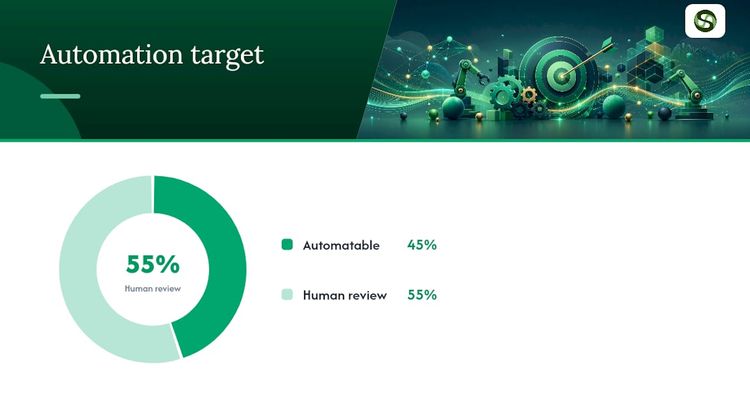
Automation earns its keep by cutting the quarterly scramble to pull evidence. It doesn't decide whether a control is designed well.
Good candidates are the systems that already log what auditors want:
- Pull access review evidence straight from your identity provider (Okta, Microsoft Entra ID or similar) instead of exporting to spreadsheets.
- Send vulnerability scan results into a tracker that links each finding to a fix ticket and a close date.
- Trigger account provisioning and removal from your HR system, so joiners and leavers create their own audit trail.
- Store every artifact somewhere with a retention rule, linked back to its matrix row.
Someone still has to read the access review and decide whether that contractor really needs admin rights. Automate the collection and keep a human on the decision.
Give every control an owner and a date
The matrix only works if each row has an owner, and ownership only means something when it's tied to a date someone gets reminded about. The typical failure is quiet: the matrix looks great, then the April access review slips because nobody set a recurring trigger.
The loop that works is simple. Assign each row to a named person. Remind them a fortnight before the evidence is due. Ask them to drop the file into the linked folder. If the date passes with nothing logged, escalate to their manager automatically. It's the same loop teams use to keep licences and certificates from lapsing, applied to audit evidence.
Run the mock audit against the matrix
Treat the matrix and the mock audit as one exercise. A matrix that looks complete often falls apart the moment someone samples it the way an auditor would.
Start by checking that every row has a current status, a named owner and a real evidence link, not a placeholder. Then have an outsider pick controls at random, ask for the underlying file, and check it proves the control ran during the period you claim.
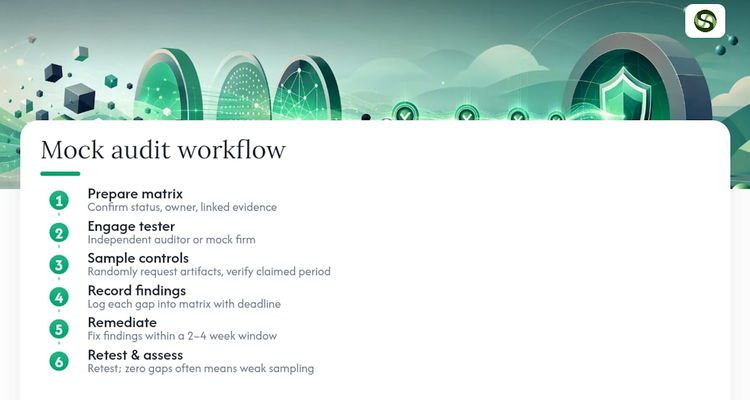
Expect it to be uncomfortable. The common findings are stale evidence, missing approval timestamps, and controls that are true in spirit but not written down in a way an outsider can check.
Log each finding back into the matrix with a fix-by date, then retest that row. Don't close a finding because someone says it's fixed; close it when the new evidence is attached.
Get people ready, not just documents
SOC 2 projects fail on people about as often as on controls. An engineer who doesn't know they own a control can't produce evidence on request, and a policy nobody has read isn't a control.
Tell each owner directly what they're responsible for and by when. A shared spreadsheet isn't the same as a person who knows their name is on a deadline.
A 30-minute briefing is usually enough: what SOC 2 asks for, what counts as evidence, and where to put it. Engineers often assume a control is fine because the system works. Auditors want proof that it worked, which is a different bar.
Give each team lead a view of their own open gaps. One security manager chasing fifteen engineers doesn't scale, and it turns compliance into a bottleneck people resent.
Use the mock audit to teach. Walking an engineer through why their change ticket got flagged does more than any policy document.
What derails readiness projects
The biggest risk isn't a missing control. It's believing you're further along than you are. Self-scored checklists drift towards "Ready" long before the evidence backs it up.
Scope creep comes next. Adding a criterion or a system halfway through reopens a large part of the matrix and evidence work, and teams nearly always underestimate it.
Then there's staleness. Months can pass between the readiness assessment and fieldwork. A control that worked in March proves nothing about August.
Watch for these in your own project:
- Rows marked Ready because of intent, not tested evidence.
- New systems added to scope without revisiting the rows they touch.
- Automation that collects data being treated as if it also made the decision.
- One person holding undocumented knowledge of how a control works.
Stay ready after the first report
A SOC 2 report describes a period that has already ended. As soon as one period closes, the next one is running, and controls that lapse between audits become next year's exceptions.
Keep the matrix live. Any new system, vendor or process change should prompt a quick check: does it touch an existing row, or need a new one?
Put the recurring work on a schedule. Quarterly access reviews, monthly scans and annual vendor reviews each need a standing reminder, not a rush before fieldwork. Treat any missed date as a gap the day it's missed, rather than waiting for the next assessment to find it.
Why buyers care about readiness
For B2B software companies, a SOC 2 report is often a condition of the deal. Enterprise security reviews regularly ask for a current Type II report, and a missing or out-of-date one can hold a contract at legal review while the buyer's team sends a long questionnaire instead.
Even before the report exists, a clear control matrix and a dated remediation plan help in due diligence. It shows a vendor that knows where its gaps are, which is more reassuring than one hunting for documents on the call.
What I'd tell a team starting its first SOC 2
The mistake I see most often isn't a missing control. It's optimistic self-scoring: marking something Ready because the team meant well, not because the evidence would survive a sample.
Run the mock audit early enough to fix what it finds, and expect it to find real gaps. Then put every evidence date on a reminder with an escalation, so remediation doesn't slip the way access reviews always seem to.
The teams that pass cleanly aren't the ones with perfect controls on day one. They're the ones honest enough to grade themselves harshly while there's still time to fix things.
Kuldeep
Where ExpiryEdge fits
ExpiryEdge handles the part of SOC 2 that's really deadline tracking. You add each recurring control (the quarterly access review, the annual vendor review, the policy sign-off) with its owner and due date. ExpiryEdge reminds that person by email, Slack, Teams, SMS or WhatsApp, asks them to upload the evidence, and escalates to a manager if the date passes with nothing logged.

Each reminder, upload and escalation lands in an audit trail you can export for your auditor. It doesn't replace a compliance automation platform that pulls technical evidence from your cloud accounts, and it won't design your controls for you. It makes sure the dates in your matrix don't quietly pass.
If your matrix lives in a spreadsheet nobody updates, try ExpiryEdge free for 14 days (no credit card) and set up reminders for your first ten controls before the mock audit.
Sources
- AICPA & CIMA: System and Organization Controls (SOC) suite of services
- Aprio: SOC 2 readiness assessment, don't start with an exception on the books
FAQ
How often is SOC 2 compliance required?
SOC 2 isn't a certificate with a fixed expiry date. It's a report on a past period, so its value fades as that period gets older. Most B2B companies with a Type II report go through the audit every year so customers always have a recent period to review. Your customer contracts may set the exact requirement.
What is a SOC 2 compliance checklist?
It's a working list of everything you need before the audit: the system boundary, the Trust Services Criteria you've chosen, a control matrix, written policies, and evidence for each control. The useful versions give every line a named owner, a status and a link to the evidence, so you can see at a glance what's still missing.
What is the difference between SOC 1, SOC 2, and SOC 3?
SOC 1 is about controls that could affect your customers' financial statements, so their auditors care about it. SOC 2 covers security, plus any of availability, processing integrity, confidentiality and privacy you pick, and it includes the auditor's detailed tests. SOC 3? Same criteria as SOC 2, but a short summary you're allowed to publish on your website.
What does SOC 2 compliance actually mean?
It means a licensed CPA firm has examined your controls against the AICPA's Trust Services Criteria and issued a report. A Type I report says the controls were designed properly on one date. A Type II report says they also worked as intended over a period of months. There's no pass mark; the report lists any exceptions found.
How long does a SOC 2 readiness assessment take?
The assessment itself is usually weeks, not months, once scope is agreed. The time goes into fixing what it finds. Work backward from the date a customer needs your report: subtract the Type II review period, then the remediation work, and you'll see when readiness has to start. Aprio warns that a failed first attempt can delay a report by four months or more.
Related reading
Frequently asked questions
It's a working list of everything you need before the audit: the system boundary, the Trust Services Criteria you've chosen, a control matrix, written policies, and evidence for each control. The useful versions give every line a named owner, a status and a link to the evidence, so you can see at a glance what's still missing.
SOC 1 is about controls that could affect your customers' financial statements, so their auditors care about it. SOC 2 covers security, plus any of availability, processing integrity, confidentiality and privacy you pick, and it includes the auditor's detailed tests. SOC 3? Same criteria as SOC 2, but a short summary you're allowed to publish on your website.
It means a licensed CPA firm has examined your controls against the AICPA's Trust Services Criteria and issued a report. A Type I report says the controls were designed properly on one date. A Type II report says they also worked as intended over a period of months. There's no pass mark; the report lists any exceptions found.
The assessment itself is usually weeks, not months, once scope is agreed. The time goes into fixing what it finds. Work backward from the date a customer needs your report: subtract the Type II review period, then the remediation work, and you'll see when readiness has to start. Aprio warns that a failed first attempt can delay a report by four months or more.