How to Set Up a Property Compliance Calendar That Works

How to set up a property compliance calendar that works

A property compliance calendar works when every entry has four things: a named owner, a due date, a reminder that fires early enough to book the contractor, and a link to the certificate that proves the job was done. A date on a shared Google Calendar has none of the other three. So start with your riskiest obligations, give each one an owner today, and build the rest over the next 90 days.
If you only do four things this week, do these:
- Walk each property and list every permit, licence, inspection and filing that's currently in force.
- Circle the three that would shut a building, void your insurance or put a tenant at risk if you missed them.
- Put those three into whatever you use now, with a due date and a person's name next to each.
- Set a reminder at least 30 days out for each (90 if a contractor has to visit).
That's a minimum start. The rest of this guide turns it into a calendar you could hand to an auditor, an insurer or your replacement.
What counts as a compliance calendar (and what doesn't)
A compliance calendar is a record of every obligation tied to a property. Each entry says what's due, when, who's doing it, which rule requires it, where it stands now, and where the proof lives. A list of dates in Outlook isn't one. Neither is a sticky note on the lease file.
The difference shows up the day something goes wrong. A plain calendar tells you a sprinkler inspection was due in October. A compliance calendar tells you Maria booked it, the contractor came on the 12th, and the certificate is attached. That second version is the one you can defend.
A useful entry covers:
- The specific obligation, such as the annual sprinkler inspection your fire code requires under NFPA 25.
- The authority behind it: the local fire marshal, a state agency or a national regulator.
- The owner and a backup.
- The status: scheduled, in progress, done or overdue.
- A link to the uploaded certificate, report or permit, with the date it was completed and who completed it.
Obligations come from several layers at once. In the US that's federal rules, state licensing and habitability codes, and city requirements, which often run on their own schedules. New York City, for example, sets its own deadlines for building safety, energy benchmarking and housing registration on top of state law. In England, a residential landlord must have a gas safety check done every year on each gas appliance and flue and the electrical installation checked at least every five years. Your calendar needs every layer that applies to each building.
Build the calendar in six steps
1. Audit every property before you build anything
Walk each building and pull every active permit, licence, certificate and filing. Look at the physical plant (fire suppression, lifts, boilers, electrical panels), the ownership side (business licences, entity filings) and anything environmental or habitability related. Note what you found, when it expires or recurs, and what paperwork you actually hold.
Rank as you go, not afterwards. Fire suppression, emergency lighting and lift certificates go straight to the top. Those are the ones where a missed date can mean a closed building rather than a late fee.
2. Turn the audit into a master list
For each obligation, capture its name, the rule or authority, the property or unit, how often it recurs, the next due date, the owner and the document you need as proof. This list is your single source of truth. Every calendar entry comes from it, and nothing goes on the calendar that isn't on the list.
3. Decide how each due date rolls forward
Some obligations fall in a fixed month every year, say a fire inspection your city requires each October. Others run from the date of the last inspection, so a lift certificate due 12 months after the last visit. Record which kind each one is. If you do an anniversary-based inspection late, the next due date usually moves with it; a fixed-month one stays put.
Some rules give you room to work early without losing your date. HSE guidance lets English landlords have the gas check done up to two months early and still keep the original deadline, as long as they keep the records to prove it. Note rules like that in the entry, because they change when you should book the engineer.
4. Name an owner, a backup and an escalation path
Every obligation needs one named person, not "facilities" or "the office". If they're away, a named backup takes over. Write down who hears about it when the owner ignores the 30-day reminder, and who signs off the finished job.
5. Set lead times that match the work
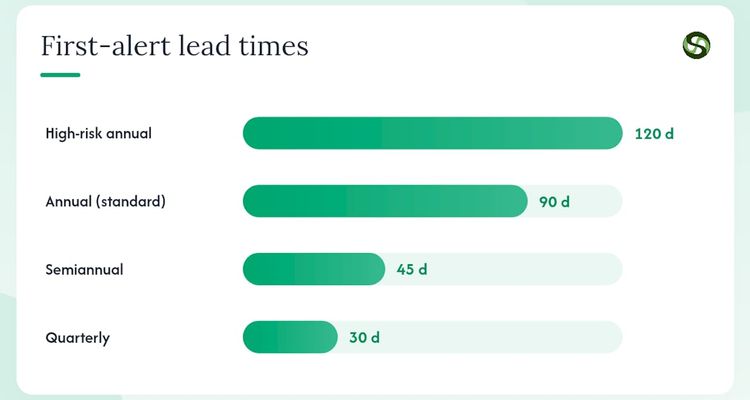
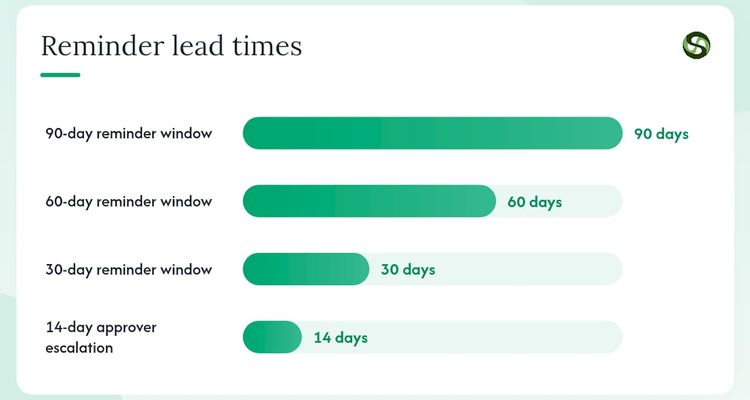
For annual obligations, remind at 90, 60 and 30 days. For quarterly items, one reminder at 30 days is usually enough. Anything that needs a certified contractor, like lift inspections or environmental testing, gets its first reminder at 90 days so there's time to get on their schedule.
6. Test it before you trust it
Before you call the calendar live, pull up the next 30 days. Check that every entry has an owner, a reminder and either a document link or a note saying where the certificate will go. Any entry missing one of those isn't ready.
💡 Pro Tip
Don't rely on email alone. Reminders get filtered and buried. Use two channels (email plus SMS or a chat message) and have the system escalate if the owner doesn't respond.
The fields every entry needs
Each entry should hold enough that a new starter could pick it up and finish the job without asking anyone. Use this as your template.
| Field | What it holds | Example |
|---|---|---|
| Obligation | Short, specific name | Annual sprinkler inspection |
| Property or unit | Address or unit ID | Maple St, Unit B |
| Authority | Rule, code or agency | NFPA 25 / local fire marshal |
| Frequency | How often it recurs | Annual |
| Next due date | Date it must be done by | 15 October 2026 |
| Owner | Named person | Maria Chen, facilities manager |
| Backup | Named alternate | James Park, operations lead |
| Status | Where it stands | Scheduled |
| Reminders | Days before due | 90 / 60 / 30 |
| Proof required | Certificate, permit or report | Inspection certificate from licensed contractor |
| Document link | Where the proof lives | /docs/maple-fire-2026.pdf |
| Completed on | Date marked done | 12 October 2026 |
| Completed by | Who confirmed it | Maria Chen |
| Notes | Contractor, delays, fixes | Contractor: ABC Fire Protection |
The owner and backup fields stop the "I thought you had it" gap. The document link and completion date give insurers and inspectors the trail they ask for. Status keeps the calendar something you act on rather than something you look at.
Schedule by risk, not by date
Not every item deserves the same attention. A missed lift inspection can take a lift out of service. A late annual entity filing usually means a late fee. Treat them the same and you'll spend your attention on paperwork while the dangerous items slip.
Here's a sensible order:
- Life safety: fire suppression, emergency lighting, lifts, gas. Longest lead times and the most escalation.
- Anything your insurance policy requires. Read the conditions; a missed inspection can give the insurer grounds to refuse a claim.
- Licences and permits: business licences, rental registrations, short-term rental permits. Rules vary sharply by city, so check locally.
- Administrative filings: annual entity reports and tax filings with the IRS or your state. They matter, but nobody gets hurt.
To rank within a tier, score each item twice from 1 to 5: how bad a miss would be (1 is a small fine, 5 is a revoked permit or a safety hazard), and how likely you are to miss it without a reminder. Multiply the two. Anything at 15 or above gets a 90-day first reminder and a named escalation contact.
As a default, use 90/60/30 days for annual items, 45/30 for semiannual and 30/14 for quarterly. If the contractor is hard to book, start at 120 days.
Spreadsheet, property management system or dedicated tracker?
Pick based on how many buildings you run, how many layers of rules apply and how often you have to prove compliance to someone else.
A spreadsheet is fine for one or two simple properties. It's free and flexible. It's also fragile: a formula breaks, a row gets overwritten, and nobody notices until the date has passed. It can't escalate, it doesn't log who changed what, and attachments tend to go missing when someone tidies the shared drive.
Your property management system makes sense if compliance tasks sit close to leasing and maintenance work already in it. One login, fewer tabs. The catch is depth. Many PMS modules handle basic date reminders but stop short of escalation, document collection and a proper audit trail, so check before you rely on one.
A dedicated deadline tracker earns its place once you run several properties, juggle federal, state and city rules, or have different people responsible for different obligations. That's the point where centralised expiry tracking stops being a nice idea and starts saving you from missed dates.
Move past the spreadsheet if any of these is true:
- You have more than three properties, or more than five active obligations per property.
- You have to prove compliance to an insurer, lender or regulator.
- Different people own different obligations.
- Local rules change often enough that you're editing dozens of entries a year.
Roll it out over 90 days
- Days 1 to 30, audit. Finish the property walk, list every obligation, score them, and enter the top five with owners and due dates.
- Days 31 to 60, populate. Enter everything else, set reminders on every item, and upload the certificates you already hold as a baseline.
- Days 61 to 90, automate and check. Set up escalation rules, run the 30-day test above, and confirm every entry has a document or a booked contractor. If you're automating inspection deadlines, create a test entry due next week and make sure the reminder actually arrives.
💡 Pro Tip
Before you close your first setup session, enter and assign the three riskiest obligations due in the next 90 days. Don't leave it until next time.
Who owns what, and how escalation works
Without clear roles, a compliance calendar is just a list. Give each entry three:
- Owner: does the work or books the contractor. One person.
- Backup: steps in if the owner is away or hasn't responded after the first reminder.
- Approver: checks the certificate is uploaded and marks the job done. Usually a manager or compliance lead.
Write the escalation rules down. A workable default: if the owner hasn't acknowledged the 30-day reminder within 48 hours, the backup and approver both get notified. If it's still untouched 14 days out, it goes to senior management. A tracker can run that chase for you so nobody has to remember to.
For an audit-ready record, check that:
- Every finished task has a dated completion record.
- The certificate sits on the task itself, not in a separate folder.
- Contractor work includes the contractor's name, licence number and contact details.
- Status changes are logged with the date and the person who made them.
💡 Pro Tip
When a contractor finishes an inspection, photograph the certificate on site and upload it before they leave. Otherwise it sits in someone's email or camera roll for days, and sometimes it never turns up.
HSE guidance, for instance, says landlords must keep gas safety records for at least two years and give existing tenants a copy within 28 days of the check. That's two more dates per property, and they belong on the calendar too.
Keep it current when the rules change
Rules move, sometimes mid-cycle. Take US beneficial ownership reporting. Many property LLCs added BOI filings to their calendars after the Corporate Transparency Act. Then a FinCEN interim final rule published on 26 March 2025 exempted US companies, and FinCEN's BOI page says a final rule made those exemptions permanent from 14 August 2026. Anyone still carrying that entry is chasing a filing they no longer owe.
A simple routine for rule changes:
- Subscribe to alerts from the Federal Register, your state agencies and your city's building and housing departments. USA.gov is a good starting point for finding the right agency.
- Read the actual rule before touching the calendar. Plenty of notices are proposals, not final rules.
- Work out which entries change. A federal filing change may touch one entry; a state fire code revision may touch dozens.
- Give the update an owner and a deadline, like any other task.
Hold a quarterly review even when nothing has changed in the law. Buildings get sold, a new lease brings a new inspection, a contractor changes their cycle. Four times a year, someone should check the whole calendar against reality.
The most common failure we see is a calendar built once and never touched again. It's accurate on day one and quietly wrong a year later. Give the calendar itself an owner, not just the tasks on it.
And build the paperwork habit from the start. An insurer handling a claim, an inspector asking about last year's test, or a lender reviewing an acquisition will all want dated proof. "We did it, we just can't find the certificate" won't get you far.
Where ExpiryEdge fits
If you'd rather not run the reminders and chasing by hand, this is the work ExpiryEdge does. You import your master list, set reminder windows by category, and assign an owner and backup to each entry. ExpiryEdge reminds the right person by email, SMS, WhatsApp, Slack or Teams, escalates to a manager when an item goes overdue, asks contractors for the renewed certificate and collects it, and keeps an audit trail you can export.

You can try it on your own portfolio with a 14-day free trial, no credit card needed. Start by loading the three riskiest items from your audit and see whether the reminders reach the right people.
Related reading
Frequently asked questions
Walk each building and write down every permit, licence and inspection that's in force. Rank them by risk. Give each one a named owner and a due date, with reminders starting 90 days out. Upload the certificates you already hold. Then set escalation rules and test the next month of entries before you rely on it.
Start with life safety, such as fire suppression and lift certificates. Add every inspection your insurance policy demands. Next come rental permits and business licences, and last of all your entity and tax filings. Residential landlords in England also need a gas safety check every year and an electrical inspection at least every five years.
Review the whole calendar at least once a quarter. Check for rule changes, new leases, sold buildings and contractors who have changed their inspection cycle, and confirm every upcoming item still has an owner and reminders. Review sooner if a regulator announces a change that touches one of your filings.
Yes. ExpiryEdge tracks permit, licence, certificate and inspection dates, reminds the owner by email, SMS, WhatsApp, Slack or Teams, and escalates overdue items to a manager. It can request renewed certificates from contractors and keeps an exportable audit trail. There's a 14-day free trial with no credit card.