Save 300–600 Hours on SOC 2 Evidence Collection for Auditors

How to collect SOC 2 evidence without the pre-audit scramble

Collect SOC 2 evidence from each source system once, as a full-population export, and map that one export to every control it supports. Put a named owner and a capture date on every artifact before the auditor asks for it. Do that and most of the follow-up requests that drag out fieldwork never get raised.
This guide walks through what counts as evidence, which systems to pull from, the formats auditors accept, the PBC list, and how to stop evidence going stale between audits. It's written for whoever ends up owning the audit: often a security lead or an ops manager, and at a smaller company, the founder.
The three kinds of SOC 2 evidence, and the one Type 2 auditors care about most
Auditors look at three kinds of evidence. Each proves something different, and handing over the wrong kind is a common reason an artifact bounces back with questions.
Procedural evidence shows a rule exists. Signed policies, onboarding checklists, incident runbooks, approvals with sign-off dates. It tells the auditor what you say you do. It doesn't show that anyone did it.
Configuration evidence shows a system enforces the rule. MFA required for every account in your identity provider, a firewall rule set, a storage bucket policy that blocks public access. It's a picture of how things were set up on the day you captured it.
Operating evidence (system output) shows the control actually ran, again and again. Access logs, ticket histories, deployment logs, alert records, scan results from across the period. Type 2 auditors lean on this hardest, because it shows behaviour rather than intent.
That's why Type 1 and Type 2 feel so different to prepare for. A Type 1 report asks whether controls were designed properly and in place on one date. A Type 2 report also tests whether they worked over a period. Microsoft's SOC 2 compliance page describes its own Type 2 audits as a rolling 12-month window with no gaps between periods, topped up by bridge letters each quarter (which Microsoft notes are self-attestations, not audited reports). If you sell to large companies, expect them to ask for a Type 2.
To map an artifact, ask two questions. Which of the five Trust Services Criteria (Security, Availability, Processing Integrity, Confidentiality, Privacy) does it support? And which control statement in your matrix does it satisfy? A vulnerability scan report usually belongs under a Security control on risk mitigation, not Availability, even though slow patching could hurt uptime one day.
- Procedural: policies, SOPs, signed acknowledgements, approval chains
- Configuration: exported settings, IAM policy JSON, dated screenshots, network diagrams
- Operating: access logs, deployment history, scan results, ticket exports, training completion records
Pull evidence system by system, not control by control
Most teams start by working down the control list. CC6.1, open the identity provider. CC6.2, open it again. It's slow, and you end up with five slightly different exports of the same user list, taken on different days.
Flip it. Treat each platform as the record for certain control areas, take one full export from it, and map that export to every control it answers. One identity provider export often covers three or four PBC line items.
Here's the pull list that covers most of a typical SOC 2 audit.
- Identity provider (Okta, Microsoft Entra ID, Google Workspace). Export every user with their role, MFA status and, for leavers, the date access was removed. That one file usually answers access control, least privilege and offboarding requests.
- Cloud console (AWS, Azure, Google Cloud). IAM policies, security groups, encryption at rest, and CloudTrail or its equivalent. The logs matter more than screenshots here, because they prove the settings held for the whole period.
- Git and CI/CD (GitHub, GitLab, Jenkins). Pull request approvals, branch protection rules and deployment logs. Between them they cover most change management controls.
- HR system (Workday, BambooHR, Rippling). The full roster with hire and termination dates, background check completion, and security training completion with dates.
- Device management (Jamf, Intune, Kandji). Encryption, patch level and screen lock status for the whole fleet. Not five sample laptops.
- Ticketing (Jira, ServiceNow, Zendesk). Access requests, change approvals and incidents with resolution times. This is often the weakest source, because people close tickets without a note. Check that every closed ticket says what was done.
- Monitoring and SIEM (Splunk, Datadog, Sumo Logic). Alert history, on-call response, and the retention setting that proves logs weren't deleted before the period ended.
- Vulnerability scanner (Qualys, Tenable, Rapid7). Every scan in the period, not just the latest one, linked to the tickets that closed critical findings inside your stated deadline.
- Vendor register. Each critical vendor's latest SOC 2 report or security questionnaire, plus the date you reviewed it.
Stamp every export with the date it was captured and the name of whoever pulled it. When the auditor has a question in week two of fieldwork, there's a person to ask.
Give auditors full populations, not handpicked screenshots
Auditors don't read every log line. They ask for the full population, count it, and pick their own sample to test. Send twelve screenshots you chose yourself and there's nothing to sample from, so you'll get a follow-up request and lose days.
A screenshot proves a setting existed on the day you took it. A dated CSV covering every relevant record proves the setting applied across the period. It also lets the auditor choose the sample instead of trusting yours, and that's what they want.
Formats auditors usually accept without argument:
- CSV or Excel for populations (user lists, ticket queues, vendor registers)
- PDF for policies and signed approvals, with the signature and date visible
- Append-only logs for system output (CloudTrail, SIEM alert history)
- Screenshots only for one-off configuration states, dated and showing the whole setting rather than one highlighted field
Say the auditor asks for proof of quarterly access reviews. A screenshot of one review meeting says nothing about the other three quarters. An export of every access review ticket for the year, with completion dates and reviewer names, lets them test two quarters at random and move on.
Build your side of the PBC list before the auditor sends theirs
The PBC (prepared by client) list is the auditor's master request list. Most of its line items come back every year and map to the same systems, so you can build your half of it before kickoff. Then the request list becomes a matching job, not a scramble.
Give every artifact the same fields, and reuse the template each year:
- Control ID, matching your control matrix and the Trust Services Criterion it supports
- A direct link to the file (not a note about where it should be)
- The named person who pulls and refreshes it
- The exact capture date. "Q3" isn't a date.
- Population size, so the auditor's sampling maths works
- Notes the auditor needs to read the artifact correctly
Pre-fill every control ID and owner before the kickoff call. Walking in with half the list already matched gives fieldwork a head start, and it shows you (and the auditor) where the real gaps are.
File evidence the way the auditor will test it
An auditor who has to dig through a messy shared drive starts doubting your controls before opening a single file.
Organise folders by Trust Services Criterion first, then by control family underneath. Security, then Access Control. Security, then Change Management. Carry on through Availability, Confidentiality and anything else in scope.
Keep file names dull and consistent: control ID, artifact type, owner initials, capture date. A file called CC6.1-AccessReview-JD-2026-03-15.csv tells anyone what it is without being opened.
Your tracker can be a spreadsheet or a dedicated tool. Either way it needs control ID, artifact name, source system, owner, last refresh date and a status (current, stale or missing), with every row linked to the actual file.
Automate the exports, not the judgement
Some evidence can't be automated. Someone still has to write the access control policy and sign it off. But configuration snapshots, log exports, device compliance, scan results and ticket data can all be pulled on a schedule, and that beats a quarterly scramble every time.
Start small. Pick the two controls that cost you the most time last year (access reviews and change management are the usual suspects), connect those source systems, and check over a few weeks that evidence arrives with its dates and owner intact. Then widen it.
Pilots fail in familiar ways. Teams keep taking screenshots instead of using native exports. Automated pulls arrive with no owner attached, so nobody can answer questions about them. Or log retention sits at a default that deletes records before the audit period closes.
Test automation on your worst control first. If it can't cope with quarterly access reviews, it won't cope with the rest.
Why evidence goes stale between audits
Three habits cause most of the trouble, and you can fix all of them without buying anything.
The first is scattered proof. Evidence sits in someone's inbox, a desktop folder or a Slack thread. When that person leaves, the evidence effectively leaves with them, even though the source system still has the data.
The second is fuzzy ownership. Nobody knows who refreshes an artifact each quarter, so either it doesn't happen or three people pull the same export on different days and get different numbers.
The third is a snapshot passed off as continuous proof. A January screenshot gets reused in July, because nobody pointed out that Type 2 evidence has to span the period.
The fixes are mostly process. Name an owner for every control before the period opens. Put capture dates on a real calendar (the second week of January, April, July and October, say). Keep everything in one versioned place. Start with ownership, because a lot of auditor follow-ups really mean "who can confirm this?"
Put every recurring evidence pull on a dated schedule
A quarterly control goes stale the moment nobody owns the date it's due. That's a calendar problem more than a tooling one.
In ExpiryEdge, each recurring pull (the quarterly access review, the yearly refresh of a vendor's SOC 2 report, the training completion export) becomes a dated item with a named owner. The owner gets reminders by email, SMS, WhatsApp, Slack or Teams. If the date passes with nothing done, it escalates to their manager, and every reminder and action goes into an audit trail you can export.
A setup that suits most SOC 2 programmes:
- Reminders 30, 14 and 3 days before each quarterly access review, so the export happens in the review month and not the week before fieldwork
- Escalation to the compliance lead the day after a missed due date
- Vendor reports tracked by date, with a request sent to the vendor for the new report before the old one goes out of date
Reuse SOC 2 evidence for ISO 27001, and top it up for HIPAA
A lot of it carries over. ISO 27001 overlaps heavily with SOC 2 on access control, risk assessment and incident response, so a quarterly access review built for SOC 2 usually serves the matching ISO control with little change.
Map each artifact once, in a control matrix that lists every framework it serves. One access review can count toward SOC 2's CC6 series (logical and physical access) and ISO 27001's access control controls at the same time. If your ISO mapping still cites Annex A.9, it's using the 2013 numbering; the 2022 edition regrouped Annex A into four themes.
HIPAA is different. The Security Rule is about electronic protected health information, so your general access evidence transfers, but you'll need artifacts SOC 2 doesn't ask for, such as business associate agreements and your documented risk analysis.
Keep every version, and never overwrite in place
If a policy changes halfway through the audit period, the auditor needs both versions with their effective dates. For part of the window, the control ran under the old rule.
Use a version number in the file name and log each change in the tracker: who, when, why. AccessControlPolicy-v3-2026-02-01.pdf tells its own story. AccessControlPolicy-FINAL.pdf tells the auditor nothing about what changed since last year.
Logs and scan results are different. Their integrity depends on the source system's retention and immutability settings, not on your file naming. Check that your SIEM keeps records for the whole period plus a buffer, and that logs can only be appended to. A missing week of logs raises more questions than a messy but complete set.
Which tools help with SOC 2 evidence?
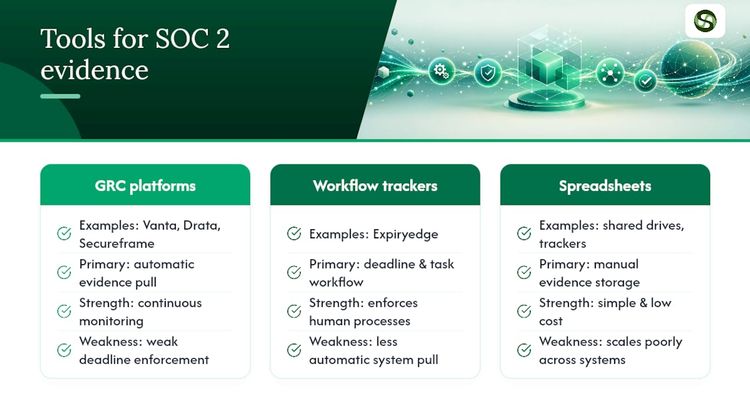
There are three broad options, and mature programmes often run two of them side by side.
Compliance automation platforms (Vanta, Drata and Secureframe are well-known examples) connect to your identity provider, cloud and HR system, pull configuration and operating evidence, and map it to frameworks. They're strongest on the technical pulls. Human tasks still need a person to act by a date: reviewing access, chasing a vendor for its report, getting a policy re-signed.
Deadline trackers such as ExpiryEdge cover that dated, human side: who does what by when, who gets told when it slips, and the record that shows it happened.
Spreadsheets and shared drives are still fine for small programmes, as long as you're strict about naming and the tracker. They get painful once you're pulling from a dozen systems across more than one audit a year.
The choice comes down to how much of your evidence a system can produce on its own, and how much depends on a person remembering a date.
Make one person accountable for each control, not each team
SOC 2 evidence never lives in one department. Security has the SIEM and scan data, engineering has the git and deployment logs, HR has training records, and procurement has the vendor register. Evidence usually arrives late because of handoffs, not missing technology.
Give each control a single accountable owner. They don't have to pull every file themselves, but they confirm it landed in the tracker on time and they answer the auditor's questions about it.
At the start of each cycle, hold a 30-minute kickoff with one person from each team that owns a source system. Walk the PBC list together, confirm owners line by line, and agree refresh dates before fieldwork, not during it.
Check completeness a week before fieldwork
Run a completeness pass against the PBC list at least a week out. For every line, confirm four things: the artifact exists, it covers the whole period rather than one date, it has a named owner, and its population size is written down.
Then cross-check control IDs against your matrix. You're looking for orphans (files with no control) and gaps (controls with no file). The auditor will spot both in the first hour.
Finally, open three or four actual files per criterion. Don't just check the link exists. An empty export or a dead link is a classic last-minute surprise, and five minutes of checking a month earlier would have caught it.
Lock down the evidence folder too
Evidence often contains sensitive material: personal data in HR exports, your network layout in configuration screenshots, open vulnerabilities in scan results. Treat the repository as a system that needs access control, not a handy shared folder.
Limit access to the owners and compliance leads who need it, and log who opens or edits what. Use encrypted storage, and redact personal data where the control under test doesn't need it.
Once the report is issued, delete working copies on a set schedule. Keeping sensitive exports forever adds risk and earns you nothing.
Your next step: put the next four quarters on the calendar
Templates and exports tell you what to collect. They don't tell anyone to refresh it in October, and that's where evidence libraries quietly go stale.

This week, list every control that needs evidence more than once a year. Put a named owner and a due date against each, and set the first reminder a month ahead. If you'd rather not run that from a spreadsheet, ExpiryEdge has a 14-day free trial with no credit card, so you can load your own evidence calendar and see whether it fits.
Sources
FAQ
What is SOC 2 evidence collection?
It's the work of gathering the policies, system settings and operating records that prove your controls worked, then mapping each one to a Trust Services Criterion and a control in your matrix. The auditor uses that evidence to test whether controls were designed well and, for a Type 2 report, whether they ran consistently across the audit period.
How long does SOC 2 evidence collection take?
It depends on how many controls are in scope and how many need hand-pulled evidence. The biggest swing is rework: exports sent back because they lack dates, owners or a full population. Pulling once per system, with an owner and capture date on every file, removes most of that rework before the auditor ever sees it.
What's the difference between Type 1 and Type 2 evidence?
Type 1 covers a single date. You show that controls were designed properly and in place that day, so policies and snapshots usually do the job. Type 2 is harder: you have to prove the controls ran across the whole period, with logs, ticket histories and dated exports. Microsoft, for example, runs its Type 2 audits on a rolling 12-month period.
Can I reuse SOC 2 evidence for ISO 27001?
Usually, yes. The two overlap heavily on access control, risk assessment and incident response. Map each artifact once in a control matrix that lists every framework it serves, and one quarterly access review can count for both. Check your ISO references use the 2022 Annex A numbering rather than the older 2013 version.
What's the fastest way to get audit-ready?
Build your side of the PBC list by source system before kickoff, and put a named owner and capture date on every artifact. Then schedule each recurring pull, like quarterly access reviews, with reminders and an escalation if it slips. Most last-minute scrambles come from evidence nobody was responsible for refreshing.
Recommended
Frequently asked questions
It depends on how many controls are in scope and how many need hand-pulled evidence. The biggest swing is rework: exports sent back because they lack dates, owners or a full population. Pulling once per system, with an owner and capture date on every file, removes most of that rework before the auditor ever sees it.
Type 1 covers a single date. You show that controls were designed properly and in place that day, so policies and snapshots usually do the job. Type 2 is harder: you have to prove the controls ran across the whole period, with logs, ticket histories and dated exports. Microsoft, for example, runs its Type 2 audits on a rolling 12-month period.
Usually, yes. The two overlap heavily on access control, risk assessment and incident response. Map each artifact once in a control matrix that lists every framework it serves, and one quarterly access review can count for both. Check your ISO references use the 2022 Annex A numbering rather than the older 2013 version.
Build your side of the PBC list by source system before kickoff, and put a named owner and capture date on every artifact. Then schedule each recurring pull, like quarterly access reviews, with reminders and an escalation if it slips. Most last-minute scrambles come from evidence nobody was responsible for refreshing.