Making Tax Digital for Landlords: Deadlines, Thresholds, Setup

Making Tax Digital for landlords means keeping digital records and sending HMRC quarterly updates from compatible software. It started on 6 April 2026 for qualifying income over £50,000, extends to income over £30,000 from 6 April 2027 and to over £20,000 from 6 April 2028. Updates are due by 7 August, 7 November, 7 February and 7 May.
Sound familiar? You have had a letter from HMRC, or you think one is coming, and you are not sure whether your rent counts before or after expenses, which tax return comes when, or whether your spreadsheet still works. This guide gives you the dates, a worked timeline and a record layout you can set up today.
Key takeaways
- Qualifying income is gross: rent plus any self-employment turnover, before expenses. Wages, pensions and dividends do not count.
- Start dates depend on an earlier year: over £50,000 in 2024 to 2025 meant 6 April 2026; over £30,000 in 2025 to 2026 means 6 April 2027; over £20,000 in 2026 to 2027 means 6 April 2028.
- Quarterly updates are due by 7 August, 7 November, 7 February and 7 May, and each one covers the tax year so far.
- No penalty points for late quarterly updates in 2026 to 2027. From 2027 to 2028, 4 points means a £200 penalty.
- Your tax return is still due by 31 January after the tax year, now sent from the same software.
- A spreadsheet can still hold your records if it is digitally linked to bridging software. Copy and paste into the software is not allowed.
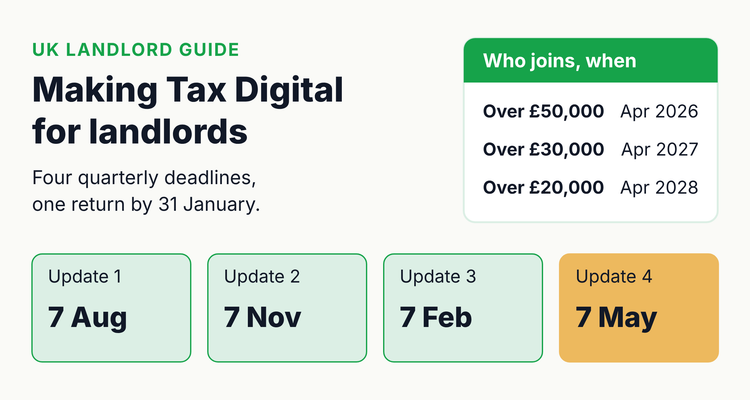 Making Tax Digital adds four quarterly deadlines to the landlord's year. The 31 January return deadline stays.
Who needs Making Tax Digital for Income Tax?
You need Making Tax Digital (MTD) for Income Tax if you are a landlord or sole trader registered for Self Assessment and your qualifying income is over the threshold for the relevant year. Qualifying income is your total income from property and self-employment before expenses, as shown on your tax return.
- Counts: UK and foreign rent (for UK residents), your share of rent from a jointly owned property, and self-employment turnover.
- Does not count: wages taxed under PAYE, pensions, dividends, and your share of profit from a partnership.
- HMRC's examples: £25,000 rent plus £27,000 self-employment income is £52,000 of qualifying income. A property let for £50,000 a year owned equally by two siblings gives each of them £25,000.
HMRC reviews your return and writes to you if you are over the threshold. If no letter arrives, it is still your responsibility to check and sign up. Some people can claim an exemption, for example if they are digitally excluded.
Making Tax Digital for landlords: when you start (last verified 12 October 2026)
| Qualifying income | In tax year | Start MTD on | First quarterly deadline | First return sent through MTD software |
|---|---|---|---|---|
| Over £50,000 | 2024 to 2025 | 6 April 2026 | 7 August 2026 | 2026 to 2027, by 31 January 2028 |
| Over £30,000 | 2025 to 2026 | 6 April 2027 | 7 August 2027 | 2027 to 2028, by 31 January 2029 |
| Over £20,000 | 2026 to 2027 | 6 April 2028 | 7 August 2028 | 2028 to 2029, by 31 January 2030 |
Thresholds: Income Tax (Digital Obligations) Regulations 2026, regulation 27, and HMRC's guidance updated 26 March 2026. Return dates follow HMRC's rule that the year before you start is filed as normal. Once you are in, you can opt out only if your qualifying income stays below the threshold for 3 tax years in a row, or an amended return takes you below it.
What are the Making Tax Digital quarterly deadlines for landlords?
The deadlines are 7 August, 7 November, 7 February and 7 May, whichever update periods you use. Standard periods follow the tax year. If your accounts run to 31 March, you can choose calendar periods instead, before you send your first update.
MTD for Income Tax quarterly update periods and deadlines
| Update | Standard period | Calendar period | Deadline |
|---|---|---|---|
| 1 | 6 April to 5 July | 1 April to 30 June | 7 August |
| 2 | 6 April to 5 October | 1 April to 30 September | 7 November |
| 3 | 6 April to 5 January | 1 April to 31 December | 7 February |
| 4 | 6 April to 5 April | 1 April to 31 March | 7 May (following tax year) |
Source: Income Tax (Digital Obligations) Regulations 2026, regulations 12 and 13, and HMRC's "Send quarterly updates" guidance. Four rules worth knowing:
- Each update is cumulative. It covers the tax year to date, so you can correct earlier figures without resending old updates.
- Send a nil update if you had no income or expenses in the period.
- You can send early, up to 10 days before the period ends, if you expect no more transactions.
- Updates are summaries, not tax returns. You make accounting adjustments at the end of the year.
Worked example: a landlord who joins on 6 April 2027
Say your gross rent in 2025 to 2026 was £34,000 and you have no other property or self-employment income. Your qualifying income is over £30,000, so you start MTD on 6 April 2027. Here is your timeline.
- By 31 January 2027: file your 2025 to 2026 return and pay as usual. HMRC uses this return to check your qualifying income.
- February to March 2027: choose compatible software, sign up for MTD and authorise the software.
- From 6 April 2027: create digital records of rent and expenses.
- 31 July 2027: second payment on account for 2026 to 2027, if you make payments on account.
- 7 August 2027, 7 November 2027 and 7 February 2028: quarterly updates 1, 2 and 3 for 2027 to 2028.
- 31 January 2028: file your 2026 to 2027 return the normal way, because it is the year before you started. Pay the tax due.
- 7 May 2028: quarterly update 4, then make your year-end adjustments.
- 31 January 2029: submit your 2027 to 2028 return from your MTD software and pay any balance.
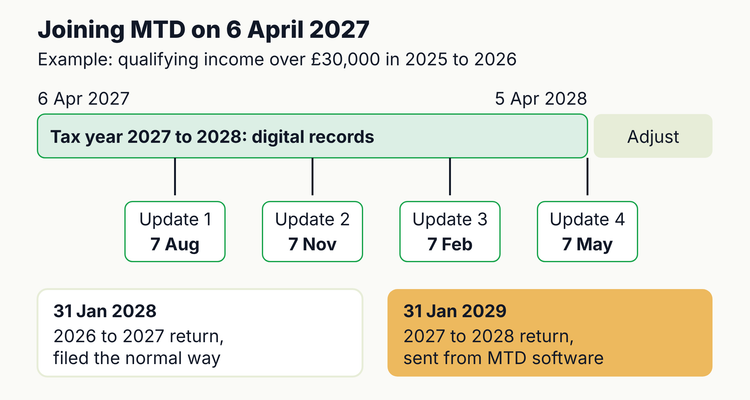 Joining MTD on 6 April 2027: four updates for 2027 to 2028, then the return through your software by 31 January 2029.
What penalties apply under Making Tax Digital?
MTD brings a points-based system for late submissions and a new structure for late payments. They apply from the tax year you join, so a 2026 to 2027 joiner's 2025 to 2026 return is still under the old Self Assessment penalties.
- Late quarterly updates, 2026 to 2027: no penalty points. You must still send all four before you can file your return.
- Late submissions from 2027 to 2028: one point per missed deadline. At 4 points you get a £200 penalty, then £200 for each further miss.
- Late tax returns: earn points in every year, including 2026 to 2027.
- Points expire 24 months after the missed deadline if you stay below 4. At 4, you need 12 months of on-time submissions to clear them.
- Late payment: none if paid within 15 days. In 2027 to 2028 it is 4% of the tax owed at day 15, another 4% at day 30, and 10% a year from day 31. Your first year gets 30 days' grace.
⚠️What happens if you miss it: from the 2027 to 2028 tax year, every missed quarterly update or return deadline adds a penalty point, and 4 points brings a £200 penalty for that miss and each one after. Late payment penalties run from day 16 on top of late payment interest. Contact HMRC before a payment is late: an agreed payment plan pauses penalties.
How should a landlord set up digital records for MTD?
Each digital record needs the amount, the date and an HMRC category. Your UK properties count as one UK property business, so HMRC does not need records per property. We still suggest tagging each entry with its property, because it makes repairs and yields easier to check.
HMRC UK property categories for MTD quarterly updates
| HMRC category | Income or expense | Typical items (our examples) |
|---|---|---|
| Total rent | Income | Rent received, including through an agent |
| Other income from property | Income | Other receipts from letting |
| Premiums for the grant of a lease | Income | Lease premiums |
| Rent, rates, insurance and ground rents | Expense | Landlord insurance, ground rent, council tax while empty |
| Property repairs and maintenance | Expense | Repairs and redecorating like for like |
| Residential property finance costs | Expense | Mortgage interest (record interest only, or the full payment and adjust later) |
| Legal, management and other professional fees | Expense | Letting agent fees, accountant, eviction legal costs |
| Costs of services provided, including wages | Expense | Cleaning or gardening you provide to tenants |
| Travel expenses | Expense | Travel to manage your properties |
| Other allowable property expenses | Expense | Phone, stationery, licence fees |
Categories come from HMRC's quarterly update direction (27 March 2026). The examples are ours: if unsure, ask your accountant.
- Spreadsheets are allowed, linked to bridging software that sends the updates. Links must be digital: linked cells, an import, or a file transfer. Once a record has been sent, do not cut, copy or paste it to move it.
- Keep the originals, such as bank statements and invoices, as you do now.
- Joint lets: you can include only your share of the income during the year, and add the expenses by resending update 4 before you file.
Do this now: get MTD-ready in 30 minutes
These steps need no software yet. Times are our estimates.
- Work out your qualifying income (10 minutes). From your 2025 to 2026 figures, add gross rent (your share if joint) to any self-employment turnover. Over £30,000 means you start on 6 April 2027.
- Check for an HMRC letter (2 minutes). If you have none but you are over the threshold, use HMRC's checker anyway.
- Pick a record method (10 minutes). Either all-in-one MTD software, or a spreadsheet plus bridging software. Check HMRC's software finder.
- Set up the record sheet below (8 minutes). Put the four 7th-of-the-month deadlines in your calendar now, with a reminder a week before each.
Copy-paste MTD record sheet for 2027 to 2028
MTD record sheet: columns and row 2 formulas (Excel or Google Sheets)
| Column | Heading | Row 2 |
|---|---|---|
| A | Date | Date received or paid |
| B | Property | Address (for your own analysis) |
| C | Description | For example: March rent, Flat 2 |
| D | HMRC category | Drop-down list of the categories above |
| E | Amount | Positive number |
| F | Update period | =IF(A2<DATE(2027,4,6),"Earlier year",IF(A2<=DATE(2027,7,5),"Q1",IF(A2<=DATE(2027,10,5),"Q2",IF(A2<=DATE(2028,1,5),"Q3",IF(A2<=DATE(2028,4,5),"Q4","Later year"))))) |
| Summary sheet, cell B2 | Year-to-date total for the category in A2, up to the end of Q2 | =SUMIFS(Records!E:E,Records!D:D,A2,Records!A:A,">="&DATE(2027,4,6),Records!A:A,"<="&DATE(2027,10,5)) |
Change the end date in the summary formula to 5 July, 5 January or 5 April for updates 1, 3 and 4. The totals should match what your software shows before you send. The sheet only counts as your digital records once it is linked to bridging software.
How can landlords make MTD easier than the old annual return?
- Do the books monthly, send quarterly. Ten minutes a month beats a weekend in January, and the updates become a check, not a project.
- Use the estimate. After each update you can see an estimated tax bill, so you can set money aside before 31 January.
- Choose calendar periods if your records already run to month ends. You must choose before the first update.
- Put tax dates next to your safety dates. Many landlords miss things because tax lives in one diary and gas checks in another.
💡 Pro Tip
Send each update in the first week after the period ends, not on the 7th of the following month. Reconciling a 3-month-old bank feed takes longer than one that is a week old, and an early update leaves time to fix a rejected submission.
Spreadsheet or software for Making Tax Digital?
For MTD itself you need HMRC-compatible software: either full MTD software, or your spreadsheet plus bridging software. A spreadsheet alone cannot send updates. For a few properties with simple income, the spreadsheet-plus-bridging route is often enough and keeps the system you already know.
ExpiryEdge does not file MTD updates. What it can do is put the four quarterly deadlines, the 31 January and 31 July payments and the PRS Database renewal next to your gas, EICR and licence dates, with reminders at 90, 60, 30 and 7 days to whoever is responsible, landlord or accountant. For the rest of your yearly duties, see our landlord compliance checklist and 12-month calendar and the landlord certificates table.
Making Tax Digital for landlords checklist
- ✓
Qualifying income worked out from your latest return
- ✓
Start date confirmed: 6 April 2026, 2027 or 2028
- ✓
Signed up and software authorised before the start date
- ✓
Digital records from the first day of the tax year
- ✓
Every record has a date, an amount and an HMRC category
- ✓
Quarterly deadlines in the calendar: 7 Aug, 7 Nov, 7 Feb, 7 May
- ✓
Previous year's return filed the normal way by 31 January
- ✓
Payments on account set aside for 31 January and 31 July
Tracking certificates too? Our free landlord compliance tracker template covers gas, EICR and EPC, and our Renters' Rights Act checklist has your PRS Database deadline.
Frequently asked questions
Do landlords have to use Making Tax Digital?
Yes, if you are registered for Self Assessment and your qualifying income from property and self-employment is over the threshold. That is over £50,000 (from April 2026), over £30,000 (from April 2027) or over £20,000 (from April 2028), based on an earlier tax year.
Is the MTD threshold based on rent before or after expenses?
Before expenses. HMRC defines qualifying income as your total income from self-employment and property before expenses, also called turnover. For a jointly owned property, only your share counts.
What are the Making Tax Digital quarterly deadlines?
7 August, 7 November, 7 February and 7 May. The deadlines are the same whether you use standard update periods (ending 5 July, 5 October, 5 January and 5 April) or calendar update periods (ending on the last day of the month).
Is there a penalty for a late MTD quarterly update?
Not in the 2026 to 2027 tax year: HMRC will not apply penalty points for late quarterly updates. From 2027 to 2028, each missed deadline earns a point and 4 points means a £200 penalty.
Can I still use a spreadsheet for Making Tax Digital?
Yes, if it is digitally linked to bridging software that sends your updates to HMRC. Moving records into the software by copying and pasting is not allowed once a record has been sent.
Do I still need to file a tax return under MTD?
Yes. You submit your tax return by 31 January after the tax year, using your MTD software. For the tax year before you start MTD, you file your Self Assessment return the usual way.
Sources
- HMRC, Find out if and when you need to use Making Tax Digital for Income Tax (updated 26 Mar 2026)
- HMRC, Work out your qualifying income for Making Tax Digital for Income Tax (updated 11 Sep 2026)
- HMRC, Send quarterly updates (updated 19 May 2026)
- HMRC, Create digital records (updated 16 Jul 2026)
- HMRC, Submit your tax return (updated 16 Jul 2026)
- HMRC, If your circumstances change (updated 7 Sep 2026)
- HMRC, Penalties for Making Tax Digital for Income Tax (updated 30 Mar 2026)
- HMRC, Making Tax Digital for Income Tax: quarterly update direction (27 Mar 2026)
- The Income Tax (Digital Obligations) Regulations 2026, SI 2026/336
- HMRC, Reduction of the mandation threshold from £30,000 to £20,000 from April 2028 (24 Mar 2026)
- GOV.UK, Understand your Self Assessment tax bill
- GOV.UK, Sign up for Making Tax Digital for Income Tax
Last reviewed: 12 October 2026
Frequently asked questions
Before expenses. HMRC defines qualifying income as your total income from self-employment and property before expenses, also called turnover. For a jointly owned property, only your share counts.
7 August, 7 November, 7 February and 7 May. The deadlines are the same whether you use standard update periods (ending 5 July, 5 October, 5 January and 5 April) or calendar update periods (ending on the last day of the month).
Not in the 2026 to 2027 tax year: HMRC will not apply penalty points for late quarterly updates. From 2027 to 2028, each missed deadline earns a point and 4 points means a £200 penalty.
Yes, if it is digitally linked to bridging software that sends your updates to HMRC. Moving records into the software by copying and pasting is not allowed once a record has been sent.
Yes. You submit your tax return by 31 January after the tax year, using your MTD software. For the tax year before you start MTD, you file your Self Assessment return the usual way.
Not financial, accounting, or tax advice
This article is for general informational purposes and does not constitute financial, accounting, or tax advice. Tax law and accounting standards vary by jurisdiction and change over time. Consult a qualified CPA, accountant, or tax advisor about the specifics of your situation.