30/60/90 Day COI Tracking to Prevent Coverage Gaps for Ops

30/60/90 Day COI Tracking to Prevent Coverage Gaps for Ops

A certificate of insurance tracking system is software that collects, reads, and verifies vendor and contractor insurance documents against your requirements, then monitors them for expiration or cancellation before a gap in coverage becomes your liability. Operations, compliance, procurement, and risk teams juggling more than a few dozen vendors on spreadsheets should automate this now. If your organization faces audits, claims, or regulatory reviews that demand proof of continuous coverage, manual tracking is a liability waiting to surface at the worst possible time.
TL;DR:
Automated systems accept certificates via email, portals, agents, or API, and extract policy details and endorsements using AI and OCR technology.
Building customized requirement templates for each vendor or contract type improves verification accuracy and reduces false positives.
Continuous monitoring detects mid-term cancellations, helping prevent coverage gaps that could lead to liability or claims.
Implementing a structured rollout with clear ownership, prioritized vendor backfill, and targeted pilot testing ensures smooth deployment and system adoption.
Integration with procurement, HR, ERP, and security systems, along with role-based access and SOC reports, is essential for seamless operation and trust.
What Is a Certificate of Insurance Tracking System?
A certificate of insurance, or COI, is the document a vendor’s insurance agent issues to confirm active coverage, limits, and any special provisions like additional insured status. A COI tracking system automates the collection, verification, and renewal of these documents so nobody on your team has to chase paperwork or squint at PDFs to confirm a liability limit meets contract terms.
The category goes by several names in procurement conversations. Some teams call it insurance tracking software, others say COI management system, and vendors market it as automated insurance tracking or insurance compliance management. They all describe the same functional job: turning a folder of scanned PDFs into a monitored, auditable compliance record.
Here’s what separates a real system from a shared drive full of PDFs and a color-coded spreadsheet.
Intake from wherever the document originates. Certificates arrive by email forward, direct upload through a vendor portal, agent submission, or API feed from a broker’s system. A COI platform needs to accept all four without forcing vendors to learn a new process, because vendor compliance is inversely related to how much friction you add to submission.
AI and optical character recognition (OCR) do the reading. Modern platforms extract policy type, carrier name, limits, effective and expiration dates, and additional insured or waiver of subrogation language directly from the document image. This matters because endorsement language is where most coverage gaps hide. A general liability policy with the right limit but no additional insured endorsement still leaves your organization exposed if that vendor causes a loss on your property. COI tracking platforms commonly build extraction specifically to catch these endorsement details rather than just the policy limits on the declarations page.
Requirement templates replace one-size-fits-all checklists. A subcontractor on a construction site needs different limits than a software vendor with office-only exposure, reflecting the specific contractors insurance benefits that protect those performing high-liability work. Good systems let you build requirement templates per vendor category, per contract type, or per project, so the automated check compares each certificate against the rules that actually apply to that relationship instead of a generic minimum.
Renewal automation runs on a configurable cadence. Instead of a compliance coordinator maintaining a tickler file, the system sends renewal requests to vendors on a schedule you set, typically 30, 60, and 90 days before expiration, with escalating messaging if the vendor doesn’t respond.
Continuous monitoring catches what a snapshot misses. A certificate can look compliant on the day it’s uploaded and still lapse mid-term if a vendor’s policy gets canceled for nonpayment. Systems that support ongoing monitoring flag mid-term cancellations rather than waiting for the next annual renewal cycle to notice a lapse.
Audit trails create the record regulators and auditors want to see. Every verification check, every exception flagged, every renewal reminder sent gets a timestamp. When a claim happens and someone asks whether you knew a vendor’s coverage had lapsed, the audit trail answers that question in minutes instead of days of email archaeology.
- Intake: email, vendor portal, agent upload, API
- Extraction: policy type, limits, dates, endorsements
- Verification: rules engine compares data to per-vendor requirements
- Renewal: automated requests on a set cadence with escalation
- Monitoring: mid-term cancellation and change detection
- Audit trail: timestamped history with exportable proof
Pro Tip: Before you commit to a platform, feed it three or four of your messiest historical certificates, the ones with handwritten endorsements or low-resolution scans, and see what the extraction actually returns. Vendor demos always use clean sample documents. Your real vendor file will not look like that.
How Does a COI Tracking System Work Day to Day?
The mechanics follow a five-stage loop: ingest, read, verify, monitor, and record. Understanding the sequence helps you picture what changes operationally once you move off spreadsheets.
- Bring existing certificates in first. Start with your active vendor list, not a blank slate. Prioritize vendors on critical contracts, high-liability trades like electrical or roofing, or anyone with site access, since those are the relationships where a coverage gap causes the most damage.
- Build templates that mirror your contracts. Pull the insurance clauses out of your standard contract language and turn them into requirement templates: minimum general liability limits, auto coverage, workers’ compensation, and any required endorsements like additional insured or waiver of subrogation.
- Let automated checks flag what’s wrong. Once a certificate is ingested, the system compares extracted data against the applicable template and flags any mismatch, whether that’s a limit that’s $500,000 short or a missing endorsement the contract requires.
- Route exceptions to a human, not a dead end. Automation should catch the obvious problems and hand ambiguous ones, like unusual endorsement wording, to a reviewer. Platforms built around hybrid verification pair AI extraction with human review specifically because certificate language varies enough that full automation on complex cases produces false confidence.
- Escalate unresolved exceptions to risk or legal. A vendor that ignores three renewal requests, or one that submits a certificate with a coverage gap it won’t fix, needs an escalation path that pulls in whoever owns vendor risk decisions, not just another automated reminder.
- Manage renewals as a lifecycle, not a single event. The system tracks the full arc: initial reminder, follow-up reminders on a set cadence, escalation messaging if the vendor stalls, and confirmation once the renewed certificate is received and verified.
- Keep monitoring after the certificate is marked current. A verified certificate isn’t a closed file. Continuous monitoring watches for mid-term cancellations, since a policy that gets canceled in month four of a twelve-month term won’t show up again until the annual renewal, unless something is actively watching for it.
Backfilling your entire vendor history on day one sounds thorough but usually stalls a rollout. Load your highest-risk vendors first, get the workflow running cleanly on those, then backfill the rest in batches.
What ROI Should You Expect From Automated Insurance Tracking?
The time savings show up almost immediately once manual chasing stops. Teams running COI compliance by spreadsheet typically have one or more coordinators spending several hours a week emailing vendors, opening PDFs, and manually checking limits against a mental checklist. Automating that intake and verification work frees those hours for higher-value tasks like vendor risk assessment or contract negotiation instead of document babysitting.
Process automation frameworks that orchestrate intake, verification, and escalation steps have been shown to increase operational efficiency and ROI by removing manual handoffs between systems. COI tracking applies the same logic to a compliance-specific workflow: fewer manual touches, faster resolution, less lag between a gap appearing and someone catching it.
Risk reduction is the harder benefit to quantify but the one that matters most when a claim lands. Catching a coverage gap the week a certificate lapses, instead of discovering it after a vendor causes a loss on your job site, is the entire point of continuous monitoring. Three metrics tell you whether the system is actually working:
- Current-certificate rate: the percentage of active vendors with a verified, unexpired certificate on file right now.
- Exception resolution time: how many days pass between a flagged gap and a resolved, compliant replacement certificate.
- Audit export completeness: whether you can produce a full, timestamped compliance record for any vendor on request, without manual reconstruction.
Building an ROI case for stakeholders doesn’t require inflated projections. Forrester’s Total Economic Impact model offers a reasonable framework for this: estimate current coordinator hours spent on manual tracking, multiply by loaded hourly cost, then add a conservative estimate of avoided exposure from catching even one gap before a claim. That math alone usually justifies the subscription cost within the first year, without needing to guess at hypothetical lawsuit avoidance.
What Does It Take to Roll Out a COI Tracking System?
A successful rollout follows a sequence, and skipping steps is exactly how projects stall in month two. Here’s the order that actually works.
Start by assigning a clear owner. Someone in compliance, procurement, or risk needs to own the COI process end to end, including the decision rights to reject a noncompliant vendor. Without a named owner, exceptions pile up because nobody has authority to resolve them.
Map your current process before you automate it. Write down how certificates come in today, who checks them, and where the bottlenecks actually are. You cannot fix a workflow you haven’t diagrammed.
Prioritize your active and critical vendors for the initial backfill, and set a realistic schedule for the rest. Trying to load every vendor relationship on week one is the single most common reason rollouts drag.
Build your requirement templates before you turn on automated checks. Map each contract type, construction subcontractor, professional services’ vendor, facilities contractor, to its own insurance requirements so the system isn’t applying a generic minimum to everyone.
Decide your intake channels early. Will vendors upload through a portal, forward to a dedicated inbox, or does your broker feed certificates through an API? Mixed intake is normal, but decide the default path before you onboard vendors, not after.
Pilot with a single vendor category before expanding. Pick one group, construction subcontractors, for example, run the full workflow end to end, measure the current-certificate rate and exception resolution time, then expand once you’ve fixed whatever broke in round one.
- Assign a named process owner with rejection authority
- Map the existing manual workflow before automating it
- Backfill critical vendors first, others on a set schedule
- Build per-contract-type requirement templates
- Choose intake channels: portal, email, or API
- Pilot on one vendor category, measure, then scale
Pro Tip: Run your pilot on the vendor category with the messiest paper trail, not the cleanest one. If the workflow survives your hardest vendors, it will handle everyone else without adjustment.
What Should You Look for When Evaluating COI Tracking Vendors?
Extraction accuracy is the first thing to test, not the last. Ask any vendor to run your actual scanned certificates, including the handwritten endorsements and low-resolution faxes your real vendors send, through their extraction engine during the demo. Marketing pages describe accuracy in generalities; a live test on your documents tells you the truth.
Buyer reviews consistently point to a short list of factors that separate a system that gets adopted from one that gets abandoned after onboarding. Independent review data shows extraction accuracy and automation quality as recurring priorities among actual users, and reviews on platforms like G2 repeatedly flag onboarding support and responsiveness as differentiators between vendors that otherwise look similar on paper.
Here’s the checklist worth working through during procurement:
- Extraction accuracy on real documents, including endorsements, not just declarations pages
- A flexible rules engine that supports per-vendor and per-contract templates
- Exception workflow clarity, meaning a defined path from flagged gap to resolution
- Monitoring granularity, specifically whether mid-term cancellation alerts exist at all
- Export formats covering PDF, CSV, and JSON for audit and reporting needs
- Security posture, including SOC reporting and access controls
- Support responsiveness during onboarding, not just after go-live
- Pricing transparency, with a clear breakdown of per-vendor or per-seat costs
| Evaluation area | What to test in a demo | Red flag |
|---|---|---|
| Extraction accuracy | Upload your own scanned certificates | Vendor only shows clean sample documents |
| Rules engine | Build one template per contract type live | Only supports a single global requirement set |
| Monitoring | Ask specifically about mid-term cancellation detection | Vague answer or “annual renewal only” |
| Exports | Request a sample PDF/CSV/JSON export | Export locked behind a higher pricing tier |
| Security | Ask for a current SOC report | No documentation available on request |
How Do Integrations and Security Fit Into COI Tracking?
A COI platform that lives in isolation from your other systems creates a second data source you have to reconcile manually, which defeats the purpose. Look for integrations with procurement platforms, HR systems for internal certifications, ERP tools, ticketing systems for exception handoffs, and identity and access management (IAM) tools for controlling who can approve or reject a vendor.
API and webhook support matters most for teams onboarding vendors at volume. A webhook that fires when a certificate is verified, or when one lapses, lets you push status updates into whatever system your procurement or facilities team already lives in, instead of requiring staff to check a separate dashboard.
On security, ask for specifics rather than accepting marketing language. Data should be encrypted both in transit and at rest. Role-based access control (RBAC) should let you restrict who can approve exceptions versus who can only view records. Logging should be detailed enough to reconstruct any decision after the fact.
- Integration coverage: procurement, HR, ERP, ticketing, IAM
- API/webhook support for real-time status updates
- Encryption in transit and at rest
- Role-based access control for approval workflows
- SOC reporting available on request
SOC reports are one of the clearest trust signals available during procurement, and asking for one is standard practice rather than an unusual demand. Vendors that can’t produce one, or stall when asked, are telling you something about their control environment.
Why a Deadline-Driven Platform Maps to COI Tracking
COI tracking is fundamentally a deadline problem wearing a compliance costume. Every certificate has an expiration date, every renewal needs a reminder cadence, and every lapse is a missed deadline with real financial exposure attached. Expiryedge was built around exactly that pattern: automated workflows, multi-channel alerts, escalations, and continuous deadline monitoring across contracts, licenses, and vendor obligations.
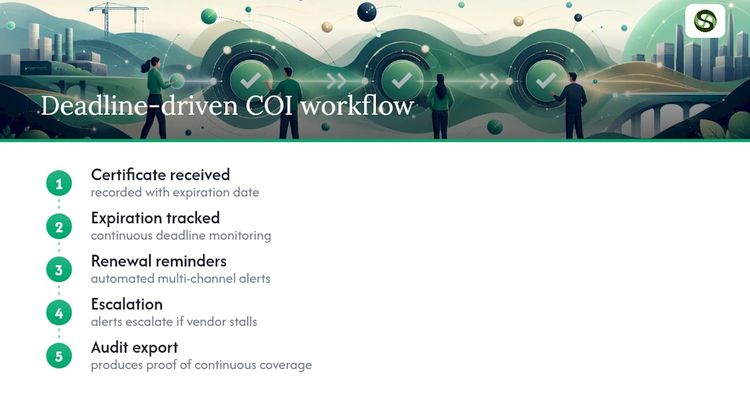
Picture vendor onboarding: a certificate comes in, Expiryedge tracks its expiration automatically, sends renewal reminders on a set cadence, escalates if the vendor stalls, and produces an audit export when you need proof of continuous coverage. It’s the same renewal alert logic that keeps procurement teams ahead of contract deadlines, applied to insurance compliance instead of contract terms.
The request side works the same way. Instead of emailing a vendor for a renewed certificate, ExpiryEdge sends a link where they upload the new COI and, if you need it, sign an updated vendor agreement in the same step. No account is needed, follow-ups continue until the certificate arrives, and a certificate missing an endorsement can be rejected with a comment so the vendor fixes only that.
A Compliance Operator’s Perspective on Rolling This Out
The pilot mistake I see most often is testing extraction accuracy on clean sample certificates instead of the scanned, handwritten mess your actual vendors send. Test on your worst documents first. The second recurring failure is building one generic requirement template for every vendor, which either rejects compliant vendors on technicalities or waves through vendors who don’t meet your real risk threshold. Measure pilot success on exception resolution time, not just how many certificates got uploaded. Speed to resolution is the number that predicts whether the rollout holds up at scale.
— Kuldeep
Get Your COI Program Off Spreadsheets
A deadline-driven system helps operations and compliance teams manage vendor insurance obligations that spreadsheets often fail to handle reliably. It maps directly to the COI workflow this guide just walked through: centralized tracking for every certificate’s expiration date, automated multi-channel reminders before a policy lapses, escalation paths when a vendor goes quiet, and audit-ready exports when a claim or review demands proof of continuous coverage.

A typical use case runs like this: a vendor is onboarded and their certificate loaded into the platform, The system tracks renewal dates and sends automated reminders as deadlines approach, escalates if vendors miss deadlines, and provides timestamped histories for audit purposes. The same underlying logic already runs certification and license expiration tracking for compliance teams outside insurance, which is exactly why it fits this use case without needing to be rebuilt for it.
If your vendor list has outgrown what a spreadsheet can safely handle, start a free trial and load your highest-risk vendors first to see how the reminder and escalation workflow holds up against your real renewal calendar.
Sources
FAQ
How do you track certificates of insurance?
Manually, it means logging expiration dates in a spreadsheet and emailing vendors before each renewal. A dedicated COI tracking system automates that by extracting data from uploaded certificates, verifying it against your requirements, and sending renewal reminders automatically. Platforms like Expiryedge handle the reminder and escalation piece of this workflow across contracts and compliance obligations generally, not just insurance.
How much does COI tracking software cost?
Pricing typically scales by the number of vendors tracked, by seat count, or as a flat subscription, and costs differ depending on whether you choose a self-serve platform or a managed service that includes expert review of complex certificates. Most vendors don’t publish flat rate cards publicly, so expect a quote based on your vendor volume during a sales conversation.
What is COI tracking?
COI tracking is the process of collecting, verifying, and monitoring certificates of insurance from vendors, contractors, or tenants to confirm their coverage meets your contractual requirements and stays active over time. It covers everything from initial intake through renewal reminders to flagging a mid-term policy cancellation.
What is an insurance tracking system, and is it the same as a tracking device?
An insurance tracking system in this context is software for monitoring vendor insurance compliance, entirely unrelated to a physical GPS or telematics device sometimes called an “insurance tracker” in auto insurance pricing programs. If you’re researching software for vendor compliance, you want a COI tracking or insurance compliance management platform, not a vehicle tracking device.
Recommended
Frequently asked questions
Pricing typically scales by the number of vendors tracked, by seat count, or as a flat subscription, and costs differ depending on whether you choose a self-serve platform or a managed service that includes expert review of complex certificates. Most vendors don't publish flat rate cards publicly, so expect a quote based on your vendor volume during a sales conversation.
COI tracking is the process of collecting, verifying, and monitoring certificates of insurance from vendors, contractors, or tenants to confirm their coverage meets your contractual requirements and stays active over time. It covers everything from initial intake through renewal reminders to flagging a mid-term policy cancellation.
An insurance tracking system in this context is software for monitoring vendor insurance compliance, entirely unrelated to a physical GPS or telematics device sometimes called an "insurance tracker" in auto insurance pricing programs. If you're researching software for vendor compliance, you want a COI tracking or insurance compliance management platform, not a vehicle tracking device.