Best Subcontractor Management Software for Documents and Bid Data (2026)

If you run a general contractor and want one place for subcontractor paperwork and pricing, Procore is the safest pick when your projects already live there. ExpiryEdge is the better fit when your real problem is getting documents and numbers back from subs on time and keeping certificates current, without paying for a full project platform.
The other five tools below each solve a narrower slice. BuildingConnected is built around bidding. Billy is built around insurance compliance. Knowify and Buildertrend bundle sub records into job management for smaller builders, and Smartsheet is the do-it-yourself route.
We make ExpiryEdge, so read our entry with that in mind. Every other fact here comes from the vendor's own pages or help centre, checked on 30 October 2026, and each claim is linked so you can check it yourself.
Seven subcontractor tools at a glance
| Tool | Best for | What subs send you | Sub needs an account? | Published price? |
|---|---|---|---|---|
| Procore | GCs running projects in Procore | Prequal forms, bids, schedule of values | Yes, for SOV and prequal portal | No, quote only |
| ExpiryEdge | Collecting documents, data and signatures, then tracking expiry | Files, form answers, e-signatures through one link | No | Yes, $29 to $199 a month |
| BuildingConnected + TradeTapp | Bid invitations and leveling | Bids, qualification forms | Yes, free Bid Board | No, quote only |
| Billy | Insurance compliance and prequal | COIs, endorsements, W-9s, prequal answers | Not stated | No, priced by vendor count |
| Knowify | Trade contractors who want jobs and accounting together | Documents stored by you, not a sub portal | Not stated | Yes, from $99 a month |
| Buildertrend | Residential builders and remodelers | Line-item bids, files | Optional, free for subs | No, quote only |
| Smartsheet + forms | Teams that want to build their own | Whatever your form asks for | Check your sharing settings | Yes, from $9 per member a month |
What to compare before you shortlist
Start with the job you're trying to fix. A GC that loses bids because comparisons take too long needs a different tool from one that keeps finding an expired certificate after the sub is already on site.
Then check four things for each tool:
- What the sub has to do. Every login you ask a small sub to create is a reason for them to reply late.
- Who pays. Some networks charge the subcontractor an annual fee, and subs pass that cost back in their price.
- Whether dates are tracked after collection. A certificate collected in January is worthless in July if nobody is told it lapsed.
- Whether bid lines carry through. If the bid form, the subcontract and the schedule of values use different line items, you'll re-key numbers at every pay application.
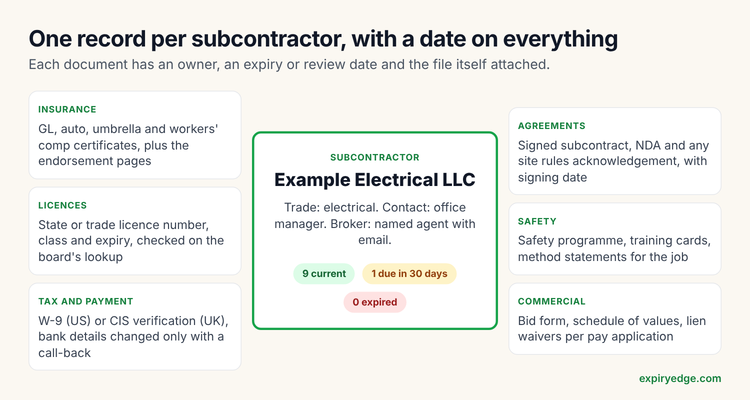 What one subcontractor record should hold, each item with its own date
1. Procore: best if your projects already run there
Procore covers bidding, prequalification and commitments in one platform. Its bid management module lets you compare bids side by side to spot gaps, and its prequalification forms let you pick from default questions or write your own.
The sub side needs more effort. Procore's own help article on submitting a subcontractor schedule of values says a first-time user has to accept a "Welcome to Procore" invite, and the GC has to grant the right permissions. Bidders can reply by email, but Procore's support FAQ calls it best practice for each bidder to log in.
Pricing isn't published. The pricing page asks you to request a quote and says Procore doesn't charge for adding users. Its blog on deal structures explains that contracts are tied to annual construction volume.
Watch out for: the cost and set-up time if all you need is sub paperwork. Procore pays off when your project managers also use it for RFIs, submittals and financials.
2. ExpiryEdge: best for collecting sub documents and keeping them current
ExpiryEdge sends each sub a link to a request you build once. The request can ask for file uploads, typed answers, dates, dropdowns and an e-signature, across as many pages as you need. The sub opens it on a phone or laptop with no account and no login, and the link keeps reminding them until it's complete.
When a submission comes back, you approve or reject each field with a comment. A rejected field reopens the same link, so a sub who uploaded the wrong page of their certificate fixes that one item instead of starting again. Uploaded documents are read for their dates, and each certificate, licence or agreement becomes a tracked record with reminders by email, SMS, WhatsApp, Slack or Teams before it expires.
For bid and budget data, you can build a request with the line items you want priced, plus fields for exclusions and a file upload for the sub's own breakdown. It won't level bids for you or run pay applications. The answers export as CSV, so most teams paste them into their leveling sheet.
Pricing is published on the pricing page: $29, $49, $99 or $199 a month, depending on how many dated records you track, with a 14-day free trial and no credit card. Subs pay nothing.
Watch out for: there's no bid board, no lead discovery and no accounting. If you need those, pair ExpiryEdge with your estimating tool or pick Procore.
3. Autodesk BuildingConnected and TradeTapp: best for bid invitations
BuildingConnected is the bidding side of Autodesk's construction tools. The pricing page lists BC Pro for inviting and managing bids, Bid Board Pro for subs tracking their own bids, and TradeTapp to "qualify and manage subcontractor financial and safety risk". All three are quote-only.
Subs can use the free Bid Board to accept invitations, submit bids and send qualifications, according to BuildingConnected support. They do need an account. TradeTapp adds automated financial reviews and safety assessments.
Watch out for: bid leveling is a paid GC feature, available with BC Pro according to the support article on the leveling tab. Expiry tracking of certificates isn't its focus.
4. Billy: best for insurance compliance with prequal attached
Billy started as certificate of insurance tracking and added prequalification. Its GC prequalification page lists questionnaire topics such as insurance requirements, EMR thresholds, bonding capacity and safety records, plus tracking of COIs, endorsements, W-9s and business licences.
Subs "never pay to submit prequalification information", and Billy's subcontractor page offers them a free lien waiver template and W-9 generator. Pricing is custom and based on vendor count.
Watch out for: Billy's own page says bid management is not included and that it pairs with bid tools. There's no budgeting.
5. Knowify: best for trade contractors who want jobs and accounting together
Knowify is job management and accounting for trade and commercial contractors. Its subcontractor feature lets you store each sub's licence, GL, workers' comp and W-9 with expiration dates, and tie work orders to sub POs so you can see the balance left on each subcontract.
Knowify is one of the few here that publishes prices. The pricing page shows Core from $99 a month for one user and Advanced from $329 a month for ten users, with Enterprise on request.
Watch out for: the same pricing page puts subcontractor document tracking and expiry alerts on Advanced and Enterprise, not Core. We found no sub portal, so your office still has to collect and upload the files.
6. Buildertrend: best for residential builders sending line-item bids
Buildertrend bid requests use line items with cost codes, and subs enter cost, quantity and unit against each one, according to its bids help article. Subs can attach their own files, and they can answer by email or through a free account.
The subcontractor overview also mentions certifications with expiration dates and reminders. Pricing is a custom quote with unlimited users, per the pricing page.
Watch out for: we couldn't find COI-specific checks such as additional insured endorsements in the help content. It's built for home builders, not commercial GCs.
7. Smartsheet with forms: best if you'd rather build it yourself
Smartsheet forms let contractors and clients submit information and files into a sheet, per its forms guide. The pricing page lists Pro from $9 per member a month billed yearly and Business from $19.
Watch out for: conditional logic in forms needs Business or higher, and nothing understands an insurance certificate or a bid form until you design it. Someone on your team becomes the system's owner.
ℹ️Two more worth a look. ConstructConnect's [bid management](https://constructconnect.com/products/bid-management){nf} lets subs submit bids without a subscription. Jotform is a cheaper form builder than Smartsheet if you only need intake, with [paid plans from $19 a month](https://www.jotform.com/pricing/){nf}.
Which one should you pick?
Pick by the problem you lose money on.
If bids are the bottleneck, look at BuildingConnected or Procore. If you're a residential builder, Buildertrend's line-item bids may be enough.
If certificates, licences and signed agreements are the bottleneck, look at ExpiryEdge or Billy. Billy goes deeper on insurance review. ExpiryEdge covers more document types per sub, takes no login on the sub's side and publishes its price.
If you're small and want one system for jobs and invoices, Knowify is worth a trial. Check that the plan you buy includes the sub document tracking.
Whatever you choose, ask subs for bid numbers on your line items, not theirs. Our guide to collecting budgeting information from subcontractors shows a bid form that carries straight into an AIA G703 schedule of values. For the paperwork side, see managing subcontractor documentation and our subcontractor onboarding checklist.
Frequently asked questions
Not for most of the tools here. BuildingConnected's Bid Board, Buildertrend's sub accounts and Billy's prequal submissions are free for subs, and ExpiryEdge links need no account. Some prequalification networks do charge subs a yearly membership, so ask before you mandate one.
Procore covers both, at a quote-based price. Most other tools lean one way: BuildingConnected toward bids, Billy toward insurance. Many GCs pair a bid tool with a document tracker instead.
Your line items by trade or cost code, unit rates where quantities are known, alternates, allowances, inclusions and exclusions, and the bid's validity date. Matching your schedule of values to those lines saves re-keying later.
For a handful of subs, yes, if one person owns it and checks dates weekly. It breaks when subs and projects multiply, because a spreadsheet doesn't chase anyone or warn you when a certificate lapses.