
TrustID Alternatives: 7 Right to Work Check Software Options for UK Employers and Agencies

ExpiryEdge comes first for the part where agencies get caught: the follow-up check when a worker's permission is time-limited. It's the low-cost layer that chases every follow-up date, whichever provider ran the first check. The worker gets a text or WhatsApp asking for a fresh share code through a no-login link, and your compliance lead hears if nothing comes back.
ExpiryEdge doesn't run checks, so you still need a provider for the check itself. For most UK employers and staffing agencies, that's TrustID. It's a registered digital verification service provider, it handles digital, share code and manual checks in one place, and its reports state when a follow-up check is due. Access Screening is the pick for agencies checking hundreds of candidates and tracking time-limited permission. Zinc bundles right to work with references and criminal checks and alerts you before permission lapses. Credas, Yoti and Experian are registered providers with strong ID technology, aimed at teams that want an API or a reusable digital ID.
We make ExpiryEdge, which doesn't run checks and is here for the follow-up dates. We took the details of the six providers from their own websites on 7 November 2026, and each one is linked.
| Tool | On the DVS register for right to work | Share code checks | Follow-up reminders | Published pricing |
|---|---|---|---|---|
| ExpiryEdge Our product | No, it doesn't run checks | No, tracks the dates | Yes, email, SMS, WhatsApp | $29 to $199 a month |
| TrustID | Yes | Yes, plus manual checks | Report states the follow-up date | Pay per check, 100 minimum; prices on quote |
| Access Screening | Uses TrustID for digital checks | Yes | Yes, before permission expires | No |
| Zinc | Yes | Yes | Yes, alerts before expiry | No, flat rate per check under 20 hires |
| Credas | Yes | Shows the code; you run the Home Office check | Not described | No |
| Yoti | Yes | Yes | Not described | No |
| Experian | Yes | Yes | Not described | No |
How we compared these tools
Right to work tools do two different jobs, so our columns separate them. Is the provider on the government's DVS register for right to work, and can it handle share codes, which cover everyone a DVSP can't? Then, does anything remind you, and the worker, before a follow-up check is due? Last, is the price on the website? We read each provider's own pages on 7 November 2026 and checked the rules against the Home Office employer's guide, the DVS register and GOV.UK's penalties page. We didn't pay for trial checks with every provider, and we make ExpiryEdge, so bear that in mind when you read its section.
One check before day one, and a second before permission runs out
The Home Office's employer's guide dated 1 October 2026 gives you three ways to check before someone starts: a manual document check, a Home Office online check with a share code, or a check through a registered digital verification service provider (DVSP). A DVSP can only check valid British or Irish passports and Irish passport cards, including passports up to six months past expiry. The provider has to appear on the government's register of digital verification services.
For agencies, the guide is plain: in a standard supply arrangement, the employment business is the worker's employer for right to work purposes and is responsible for the check. The hirer doesn't routinely repeat it. You can't rely on a check someone else ran unless it was a prescribed check through a registered DVSP.
Two more rules make this a tracking problem. First, workers with time-limited permission need a follow-up check on or before the date their permission ends. Second, you keep copies for the length of the employment and two years after. Get it wrong and the guide sets a civil penalty of up to £60,000 per illegal worker, which matches the figure on GOV.UK's penalties page.
From 1 October 2026 the scheme also reaches workers on worker contracts, individual subcontractors and online matching services, for engagements that started on or after that date. Share codes from the online service last 90 days from issue, so an old code in a candidate's email won't work for a later placement.
So the software has two jobs. Run a valid check fast, through the right route for each person. Then know every follow-up date and get the worker to act before it passes.
- Date of the initial check, before the first shift
- End date of each worker's time-limited permission
- Follow-up check, on or before that end date
- Six-month limit on a Positive Verification Notice, if the Home Office checked for you
- Two years after the worker leaves, when copies can be destroyed
1. ExpiryEdge: best for tracking follow-up checks across every worker, whoever ran the first one
ExpiryEdge isn't a DVSP and doesn't run right to work checks. It tracks the dates around them, which is where agencies get caught: the follow-up check for a student whose visa ends in March, or the carer whose permission expires mid-assignment.
Each worker gets a record with the date of the initial check, the method used and the permission end date. You set reminders, say 60, 30 and 7 days before. They go to the worker by SMS, WhatsApp or email, asking for a fresh share code through a link that needs no login, and to your compliance lead in Slack or Teams. If nobody acts, the item escalates to the branch manager. The audit log shows each step, which is the evidence you want if an enforcement officer asks.
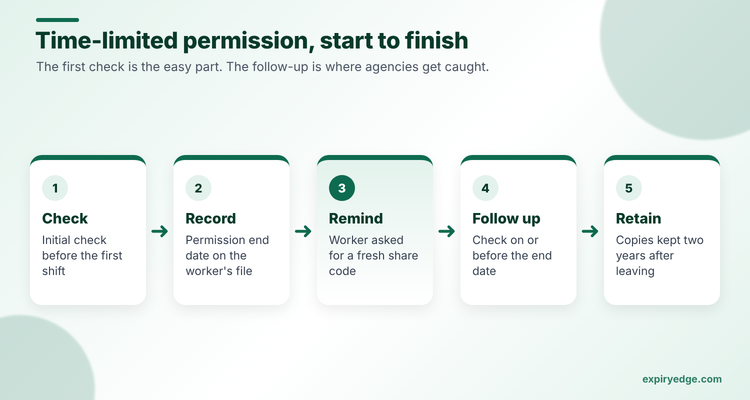
You can hold the copies and the retention date on the same record, so you know when two years after leaving has passed. Our temporary staffing compliance page shows the setup.
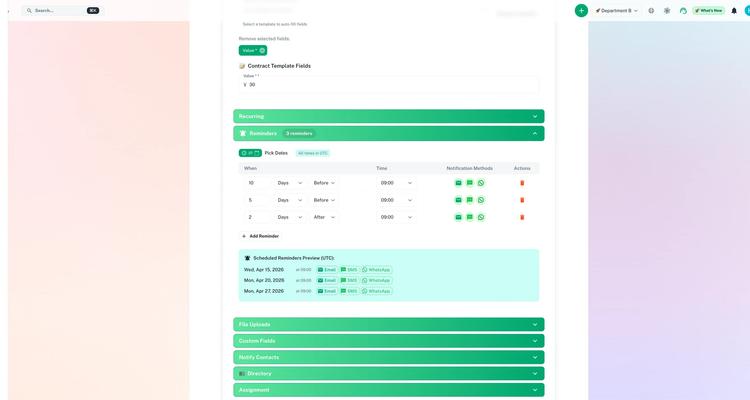
Try it with your own follow-up dates in 15 minutes
- Import a CSV of workers on time-limited permission, with the first check date, the method used and the permission end date as custom fields.
- Set a 60/30/7-day schedule that WhatsApps or texts the worker and posts to your compliance lead in Teams, escalating to the branch manager if nothing happens.
- Send one worker a no-login request link with a text field for their new share code and a file field for any updated document.
Pricing: ExpiryEdge lists its plans in US dollars: $29, $49, $99 or $199 a month, by users and dated items. The 14-day free trial doesn't take a card.
Watch out for: you still need a provider or the Home Office service to do the check itself. ExpiryEdge records it and makes sure the next one happens.
Item limits for each plan are on the ExpiryEdge pricing page.
2. TrustID: best all-round provider for digital, share code and manual checks
TrustID's right to work page describes it as a certified DVSP under the UK digital identity trust framework. Digital checks read the chip in British and Irish passports. It says it's one of a few providers that also support manual and share code checks, and physical document checks cover people who can't do a remote check.
Reports state the date of any follow-up check, and TrustID says it lets you know when one is due. It lists integrations with more than 50 ATS and HR systems, and an API with a minimum volume.
Pricing: pay per check with no set-up or admin fees, a minimum order of 100 checks, and volume-based prices on a quote request.
Watch out for: the 100-check minimum. A small agency running a few checks a month will pay up front for credits.
3. Access Screening: best for agencies checking candidates in bulk
Access Screening's right to work software runs all three Home Office routes: manual, share code and digital. Digital checks go through TrustID, which it calls a registered DVSP.
It's written with agencies in mind. Its candidate portal lets you run checks across hundreds of candidates at once. Time-limited permissions are tracked automatically, with reminders before any expiry, and check history carries over when a temp is placed again.
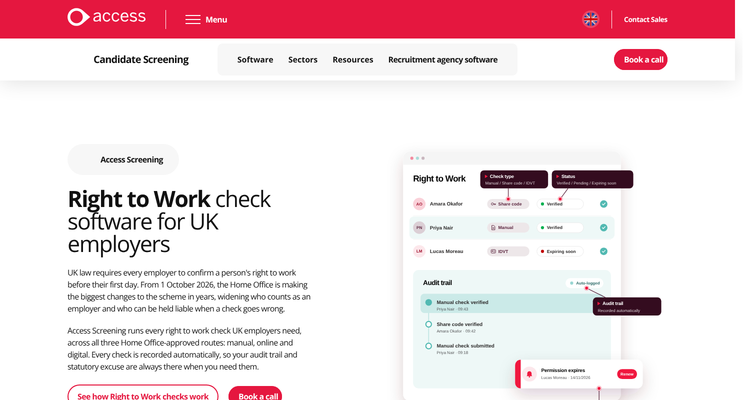
Pricing: not published. You book a call or a demo.
Watch out for: it's part of the wider Access Group suite. Ask whether you can buy right to work on its own and what each check costs.
4. Zinc: best for right to work bundled with other background checks
Zinc's right to work page lets candidates share a code through a secure link. Results often come back as "Consider" when the Home Office response has conditions or an expiry date. Zinc is clear that you still run the Home Office online check and an impostor check yourself to get your statutory excuse.
As expiry approaches, Zinc alerts your team so you can start a follow-up check. You can add criminal, reference, credit and qualification checks to the same candidate journey, and ATS or HRIS connections cost nothing extra.
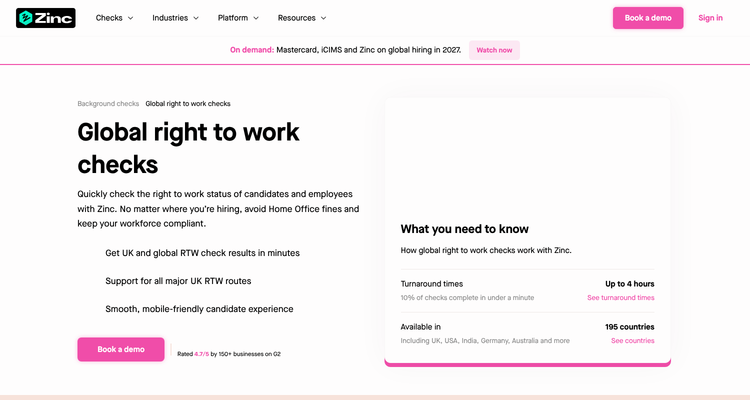
Pricing: not published. The pay-as-you-grow plan for under 20 hires a year is a flat rate per check. Larger plans use a credit pool and need a demo.
Watch out for: the share code result isn't the end of the job. Budget time for your own Home Office check on each code.
5. Credas: best for adding checks to your own system
Credas says on its recruiter page that its check is certified under the digital identity trust framework, with API integration into your CRM. Its help article covers British or Irish passports with a liveness check, and share codes shown in the portal for you to check with the Home Office.
Pricing: not published. Credas mentions a range of tariffs with volume discounts and offers a free trial.
Watch out for: its product page tells you to schedule follow-up checks yourself.
6. Yoti: best for a reusable digital ID
Yoti's right to work page offers online ID checks, a reusable Digital ID app and share code checks for people who aren't British or Irish. One check can cover both right to work and DBS. It says it's integrated into more than 70 software products, with a no-code portal or an API.
Pricing: not published.
Watch out for: follow-up checks aren't described on the page.
7. Experian: best for mixed remote and face-to-face checks
Experian's right to work solution uses a candidate app for remote checks and a recruiter app for in-person document scans. It combines digital checks with share code checks on one platform.
Pricing: not published. You call or fill in an enquiry form.
Watch out for: the page doesn't describe follow-up reminders.
ExpiryEdge as an alternative to TrustID
We put ExpiryEdge first because the follow-up date is where agencies get caught, but this isn't a straight swap. TrustID runs checks and ExpiryEdge doesn't, so most agencies that use ExpiryEdge keep a provider for the check itself.
Where ExpiryEdge replaces something is the spreadsheet of permission end dates. If your provider's report gives a follow-up date but nobody gets reminded, or reminders only reach your inbox and not the worker, ExpiryEdge closes that gap at a published price. It also holds the agency's other dates: client contracts, insurance and the 12-week Agency Workers Regulations clock.
Stay with TrustID alone if your volumes justify the 100-check minimum and its follow-up notices fit how your team works. Pick Access Screening or Zinc if you want checks and reminders from one vendor.
Split your workers by route before you compare quotes
Split your workforce by route first. British and Irish passport holders can go through a DVSP. Everyone else needs a share code or a manual check, and they're the ones with follow-up dates.
Then work out volume. If you place a few dozen people a year, a pay-as-you-go plan suits you better than a 100-check bundle. If you run hundreds of checks, ask for a bulk portal like Access Screening's.
Finally, decide who owns follow-ups. Test each vendor with a worker whose permission ends in six weeks, and ask what the worker and your team receive, and when.
Our staffing compliance software guide covers the rest of the agency file. See the candidate compliance comparison for credentials, and our article on common visa and work permit tracking mistakes.
Frequently asked questions
Yes. You can use a registered digital verification service provider, but it'll only check valid British or Irish passports and Irish passport cards. TrustID, Zinc, Credas, Yoti and Experian are all on the government register. For everyone else you'll need a share code or a manual check.
On or before the date a worker's time-limited permission ends, if you'll keep employing them. Workers with settled status don't need one. Access Screening and Zinc send reminders, and ExpiryEdge can remind both the worker and your team at 60, 30 and 7 days.
The agency. The Home Office guide says the employment business is the employer in a standard supply arrangement and is responsible for the check. The hirer doesn't routinely repeat it.
Most providers quote on request. TrustID charges per check with a 100-check minimum, and Zinc offers a flat rate per check for under 20 hires a year. ExpiryEdge tracks the dates rather than running checks, and its plans start at $29 a month after a 14-day free trial.
Up to £60,000 per illegal worker as a civil penalty, under the Home Office employer's guide. Knowingly employing an illegal worker is a criminal offence with up to five years in prison and an unlimited fine.
For the whole time the person works for you and for two years after they leave, then destroy them securely. Keeping the leave date and destruction date on each worker's record, in ExpiryEdge or your HR system, makes the clean-up easy.