
Assign, Schedule, and Automate Deadlines
Automatically assign tasks, schedule reminders, and automate deadline workflows. Save time with intelligent task distribution and automated follow-ups.
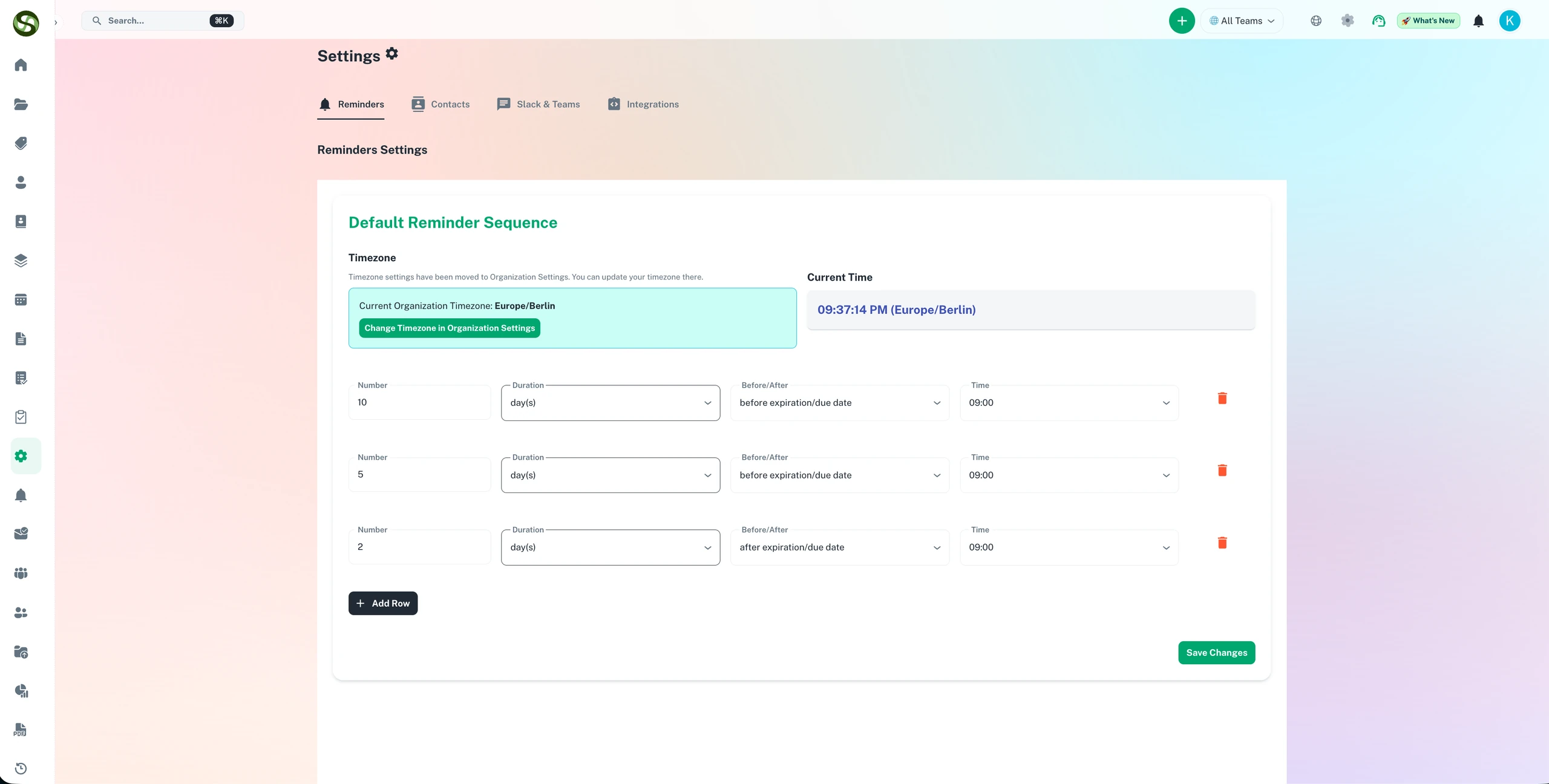
Automate task assignment and deadline scheduling across your entire team
Automated task assignment
Recurring deadline scheduling
Workflow automation rules
Overdue task alerts
Assign, Schedule, and Automate Deadlines Features
Everything you need to streamline your workflow and boost productivity
Task Assignment
Easily assign task to team members with full control. Choose the right person based on role, workload, or department and keep accountability transparent.
Centralized Scheduling
Apply one reminder schedule across all tasks and notify the right team members for each task independently so everyone stays aligned.
Recurring Automation
Automate recurring deadlines like monthly reports, quarterly reviews, or annual renewals. Set it once and let the system handle repetition automatically.
Workload Balancing
Prevent team burnout with automatic workload distribution. The system tracks each person's assignments and you can balances new tasks accordingly.
Overdue Tracking
iew overdue and critical expiries in one place and decide when and how to escalate issues within your team.
Audit Trail
Complete history of all assignments, schedule changes, and automations. Know who assigned what, when, and why for full accountability.
Why Use Assign, Schedule, and Automate Deadlines?
Real benefits that drive measurable results for your business
Save 15+ Hours Per Week
Eliminate manual task assignment and reminder scheduling. Automation handles the repetitive work while you focus on strategic activities.
Reduce Missed Deadlines by 90%
Automated reminders and smart scheduling ensure nothing falls through the cracks. Multi-channel alerts reach team members wherever they work.
Improve Team Productivity
Balanced workloads prevent burnout and ensure optimal resource utilization. Everyone knows exactly what they need to do and when.
Scale Without Hiring
Handle 10x more deadlines without adding headcount. Automation scales infinitely while maintaining quality and consistency.
Assign, Schedule, and Automate Deadlines in Action
Visual walkthrough of the platform in action
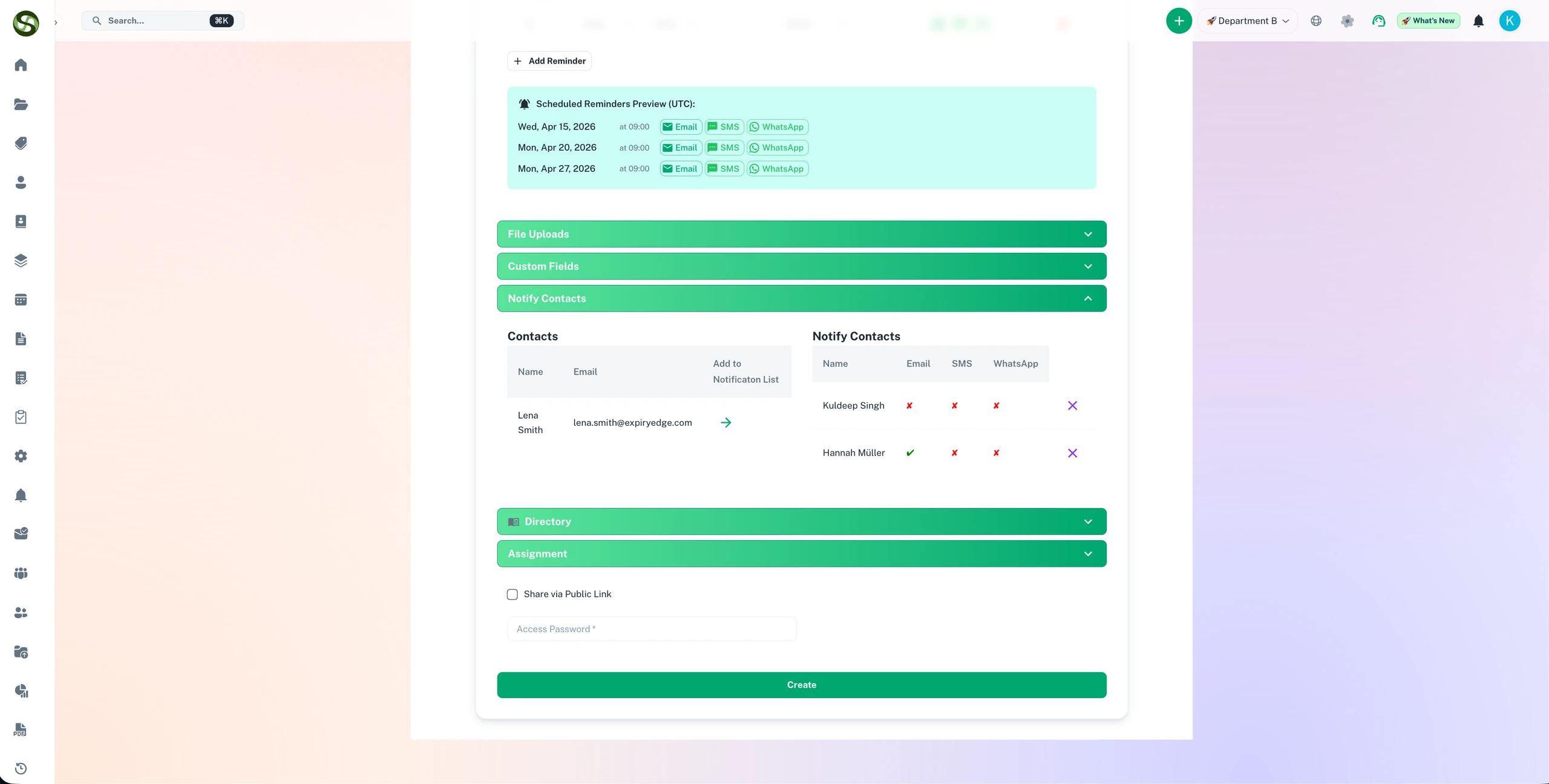
Assign Contacts and Owners
Assign responsible contacts to each expiry record - they receive reminders on their preferred channel automatically.
Automated Reminder Scheduling
Configure multi-step reminder sequences once - ExpiryEdge fires every alert on schedule without any manual intervention.
Who Uses Assign, Schedule, and Automate Deadlines?
Designed for teams and businesses across industries
License Renewals
Auto-assign professional licenses to employees, schedule reminders 90, 60, 30 days before expiry, and escalate if not renewed.
Contract Management
Assign contracts to legal team, automate renewal reminders, and schedule review meetings before expiration dates.
Recurring Reports
Automate monthly, quarterly, and annual reporting deadlines. Assign to relevant departments with scheduled reminders.
Compliance Deadlines
Auto-assign regulatory filings to compliance team, schedule multi-stage reminders, and track submission status.
Employee Certifications
Track team certifications, auto-assign renewal tasks to HR, and ensure continuous compliance with industry requirements.
Invoice Processing
Automatically assign invoices to approvers, schedule payment reminders, and escalate overdue payments to finance managers.
Frequently Asked Questions
Everything you need to know. Can't find the answer? Reach out to our support team.
ExpiryEdge automatically assigns tasks to the correct owner based on item type, department, or team. When a compliance item is created or a renewal deadline approaches, the system routes the task to the designated owner and sends them a reminder on their preferred channel. You configure the assignment rules once per item type, and the system handles all future assignments automatically.
Yes. For recurring obligations like annual certifications, quarterly inspections, or monthly reports, you set the renewal interval once. When an item is marked as completed or renewed, ExpiryEdge automatically calculates the next due date and creates the next task in the cycle. Recurring compliance never requires manual reset.
ExpiryEdge allows you to see how many active items each team member owns, making it easy to redistribute tasks if one person is overloaded. When onboarding new items or reassigning responsibilities due to staff changes, managers can quickly balance the workload across the team without breaking existing reminder schedules.
Reassigning ownership in ExpiryEdge takes seconds. You update the responsible owner on any item, and all future reminders automatically route to the new person. The full history - previous renewals, uploaded documents, and action logs - remains intact. Unlike spreadsheet-based tracking, the process does not break when personnel change.
Yes. ExpiryEdge supports automatic escalation. If a task owner does not complete a compliance action before the deadline, the system automatically notifies their manager or a designated escalation contact. You configure the escalation path and timing per item type - so critical compliance items always get the attention they need.
Ready to Get Started?
Join thousands of teams already using ExpiryEdge to streamline their workflows