
Custom Reminder Schedules
Create custom reminder schedules for any deadline. Set multiple alerts at different intervals with channel-specific delivery preferences.
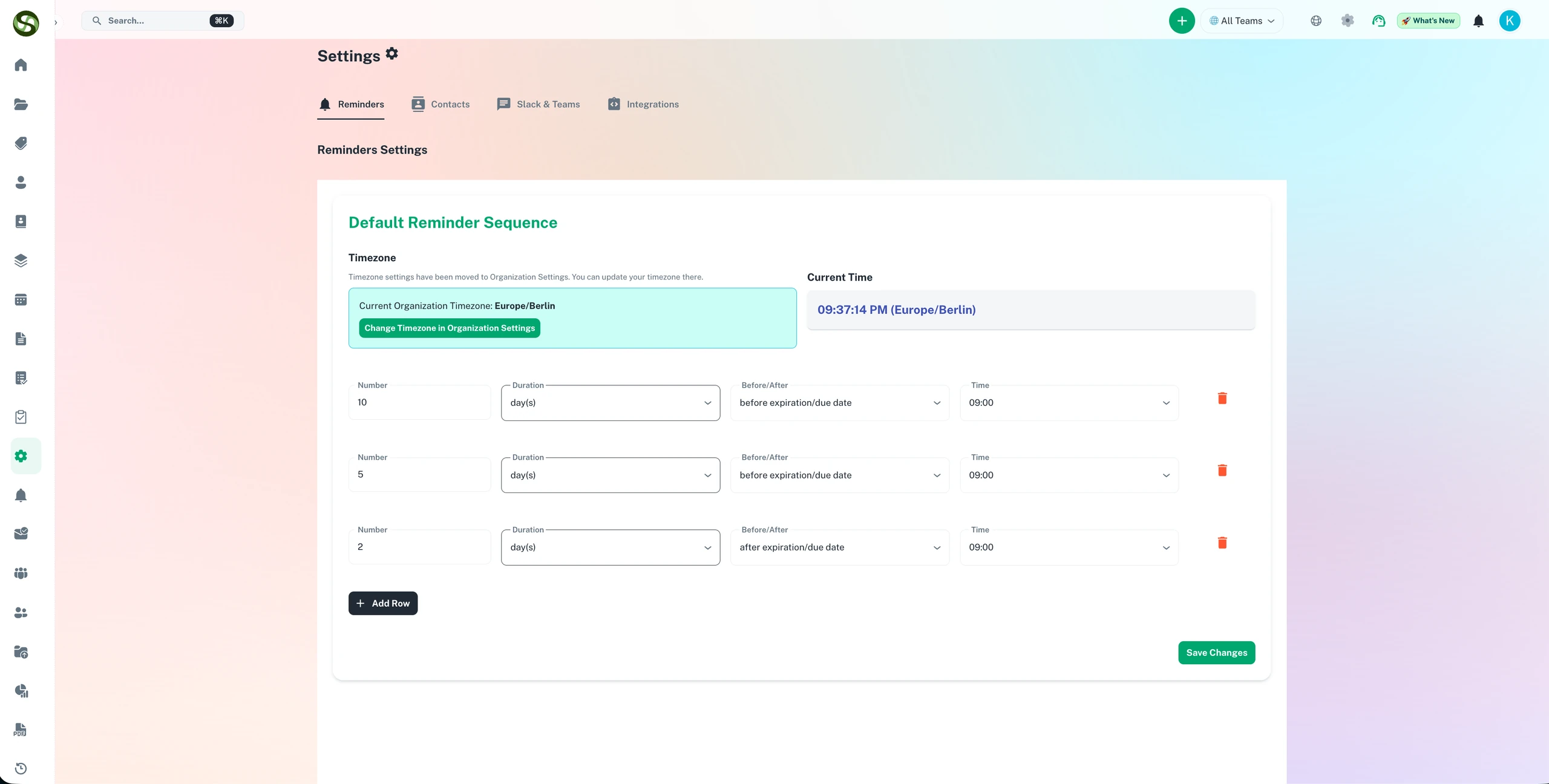
Build custom reminder schedules that fit your team's renewal and deadline workflows
Custom reminder intervals
Multi-stage alert sequences
Per-item schedule control
Escalation reminders
Custom Reminder Schedules Features
Everything you need to streamline your workflow and boost productivity
Flexible Timing Options
Set reminders at any interval: days, weeks, months before deadlines. Configure multiple reminders (90, 60, 30, 7, 1 days before) or custom intervals specific to your needs.
Multi-Channel Scheduling
Send different reminders through different channels. Early email warnings, mid-term Slack updates, urgent SMS alerts. Match the channel to the urgency.
Escalation Rules
Automatically escalate if no action is taken. Start with the assignee, then notify their manager, then executives. Define custom escalation paths per deadline type.
Business Hours Delivery
Schedule reminders to arrive during business hours only. No 3 AM alerts. Configure delivery windows by timezone for global teams.
Recurring Schedules
Set up reminder schedules that repeat automatically. Perfect for monthly, quarterly, or annual deadlines that need consistent notification patterns.
Conditional Reminders
Send reminders based on status or conditions. Only remind if task is not started, or increase frequency if deadline is at risk.
Why Use Custom Reminder Schedules?
Real benefits that drive measurable results for your business
Never Miss Critical Deadlines
Multiple reminder touchpoints ensure deadlines are never forgotten. Customize timing to match how far in advance you need to prepare.
Reduce Alert Fatigue
Smart scheduling prevents notification overload. Send the right number of reminders through the right channels at the right times.
Match Your Process
Every deadline type has different lead times. License renewals need 90-day notice, invoice approvals need 3-day notice. Customize for each.
Global Team Support
Timezone-aware delivery ensures international team members receive reminders during their working hours, not in the middle of the night.
Who Uses Custom Reminder Schedules?
Designed for teams and businesses across industries
Professional Licenses
Set reminders at 180, 90, 60, 30, and 7 days before license expiry. Start renewal process early with plenty of time for paperwork.
Contract Renewals
Remind legal team 6 months in advance for negotiation, 3 months for approval, 1 month for execution. Multi-stage reminder schedule.
Invoice Payments
Alert accounting 7 days before due date via email, 3 days before via Slack, day-of via SMS. Escalate to CFO if unpaid.
Certifications
Remind employees 60 days before certification expires for re-training. Follow up at 30, 14, and 7 days if not completed.
Recurring Reports
Remind report owners 5 business days before monthly submission. Daily reminders in the final 3 days.
Compliance Filings
Early reminders 90 days out for data gathering, frequent reminders in final 30 days. SMS alerts on filing day.
Frequently Asked Questions
Everything you need to know. Can't find the answer? Reach out to our support team.
When configuring an item type, you define the full reminder sequence: for example, send an alert at 90 days, 60 days, 30 days, 14 days, and 7 days before expiry. Each reminder can be sent to different recipients via different channels. Once configured, ExpiryEdge sends every reminder in the sequence automatically, in perpetuity, for every item of that type.
Yes. Each item type has its own independent reminder schedule. Contracts with a 90-day notice period get reminders starting 120 days before expiry; annual vehicle MOTs get reminders at 60 and 30 days; quarterly equipment inspections might only need a 14-day reminder. Every item type is configured to match its specific renewal lead time.
Yes. For each reminder in the sequence, you specify who receives it. A 90-day reminder might go only to the item owner. The 30-day reminder might go to the owner and their manager. The 7-day reminder might escalate to senior leadership. This tiered approach ensures the right people are informed at each stage without flooding everyone with every alert.
ExpiryEdge supports email, SMS, WhatsApp, Slack, Microsoft Teams, and API/webhooks. Each step in the reminder schedule can use a different channel. You might send an early courtesy reminder by email, a mid-sequence reminder via Slack for visibility, and an urgent final reminder via SMS to guarantee it is seen.
Yes. ExpiryEdge supports post-expiry reminders. If an item lapses without renewal, you can configure a follow-up reminder sequence: notify the owner immediately on expiry, escalate to the manager 3 days later, and notify senior leadership 7 days after expiry if still unresolved. This ensures lapsed compliance is actively managed rather than silently ignored.
Ready to Get Started?
Join thousands of teams already using ExpiryEdge to streamline their workflows