How to Track Subcontractor COIs, Licences and Insurance Expirations (A System That Works)

The system that works is simple to describe: one record per subcontractor, a separate expiry date for every policy and licence, renewal requests that go to the sub's broker 90 days out, a short review checklist, and a rule that nobody gets paid or goes on site while something has lapsed. Most teams that struggle are missing the last part.
If you're a new project manager and sub insurance tracking feels like a nightmare, you're not imagining it. Every certificate involves three parties: the sub, their broker and you. A typical sub carries general liability, auto, umbrella and workers' comp, often with four different renewal dates. And the certificate you're handed doesn't prove what your subcontract asked for.
Here's how to set it up so it runs without you chasing every email.
Why it feels like a nightmare
The certificate isn't the policy. The Wisconsin Office of the Commissioner of Insurance says a certificate doesn't amend, extend or alter the coverage behind it. So a clean-looking ACORD 25 can still leave you without the additional insured status your contract requires.
The sub doesn't issue it. Their broker does, and the sub's office manager is the go-between. Ask the sub and you wait for two handoffs. Ask the broker, with the sub copied, and you wait for one.
The dates move. Policies renew on the sub's schedule, a carrier can cancel mid-term, and workers' comp may renew at a different time from GL. A single "insurance expiry" column on a spreadsheet hides three of those four dates.
1. Write down what you require, once per contract type
Before you track anything, list what your subcontract actually demands. For most US GCs that's general liability limits, additional insured status for ongoing and completed operations, waiver of subrogation, primary and non-contributory wording, auto, umbrella and workers' comp.
The additional insured part is where reviews go wrong. ISO form CG 20 10 covers ongoing operations and CG 20 37 covers completed operations; the Insurance Journal's guide to construction endorsements explains why you usually need both. Put the forms you accept into your requirements list, so whoever reviews the certificate checks against the list and not their memory.
Keep a short version for low-risk trades. A cleaning crew doesn't need a $5 million umbrella, and asking for one just slows everyone down.
2. Give every policy and licence its own dated record
Track policies, not certificates. One sub might have four records: GL expiring 1 March, auto 15 June, umbrella 1 March and workers' comp 1 January. Each gets its own reminder.
Licences work the same way. Record the licence number, class and expiry, and check it on the state board's own lookup when the sub starts. In California, that's the CSLB's Check A License tool, which also shows whether workers' comp is on file with the board. Save a screenshot with the date you checked.
Collect a W-9 at onboarding too. You'll need the sub's taxpayer ID for information returns, and the IRS 1099-NEC instructions now set the reporting threshold at $2,000 for tax years beginning after 2025.
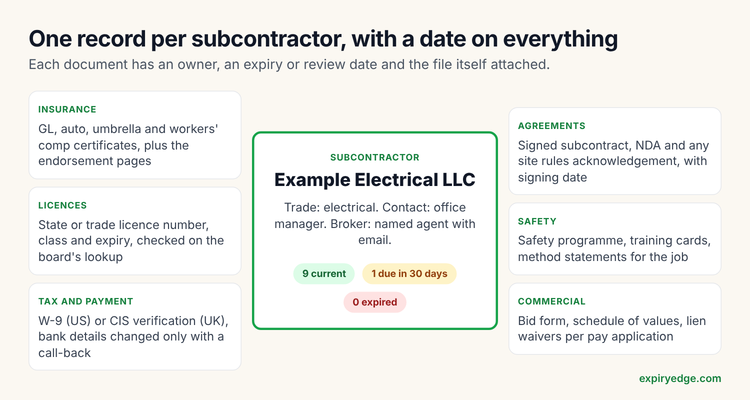 Each item on the sub's record carries its own date and owner
3. Ask the broker directly, through a link
Send the request to the sub's broker and copy the sub. Use an upload link rather than "reply with your COI", because email attachments end up in one person's inbox and nobody else can see them.
Ask for three things in the same request: the certificate, the endorsement pages for additional insured and waiver of subrogation, and the broker's name and email for next time. That last field saves a week at every renewal.
4. Review with a six-point checklist
Every certificate gets the same six checks before you mark it approved:
The six checks before you approve a certificate
- ✓
Named insured matches the legal name on your subcontract
- ✓
Policy dates cover the work, including the completion date
- ✓
Limits meet or exceed your requirements for each line
- ✓
Endorsement pages show CG 20 10 and CG 20 37 (or equivalents) naming your company and the owner
- ✓
Waiver of subrogation and primary wording appear where your contract requires them
- ✓
Certificate holder is your correct legal entity and address
If anything fails, send one deficiency notice listing every problem, not one email per problem. Our six COI checks for general contractors goes deeper on each one.
5. Start renewals 90 days out
Ninety days sounds early. It isn't, because the broker has to issue the new certificate after the policy renews, and brokers are busiest at the same renewal dates you are.
A schedule that works: first request at 90 days, a second at 60 copying the broker again, escalation to the project manager at 30, and a final notice at 7 days saying what happens on expiry day.
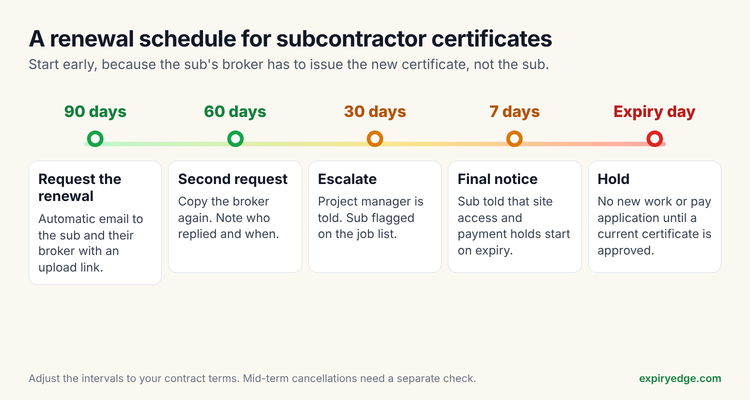 A renewal schedule you can run for every policy
6. Tie compliance to site access and payment
This is the rule that makes the rest work. A sub with an expired policy doesn't start new work and doesn't get paid on the next pay application until a current certificate is approved.
Put it in the subcontract and tell subs at onboarding. Once the office manager knows a lapsed certificate holds up a payment, renewal certificates arrive without chasing. If you use Procore Pay, it can hold payments on commitments that aren't insurance compliant, per Procore's support article.
7. Spend 15 minutes on it every Monday
Look at three lists: what expires in the next 30 days, what's overdue, and which deficiency notices haven't been answered. That's the whole weekly routine. It works only if the dates in step 2 are right.
💡 Pro Tip
Ask every new sub for their broker's direct email on day one and store it on their record. It's the single field that saves the most time at renewal.
What do other GCs use for this?
Most start with a spreadsheet and a shared inbox. That holds up for a dozen subs if one person owns it. It stops working when subs multiply, because a spreadsheet can't chase a broker or warn anyone that a policy lapsed last Tuesday.
The next step is a dedicated tracker. Our comparison of subcontractor COI tracking software covers seven, from Billy and illumend to Jones and BCS. ExpiryEdge is the one we make: it sends the upload link, reads policy dates from the certificate, reminds the sub and their broker before each expiry, escalates to the PM when nothing arrives, and keeps licences, W-9s and signed agreements on the same record. Plans start at $29 a month with a 14-day free trial.
Frequently asked questions
It's harder than it looks, because the sub, their broker and you all touch each certificate, and policies renew on different dates. Asking the broker directly, tracking each policy separately and linking compliance to payment removes most of the chasing.
Check the named insured and the policy dates first. Then compare each limit with your subcontract. Ask for the endorsement pages, because the certificate can't prove CG 20 10 or CG 20 37 on its own, and confirm waiver and primary wording if your contract needs them. Last, make sure the holder is your correct entity.
Record the licence number, class and expiry date, verify it on the state licensing board's lookup at onboarding, and save a dated screenshot. Set a reminder before expiry and check the board again after the sub renews.
For a small number of subs, yes, if one person owns it and reviews it weekly. Once you're tracking dozens of policies, a tool that sends requests and reminders by itself saves more time than it costs.