How Deadline Prevention Systems Work for Ops & Compliance

How Deadline Prevention Systems Work for Ops & Compliance

A deadline prevention system predicts risk and triggers actions before a date is missed, not after. Instead of logging a lapse and scrambling to recover, these platforms monitor every contract renewal, certification, regulatory filing, and vendor obligation in real time, then fire automated workflows, alerts, and escalations days or weeks ahead of the critical date.
The operational payoff is concrete:
- Fewer missed renewals and the penalties that follow
- Less firefighting when a compliance gap surfaces at audit time
- A timestamped audit trail that proves due diligence to regulators
- Reduced admin burden as reminders and task assignments run automatically
Research confirms that 85% of projects experience delays driven by poor scope definition, resource overallocation, and missed dependencies. For compliance and procurement teams, those delays carry regulatory and financial consequences that project delays in a software sprint simply do not. Expiryedge is built specifically for this problem.
How deadline prevention systems work: core components
Every capable platform shares the same modular architecture. Understanding each layer tells you what to evaluate during procurement.
The date-driven data model
The foundation is a structured record for every time-sensitive obligation. Each record captures:
- Anchor date (expiry, renewal, or filing due date)
- Record type (contract, certification, license, insurance, inspection)
- Owner and backstop assignee
- Recurrence rule (annual, quarterly, custom interval)
- Business-day calendar (so a deadline falling on a holiday rolls correctly)
- Lead-time windows for each reminder tier
This is meaningfully different from a task in a general project tool. A contract obligation record carries metadata that drives the entire downstream workflow automatically.
Automated workflows, templates, and approval gates
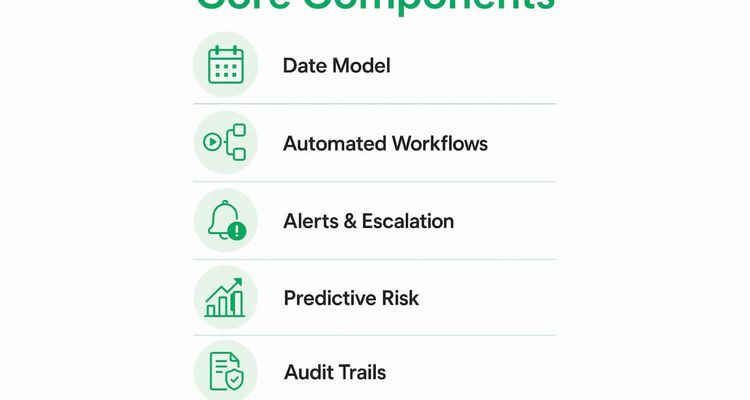
Once a record exists, the system executes a pre-configured workflow. Templates define the checklist steps, who owns each step, and what approval gates must clear before the deadline is marked resolved. Fixed-deadline workflow best practices recommend pairing each task with a backstop assignee so no single person’s absence creates a gap.

Alerts, escalation engine, and audit trails
Multi-channel notifications (email, SMS, in-app) go to the primary owner first, then escalate to a manager or backstop if no action is taken. The escalation workflow is configurable by deadline type and risk tier. Every reminder sent, every task completed, and every approval granted writes a timestamped entry to an immutable audit log. That log is what you show an auditor.
| Component | What it does | Output |
|---|---|---|
| Date-driven data model | Stores anchor dates, recurrence, and ownership | Structured obligation records |
| Workflow engine | Executes checklists, approval gates, and assignments | Completed task evidence |
| Alert and escalation engine | Fires multi-channel reminders at configurable lead times | Notification history |
| Audit trail | Logs every action with timestamp and user | Exportable compliance report |
| Dashboard | Aggregates status across all obligations | Real-time visibility |
Do these systems actually predict risk before it’s obvious?
Yes, and the prediction layer is what separates a true prevention platform from a calendar with reminders.
Modern systems use workload capacity analysis to flag future overload windows across a team. The inputs are historical task durations, real-time progress on open items, resource utilization, dependency graphs, and leave calendars. When the model detects that a team member has three critical deadlines converging in the same two-week window, it surfaces that conflict now, not the day before.
AI-based delay prevention can flag risks several days to a couple of weeks before they become critical by comparing current execution against past patterns. In practice, a compliance manager sees a dashboard alert: “Vendor certification renewal and two insurance policy expirations are due within 8 days; assignee has four other open items.” The system recommends reassigning one item or extending a non-critical task.
Pro Tip: Pair every predictive alert with a short decision menu: reduce scope, reassign, or extend. Managers act faster when the options are pre-framed rather than open-ended.
Real-time staff oversight tools that surface workload signals, like those discussed in workforce management research, reinforce why capacity data needs to flow into deadline systems, not sit in a separate HR tool.
Why human bias causes missed deadlines and how systems fix it
Optimism bias and the planning fallacy are the primary behavioral causes of missed deadlines. Teams consistently underestimate task duration and overload calendars because they plan for the best case, not the realistic one.
Automated policy controls address this directly:
- Mandatory buffers by task type. Routine tasks get a 10–15% buffer; experimental or high-uncertainty work needs 50% or more. Buffers are set at the milestone level, not on every subtask, which preserves urgency.
- Required dependency validation. The system refuses to accept a deadline until upstream dependencies are mapped and their completion dates are confirmed.
- Tradeoff menus at planning time. Rather than asking teams to simply work harder, presenting explicit tradeoffs (reduce scope, extend timeline, deprioritize other work) surfaces unrealistic commitments before they become missed deadlines.
- Approval gates. A manager must sign off on any deadline that falls outside the buffer policy, creating a documented record of the decision.
These controls work because they make the cost of an unrealistic deadline visible at the moment of commitment, not three weeks later.
Where deadline prevention platforms fit in your tech stack
A prevention platform is not a standalone island. It needs to exchange data with the systems that already hold your dates and documents.
| Source system | Data exchanged | Typical sync cadence |
|---|---|---|
| Calendar (Exchange / Google) | Deadline events, leave blocks | Real-time or daily |
| ERP / contract repository | Contract dates, renewal terms | Daily or on-change |
| HR / leave system | Assignee availability | Daily |
| IAM / SSO | User identity, role-based access | On-login |
| Document storage | Certificates, signed agreements | On-upload |
| Ticketing system | Linked tasks, escalation tickets | On-event |
Architecture patterns worth noting: most SaaS prevention platforms use a webhook or event model so changes in a source system trigger immediate updates. API-first integration handles ERPs and contract repositories. Legacy spreadsheets can be imported via structured CSV with field mapping for anchor dates and recurrence rules. Time zone handling and business-day calendars must be configured at the tenant level, not left as defaults.
What security and audit controls should you require?
Procurement teams evaluating these platforms should treat security and auditability as non-negotiable, not nice-to-have.
Baseline controls to verify:
- Encryption at rest and in transit (AES-256 / TLS 1.2+)
- Role-based access control with least-privilege defaults
- SSO/SAML integration with your identity provider
- Tenant separation (your data is logically isolated)
- Immutable audit logs with timestamps on every action
- Exportable compliance reports with configurable retention periods
Trust signals to request during procurement: SOC 2 attestation or equivalent, customer case-study metrics showing missed-deadline reduction rates, and documented data-handling and retention policies. Ask vendors for a sample audit report before you sign.
Implementation checklist and realistic timeline to value
A phased rollout reduces risk and produces measurable results within weeks.
- Discovery and data inventory. Catalog every time-sensitive obligation across contracts, certifications, licenses, and regulatory filings. Identify anchor dates, owners, and current tracking methods.
- Map anchor dates and recurrence rules. Import or enter records into the platform; configure business-day calendars and time zones.
- Set templates and buffer rules. Build workflow templates for your top obligation types; apply buffer policies by task category.
- Pilot with one business unit. Run a 4–6 week pilot on the obligation type with the highest renewal volume or penalty risk.
- Measure pilot outcomes. Track missed-deadline rate, admin hours saved, and escalations avoided against your baseline.
- Scale and integrate. Expand to additional teams and connect source systems via API or connector.
| Phase | Duration | Success signal |
|---|---|---|
| Discovery and data import | Weeks 1–2 | All anchor dates mapped and in system |
| Template and buffer setup | Week 3 | Workflows firing correctly in test |
| Pilot (one business unit) | Weeks 4–6 | Zero missed deadlines; baseline metrics captured |
| ROI measurement | Month 3 | Quantified time saved and penalties avoided |
| Full rollout and integration | Months 3–6 | All obligation types covered; audit trail active |
ROI levers to capture during the pilot: admin hours reclaimed per month, penalty fees avoided, renewal rate improvement, and escalations that did not reach a manager because the system caught them first. Automated compliance tracking consistently surfaces time savings that justify the subscription cost within the first quarter.
Change management matters as much as configuration. Get stakeholder sign-off before go-live, run a short training session focused on the dashboard and alert acknowledgment flow, and document a fallback procedure (usually a shared spreadsheet) for the cutover week.
KPIs that prove the system is working
Post-deployment, track these metrics monthly:
- Missed-deadline rate (target: zero for high-risk obligations)
- On-time renewal rate (track by obligation type)
- Mean time to resolve at-risk items (days from alert to action)
- Admin hours saved per month (compare to pre-deployment baseline)
- Escalations avoided (alerts resolved at the assignee level, not escalated)
| KPI | Suggested alert threshold | Measurement method |
|---|---|---|
| Missed-deadline rate | Any miss triggers review | System audit log |
| Concurrent critical deadlines per person | More than 2 triggers high-priority alert | Dashboard workload view |
| On-time renewal rate | Below target triggers process review | Renewal completion report |
| Mean time to resolve at-risk items | More than 3 days triggers manager alert | Task completion timestamps |
Capture a baseline before go-live. Without it, you cannot compute ROI or defend the budget in a quarterly review.
Dedicated prevention platform vs. general project tools
Use a dedicated deadline prevention platform when:
- Dates drive compliance obligations or contract revenue, not just project milestones.
- Multiple teams need centralized visibility into the same obligation records.
- Audit trails and certification-level tracking are required by regulators or clients.
- Recurring obligations (annual renewals, quarterly filings) need automated recurrence rules.
General project management tools are the right choice when work is primarily milestone-driven, deadlines are internal rather than regulatory, and audit evidence is not a requirement.
Practical thresholds that should push you toward a specialized solution:
- More than 50 contracts or certifications active at any time
- Any regulatory reporting obligation with financial penalties for lateness
- Multiple departments tracking the same vendor or certification records
- A recent audit finding related to expired documents or missed renewals
Procurement teams in particular hit these thresholds faster than they expect, especially as vendor rosters grow.
Key Takeaways
Deadline prevention systems work by combining a date-driven data model, automated workflows, predictive workload analysis, and immutable audit trails to stop missed deadlines before they occur; not after.
| Point | Details |
|---|---|
| Prevention, not reaction | Systems trigger actions days or weeks ahead; audit trails prove compliance after. |
| Buffer rules reduce human bias | Apply 10–15% buffers for routine tasks and 50% or more for high-uncertainty work at the milestone level. |
| Predictive alerts flag risk early | Workload analysis can surface overload windows 10–14 days before a deadline becomes critical. |
| Pilot before scaling | A 4–6 week pilot on high-penalty obligations captures baseline metrics and proves ROI by month 3. |
| Expiryedge fits this model | Expiryedge delivers date-driven tracking, multi-channel escalations, workflow templates, and audit trails in one platform. |
The case for prevention-first deadline management
Most organizations discover they have a deadline problem the hard way: a vendor certification lapses, a contract auto-renews at the wrong rate, or an auditor asks for evidence that simply does not exist. The instinct is to add more reminders. That is the wrong fix.
The real gap is structural. Reminders without workflows leave the action undefined. Workflows without audit trails leave the evidence undocumented. And neither addresses the underlying behavioral issue: teams accept deadlines that are unrealistic because no system forces the tradeoff conversation at the moment of commitment.
What actually works is the combination of enforced buffer policies, paired backstop assignment, and a decision menu that surfaces tradeoffs before work begins. The technology is the enabler, but the governance design is what makes it stick. A platform that lets you configure buffer rules by obligation type and requires a manager approval for any deadline that violates policy is doing something a calendar reminder can never do: it is changing the planning behavior, not just the notification frequency.
The teams that get the most value from these systems are the ones that treat the pilot as a process audit, not just a software trial. Map your obligations, find the gaps, and let the data tell you where the risk actually lives.
Expiryedge covers every layer of this guide
Missing a renewal or filing deadline costs real money, and the admin burden of tracking hundreds of obligations manually is unsustainable as organizations grow. Expiryedge is built for exactly this: a centralized platform where every contract, certification, license, inspection, and regulatory obligation lives in a date-driven record with automated workflows, multi-channel alerts, escalation paths, and a full audit trail.

A typical pilot runs several weeks on your highest-volume or highest-penalty obligation type. By the end, you have a baseline missed-deadline rate, documented time savings, and a workflow template library ready to scale. Expiryedge supports SOC 2-aligned security controls, role-based access, and exportable compliance reports so your audit evidence is always ready. Start your free trial at Expiryedge and see how many obligations are currently untracked.
Useful sources
- AI Delay Prevention Strategies — Orangescrum: Supports the 85% project-delay statistic and the 10–14 day early-warning capability of predictive systems.
- Deadline Management — Atlassian: Primary source for optimism bias, planning fallacy, and buffer-range recommendations by task type.
- Proactive Enforcement of Obligations — ETH Zurich: Academic basis for the prevention-first argument and making deadline implications visible.
- How to Push Back on Unrealistic Deadlines — CareerAI: Source for the decision-menu tradeoff framework.
- Workload and Cognitive-Load Tracking — Duetiful: Product-level evidence for backstop assignment and pre-configured reminder sequences.
- Fixed Deadline Workflow Best Practices — Expiryedge Blog: Practical workflow design guidance for ops teams.
- Deadline Escalation Workflow Guide — Expiryedge Blog: Step-by-step escalation policy and backstop configuration.
- Benefits of Automated Compliance Tracking — Expiryedge Blog: Time-savings and compliance-rate evidence for ROI calculations.
FAQ
What does a deadline prevention system actually do?
It monitors every time-sensitive obligation, fires automated reminders and workflows ahead of the due date, and escalates unresolved items to a manager, so deadlines are averted rather than missed and then recovered from.
How is this different from a project management tool?
General project tools manage milestone-driven work. Deadline prevention platforms are built for fixed-date obligations like contract renewals, certifications, and regulatory filings, with recurrence rules, audit trails, and compliance-grade evidence capture that project tools do not provide.
How far in advance do these systems flag risk?
Predictive systems can surface workload conflicts and schedule risk 10–14 days before a deadline becomes critical, giving managers time to reassign tasks or adjust scope rather than react at the last minute.
What security certifications should I require from a vendor?
At minimum, request SOC 2 attestation, encryption at rest and in transit, role-based access control, SSO/SAML support, and immutable audit logs with exportable compliance reports.
How long does it take to see ROI from Expiryedge?
A 4–6 week pilot on high-penalty or high-volume obligations typically produces measurable results, including documented time savings and a reduction in missed deadlines, by the end of month 3.
Recommended
Frequently asked questions
General project tools manage milestone-driven work. Deadline prevention platforms are built for fixed-date obligations like contract renewals, certifications, and regulatory filings, with recurrence rules, audit trails, and compliance-grade evidence capture that project tools do not provide.
Predictive systems can surface workload conflicts and schedule risk 10–14 days before a deadline becomes critical, giving managers time to reassign tasks or adjust scope rather than react at the last minute.
At minimum, request SOC 2 attestation, encryption at rest and in transit, role-based access control, SSO/SAML support, and immutable audit logs with exportable compliance reports.
A 4–6 week pilot on high-penalty or high-volume obligations typically produces measurable results, including documented time savings and a reduction in missed deadlines, by the end of month 3.