Best Tools to Send and Collect Signed NDAs from Subcontractors (2026)

DocuSign is the safe default for sending NDAs to subcontractors: every signer knows the email, and its Business Pro plan adds bulk send and PowerForms, a self-serve signing link you can hand to every sub. ExpiryEdge is the better pick when the NDA is one item in a bigger sub file, because the same no-login link can collect the signature, the certificate of insurance and the W-9, then remind you when the NDA's term runs out.
If you only need signatures, Dropbox Sign and BoldSign cost less. PandaDoc is the one plain e-signature tool here that tracks renewal dates. Adobe Acrobat and Zoho Sign make sense if you already pay for them.
We make ExpiryEdge. The other entries rely on each vendor's own pricing and help pages, checked on 30 October 2026. Prices are US list prices in US dollars before tax; UK prices differ.
NDA signing tools compared (US prices)
| Tool | Entry price for business use | Bulk send | Reusable self-serve link | Tracks NDA end date |
|---|---|---|---|---|
| DocuSign | $30 per user a month (Standard, annual) | Business Pro, $45 | PowerForms, Business Pro | Only in DocuSign IAM |
| ExpiryEdge | $29 a month (10 e-signatures) | Up to 200 subs per send | Same request reused per sub | Yes |
| Dropbox Sign | $15 a month (Essentials, annual) | Standard and up | Not found | Not found |
| PandaDoc | $19 per seat a month (Starter) | Business, paid add-on | Business, paid add-on | Yes, renewal dates |
| Adobe Acrobat | $16.99 per licence a month (Standard) | Acrobat Pro | Web forms, Pro | Not found |
| Zoho Sign | $10 per user a month (Standard, yearly) | Enterprise | SignForms, Enterprise | No |
| BoldSign | $5 per user a month (Growth, yearly) | Business, $0.25 per envelope | Bulk links, Business | Not found |
What matters when the signer is a subcontractor
Electronic signatures are valid for an NDA in both the US and the UK. In the US, the ESIGN Act, 15 U.S.C. 7001, says a contract can't be denied legal effect just because it was signed electronically. In England and Wales, the Law Commission's 2019 report concluded that an electronic signature can execute a document, deeds included, if the signer means to authenticate it.
So the tool choice comes down to friction and filing. Small subs sign on a phone between jobs, so no account should be needed. Most tools here meet that. Dropbox Sign's help centre and Zoho's FAQ both confirm signers don't need one.
Filing is where NDAs get lost. A signed PDF in one project manager's inbox doesn't help the estimator who's about to send drawings to the same sub next year.
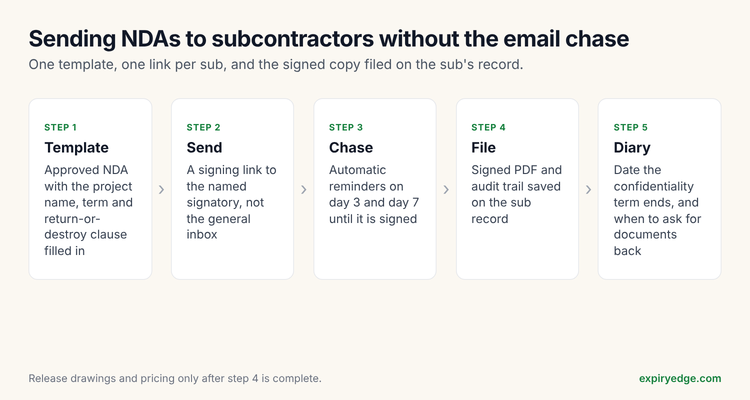 How an NDA moves from template to the sub's record
1. DocuSign: best for signing at volume
DocuSign is the name most subs recognise. DocuSign's US pricing page lists Standard at $30 per user a month and Business Pro at $45, both billed annually. Templates, reminders and an audit trail come with every plan.
For subcontractor NDAs, the useful features are on Business Pro. Bulk send lets you send one NDA to a list of subs. PowerForms create a link anyone can open to sign, and DocuSign names NDAs as a use case.
Watch out for: Standard and Business Pro allow 100 envelopes per user per year. Renewal and expiry tracking sits in DocuSign IAM, a separate product starting at $45 per user a month on the IAM pricing page.
2. ExpiryEdge: best when the NDA belongs on the sub's file
ExpiryEdge treats the NDA as one field in a document request. You upload your NDA as a PDF and mark where it's signed, then add whatever else you need from the sub in the same request: certificate of insurance, W-9, a contact for the project. The sub opens the link with no account, signs, uploads and submits.
You can send one request to up to 200 subs at once. Each sub gets automatic follow-ups until they finish. When it's done, the signed PDF and the signing provider's certificate of completion are stored with the submission, and you can export it as a PDF, CSV or ZIP.
The part plain e-signature tools skip is the date. Put the NDA's end date, or the date you'll ask for documents back, on the sub's record, and ExpiryEdge reminds the right person by email, SMS, WhatsApp, Slack or Teams.
Pricing: on the pricing page. The $29 Personal plan includes 10 e-signatures a month, $49 Pro includes 30, $99 Business 100 and $199 Power 300. There's a 14-day free trial with no credit card.
Watch out for: if you send hundreds of NDAs a month and need nothing else from subs, a pure e-signature tool will be cheaper per signature.
3. Dropbox Sign: best low-cost signatures for a small team
Dropbox Sign (formerly HelloSign) offers unlimited signature requests on every plan, per its pricing page. Essentials is $15 a month billed yearly for one user and five templates, and Standard is $25 per user a month.
Bulk send is on Standard and Premium, needs a template and reaches up to 250 recipients at a time, according to Dropbox's help article.
Watch out for: five templates on Essentials goes quickly if you keep separate mutual and one-way NDAs for different regions. We found no renewal or expiry tracking.
4. PandaDoc: best for tracking NDA renewal dates inside the signing tool
PandaDoc is a document and proposal tool with e-signature built in. Its pricing page lists Starter at $19 per seat a month and Business at $49, billed annually.
PandaDoc tracks renewals: you can set a renewal date and get notified before it arrives. Its agreement renewals article says manual dates are rolling out to Starter and Business, while AI-extracted dates need Enterprise or a $20 per seat add-on.
Watch out for: its plan comparison puts automatic reminders on Business and up, and bulk send and web forms are paid add-ons even there. Only the document owner gets renewal alerts.
5. Adobe Acrobat: best if your office already pays for Acrobat
Adobe sells e-signatures inside its Acrobat team plans. The business pricing page lists Acrobat Standard at $16.99 per licence a month and Acrobat Pro at $23.99, both on annual plans.
Watch out for: sending in bulk needs Acrobat Pro, per Adobe's help page, and web forms (the self-serve link) are on Pro and Studio only.
6. Zoho Sign: best value if you run Zoho
Zoho Sign starts at $10 per user a month billed yearly. Standard allows 25 envelopes per user a month, and Professional ($16) removes the cap. Reminders and the audit trail are on every plan.
Watch out for: bulk send and SignForms, its self-serve link, are Enterprise only and use credits.
7. BoldSign: cheapest paid plan for occasional NDAs
BoldSign has a free Essential tier with 25 envelopes a month, then Growth from $5 per user a month on yearly billing with 50 envelopes per user. Business removes the envelope cap. Signers don't need an account, per BoldSign support.
Watch out for: BoldSign's pricing page puts bulk send and bulk links on Business and Premium, at $0.25 per envelope on top.
Which should you choose?
If you send NDAs to dozens of subs every week and need nothing else from them, choose DocuSign Business Pro or Dropbox Sign Standard. If you're already paying for Acrobat Pro or Zoho, start there.
If the NDA is the first of several things you need before a sub sees your drawings, choose a tool that collects them together and files them where your team will look. That's ExpiryEdge's job. PandaDoc is the alternative if you mainly want renewal dates on contracts you also draft in PandaDoc.
Before you send anything, check the NDA itself. In the US, an agreement with a contractor that covers trade secrets should include the whistleblower immunity notice in 18 U.S.C. 1833(b), which defines "employee" to include contractors and consultants. In the UK, Acas lists what an NDA can't stop, including whistleblowing and reporting a crime to the police. Our guide on how to issue and collect signed NDAs from subcontractors covers the process from template to filing.
Frequently asked questions
Generally yes. In the US the ESIGN Act stops a contract being denied effect just because it was signed electronically. In England and Wales the Law Commission concluded in 2019 that an electronic signature can validly execute a document. Ask a lawyer about any special formality your NDA needs.
Not with the tools in this comparison. DocuSign, Dropbox Sign, Zoho Sign, BoldSign and ExpiryEdge all let the signer open a link and sign without creating an account.
PandaDoc tracks renewal dates, and DocuSign does it in its separate IAM product. ExpiryEdge puts the NDA's end date on the sub's record and sends reminders. Most other e-signature plans store the signed file but don't diary its term.
One-way is usual when only you share drawings, pricing or client details. Choose mutual when the sub will also share its own pricing methods or designs. The UK Intellectual Property Office publishes example one-way and mutual NDAs you can compare.