
Best Staff Certification Tracking Software for K-12 District, Charter and Private School HR (2027)

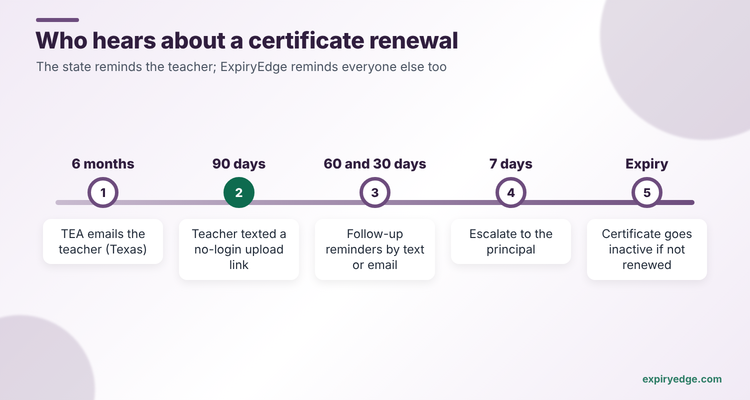
ExpiryEdge is our first pick for charter networks, private schools and small districts that need every teaching certificate, sub permit, background clearance and CPR card chased before it lapses. It texts or emails the teacher at 90, 60, 30 and 7 days, sends a no-login link to upload the renewed certificate, escalates to the principal when nothing comes back, and reaches agency subs and contractors who aren't in the HR system. Prices are published, from $29 a month.
If your district already runs Frontline for HR, absence or hiring, Frontline Central keeps credentials next to those records, and ExpiryEdge can cover the subs and contractors who sit outside it. If you need a state database check, use the state system or, in California, SourceK12 Credential Monitor. The others solve part of the job. PowerSchool Employee Records suits districts already on PowerSchool. Vector Solutions and Raptor PublicSchoolWORKS deliver and track the mandated training courses. SourceK12 Credential Monitor is a specialist for California's credential rules.
We make ExpiryEdge. So we're not neutral. What we report about Frontline, PowerSchool, Vector, Raptor and SourceK12 comes from their own product pages, read on 7 November 2026, and is linked in place.
| Tool | Reminds the teacher directly (email, SMS, WhatsApp) | Staff upload renewals from a link, no login | Tracks agency subs, coaches and contractors too | Escalates to the principal | E-signatures included | Published pricing / free trial |
|---|---|---|---|---|---|---|
| ExpiryEdge Top pick | Yes, email, SMS, WhatsApp, Slack, Teams | Yes, no-login request link | Yes, as outside contacts | Yes, at the step you choose | Yes, built in | $29-$199/month, 14-day free trial |
| Frontline Central | Yes, employee and manager | Staff self-service view | Not stated | Notifies managers | Not stated | Quote on request |
| PowerSchool Employee Records | Email reminders for paperwork | Not stated | Not stated | Not stated | Yes, contracts and new-hire documents | Quote on request |
| Vector Solutions | Not stated | Not stated | Not stated | Not stated | Not stated | Quote on request |
| Raptor PublicSchoolWORKS | Automated training notifications | Not stated | Not stated | Not stated | Not stated | Quote on request |
| SourceK12 Credential Monitor | Yes, 90, 60 and 30 days | Teacher portal | Not stated | Yes, to administrators | Not stated | Quote on request |
How we compared these six
District HR loses a certificate in one of two ways: nobody tracked the date, or the teacher never heard about it. So the first columns ask whether a tool's reminder reaches the employee and whether they can send proof back without a login. We added subs and contractors because agency staff are where most schools slip, escalation because a principal needs to know before the first lesson, and published pricing because charters and private schools often can't sit through a procurement cycle. We read each vendor's product pages on 7 November 2026 and checked renewal rules with TEA, California's CTC and OSHA. We didn't trial every system. We make ExpiryEdge, so weigh our verdict on it with care.
The state reminds the teacher. Nobody reminds HR
A teaching certificate expires on the state's clock, not yours. In Texas, a standard certificate is valid for five years, and renewal needs 150 hours of continuing professional education for a classroom teacher or 200 for a principal or counselor. The educator keeps the evidence, not TEA. TEA emails a reminder six months out, but says the educator is responsible even if it never arrives. A certificate that isn't renewed goes inactive.
California works the same way. The Commission on Teacher Credentialing lets a teacher renew up to a year before expiry and sends a courtesy email 90 days out. Preliminary credentials last up to five years and can't be renewed, only cleared. Emergency permits can't be renewed at all.
So the state reminds the teacher. Nobody reminds you, and you're the one with an uncertified teacher in a classroom if it lapses. That's the gap the software fills. Good tracking means three things: every person has every dated item on file, the right person hears about a renewal months before it's due, and the new document comes back to HR without someone typing it in by hand.
Training runs on an even shorter clock. Staff with occupational exposure to blood need bloodborne pathogens training at least once a year, within one year of the last session. Mandated reporter, Title IX and seizure or epinephrine training follow state rules. Background check and fingerprint renewal rules also vary by state, so build your schedule from your own state's code.
- Teaching certificate or credential, with the state's expiry date
- Renewal hours or credits logged against that certificate
- Substitute permit or emergency permit, often with a short life
- Background check or fingerprint clearance, on your state's cycle
- Bloodborne pathogens training for exposed staff, every 12 months
- CPR, first aid and any state-mandated training with an expiry
1. ExpiryEdge: best for chasing every certificate and clearance, with staff uploading proof from a link
With ExpiryEdge, no teacher walks into a classroom on a lapsed certificate because the state's email went to an old inbox, and HR stops building the renewal list by hand each term. The teacher hears about it early, sends proof from a link, and the principal hears only if nothing comes back.
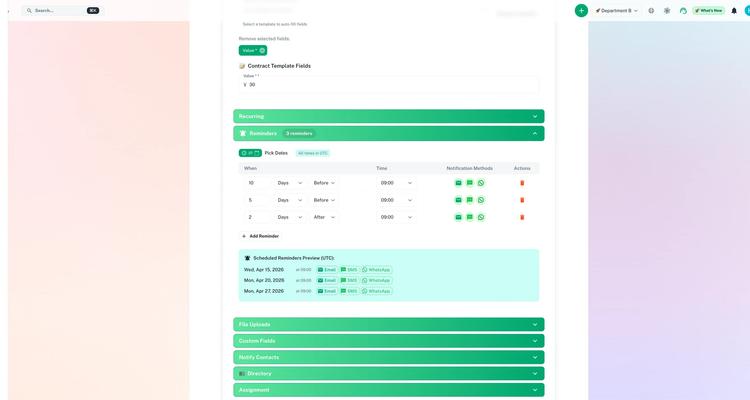
Each staff member gets a record with their certificate, sub permit, background check, CPR card and training dates, built from a custom template, and ExpiryEdge reads the expiry date from an uploaded certificate. You set the reminder steps, say 90, 60, 30 and 7 days, and they go to the teacher by email, SMS or WhatsApp, not just to HR. Each reminder can carry a request link the teacher opens without a login to upload the renewed certificate and e-sign a form, and your HR lead approves or rejects each upload, with a rejected item reopening the same link. If nothing comes back, it escalates to the principal.
The same works for people outside payroll. A retired teacher who subs twice a month, a volunteer coach or an after-school contractor can be an outside contact who gets a text when their clearance is due.
Try it with your own teaching certificates in 15 minutes
- Import a staff CSV with a dropdown for certificate type, a text field for state and a number field for renewal hours logged.
- Set a 90, 60, 30 and 7-day schedule that emails and texts the teacher a request link, then escalates to the principal if nothing comes back.
- Add one agency substitute as an outside contact and send a no-login request for their sub permit and background clearance.
Pricing: the price goes with the number of dated items, not staff: $29, $49, $99 or $199 a month. Start with a 14-day free trial, no credit card needed. How many items each plan holds is on the pricing page.
Good to know: ExpiryEdge works beside your state's certification system and your training platform. You verify in TEA, the CTC or your state's database and deliver courses where you do now, and ExpiryEdge makes sure every renewal gets chased.
2. Frontline Central: best for districts already on Frontline
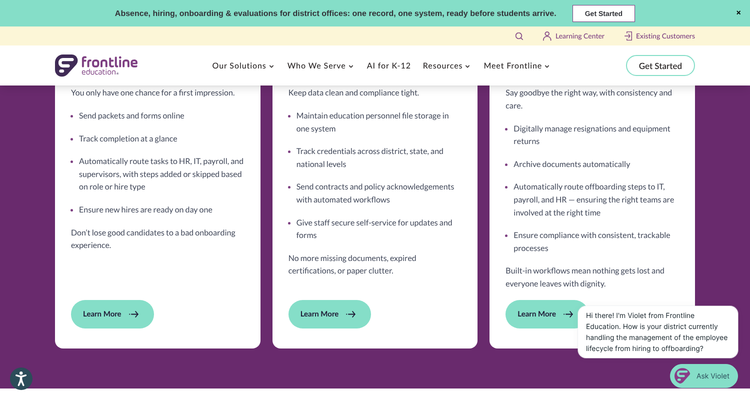
Frontline Central is Frontline Education's employee records system. Its product page says it tracks credentials across district, state and national levels, shows expiring credentials at a glance, and automatically notifies employees and managers. Staff get self-service to view their own credentials and expiration dates.
The rest of the page covers onboarding packets sent online, custom forms with multi-step approvals, and contracts and policy acknowledgements sent through automated workflows.
Frontline's Professional Growth page for Texas adds 30, 60 and 90-day notifications for certification renewals, and pairs with Central to keep certifications and PD in one view.
Pricing: not published. The page routes you to a demo request.
Watch out for: you'll need a sales call for a number, and the pages we read don't say whether outside people, such as agency substitutes or coaches on contract, can be tracked without becoming employees.
3. PowerSchool Employee Records: best for PowerSchool districts
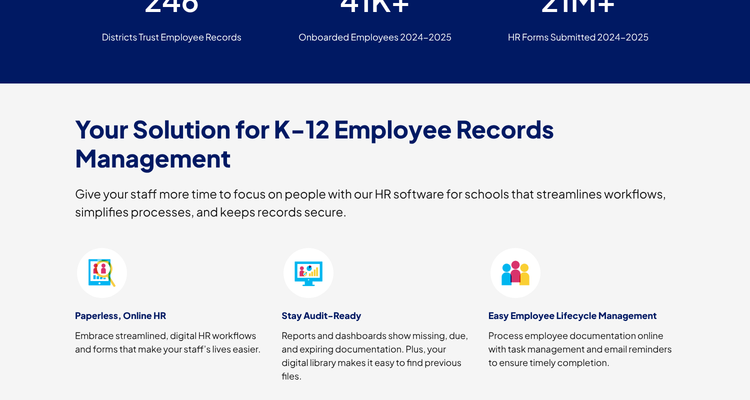
Employee Records is part of PowerSchool's recruiting and HR products. The Employee Records page says reports and dashboards show missing, due and expiring documentation, task management and email reminders push staff to finish their paperwork, and contracts and new-hire documents can be signed with e-signatures.
Pricing: not published. The page offers a demo.
Watch out for: the page talks about documents in general. It doesn't describe tracking a certificate's state expiry date or renewal hours, so test that with your own records in the demo.
4. Vector Solutions: best for mandated training plus licence credits
SafeSchools training is now Vector Solutions, which sells K-12 online training. Its safety and compliance course page lists bloodborne pathogens, child abuse mandatory reporting and Title IX, and says it can automate training assignment, tracking and reporting and assign courses to new hires as they're added.
Vector's PD tracking added licence tracking back in March 2018, so teachers can watch their progress toward recertification credits.
Pricing: not published. You request a demo.
Watch out for: it's a training and PD system. The pages we read don't describe expiry alerts for the certificate itself.
5. Raptor PublicSchoolWORKS: best training library for compliance mandates
Raptor now sells PublicSchoolWORKS. Its staff compliance training page lists 750 courses, a catalogue you can tailor to board policies and handbooks, and automated tools for scheduling, notifications, tracking and reporting.
Pricing: not published. The page asks you to request a demo.
Watch out for: it tracks training, not teaching certificates or background checks.
6. SourceK12 Credential Monitor: best for California districts
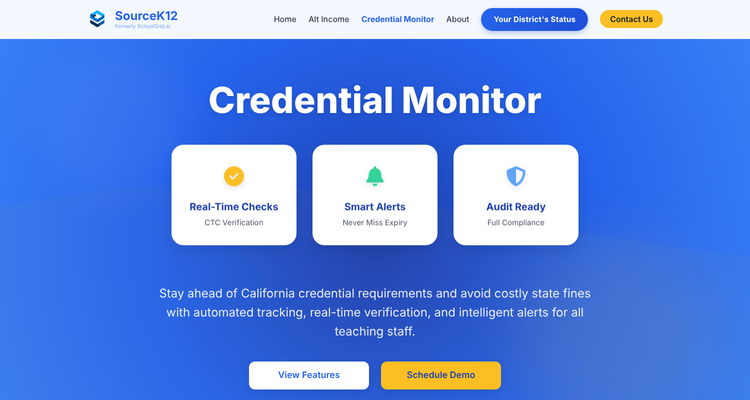
Credential Monitor is built for California. It imports staff from your HR or student system, checks credentials against the CTC database, matches them to the subjects and grades each teacher teaches, and sends alerts 90, 60 and 30 days before expiry with escalation to administrators. Teachers get a portal to upload documents.
Pricing: not published. You schedule a demo.
Watch out for: it only covers California credentials. The page doesn't mention substitutes, background checks or training.
ExpiryEdge as an alternative to Frontline Central
We put ExpiryEdge first because most certificate lapses come from a reminder that never reached the teacher, and that's what it fixes. Switch to ExpiryEdge if you don't run Frontline for absence, hiring or HR already, and your real problem is chasing people. A charter school with 60 staff and six dated items each is tracking 360 dates, which fits the $99 Business plan's 750.
ExpiryEdge also reaches people Frontline may not. Subs from an agency, coaches and contractors can be outside contacts, so their clearances get chased the same way as a teacher's.
If your district already uses Frontline's HR suite, keep employee credentials there, next to onboarding, absence and PD records, and add ExpiryEdge for the people and dates outside it. Some districts use both: Frontline for employees, ExpiryEdge for vendors, contractors and building permits.
Count people and dates, then test one substitute
Count the people first, then the dates. Add teachers, paraprofessionals, subs, coaches and contractors, and multiply by how many dated items each carries. That tells you whether per-employee or per-item pricing is cheaper.
Then test the hard case. Pick a substitute whose permit expires next month and ask each vendor what that person receives, on what channel, and how the new permit gets back to you. If the answer is "HR emails them", you haven't bought much.
Last, decide whether you need courses. If yes, Vector or PublicSchoolWORKS delivers them, and you track the certificates elsewhere. Our schools compliance software guide shows how the pieces fit, the school facilities comparison covers the building side, and our background check renewal policy guide helps you set the rechecking rules. See ExpiryEdge for education for the setup.
Frequently asked questions
Most use the HR system or a spreadsheet. Better tools store each certificate's expiry, alert HR and the teacher months ahead, and collect the renewed certificate. Frontline Central, SourceK12 and ExpiryEdge all send advance alerts, and SourceK12 also checks the California CTC database.
It depends on the state. A Texas standard certificate is valid for five years and needs 150 CPE hours for a classroom teacher, per TEA. California clear credentials are renewed online through the CTC, which lets teachers renew up to a year early and sends a 90-day reminder.
Most K-12 vendors don't publish prices. Frontline, PowerSchool, Vector Solutions, Raptor and SourceK12 all quote after a demo. ExpiryEdge publishes its prices, from $29 to $199 a month, with a 14-day free trial and no credit card.
Maybe not for employees. Frontline Central tracks credentials and PowerSchool Employee Records flags expiring documents. You may still want a separate tracker for agency subs, coaches, contractors and building permits that sit outside the HR system.
Yes, with some tools. Frontline Central gives staff self-service to view credentials, SourceK12 has a teacher portal for uploads, and ExpiryEdge sends a no-login link by email, SMS or WhatsApp so a teacher or substitute can upload the new certificate from a phone.
OSHA's bloodborne pathogens standard covers staff with job-related exposure. They need training when they start the role, then at least once a year, within one year of the last session. Vector Solutions and Raptor PublicSchoolWORKS both offer bloodborne pathogens courses that track who finished them.